
Notion has rebuilt its AI agents and changed how teams pay for them. In an October 19 launch post, co-founder Akshay Kothari said Notion Agent and Custom Agents now run on new infrastructure, get their own computer and browser, and can stay on one task for much longer. The same post replaces Notion's AI billing with a new credit system. New Business and Enterprise workspaces are on it now. Existing workspaces move over on November 2, 2026.
If your team pays for Notion Business or Enterprise, the credit change is the part to read before November 2. This guide covers what the agents can now do, how the new credits work, how linking a ChatGPT plan works, and what admins should check.
What changed, in short
Per Notion's release notes for October 19 and the launch post:
- Computer and browser use. Notion Agents have a private computer where they can run code and work with files, plus an optional web browser that can click through sites and fill out forms.
- Longer tasks. The release notes say agents can work on tasks for up to 24 hours. The launch post says a single task used to be limited to five minutes.
- A new Auto router. Auto picks a model for each task. Notion says that across 20+ common tasks, Auto gave results similar to Opus 5.5 and Astra at about 90% lower average cost.
- "Review for me" mode. A separate model checks whether an action is safe before the agent takes it.
- Bring your own AI. You can connect a ChatGPT Plus, Pro or Go account to your personal Notion Agent. Bring Your Own Key is in private alpha for Enterprise.
- AI Command Center (coming soon). One admin view for usage, spending limits and agent controls.
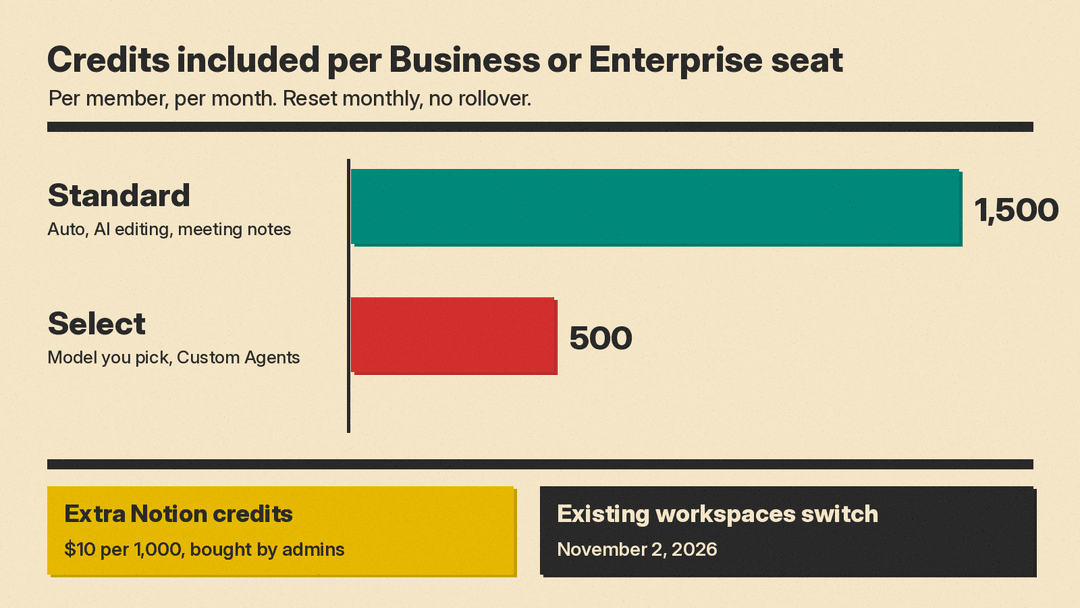
- New credits. Each Business and Enterprise seat gets 1,500 Standard credits and 500 Select credits a month.
What the agent's computer and browser can do
Notion's help page on turning on web browsing separates two things. The agent's built-in computer is "a private, secure space where it can run code, work with files, and build things for you." On its own, that computer is closed off from the internet.
Web browsing opens it up. With browsing on, Notion says the agent can:
- Open websites and click through them, even sites that do not have a Notion connection.
- Fill out and submit forms.
- Download files and bring them into Notion.
- Gather information from several sites and organize it in a Notion page or table.
You can watch each step in a live browser view and click or type to help. If a site asks you to sign in, you get a pop-up and the agent waits. Notion says your login details go directly to the browser, are not saved in Notion, and the agent cannot see them.
The launch post gives a cost reason for the computer as well: agents can write short scripts that are "faster, cheaper, and higher-quality to run as code versus with language model tokens."
Web browsing is on by default for most plans. On Enterprise plans, or if you work with an account manager, an owner or admin has to allow it first under Settings, then Notion AI, then "Enable web browsing for computer." Each person then turns it on for their own agent.
The risks Notion lists
Notion's help page names three risks before you turn browsing on:
- Prompt injection. A website or code the agent opens could contain instructions that try to change what it does.
- Data exposure. The agent could send information from your chat to an external service.
- Untrusted code. Tools or code from the web could behave in unexpected ways.
Notion says these risks "can't be eliminated completely when an AI agent connects to the open internet." If your team handles customer data, decide who gets browsing before anyone turns it on.
Why tasks can now run for 24 hours
The launch post says each agent session now runs on a dedicated service with a queue-backed worker loop, so work keeps going through restarts. Agents also compact long conversations and offload large tool results instead of putting them all in the context window. Notion says this is its sixth agent harness, that Custom Agent runs cost about 30% less in its testing, and that agents run up to 50% faster on web and mobile.
These are Notion's own figures, so treat "about 90% lower cost" as a vendor claim until you see your own usage.
How the new credits work
Notion's credits help page sets out three balances:
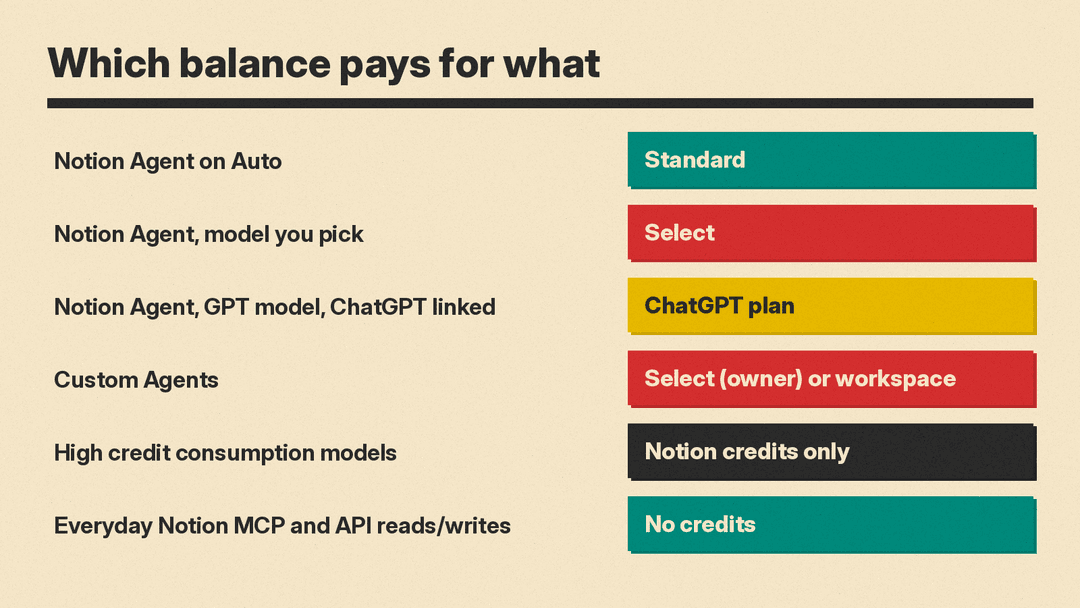
- Standard credits: 1,500 per member per month. These cover work where Notion picks the model, such as Notion Agent on Auto, AI editing, page translation, AI blocks and AI database formulas.
- Select credits: 500 per member per month. These cover Notion Agent when you pick a model yourself, and Custom Agents.
- Notion credits: a shared workspace balance that admins buy and control. Notion's pricing page lists them at $10 per 1,000 credits, as of October 2026.
Some rules matter for planning:
- Standard and Select credits are separate. You cannot combine them, swap one for the other, or move them between members.
- Both reset monthly and do not roll over.
- If you run out of one kind, features that use it pause until the next reset, unless your admin lets you continue on Notion credits.
- Included amounts can vary by plan and contract. Each person can check theirs under Settings, then Notion AI, then Usage.
Notion explains the split this way: "A few complex tasks or frequently running Custom Agents could quickly exhaust a shared allowance." Separate balances keep everyday Auto use safe from a heavy agent.
Which balance pays for what
Four details from the help page are easy to miss:
- Custom Agents bill the owner. By default, a Custom Agent uses its owner's Select credits, even when the whole team uses it. An admin can fund it from Notion credits instead and set a budget per agent.
- High credit consumption models need Notion credits. Standard and Select credits do not cover them. The launch post names Fable and Astra as examples.
- AI Meeting Notes starts counting on December 1, 2026. It will draw on Standard credits, and Notion estimates a one-hour meeting uses about 10 Standard credits.
- Notion MCP and API use is free of credits. Everyday reads and writes through Notion MCP and the Notion API do not use credits, though rate limits apply.
The page also says Notion may change the features covered, the size of the allowance and how use is counted.
For context on price, Notion's pricing page lists the Business plan at $20 per member per month billed yearly, as of October 2026.
Using your ChatGPT plan inside Notion
Notion built a connection with OpenAI that lets you use a ChatGPT plan in Notion. According to the help page, you need:
- A Notion workspace on the Business or Enterprise plan.
- Membership in that workspace. Guests cannot use it.
- A ChatGPT Plus, Pro or Go account. Each person connects their own.
- Notion Agent. It does not work with Custom Agents.
The model you pick decides who pays. Pick a specific GPT model and the session uses your ChatGPT plan. Pick Auto or a non-GPT model and it uses your Notion credits: Standard for Auto, Select for a model you choose. The model picker shows which plan is in use before you send a message. If you hit your ChatGPT limit, Notion Agent asks to switch to your workspace's credits and switches back when ChatGPT usage is available again.
Notion's launch post puts it plainly: "You shouldn't have to pay for AI twice." If your company is still choosing a main assistant, our Microsoft 365 Copilot vs Gemini in Google Workspace comparison covers the two suite options.
What admins should do before November 2
Notion says existing customers move on November 2 and admins will get an email with the details. A short checklist built from Notion's own pages:
- Find your Custom Agents and their owners. Shared agents bill their owner's 500 Select credits by default. Decide which ones should run on a workspace budget.
- Decide on web browsing. On Enterprise it stays off until an admin allows it. Weigh the prompt injection and data exposure risks Notion lists.
- Plan for meeting notes. If your team records many meetings in Notion, budget for about 10 Standard credits per hour of meetings from December 1.
- Point people to Auto. Notion's FAQ says Auto is the choice for writing, summarizing and questions, and that Standard credits should cover that work for the month.
- Tell ChatGPT subscribers. Staff with Plus, Pro or Go can link their accounts to save Select credits when they pick a GPT model.
Notion says "the vast majority of users are unlikely to run out of credits." That is an estimate, not a guarantee. Check the Usage page in the first weeks after the switch.
How this fits the wider push
Notion is not the only company selling agents for work. Town sells AI assistants for whole teams, and Anthropic has launched Claude Duet, a proactive agent. Notion's launch post also names Claude, ChatGPT, Grokbot and Muse among the agents that can connect to Notion through its improved MCP server.
For buyers, the practical change is the bill. Shir, Notion's Head of AI and Core Product, is quoted in the launch post: "To support long-running threads in a way that wouldn't blow through credits, we knew we needed to pair them with significant efficiency gains." Notion's answer is separate allowances and admin budgets rather than one shared pool.
