
Synthesia, the London company behind AI avatar videos, now sends new Basic and self-serve users straight into its new video agent when they finish signing up. Syren is Synthesia's AI video agent, software that plans and builds a whole video from a brief instead of asking you to lay out each scene. It launched in beta on October 9, 2026, according to Digital Human News and a LinkedIn post from CEO Victor Riparbelli. A month in, the free launch credits that came with it run out: Synthesia's help center says they expire on November 9, 2026 at 23:59 BST. Here is what Syren does, what it costs in credits, and where it falls short.
What is Synthesia Syren?
Synthesia describes Syren in one line on its product page: you describe the video you want, and Syren "writes it as code and renders it live in front of you." You get a finished video in one pass, then refine it by chatting with the agent rather than building each scene by hand.
Riparbelli wrote on LinkedIn that Syren is "Powered by Opus 5.5 + Synthesia Syren renderer with 3D support" and that it works in the browser or through Claude. The product still carries a Beta label, and Synthesia tells users to expect fast updates.
The output is a mix of the things a small agency would assemble: motion graphics, animation, AI avatars, voiceover, music and b-roll. Synthesia pitches it for product launch videos, explainers, how-tos and ads.
How Syren makes a video
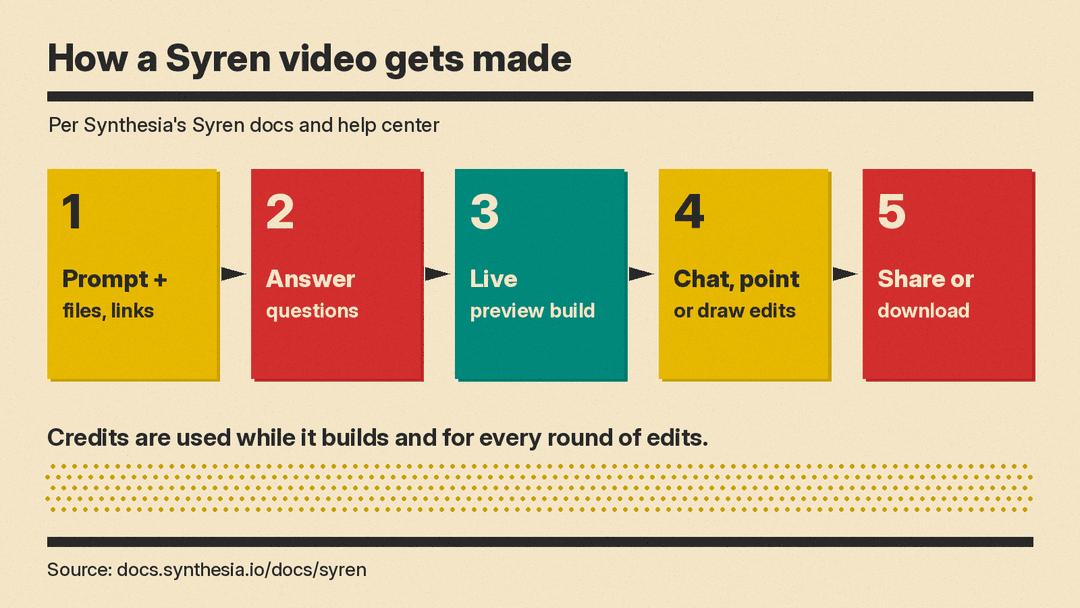
According to Synthesia's Syren docs, you start with a prompt or one of the example videos, then attach whatever material you have. Supported inputs include documents and decks (PDF, DOCX, PPTX), screenshots and screen recordings, images, footage, a music track, a voice recording for the avatar to lip-sync to, and YouTube links. For product screenshots, you can tell Syren to show them exactly or to redesign them as motion graphics.
The docs say prompts up to about 2,500 words work well. The help center adds a warning that very long prompts can fail, and suggests starting simple and refining in chat.
Before it builds, Syren may ask who the video is for. If your prompt is short and you attach no files or brand kit, it offers three creative directions, each with a preview image, avatars and a music sample. It may also show an avatar picker. Then it builds the video while a live preview plays.
Landscape 16:9 (1920x1080) and portrait 9:16 (1080x1920) are in the menu. You can ask for square 1:1, 4:5 or 5:4 in the prompt.
Editing by chat, pointing and drawing
Editing is where Syren differs most from Synthesia's older editor. There are three ways to ask for a change:
- Chat: ask it to rewrite or shorten the script, swap the avatar or voice, restyle a scene, change the music or shot types, or fix how a word is pronounced.
- Point: select one element, such as a heading or image, and type an instruction like "make this bigger" or "fade this in at 2s".
- Draw: mark the preview with a pen or box, attach up to 4 images, and send the note. Each message carries the playhead position, so Syren knows which moment you mean. Drawing is not available on mobile.
Undo and redo reverse every change, yours and Syren's. You can also remix a finished video made in Synthesia Studio: Syren offers to remake it as a standout video, sum up its key points, or cut a short vertical version, and the original stays as it is.
Syren can add action scenes, where an avatar moves while speaking, and dialogue scenes, where two avatars talk in the same shot. Each can run up to 15 seconds.
Avatars, voices and brand kits
Syren uses Synthesia's stock avatars and avatars made with Avatar Builder. On Starter plans and above, you can put yourself in the video: write "my avatar" in the prompt, and Syren uses your Personal Avatar and your cloned voice if that voice is set as the avatar's recommended voice. Only Personal Avatars 2.0 work. (The FAQ on the product page still says to create the video in Synthesia Studio to use your own Personal Avatar or cloned voice.)
A brand kit applies your logos, colors, fonts and avatars. The Syren product page says full custom brand kits with typography and animation styles are "coming soon". That page also says you own the videos you make and can use them commercially, as long as you have the rights to anything you upload.
Use Syren inside ChatGPT and Claude
Syren also runs inside chat assistants. In ChatGPT you install Synthesia from the plugin marketplace. In Claude you turn on the Synthesia connector, which uses MCP, a standard way for assistants to call outside tools. The docs say Syren can then use anything in the conversation as source material, including content from other connectors such as Slack threads, Notion pages and Drive documents. That is a similar idea to the Luma and Runway tools for coding agents, aimed at office users instead of developers. Videos made this way use credits the same as in the Synthesia app.
Credits and pricing
This is the part to read carefully. Syren uses credits while it builds and for every round of chat edits, not only when you download.
- Free launch credits: the Syren credits article says new Basic, Starter and Pro users get 1,000 free Syren credits and Enterprise users get 1,500, enough for one full video with a few edits. It says launch credits expire on November 9, 2026 at 23:59 BST. After that, Syren draws on your normal account credits, and it does not show a notification when it switches. The pricing page lists different promo amounts: 1,000 credits on Basic, 1,500 on Starter and Pro, and 2,000 per user on Enterprise, each valid for one month.
- Cost per video: Synthesia's own pages differ. The Syren page says a two-minute video with up to two rounds of edits "typically uses 1,000 to 2,000 credits". The pricing page says a one-minute video typically uses 1,000 to 2,000 credits. For comparison, the pricing FAQ says a typical finished minute of a regular Studio video uses about 100 credits.
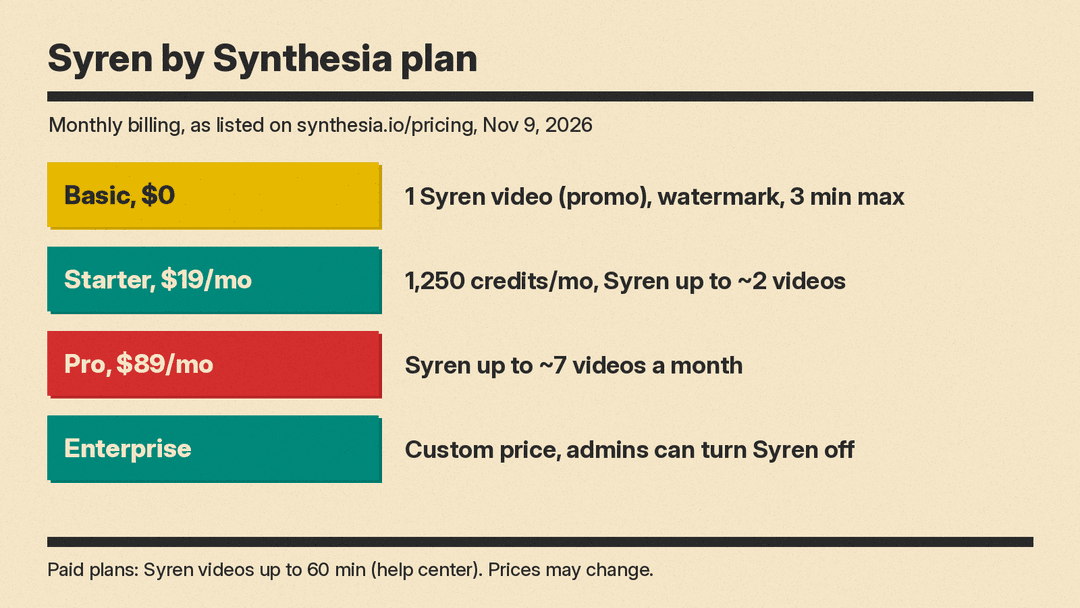
Plans as listed on the pricing page as of November 9, 2026, with monthly billing:
- Basic: $0, 500 credits a month, one Syren video as a limited promo, watermark.
- Starter: $19 a month ($9 for the first month), 1,250 credits a month, Syren "up to ~2 videos" a month. Yearly billing is $14 a month ($168 a year).
- Pro: $89 a month ($49 for the first month), Syren "up to ~7 videos" a month. Yearly billing is $59 a month ($708 a year).
- Enterprise: custom pricing. Admins can turn Syren off for the organization (or the workspace, if the account has no organization) and set a monthly credit limit per user.
Limits to know
From Synthesia's docs and help center:
- Syren videos can be up to 3 minutes on Basic and up to 60 minutes on paid plans. Syren asks you to confirm anything over 15 minutes. (The FAQ on the product page still says three minutes.)
- Avatar scenes longer than 30 seconds can time out.
- Only the first 24 audio tracks are mixed into the export; extra voiceover or sound effects are dropped.
- Interactive avatars and live conversations are not available in Syren.
- Uploads are capped at 45 MB per message, and PDFs over 8 MB are read as text only.
- You cannot invite collaborators to one video. Create it under Workspace videos so your team can edit it.
Syren vs Synthesia Studio
Synthesia keeps both. Syren is the prompt-driven option for speed and visual polish. Studio is for videos where the message must be exact and repeatable, such as training, compliance and onboarding, with control over every script line and translation into many languages. If you mainly need translated versions of existing videos, the AI lip sync and dubbing tools we compared are a closer fit.
Why it matters
As Digital Human News put it, the avatar stops being the product and becomes one layer that an agent places alongside graphics, music and b-roll. For a marketer with a deck and a deadline, that removes most of the editing work. The trade is control and predictability: the agent picks the structure, every revision costs credits, and Synthesia's own credit estimates do not agree with each other. Teams that need sign-off on every on-screen claim will still want Studio.
Syren is one of several chat-first video agents. DeepBrain AI Studios 5.0 launched its own video agent on November 9, and Genspark's Media Studio also uses an agent to direct video. Once the launch credits are gone, credit cost per finished minute is the number to compare.
