
AI lip sync changes a speaker's mouth movements so they match a new audio track. Creators use it to dub a video into another language, to fix a line after the shoot, or to make an AI-generated character talk. This guide covers eight real tools, what each one is built for, and what the vendors list for limits and prices as of October 2026. Prices and features change often, so check each site before you pay.
Three kinds of lip sync tools
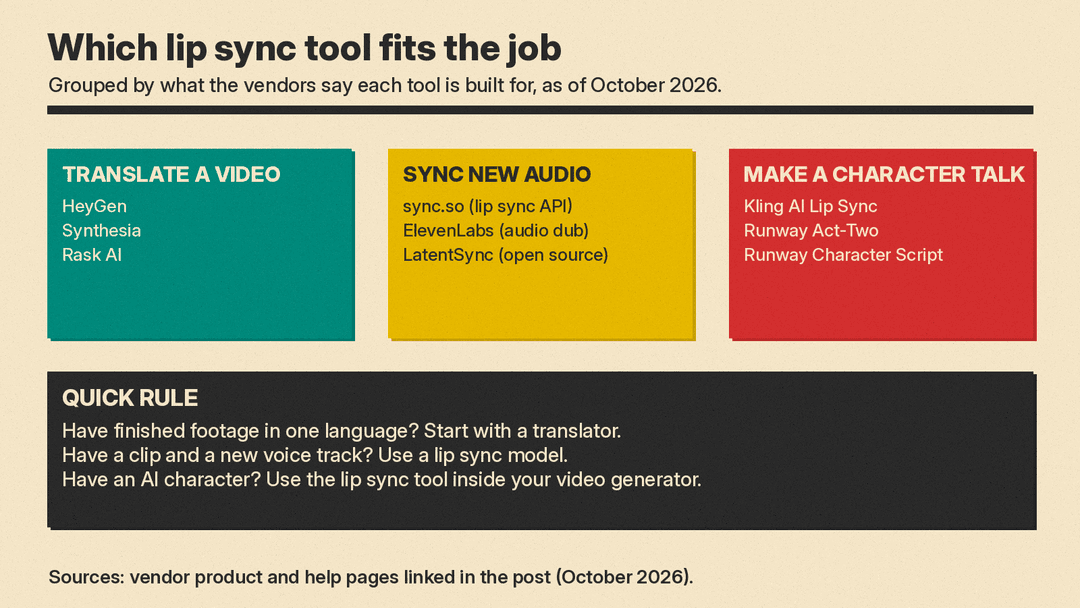
The tools below fall into three groups, and picking the right group matters more than picking the "best" brand.
- Video translators take a finished video, translate the speech, clone the speaker's voice, and re-sync the lips in one job. HeyGen, Synthesia and Rask AI work this way.
- Lip sync models take a video plus any audio track you supply and change only the mouth. sync.so and the open-source LatentSync work this way. ElevenLabs makes the dubbed audio but does not change the picture, so it pairs with a lip sync model.
- Character tools sit inside AI video generators and make a generated or uploaded character speak. Kling AI and Runway offer these.
If you are new to the generators themselves, start with our guide to the best AI video generators and come back here for the talking part.
Best for translating finished videos
HeyGen
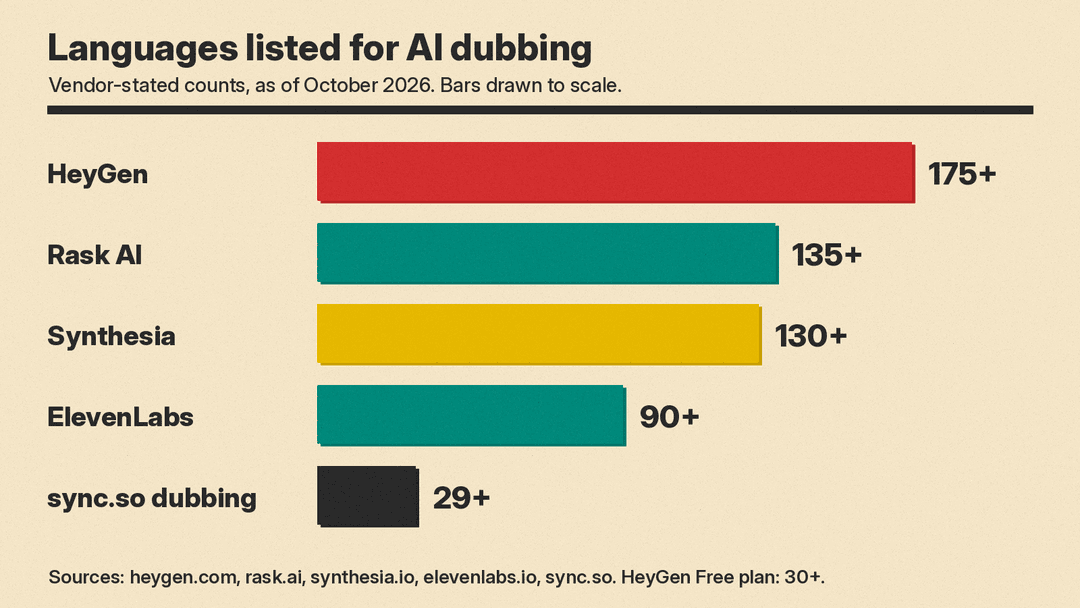
HeyGen's video translator says it translates videos into 175+ languages and dialects with voice cloning, lip sync and subtitles. You upload a file or paste a YouTube link, then pick up to 10 target languages at once. An Edit and Review step lets you proofread the translated script before the final render, and a brand glossary supports forced translations, protected terms and pronunciation. HeyGen's pricing page lists a Free plan with 3 watermarked videos a month, each up to 1 minute, and 30+ translation languages; paid plans start at $29 a month ($24 a month billed yearly) and allow videos up to 30 minutes in 175 languages and dialects. HeyGen also has an avatar video model, covered in our HeyGen Video 1 explained.
Good fit: creators and marketing teams who want the whole job done in one upload.
Synthesia
Synthesia's AI dubbing lists 130+ languages and dialects, voice cloning, and lip sync for people speaking on screen. It detects multiple speakers and clones each voice separately. You can keep the video length fixed or let it adjust to the translated audio. It accepts MP4, MOV and WebM files up to 4K, or a YouTube link. The free tool dubs your first minute and trims longer videos, and free output carries a watermark until you upgrade. Synthesia says editing the translated script and retranslating does not use extra credits.
Good fit: company training, onboarding and internal video, where the same message goes to many regions.
Rask AI
Rask AI offers dubbing in 135+ languages, voice cloning in 32 languages, and multispeaker lip sync, so lips match the new audio for every speaker on screen. It has a line-by-line editor for the transcript and translation, a terminology dictionary for brand terms, on-screen text translation, and subtitles. Rask says you can re-dub changed lines with no extra charge and that its voices are built on models including Eleven v4. An API and Python SDK cover upload, transcription, dubbing, glossaries, re-dubs and lip sync. Rask says it is SOC 2 Type II certified.
Good fit: courses, podcasts and interview shows with several speakers, and teams that want to run dubbing from code.
Best for syncing your own audio
sync.so
sync.so is a lip sync company first. Its current models are sync-3, lipsync-2-pro and react-1. The company says sync-3 handles objects blocking the face, 4K ProRes, multiple faces, several camera angles, low light, fast camera moves and rapid dialogue. You upload a video, give it a voice by cloning, generating, or using the clip's own audio, and get the synced result. It also offers an API, a Premiere plugin and a ComfyUI node, plus a watermark check that tells you if a video was modified with its technology.
Pricing is a monthly plan plus a per-second rate, as of October 2026:
- Hobbyist: $5 per month plus $0.05 per second, videos up to 1 minute.
- Creator: $19 per month plus $0.05 per second, videos up to 5 minutes, no watermark.
- Growth: $49 per month plus $0.0475 per second, videos up to 10 minutes.
- Scale: $249 per month plus $0.04 per second, videos up to 30 minutes.
sync.so's homepage also lists visual dubbing across 29+ languages. Its pricing page bills dubbing audio per second, separately from lip sync ($0.10 per second on Hobbyist and Creator).
Good fit: editors and developers who already have the new audio and want the best possible mouth match.
ElevenLabs Dubbing (audio only)
ElevenLabs Dubbing v2 covers 90+ languages and works from the original audio, not a transcript, so tone and delivery carry over. Each dub uses an automatic voice clone of the original speaker, and "sync-aware" translation keeps starts and stops aligned with the original. It does not redraw the speaker's mouth. Pair it with a lip sync model such as sync.so if you need on-screen lips to match. As of October 2026, the free plan includes 0.4 minutes of Dubbing v2 per month, with a watermark on video dubs, and paid plans start at $6 per month (Starter, 2 minutes, no watermark). An API is available. For ElevenLabs plan prices next to other voice tools, see our AI voice and music pricing comparison.
Good fit: the audio half of a dubbing pipeline, or audio-first content like podcasts.
LatentSync (open source)
LatentSync is ByteDance's open-source lip sync model, released under the Apache 2.0 license. It uses audio-conditioned latent diffusion based on Stable Diffusion, with Whisper turning the audio into embeddings. Version 1.6, released in June 2025, was trained on 512 by 512 video to reduce blurriness. The README lists minimum inference memory of 8 GB of VRAM for version 1.5 and 18 GB for version 1.6. You can run it locally through a Gradio app or a script.
Good fit: people with a capable GPU who want free, local lip sync and are comfortable with Python.
Best for making AI characters talk
Kling AI Lip Sync
Kling AI's Lip Sync syncs speech, songs or generated voices to Kling character videos. It needs a full, clearly visible face, and works with realistic, 3D and 2D human characters but not animals, per Kling's guide. You upload a voiceover or singing track, or use built-in text to speech with speed control from 0.8x to 2x. That guide lists 5 credits for a 5-second clip and 10 credits for a 10-second clip. On the API price list, lip sync costs $0.07 per 5 seconds plus $0.007 per face recognition call. The API docs say it supports one person per job and audio between 2 and 60 seconds.
Runway Act-Two and Character Script to Video
Runway retired its standalone Lip Sync tool on May 27, 2026 and points users to Act-Two instead, according to its deprecation list. Act-Two works differently from audio-driven tools: you record a driving performance of a person acting the scene, and Runway transfers the speech, expressions and motion to a character image or video. It needs a Standard plan or higher, costs 5 credits per second with a 3-second minimum, runs up to 30 seconds, and outputs 24 fps video (1280x720 for 16:9). Runway says it works with a range of angles, non-human characters and styles. If you would rather type the lines, Character Script to Video animates a character image from a script plus a voice, or from your own audio file. For a wider look at the two platforms, see Kling vs Runway.
How to get cleaner lip sync
The vendors' own guidance points to the same habits:
- Show the whole face. Kling requires a complete, clearly visible face. Runway asks for a subject framed at most from the waist up, with defined mouth and eyes, and no cuts that interrupt the shot.
- Use clean audio. Runway notes that clear audio with minimal background noise and steady volume gives the best results.
- Keep one speaker per job when the tool asks for it. Kling's API and Act-Two both handle one character per generation. Runway's multi-character tutorial gets around this by cropping to each character and generating each performance separately.
- Fix the script before you render. Synthesia and HeyGen both let you review the transcript or translation first. Fixing names and terms there is cheaper than regenerating later.
- Check length limits. Act-Two runs up to 30 seconds, Kling's API accepts 2 to 60 seconds of audio, and sync.so plans allow videos from 1 minute (Hobbyist) to 30 minutes (Scale).
Rights and consent
Lip sync edits what a real person appears to say. Synthesia's FAQ states that you must own the video or have explicit permission from the copyright holder, including rights to the voices and images in it. Get consent from anyone whose face or voice you dub.
Which one should you pick?
- Translating your own talking-head videos: HeyGen or Synthesia, with Rask AI for multi-speaker shows.
- Matching lips to audio you already have: sync.so, or LatentSync if you want free and local.
- Producing natural-sounding dubbed audio: ElevenLabs, then a lip sync model for the picture.
- Making a generated character speak: Kling AI Lip Sync for audio-driven clips, Runway Act-Two when you want to act the scene yourself.
Sources
- HeyGen AI Video Translator
- HeyGen pricing
- Synthesia AI Dubbing
- Rask AI
- sync.so and sync.so pricing
- ElevenLabs Dubbing Studio
- ElevenLabs pricing
- LatentSync on GitHub (ByteDance)
- Kling AI Lip Sync feature, Kling Lip Sync guide, Kling API pricing, Kling Lip Sync API
- Runway deprecated tools, Runway Act-Two, Runway multi-character dialogues, Runway Character Script to Video
