
Two AI video companies moved their tools into the apps people already use to plan and code. On November 3, 2026, Luma released an MCP connector so Claude and ChatGPT can run Luma's image and video workflows inside a chat. On November 2, Runway released Runway Dev plugins so coding agents can build Runway's API into an app. Both put a video AI company's tools inside an AI assistant, but they serve different people and work in different ways. This post explains both, what each one costs you, and what the companies do not say, as of November 2026.
What Luma's MCP connector does
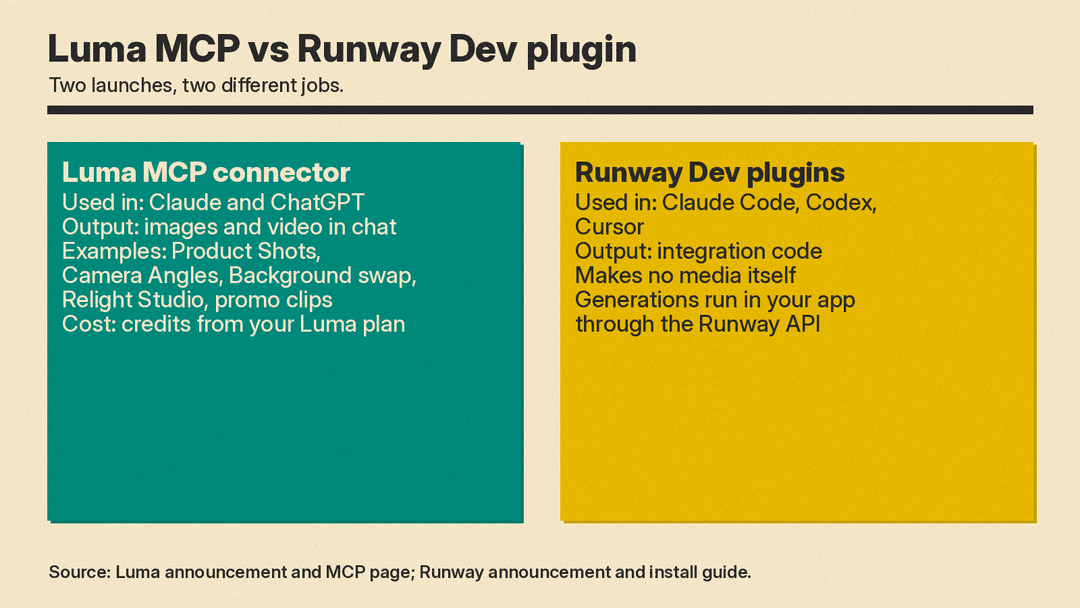
Luma's announcement frames the connector as a way to use "Luma's creative intelligence and workflows inside of ChatGPT and Claude." The pitch is for in-house and agency creative teams that need many ad variants from one winning ad. You ask your assistant which ad performed best, then ask Luma to restyle it into new scenes, camera angles and lighting in the same conversation. Finished images and video come back in the chat.
MCP, the Model Context Protocol, is an open standard that lets an AI assistant call outside tools. If the term is new, our plain-English MCP guide explains it. Here, Luma is the outside tool and the chat assistant is the one that calls it.
The announcement lists what you get:
- Luma Agent, which Luma describes as a creative partner that can orchestrate entire projects from a single text prompt.
- Product Shots, which turn one product photo into campaign-ready imagery.
- Camera Angles, which generate new angles of the same product as a set.
- Background swap, Relight Studio, and short promo clips for channels that need motion.
The Luma MCP page adds more pre-set workflows: art style match, face swap, ad variants and multi-angle shot coverage. Luma calls each one a ready-made recipe from its creative team. You give it a photo and get finished assets back.
Setup, plans and credits
According to the Luma MCP page, you can connect Luma in Claude on the web or desktop and in ChatGPT. It also says any app that can add a remote MCP server by URL can connect to https://agents.lumalabs.ai/mcp. You sign in with your Luma account.
The page's FAQ answers the questions most readers ask:
- Plans: every Luma plan includes it. In Claude, custom connectors work on every plan, and the Free plan allows one.
- Cost: each image or video Luma makes uses credits from your Luma plan, the same as in Luma.
- Storage: results are saved in your Luma account, and each result also shows in the chat with a link to open or download it.
- Privacy: files you share go to your Luma account and are used only to make what you ask for.
A Luma guide to the ChatGPT plugin gives practical advice. Video can take several minutes, so ask the assistant to check status before you resubmit. The models offered through the connector may differ from those in the Luma app. Results do not appear on a Luma board by themselves. You ask the assistant to save them to your Asset Library, then bring them onto a board. The guide is dated October 19, 2026, so the ChatGPT plugin may have existed before the November 3 announcement.
The guide also suggests a test first: "For larger requests, start with one test before asking for the full batch." Credits are spent on every generation, so that is sound advice.
What Runway's plugins do
Runway's announcement is aimed at a different reader. It launches Runway Dev plugins for Claude Code, Codex and Cursor. One install connects your coding agent to your Runway Dev account through the Runway Dev MCP and adds Runway's skills for building with the API. You describe a feature, such as a product video for every item in your store, and the agent builds it without leaving the editor.
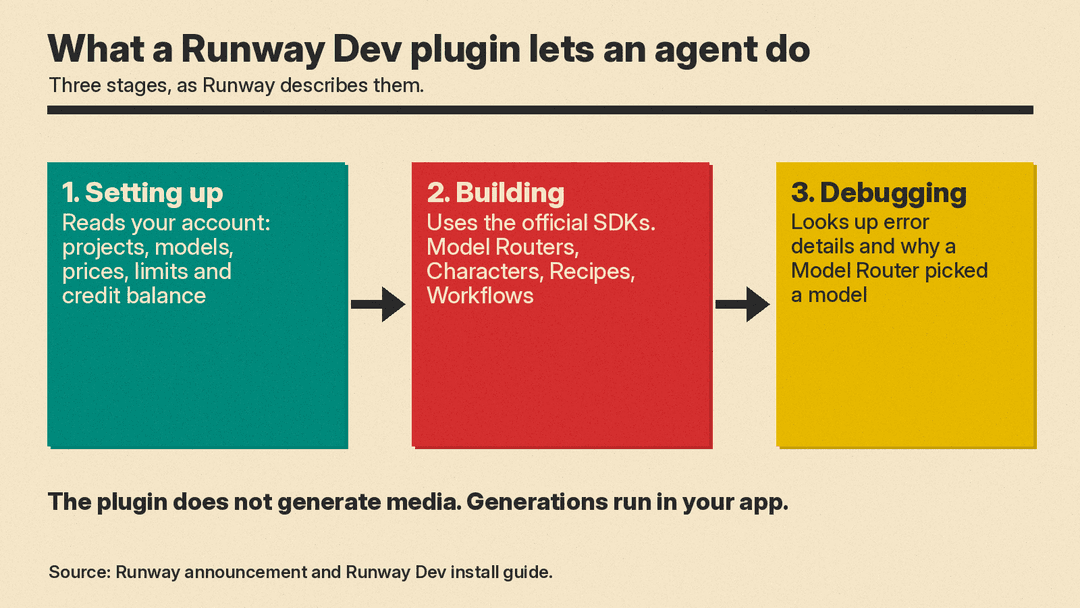
Runway describes three stages:
- Setting up: the agent reads your Runway Dev account, including projects, the models each project can use with their prices and limits, and the credit balance.
- Building: skills show the agent how to use the official SDKs. The agent can create a Model Router to pick the right model for each request, or a Character for real-time avatars. It can also build on Recipes, which are ready-made pipelines, or on Workflows your team published as API endpoints.
- Debugging: when a task fails, the agent looks up the error details and sees why a Model Router picked a given model.
Runway's install guide is clear on one point: the plugin does not generate media. Generations run in your app through the API. Your app uses its own Runway API key, stored on your server, and the guide says never to put the key in the plugin or MCP config. Sign-in happens in your browser, and the guide says to complete it yourself rather than ask the agent to automate it.
The install commands differ by tool. In Claude Code, the guide gives /plugin install runway-api@claude-plugins-official. In Cursor, type /add-plugin runway-api in Agent chat. The Codex steps are longer, and the guide lists them. Agents without plugin support can connect the MCP at https://dev.runwayml.com/mcp and add the skills separately.
Two different jobs
Luma's connector is for someone who wants finished creative assets from a chat. Runway's plugin is for someone who wants an agent to write code that makes assets later, inside a product. Luma's output is the image or clip. Runway's output is working integration code.
That difference changes where the cost lands. With Luma, credits come out of your Luma plan as you generate. With Runway, the plugin itself generates nothing, and its docs say generations run through your app's API calls. Neither announcement quotes a separate price for the connector or plugin, though the Luma FAQ states that generation uses credits.
For creators, the practical result is shorter distance between an idea and a render. A marketer can restyle an ad without opening another tool. A founder can ask an agent to add video generation to a store. Our earlier look at Runway App Studio covered the no-code route for the same goal, and our image-to-video guide compares tools you can use directly.
What the sources do not say
- Luma's announcement does not give credit costs per workflow. Check your plan before a large batch.
- The Luma page does not say which video models the connector exposes, and the ChatGPT guide says the list can vary.
- Runway's announcement does not say whether the agent must ask before it creates a Model Router or Character. Review what your agent proposes.
- Both tools connect to your account. The Luma connector spends your Luma credits when it generates. The Runway plugin generates nothing itself, but the app it helps build calls the API with a key from your Runway Dev account.
