
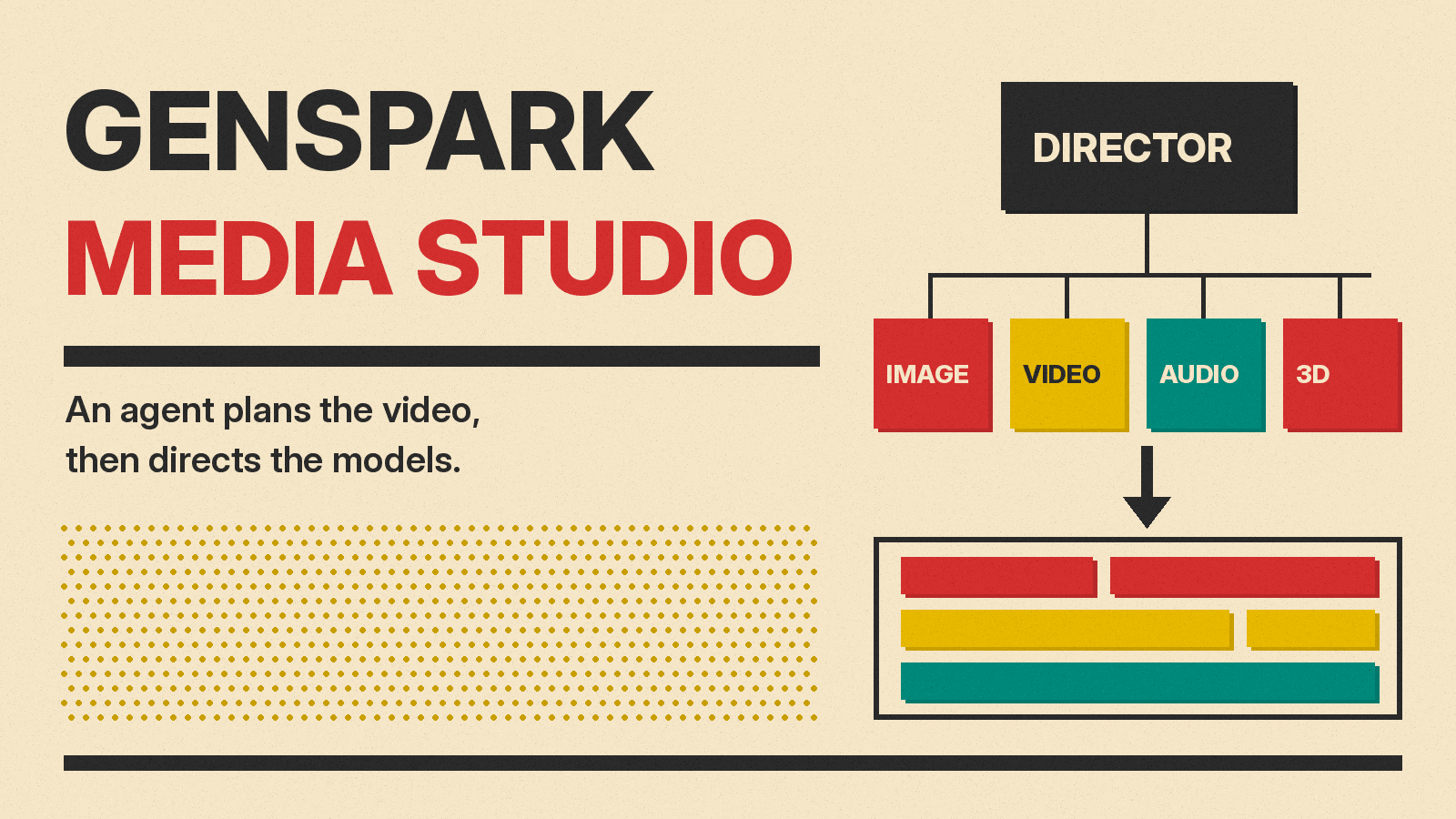
Genspark has launched Media Studio, an AI video studio where an agent plans and assembles a finished video instead of handing back a single generated clip. The company announced it in a blog post dated October 27 and a Japanese press release the same day. Media Studio is live at genspark.ai/media-studio.
The pitch is simple: describe the video you want, answer a couple of questions, and the studio handles the script, storyboard, shots, sound, edit and subtitles. That puts it in a different category from the clip generators in our best AI video generators guide. It is closer to a production assistant that calls those generators for you.
What Genspark announced
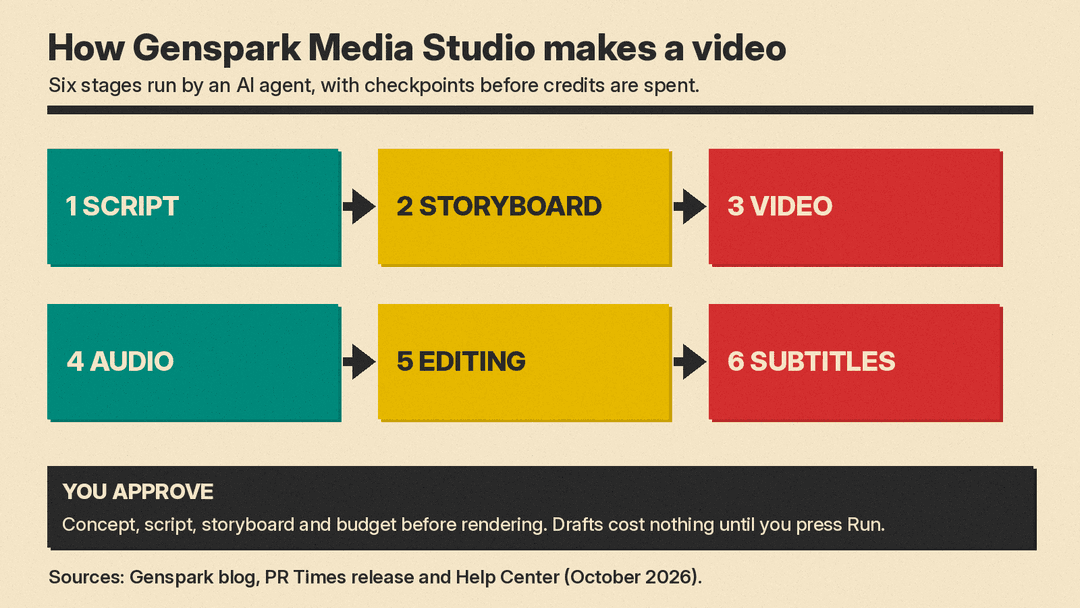
Genspark says Media Studio runs six stages end to end, per the press release: script, storyboard, video, audio, editing and subtitles. The output is meant to be a finished piece, not raw footage. The blog says one pipeline covers "a 15-second ad or a 10-minute short drama," plus posters and interactive films. The press release says 157 genres and styles can be applied in one click, covering short films, ads, music videos and series.
The blog says the director is an agent. In Genspark's words, "The most advanced language models act as the director brain." The blog names Claude Opus 5.5 and Fable 5.1 as the models that plan the piece, write the script and write the code, with GPT-6 Astra handling multimodal verification in the 3D director stage.
That director then calls dozens of generation models for image, video, audio and 3D, drawn from more than a dozen providers, the blog says. The roster it names includes Seedance 2.5, GPT Image, Nano Banana, ElevenLabs and Seed Audio. Genspark says new models will be added as they ship.
How the workflow runs
Before it renders anything, the agent agrees with the user on concept, script, storyboard and budget, according to the blog. It then runs generation, quality checks, editing and compositing. Each key checkpoint comes back to the chat, and the user can circle a spot on a frame and say what should change.
The Media Studio help center describes the work surface as a board, not a chat window. Every output lands as a node that stays editable. Connecting one node to another makes it a reference for the next generation, which is how Genspark says a character or product stays the same across many shots. The help center advises that two or three strong references on a node are "far more stable than ten weak ones."
The toolset on the board includes:
- A layer editor that Genspark calls Photoshop-grade, with PSD export
- A multitrack video composer that exports a Premiere project or a CapCut draft
- Motion Studio, described as "the board's After Effects," for exact titles, captions and data overlays
- A 3D director stage that blocks out a scene as a plain white model before any video is rendered
- An interactive film builder for branching stories that play in the browser and export to Steam and mobile
Video tools on the board cover reshooting a clip while keeping its blocking and camera, extending a clip, upscaling, removing or replacing an object, and a Dub feature. Dub remakes a clip's dialogue, music and effects with Seed Audio 1.5 and returns them as separate tracks. The help center says the model voices only lines that are quoted word for word in the brief.
Story Bible: the fix for drifting faces
Genspark's press release lists character drift, where a face changes from one scene to the next, among the common problems in AI video. Genspark's answer is the Story Bible. The help center says it fixes "the world, the cast, wardrobe, props, voices and the camera grammar as canon with reference images," and any project can attach it. Once attached, the agent copies the canon reference images and voice clips into the project before each generation.
The agent offers to start a Story Bible when a brief is for a film or series that still has to be invented, runs past about 3 minutes, has a cast that recurs across deliverables or has an undecided setting, and the project is still empty. The bible itself is built in rounds: three treatment directions, then written rules for story, cast and camera, then batches of reference images and voice samples. The help center's rule of thumb is that a bible is worth it whenever the same character or product appears in more than three shots.
What it costs
Neither the launch blog nor the help center gives a per-minute price for a finished video. The help center explains how credits are charged instead, and it adds a detail the launch blog leaves out: the planning model depends on the tier you pick.
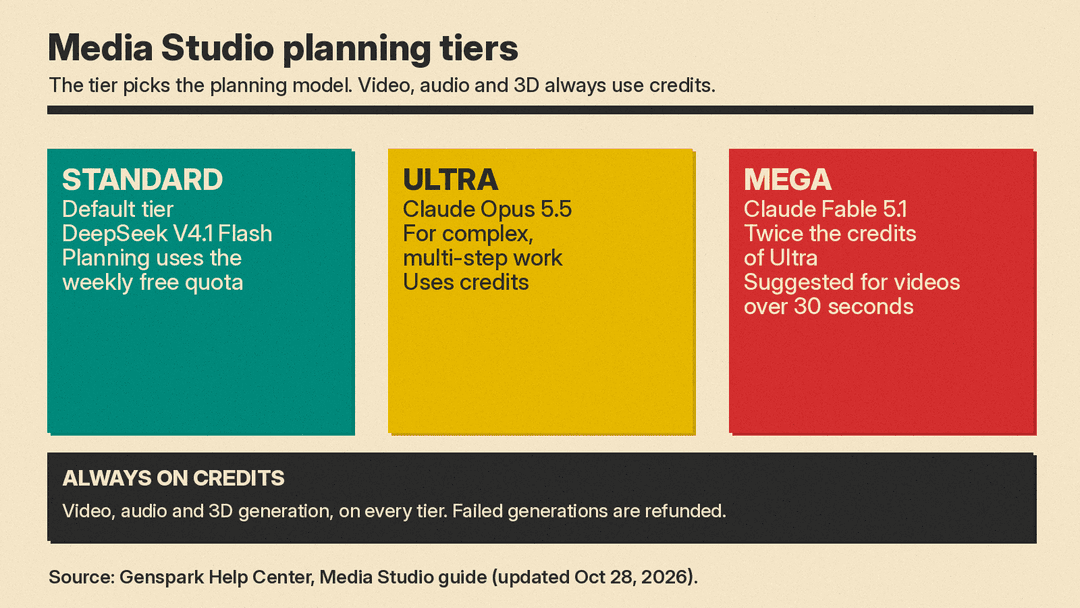
- Standard (default): planning runs on DeepSeek V4.1 Flash, and planning and default-quality images use the weekly free quota.
- Ultra: planning runs on Claude Opus 5.5 and uses credits.
- Mega: planning runs on Claude Fable 5.1 at twice the credits of Ultra. Genspark recommends it for video productions over 30 seconds.
So the Claude models named in the launch blog are the paid planning tiers. On every tier, video, audio and 3D generation use credits, priced by model, resolution, duration and count. The help center says a configuration node shows the estimated cost before you send, a draft costs nothing until you press Run, and failed generations are refunded. Genspark's membership page says the free quota comes with Plus and Pro plans and resets 7 days after the first message of each window.
For launch, the press release says Plus, Pro, Team and Enterprise users get 50% off Media Studio credit use until November 4 at 19:00 Japan time.
Why it matters
Genspark's press release says many AI video tools are either built for professionals or generate only short clips. A creator who wants a 60-second ad still has to write the script, keep the character consistent, add a voice and music, cut the shots and caption them. Media Studio tries to put all of that behind one agent, with checkpoints so credits are not burned on takes the user would reject.
Runway took a different route with App Studio, which builds custom no-code video apps. Genspark is betting that an agent sitting on top of many models, including ByteDance's Seedance 2.5, can produce a usable final cut.
Some questions remain open. The Get inspired gallery shows work made in Media Studio, but those are Genspark's own examples, not an independent test of output quality. The real cost of a finished minute will depend on how many shots get regenerated. The Premiere and CapCut export does mean editors can take a cut into their own tools to finish it.
