
OpenAI says GPT-6 Astra is designed to be "a more effective collaborator," and that changes how it responds to prompts. It is more likely to ask questions, can be more sensitive to skill files, and tends toward lists and Markdown. OpenAI's developer guide, Using GPT-6, now ships a set of copy-paste prompts to adjust each of these habits.
This guide collects those prompts, explains when to use each one, and shows how to pick a reasoning effort for GPT-6.1 Terra. We also tried three of the prompts on a small local model. We could not call GPT-6 for this post, so that test says more about the prompts than about GPT-6.
One caveat from OpenAI applies to everything below. The company says the prompts "address behavior observed with GPT-6 Astra" and asks you to "evaluate them with your chosen model and workload." They are a starting point for Astra, Sol, Terra and Luna, not a guaranteed fix.
The GPT-6 family in one minute
OpenAI's guide lists four models:
- GPT-6 Astra: "Highest intelligence," for "the most demanding reasoning, coding, and professional work."
- GPT-6.1 Sol: "Near-Astra performance for complex work at a lower cost."
- GPT-6.1 Terra: "Fast and efficient," for "visual reasoning, precise computer use, and clear, natural writing."
- GPT-6 Luna: "Fastest and most cost-effective," for "focused, high-volume tasks."
Terra's model page lists text and image input, text output, a 1,050,000 token context window, 128,000 max output tokens and a Jun 01, 2026 knowledge cutoff. Standard pricing is $1 per million input tokens and $5 per million output tokens. Our GPT-6.1 Terra explainer covers its launch claims and test results. For how Terra stacks up against rival models, see our GPT-6.1 Terra vs Claude Sonnet 5.5 vs Gemini 4 Argon comparison.
What changed in how GPT-6 behaves
OpenAI names five behavior areas it saw with GPT-6 Astra:
- Initiative and follow-through. The model "is more likely to ask the user a question when additional input could materially change the result." That can make it stop when you expected it to assume and keep going.
- Instruction following. Astra is "stronger at general instruction following" but "can be more sensitive to instructions contained in skills and other files, such as
AGENTS.md." OpenAI says it "strongly" recommends auditing those files. - Personality and writing style. The model "tends toward detailed, formatted responses and may use recurring phrases across sessions."
- Subagent delegation. It "may delegate less often than desired for your workflow."
- Testing and verification. On coding tasks it tends to test thoroughly, which on small tasks "can result in broader tests than the task requires."
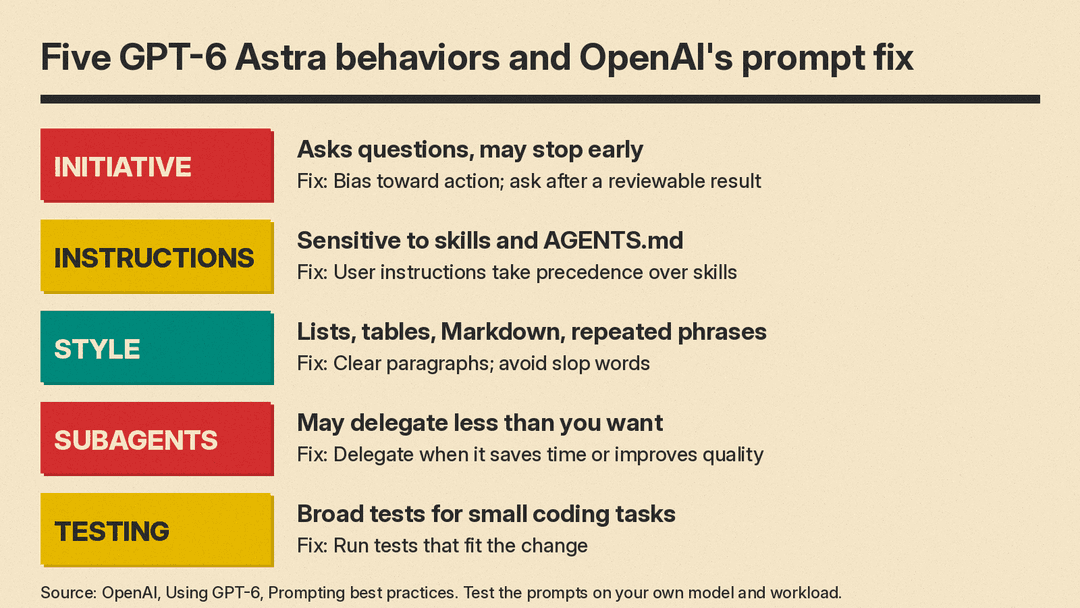
For everyday users, the first and third points are the ones you notice in chat. OpenAI's answer to all five is the same: tell the model what you want in the prompt.
Fix 1: stop the model from asking too much
OpenAI's guide says GPT-6 Astra is "more likely to ask for clarification where earlier models would make assumptions." To push it toward finishing work, OpenAI suggests starting with this prompt:
You should infer the user's intent and task scope from the instructions and prior conversation context. Your job is to bias towards action and carry the user's intended task to completion.

When the user expresses intent to perform new work or fix an existing issue, persist until the user's intended goal is complete. Progress autonomously towards the user's goal (e.g. creating isolated worktrees / checkouts if needed, resolving merge conflicts, read-only actions, creating draft PRs etc.) unless they are clearly destructive or irreversible.
The second prompt treats everyday phrasing as a request to act:
When the user's prompt indicates a request for action, such as "can you...", "I want to...", "help me..." and similar expressions, treat these as instructions to do the work and take action. Do not stop at acknowledging capability (e.g. "Yes…"), proposing a plan, or offering to continue. Do not settle for a partial or "helpful enough" solution that does not fully satisfy the user's task to save time, effort or tokens. If a task requires sustained work, complete all the necessary work until the intended outcome is fulfilled.The third prompt is the one to copy if you build agents. It tells the model to ask for approval only after it has something concrete to approve:
Before asking the user clarifying questions, you should complete the work that is already authorized from context and necessary to make the proposed action concrete and reviewable. The user should be approving a concrete, reviewable result. For example, before deploying a change, writing to an external application, merging a PR or publishing a site, do all the required work first so that user approval is the final step. You don't need user permission for reversible tasks, read-only actions, reviews or fixes, or anything for which authorization is provided earlier in the session or strongly implied from the task instruction.

Do not introduce unsolicited warnings, disclaimers, approval flows, or safety/compliance checklists due to hypothetical risk.
OpenAI says this approach "avoids blocking the task before the model has done the work it can, and often leads to quicker task completion." It also notes the model "likes to ask non-blocking questions as it's working by default," so tune these prompts to the level of autonomy your app needs. If your agent touches money, email or production systems, keep a human approval step for those actions and use this prompt to make sure the request arrives with the work already done.
Fix 2: make user instructions beat skill files
Because GPT-6 Astra follows long instructions closely, OpenAI warns that "unclear or conflicting guidance in a skill file may cause the model to pause and block work early." Its fix is to state the priority order:
The user's instructions take precedence over guidelines provided in a skill. If explicit user instructions conflict with a skill's instructions, prioritize the user's instructions.A second prompt makes the model explain itself when a skill changes its course:
If a skill causes you to ask for permission or confirmation, pause, leave requested work unfinished, or diverge from the user's intent, name and link to the exact SKILL.md file you read, quote the relevant instruction, and briefly explain how it applies. Distinguish explicit skill requirements from your interpretation of guidelines.OpenAI suggests this one to "find silent and conflicting guidance" when an app loads many skills and files like AGENTS.md. If you write your own skills, our guide on how to write an agent skill (SKILL.md) explains how skill files are put together, which helps when you audit them.
Fix 3: plain prose and fewer stock phrases
OpenAI says GPT-6 Astra "tends to use lists, tables and Markdown to make responses scannable." If you want prose, say so. This is OpenAI's prompt for a plainer default style:
Default to using clear, concise paragraphs, each developing one main idea. Use lists only when the information is genuinely parallel, sequential, or easier to compare, and avoid nested lists unless the hierarchy cannot be expressed clearly in prose. Use plain, simple language: familiar words, concrete examples, and precise verbs. Prefer active voice and direct statements.

Make sure to state the main point clearly and early, then develop it with the explanation and detail the reader needs. Let each sentence build on what came before. Develop the points that matter and provide enough support to be useful.
For technical answers, OpenAI offers a shorter prompt that keeps jargon in check:
Use plain language over jargon, and reference technical details only to the degree that it helps illustrate an idea or your work to the user. Communicate complex concepts in a clear and cohesive manner, and calibrate your writing to the level of background knowledge assumed from the user's prompt and context.To reduce jargon and stock phrases, OpenAI's guide gives this prompt:
Avoid using slop words or phrases like "Bottom Line:" in conclusions, "delve," "foster," "leverage," "it's worth noting," "importantly," "Question? Answer." or "This isn't about X. It's about Y.", "genuinely" or hyphenated compound descriptions and adjectives. Do not use concluding summary statements such as "In short:..", "The simplest mental model is:...".

State the intended action directly. Avoid adding what you won't do, what will remain unchanged, or how you'll separate or categorize results. Do not use contrastive framing such as "X, not Y" that introduces an unprompted alternative that the user didn't ask about. Avoid invented compound labels like "exact-head checks" and "editorial-row layouts", vague qualifiers, and canned transitions; use plain verbs and prepositions to state the actual relationship directly.
Fixes 4 and 5: subagents and testing (for builders)
If you run a multi-agent system, OpenAI's prompt to raise delegation is:
If at any point you can parallelize work by delegating tasks to another agent (no matter if you are the root or subagent), you should do so using collaboration tools if it could save time or improve quality.OpenAI also says messages between agents "may contain grammar or spacing errors," and offers this fix:
Messages that you send to other agents and your final answer may be read by a human, so ensure they are legible. Always put proper spaces between words and/or numbers.For coding agents that over-test small changes, OpenAI's calibration prompt is:
Do not write tests for reversible, low-impact changes that mirror the implementation. If you do choose to verify your work with tests, make sure that the tests are meaningful and necessary to verify implementation.

Run tests appropriate to the change and complete required checks. Once those pass, broaden or repeat testing only when new changes, failures, or unresolved concerns justify it; otherwise, continue toward completing the task.
How to pick reasoning effort
Reasoning effort controls how much the model thinks before it answers. OpenAI's reasoning guide says "lower effort favors speed and lower token usage, while at higher effort the model thinks more completely to provide higher quality responses."
GPT-6.1 Terra supports none, low, medium (the default), high, xhigh and max. OpenAI's advice for Terra is direct: "Start with medium and increase it if the improvement in quality is worth the added time and tokens."
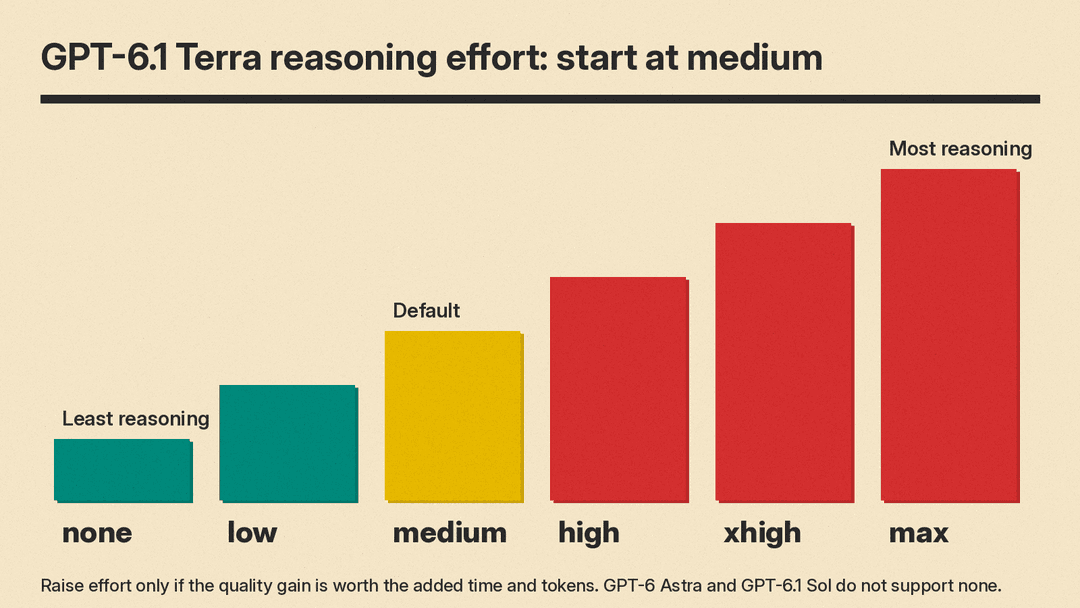
The reasoning guide describes each level:
- none: "Latency-critical tasks that do not benefit from any reasoning," such as voice, fast retrieval and classification.
- low: "Efficient reasoning with a modest latency increase," for drafting, data analysis and support chat.
- medium: "Default configuration for most workloads."
- high: "Hard reasoning, complex debugging, deep planning." OpenAI suggests you evaluate both
mediumandhighdepending on the task. - xhigh: "Only use when your evals show a clear benefit that justifies the extra latency and cost."
- max: "Maximum reasoning for your most complex tasks."
Three migration details from the GPT-6 guide matter here:
- GPT-6 Astra and GPT-6.1 Sol do not support
none. Uselowinstead. Terra, GPT-6 Sol and GPT-6 Luna do supportnone. - If your old requests used
minimal, start withlowand compare results on representative tasks. - When effort is not
none, removetemperature,top_pandtop_logprobsfrom your requests.
You can also change effort partway through a conversation. Add a configuration_update input item to raise effort for a hard follow-up or lower it for a routine one, and keep the request-level reasoning.effort unchanged so the cached prompt prefix still applies. OpenAI says this works for the GPT-6 family in standard, single-agent mode. Note too that on Terra, tool calling requires the Responses API.
Our suggestion: adapt the prompts for ChatGPT custom instructions
This section is our suggestion, not OpenAI's. OpenAI wrote the prompts above for developers, and some lines (worktrees, draft PRs, subagents) do not apply to a chat app.
ChatGPT has a custom instructions setting. In the web and desktop apps it is under Settings, then Personalization. OpenAI's help page says Free and Go users can save up to 1,500 characters there, and Plus, Pro, Business, Enterprise and Education users up to 5,000. OpenAI's initiative, style and anti-slop prompts together run past the 1,500 character limit, so we condensed their guidance into this 649 character version:
Infer my intent from what I write. When I ask "can you" or "help me", do the work instead of describing a plan. Make reasonable assumptions for small gaps and tell me what you assumed. Ask a question only when the answer would change the result, and do the work you can first.

Write in clear paragraphs that each make one point. Use lists only for steps or items I will compare. State the main point first. Use plain words and active voice.

Avoid stock phrases such as "delve", "leverage", "it's worth noting", "Bottom line:" and "In short:". Do not end with a summary sentence. Do not contrast my question with an alternative I did not ask about.
Keep only the parts that match a habit you actually see. If you like bullet lists, drop the second paragraph.
What happened when we tested three prompts
We could not run GPT-6 for this post. As a stand-in, we ran three of OpenAI's prompts as system messages on Gemma 3 1B, a small model running locally, at temperature 0, one run each. A 1B model is far weaker than any GPT-6 model, so read this as a check on how clear the prompts are, not as a result for GPT-6.
- Plain-prose prompt: no improvement. We asked how a new manager should run one-on-one meetings. Without the prompt, the answer had 5 list lines and 8 bold spans. With OpenAI's prose prompt, it had 6 list lines and 15 bold spans. Both answers ran past our 450 token limit. The small model ignored the style request.
- Anti-slop prompt: large change. We asked for a short paragraph about a bakery switching to local flour. Without the prompt, the model wrote 236 words: three bold-labeled options with exclamation points and two follow-up questions. With the prompt, it wrote one 44-word paragraph. It still used one hyphenated compound ("highest-quality") that the prompt bans.
- Skill priority prompt: failed. We loaded a fake SKILL.md that required a formal tone and a "Kind regards" sign-off, plus OpenAI's line that user instructions take precedence. The user asked for a casual email signed "cheers, Andy." The model wrote a casual email but signed it "Kind regards, Andy," so the skill won.
This is the anti-slop output in full:
We've shifted to using locally sourced flour to enhance our baked goods. This choice supports our community and ensures the freshest, highest-quality products. We've partnered with local farmers to deliver superior ingredients, resulting in richer flavor and a more sustainable approach to our baking.The lesson is the one OpenAI gives: test on your own model. OpenAI wrote these prompts for behavior seen on GPT-6 Astra, and our small test shows results can differ a lot by model.
Common mistakes
- Pasting every prompt at once. Each prompt targets one behavior. Add the ones that match a problem you see, then check the result.
- Skipping the skill audit. OpenAI "strongly" recommends reviewing skills and files like
AGENTS.md. OpenAI says unclear or conflicting guidance in a skill can make the model "pause and block work early." - Removing all approval steps. The initiative prompts tell the model to act on reversible work. Keep human approval for actions that are destructive or irreversible, and have the model prepare a reviewable result first.
- Jumping to
xhighormax. OpenAI says to start Terra atmediumand its reasoning guide says to usexhighonly when evals show a clear benefit. - Keeping old sampling settings.
temperatureandtop_pmust go when reasoning effort is notnone. - Using
noneon Astra or 6.1 Sol. The reasoning guide says settingnoneon GPT-6 Astra "returns HTTP 400." - Calling tools through Chat Completions. Terra supports Chat Completions, but tool calling requires the Responses API.
