
Most marketing teams do not need a dozen AI subscriptions. They need AI inside the few jobs that eat the most hours: writing on-brand copy, getting found in search and AI answers, keeping social channels fed, producing visuals and video, and sending the right email to the right person. This guide lists 10 real tools across those jobs, with what each one does, who it suits, where it falls short, and pricing only where we read it on the vendor's own page.
All prices and plan details are as of October 2026. Plans change often, so check the linked pricing page before you pay.
If you mostly need a general assistant for drafting and editing, start with our guide to the best AI tools for writers, which covers ChatGPT, Claude, Grammarly, and more. This page focuses on tools built for marketing work. If you are a student, our guide to the best AI tools for students covers study and research tools.
How we picked
- Real, available products only. Every tool below has a live official site and accepts new customers today.
- Built for a marketing job. Each tool had to help with at least one part of the work: copy, SEO and AI search, social, design, video, or email and CRM.
- Verified details only. We state a price, free plan, or trial only when the vendor's own page showed it. Where we could not read the price or the billing terms were unclear, we left it out.
- A clear limit for each. No tool fits every team, so each entry names a caveat.
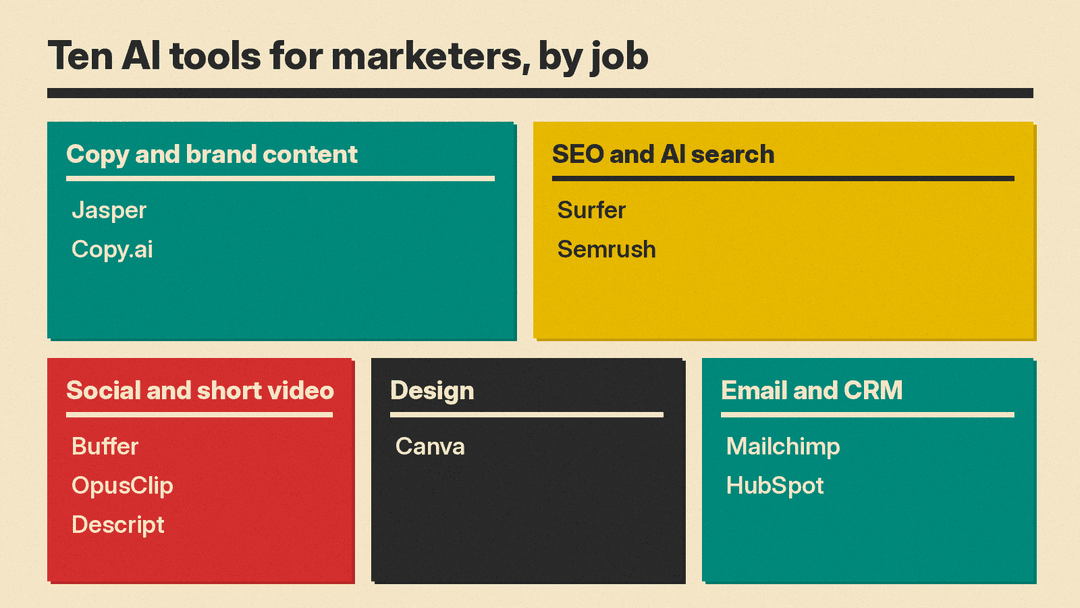
Copy and brand content
Jasper
Jasper is an AI platform built for marketing teams. Beyond chat and a document canvas, it stores Brand Voices, Audiences, Knowledge, and Style Guide rules so output follows your brand, and it offers purpose-built marketing agents plus a no-code builder for custom agents.
- Who it suits: in-house teams and agencies that write a lot of campaign copy across several brands and want shared brand rules.
- Limit: the agents and its GEO Hub run on credits on the Business plan, on top of seat pricing, so heavy automated use adds cost. More than one user means talking to sales.
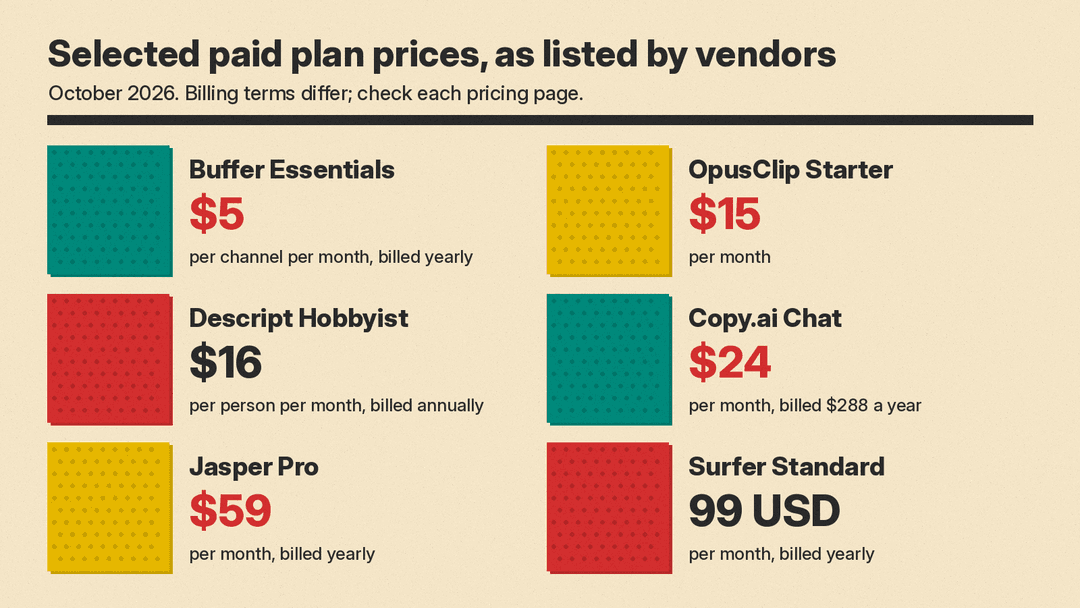
- Pricing note: Pro is $59 per month billed yearly or $69 billed monthly, with a 7-day free trial, per Jasper's pricing page as of October 2026. Jasper also lists a 20% nonprofit discount.
Copy.ai
Copy.ai now pitches itself to go-to-market teams, not only copywriters. The entry Chat plan gives a small team unlimited words in chat and access to OpenAI, Anthropic, and Gemini models. Higher plans add monthly workflow credits for running automated content workflows.
- Who it suits: small teams that want one chat workspace with several model providers, and larger sales and marketing orgs that want to automate repeat content tasks.
- Limit: the jump from the Chat plan to the first workflow plan is large, so automation is priced for bigger teams.
- Pricing note: Chat is $29 per month billed monthly, or $24 per month billed $288 a year, and includes 5 seats. Growth is $1,000 per month billed $12,000 a year, per Copy.ai's pricing page as of October 2026.
SEO and AI search
Surfer
Surfer is a content optimization tool. Its Content Editor gives live guidelines while you write, and its AI writing assistant, Surfy, drafts and optimizes pages. Newer plans also track whether ChatGPT, Gemini, Google AI Overviews, and other AI models mention your brand for prompts you choose.
- Who it suits: content marketers and SEO teams that publish blog posts and landing pages and want a score to write against.
- Limit: plans cap the number of documents you can create or optimize and the number of AI prompts tracked. A content score is guidance, not a guarantee of rankings.
- Pricing note: plans on the pricing page range from 49 USD to 299 USD per month, with a Standard plan at 99 USD per month billed yearly, per Surfer's pricing page as of October 2026. Surfer says annual billing is charged up front.
Semrush
Semrush is a large SEO and competitive research platform with keyword tracking, website monitoring, and traffic and market data. It now pairs classic SEO with AI visibility features that report how brands show up in AI answers, and it offers an MCP connection so you can query its data from AI assistants.
- Who it suits: marketers and agencies that need keyword and competitor data, not only writing help.
- Limit: it is a broad toolkit with a learning curve, and tracked keywords and monitored sites are capped by plan.
- Pricing note: Semrush offers a free start. We could not read plan prices on its pricing page, so we have left them out. See Semrush plans.
If your team already pays for an office suite with AI built in, our Microsoft 365 Copilot vs Gemini in Google Workspace comparison covers what those plans include before you add another tool.
Social and short video
Buffer
Buffer schedules posts to social channels such as LinkedIn, Threads, X, Instagram, and Bluesky. Its AI Assistant, built into the post composer, brainstorms ideas, repurposes one post into versions for each channel, and rewrites for tone and length.
- Who it suits: solo marketers, creators, and small teams that run several social accounts.
- Limit: the AI is a writing helper, not a strategy tool. Buffer says text you enter into the assistant is shared with OpenAI, so keep confidential launch details out of it.
- Pricing note: the free plan includes the AI Assistant and 10 scheduled posts per channel. Essentials is $5 per channel per month and Team is $10 per channel per month, each billed yearly, per Buffer's pricing page as of October 2026.
OpusClip
OpusClip takes long videos, such as webinars, podcasts, and interviews, and uses AI to pick short clips for social. It can generate clip titles, descriptions, and hashtags, and the Pro plan exports to Adobe Premiere Pro and DaVinci Resolve for finishing.
- Who it suits: teams sitting on long-form video that want a steady supply of short clips.
- Limit: usage is metered in credits, and the clips it picks still need a human check for context and brand fit.
- Pricing note: there is a free plan. Starter is listed at $15 per month and Pro at $29 per month, per OpusClip's pricing page as of October 2026. Business pricing is custom.
Descript
Descript edits video and audio by editing the transcript. Its AI co-editor, Underlord, can find highlight clips, draft scripts, generate images, and clean up audio with features like Studio Sound.
- Who it suits: marketers who make product videos, webinars, or podcasts and do not want a traditional timeline editor.
- Limit: plans meter both media hours and AI credits, so long recordings and heavy AI use can push you to a higher tier.
- Pricing note: a free plan is available. Hobbyist is $16 per person per month billed annually or $24 billed monthly, and Creator is $24 or $35, per Descript's pricing page as of October 2026.
If you need fully generated video rather than edits of your own footage, see our roundup of the best AI video generators.
Design
Canva
Canva is the default design tool for many marketing teams. Its AI features include Canva AI 2.0, a chat-style assistant that can build and edit designs, plus Magic Write for copy, Magic Resize for adapting one design to many formats, Magic Layers for turning AI images into editable layouts, and an AI photo editor. Canva says its AI can learn your brand's fonts, colors, and rules, and can run scheduled tasks.
- Who it suits: anyone producing social graphics, ads, decks, and one-pagers without a full-time designer.
- Limit: templates make it easy to look like everyone else. Brand controls help, but someone still needs to own the visual standard.
- Pricing note: we could not load Canva's pricing page, so we have left out figures. See Canva's AI features and check plans on the site.
Email and CRM
Mailchimp
Mailchimp is an email marketing platform with automations, segmentation, and SMS in select markets. Its generative AI features, including the Intuit Assist beta for drafting and suggestions, are available on paid tiers.
- Who it suits: small businesses and ecommerce brands that run newsletters and automated email flows.
- Limit: generative AI features are not included on the Free or Essentials plans, per Mailchimp's plan comparison. Intuit Assist is a beta in English and in select countries only.
- Pricing note: Mailchimp says accounts with fewer than 250 contacts can use the free plan, and Standard and Essentials have a 14-day free trial, per Mailchimp's pricing page as of October 2026. Prices vary by contact count and region, so we have left them out.
HubSpot
HubSpot is a CRM with marketing, sales, and service tools. Its Agent Hub groups AI agents that run on your CRM data, including a Content Agent for blog posts, social posts, and landing pages in your brand voice, a Campaign Agent that turns one goal into a multi-channel plan, and a Nurture Agent for personalized email. Agent Builder lets you make custom agents without code.
- Who it suits: teams already on HubSpot, or teams that want marketing, sales, and CRM data in one place.
- Limit: many AI features and agents consume HubSpot Credits, which you buy in packs or pay as you go, so costs scale with use. The value depends on how clean your CRM data is.
- Pricing note: HubSpot says Agent Hub is included in all Starter, Professional, and Enterprise editions, per its AI and Agent Hub page as of October 2026. We did not verify edition prices.
How to choose
Start from the job that costs your team the most hours each week, not from the tool with the longest feature list.
- If writing on-brand copy is the bottleneck: try Jasper if you manage several brands and want shared brand rules, or Copy.ai if a small team wants one chat workspace with several model providers.
- If organic traffic is the goal: Surfer helps you write pages against a content score. Semrush gives you the keyword and competitor data to decide what to write in the first place. Many teams use one of each.
- If social is the bottleneck: Buffer handles scheduling and channel-specific rewrites. Add OpusClip or Descript if you have long videos to cut into clips.
- If you lack design help: Canva covers most day-to-day graphics.
- If email and lead nurture matter most: Mailchimp fits newsletter-first small businesses. HubSpot fits teams that want AI working on CRM data across marketing and sales.
- If budget is tight: Buffer, OpusClip, Descript, and Mailchimp have free plans, and Jasper has a 7-day trial. Test on one real campaign before paying.
A practical starting stack for a small team is one copy or chat tool, one SEO tool, and one scheduling tool. Add video, design, or CRM agents when a specific task keeps slowing you down.
What these tools do not do
None of these tools knows your customers better than you do, and none checks facts or claims reliably. AI copy can repeat competitor phrasing, overstate product claims, or invent statistics. Have a person review anything that makes a claim about your product, pricing, or results before it ships, and check your industry's rules on advertising and disclosures. Read each tool's data and training settings before you paste in customer lists or unreleased plans.
