
If your company already runs on Microsoft 365 or Google Workspace, the AI assistant question mostly answers itself. Moving email, files, and calendars to a different suite to get a better chatbot rarely pays off. The harder decisions come inside each suite: what you get for free, what costs extra, and which features your team will use every week.
This guide compares Microsoft 365 Copilot and Gemini in Google Workspace for small and midsize teams, as of October 2026. Every price below was checked on Microsoft's and Google's own pricing pages on October 19, 2026, in US dollars per user per month. Prices change often, and both vendors are running promotions right now, so confirm at checkout.
The short version
- Packaging is the biggest difference. Google builds Gemini into its Business plans. Microsoft gives eligible business users Copilot Chat at no extra cost, but full Microsoft 365 Copilot (inside Word, Excel, PowerPoint, Outlook, and Teams, grounded in your work data) is a paid add-on or a "with Copilot" bundle.
- On list price, Google is cheaper per seat. Google Workspace Business Standard is $14 with a one-year commitment and includes Gemini in Gmail, Docs, Meet, and more. Microsoft 365 Business Standard with Copilot is $23.50 paid yearly.
- Pick the suite your files already live in. Both assistants work best on content they can see: Copilot uses your Microsoft 365 data, and Gemini retrieves Workspace content the user already has access to.
- Both have a 300-user ceiling on business plans. Larger organizations move to enterprise licensing on either side.
What each one is
Microsoft 365 Copilot
Microsoft sells two tiers of AI to businesses.
- Copilot Chat is included at no additional cost for Microsoft Entra users with an eligible Microsoft 365 subscription. Microsoft's business plans FAQ says it uses public web data and "doesn't integrate with Microsoft 365 apps or organizational content such as files, emails, or chats." The Copilot pricing page adds that it includes Copilot in Outlook and the Microsoft Copilot app, and that organizations can use their own custom agents on a metered basis.
- Microsoft 365 Copilot is the paid tier. According to Microsoft's Copilot for business page, it adds Copilot inside Word, Excel, PowerPoint, Outlook, and Teams, chat grounded in your work data through what Microsoft calls Work IQ, prebuilt agents including Researcher, Analyst, and Facilitator, usage analytics, and a choice of large language models.
For companies with 300 or fewer users on Business Basic, Business Standard, or Business Premium, Microsoft sells this paid tier as Microsoft 365 Copilot Business. Microsoft's Copilot Business FAQ says it "delivers the same capabilities" as the main Microsoft 365 Copilot offering, supports up to 300 seats per tenant, and can be added to plans without Teams.
Gemini in Google Workspace
Google takes the opposite approach. Gemini features ship inside the Workspace plans, and the plan tier sets how much you get. Google's AI for business page describes three pieces.
- Gemini app for work: a chat assistant for drafting, analysis, and research.
- Gemini in the apps: help inside Gmail, Docs, Sheets, Slides, Drive, Meet, Chat, and Vids, which Google groups under the name Workspace Intelligence.
- Gemini Notebook: a research tool grounded in documents you upload, which can produce summaries, Audio Overviews, Mind Maps, and Video Overviews.
Google also sells Gemini Enterprise, a separate agent platform for building, deploying, and governing agents across Workspace and other business apps, and an AI Expanded Access add-on that raises limits on features such as Workspace Studio automations, image and video generation, and real-time speech translation. Google's pricing page lists both, without prices on that page.
Pricing, as of October 2026
Microsoft
From Microsoft's Copilot pricing page, per user per month:
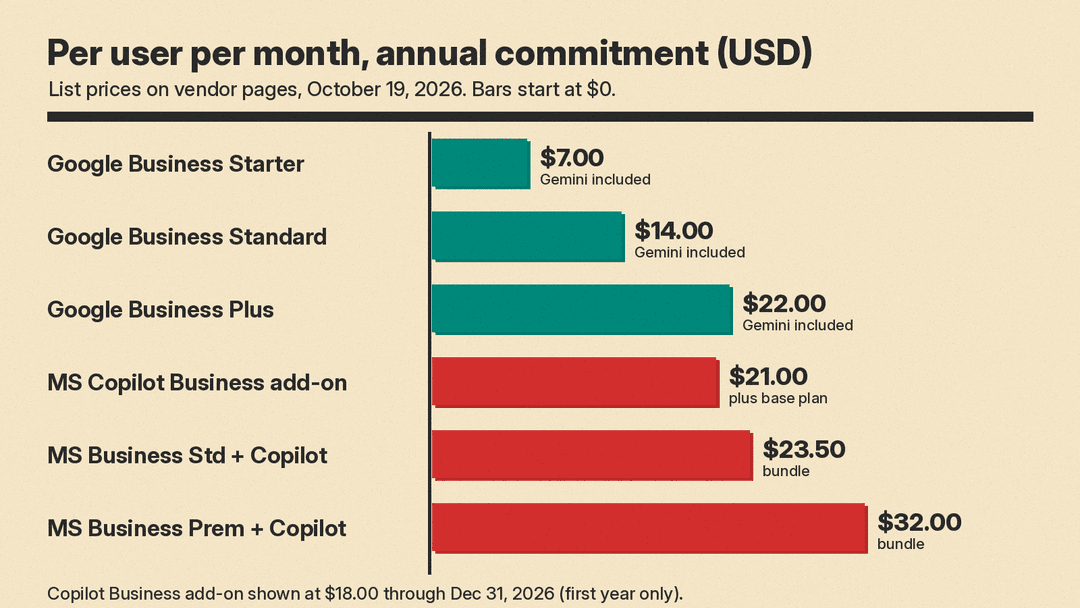
- Microsoft 365 Business Standard with Copilot: $23.50 paid yearly, or $28.20 on a monthly subscription.
- Microsoft 365 Business Premium with Copilot: $32.00 paid yearly, or $38.40 on a monthly subscription. Premium adds device management, threat protection, and data classification tools.
- Microsoft 365 Copilot Business add-on: $21.00 list, currently shown at $18.00 paid yearly, or $25.20 on a monthly subscription. You still pay for the underlying Microsoft 365 business plan.
Read the add-on promotion carefully. Microsoft's footnote says the discount "is available between July 1, 2026, and December 31, 2026," requires an annual commitment, applies "to the first year only," and is not available on trials. In practice, an $18 seat bought this quarter renews at the $21 list price unless Microsoft changes it. Microsoft also sells "no Teams" versions of both bundles for companies that license Teams separately.
From Google's pricing page, per user per month, before tax:
- Business Starter: $7. Includes the Gemini assistant in Gmail, chat with Gemini, and Google Vids.
- Business Standard: $14. Adds Gemini in Gmail, Docs, Meet, and more, Gemini Notebook with expanded access, expanded model access in the Gemini app, and 2 TB of pooled storage per user.
- Business Plus: $22. Adds Vault, eDiscovery, stronger endpoint management, and 5 TB of pooled storage per user.
- Enterprise: contact sales. Adds data loss prevention, context-aware access, data regions, and AI Classification for Drive.
Google's AI page shows Business Standard at $14 with a one-year commitment and $16.80 without one, a saving the pricing page describes as 16%. Google is also showing introductory discounts for new customers on the first three months, limited to the first 20 users, so your first invoices may be lower than the list price.
What the gap looks like
For a team that does not yet use either suite, the closest like-for-like comparison on list price, with a one-year commitment, is:
- Google Workspace Business Standard with Gemini: $14
- Microsoft 365 Business Standard with Copilot: $23.50
That is $9.50 per user per month, or $114 per user per year. For a 20-person team, that is $2,280 a year. The plans are not identical, though. Microsoft's bundle includes desktop Office apps, which matters if your team lives in Excel and works with outside partners who send Office files. Google's plan includes Office file interoperability but is browser-first.
For a team already on Microsoft 365 Business Standard, the real question is whether to add Copilot Business for $21 a seat at list ($18 during the current promotion), or to stay on the free Copilot Chat.
Feature by feature
Both vendors cover the same everyday jobs. The differences are in depth, packaging, and where the feature lives.
- Copilot in Outlook drafts, summarizes threads, and helps with replies. Microsoft's pricing FAQ lists Copilot in Outlook as part of the free Copilot Chat tier, while full grounding in your mailbox and other work data comes with the paid license.
- Gemini in Gmail is available from Business Starter up, according to Google's pricing page. Google describes it as a way to "find, summarize, and write emails faster."
Documents and slides
- Copilot in Word and PowerPoint writes, edits, and summarizes documents and builds presentations from prompts or existing files. Microsoft lists both on its Copilot for business page as part of the paid tier. Microsoft is also previewing Word, Excel and PowerPoint inside the Copilot app for Frontier customers; see our Office in Copilot explainer.
- Gemini in Docs and Slides handles drafting and polishing in Docs and image generation in Slides. On Google's pricing grid, Gemini in Docs starts at Business Standard.
Spreadsheets
- Copilot in Excel is part of the paid Microsoft 365 Copilot tier, and Microsoft also highlights an Analyst agent for data analysis.
- Gemini in Sheets is described by Google as a way to "visualize data and surface insights faster." Google's pricing grid also lists Smart Fill, Smart Cleanup, and Answers for easier analysis.
If spreadsheets are the core of your work, test both on your own files. Excel's depth of formulas, pivot tables, and add-ins is a reason many finance teams stay on Microsoft regardless of the AI layer.
Meetings
- Copilot in Teams gives real-time meeting summaries and insights, according to Microsoft's Copilot for business page. The Facilitator agent helps run meetings. Teams features require a Teams license.
- Gemini in Meet offers AI notetaking, translated captions, and noise cancellation on Business Standard, according to Google's AI page.
Research and agents
- Microsoft: Researcher and Analyst agents come with the paid license. Teams can browse an Agent Store and build their own agents in Copilot Studio. Microsoft says licensed users can use assistive custom agents at no additional cost, while Copilot Chat users pay for agents on a metered basis, and agents for Copilot Chat need an Azure subscription.
- Google: Gemini Notebook handles document-grounded research, Workspace Studio automates workflows across Workspace apps, and Gemini Enterprise is the separate platform for building and governing agents at scale. Google's new Gemini agent, now in private preview, is covered in our Gemini agent for work explainer.
Data connections
- Microsoft says Copilot can search Microsoft 365, on-premises tools, and business apps through "over 100 connectors."
- Google says Gemini Enterprise connects agents to apps such as Microsoft 365, Salesforce, SAP, and Jira.
Data protection
On paper, the two vendors make similar promises.
- Microsoft says prompts and responses stay within the Microsoft 365 service boundary under its enterprise data protection, are logged according to your retention policies, are available for eDiscovery, and "continue to not be used to train the underlying large language models."
- Google says Workspace data is "not used to train or improve Gemini models or for ads targeting," that Gemini only retrieves content the user can already access, and that admins can restrict access with data loss prevention, information rights management, and client-side encryption.
Both approaches inherit your existing permissions. If your file sharing is messy, the assistant will surface files people were never meant to see but technically could. Microsoft sells SharePoint Advanced Management partly for this reason. On either suite, clean up sharing before you roll out AI widely.
How to choose
You already use Microsoft 365
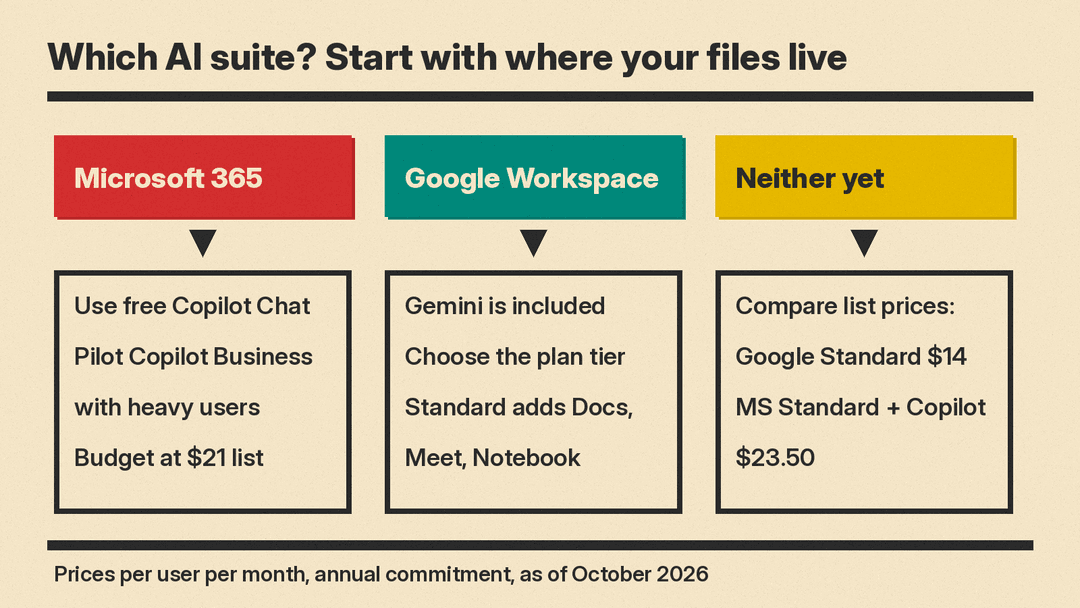
- Turn on and promote Copilot Chat first. It costs nothing extra on eligible plans and shows you who actually uses AI.
- Buy Copilot Business for a pilot group of heavy Outlook, Excel, and Teams users rather than the whole company. Microsoft's FAQ says you can buy more Copilot Business licenses at any time.
- Budget at the $21 list price, not the $18 promotion, since the discount covers only the first year.
- If you are about to renew anyway, compare the "with Copilot" bundle against your current plan plus the add-on.
You already use Google Workspace
- Check your tier. On Business Starter, Gemini is mainly in Gmail and the Gemini app. Moving to Business Standard adds Gemini in Docs, Meet, and more, plus Gemini Notebook with expanded access.
- Consider the AI Expanded Access add-on only after you see people hitting limits.
- Look at Gemini Enterprise only if you want to build and govern custom agents across many systems.
You are choosing a suite from scratch
- Choose Microsoft if your team needs desktop Excel and Office, works heavily with outside parties who send Office files, or needs the device management and security stack in Business Premium.
- Choose Google if your team is browser-first, price per seat matters most, and you want AI included without a separate purchase decision.
- In both cases, run a two-week trial with five real users on real work: one email-heavy role, one spreadsheet-heavy role, and one meeting-heavy role. Google offers a 14-day trial, and Microsoft lists a one-month free trial on its business plans.
Practical rollout tips for either suite
- Write down three tasks per role before the trial. "Summarize the weekly customer email backlog" is testable. "Be more productive" is not.
- Fix sharing permissions first. Both assistants can only see what users can see, which includes files shared too widely.
- Set a review rule. AI drafts of customer emails, contracts, and numbers need a human check before they go out.
- Measure usage after 30 days. Microsoft includes adoption and usage analytics with the paid Copilot license. Drop seats that go unused.
- Track renewal dates. Microsoft's Copilot Business promotion ends December 31, 2026, and Google's introductory discounts last three months.
Bottom line
As of October 2026, Gemini comes bundled with Google Workspace and costs less per seat at list price. Microsoft 365 Copilot is a separate purchase, and it gives Microsoft-based teams deeper AI inside Excel, Outlook, and Teams, along with prebuilt agents. For most small businesses the suite you already use should decide it. The useful work is choosing the right tier, piloting with real tasks, and budgeting for the price after any promotion ends.
