
Microsoft has put Word, Excel and PowerPoint inside the Copilot app. The feature is called Office in Copilot, and Microsoft's Tech Community post, dated October 9, 2026, says it "is rolling out today for Frontier customers in Chat and Cowork." It is part of the redesigned Copilot that Microsoft announced on September 25, and it got fresh coverage today in GCN.
The short version: you can ask Copilot for a document, workbook or deck, and it opens a real Office file next to the chat. You and your team then edit that file in the same window. Most people cannot use it yet. Below is what it does, who gets it, how the billing works, and what to do if you run Microsoft 365 for a team.
What Office in Copilot does
GCN describes the change as positioning the chat-style Copilot app "as a starting point for document work rather than a sidebar feature bolted onto Word, Excel and PowerPoint." You start in the chat, and the Office editor comes to you.
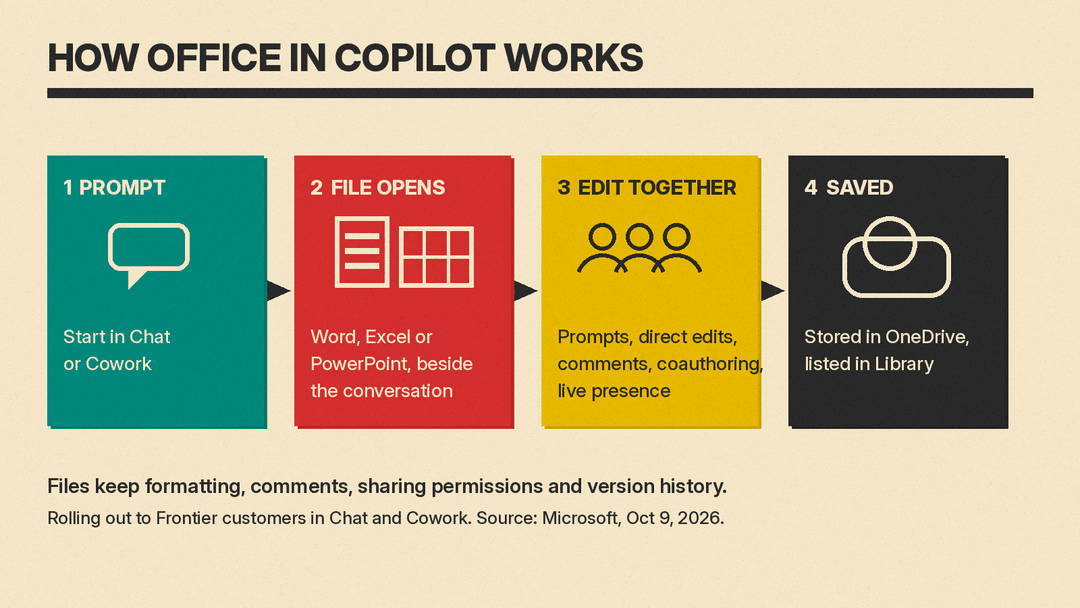
Microsoft's example prompt is "Turn these research notes into a customer-ready launch brief with an executive summary, key messages, risks, and next steps." Copilot creates a Word document, and the document "opens side by side with your Copilot conversation." From there you have three ways to change it:
- Keep prompting. Microsoft gives follow-ups like "Make the opening more direct" and "Add a table comparing the three rollout options."
- Edit by hand. Microsoft says you have "full editing capabilities" with familiar controls in the canvas.
- Bring in teammates. The view has built-in sharing, comments, coauthoring and presence, and changes show in real time.
Microsoft says Copilot "retains everything in the same file with no separate drafts to reconcile." In the September announcement it also says you can "@mention a teammate and their edits show up as they make them," and that files stay in sync between Copilot and the Office apps.
You can start in either of the two Copilot modes. Chat is for quick questions and drafts. Cowork is for work you delegate: you define a task and it "runs end-to-end to return a completed result," such as an RFP response or a customer briefing, per Microsoft.
Library, OneDrive and governance
The app also gets a Library. It lists your recent Word, Excel and PowerPoint files, plus pages and AI-generated images, "whether they were created in Copilot or in the Office apps." You can reopen a file, keep editing it with Copilot, or start a new one from there.
For IT teams, the more important line is about storage. Microsoft says every file is stored in OneDrive and keeps "formatting, comments, sharing permissions, and version history," while inheriting existing security labels, compliance and governance controls. In plain terms, a deck made in the Copilot app is the same kind of file as one made in PowerPoint, with the same rules attached.
Microsoft also says users can pick the model for a task or let Auto choose one.
Updates inside Word, Excel and PowerPoint
The same posts list changes to Copilot inside the Office apps themselves. These are useful even if you never open the new Copilot app:
- PowerPoint: Copilot keeps decks on-brand automatically, makes it easier to refine slides and images, and applies custom templates.
- Excel: you can review edits made by Copilot or a collaborator and "see exactly what changed and why," and Copilot recommends charts for your data.
- Skills and connectors: Microsoft says these bring specialized work into the apps, with examples of financial analysis in Excel and legal workflows in Word.
Who gets it: the Frontier program
Office in Copilot is in Microsoft's Frontier program, which is Microsoft's early access track. According to Microsoft Learn, Frontier gives organizations "preview access to innovative and emerging capabilities in Microsoft 365 before those features reach general availability." Frontier features "are preview and subject to change."
What you need, per that page:
- Your admin has to turn Frontier on. It is managed at the tenant level, and the default setting is "No access." Admins can enable it for all users or for specific users and groups.
- A Copilot license. A Copilot license is not needed to enroll in Frontier, but users without one "aren't presented with Copilot-related Frontier features."
- Some patience. Microsoft says it "might take three hours" for Frontier features to appear after an admin turns them on.
Microsoft has not given a date for Office in Copilot to reach everyone. GCN reports the company "has not said when the capability will expand to all Microsoft 365 subscribers."
One more admin note from the same Learn page: Microsoft is retiring Targeted release in January 2027. Users on Targeted release will fall back to Standard or Deferred release, while users already enrolled in Frontier stay in Frontier.
How the billing splits
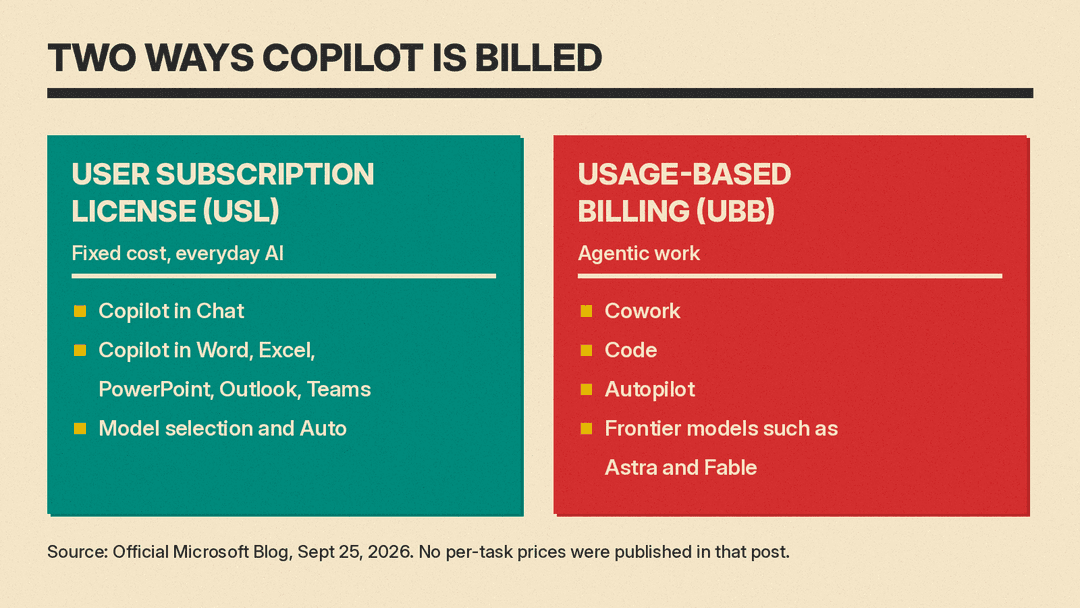
The September announcement also explains how Microsoft now prices Copilot work, and it matters for teams planning a pilot. There are two models:
- A user subscription license (USL) covers everyday AI at a fixed cost: Copilot in Chat and across Word, Excel, PowerPoint, Outlook and Teams, plus model selection and Auto routing.
- Usage-based billing (UBB) covers agentic work. Microsoft says "Cowork, Code, and Autopilot, new long-running agentic capabilities, and frontier models like Astra and Fable all run on UBB."
So a draft you start in Chat sits under the seat license, while the same request handed to Cowork runs on usage billing. Microsoft did not publish per-task prices in these posts. It did announce cost controls: admins can set spending policies, choose which model families each group can use, and route credit requests into approval workflows, and users can see their own credit usage and balances in Copilot.
The rest of the new Copilot
Office in Copilot is one part of a larger redesign. From the September 25 post:
- Home is the new starting screen where Chat and Cowork sit together.
- Code lets people describe an app, tracker, dashboard or automation and have Copilot build it. Microsoft says it runs in a sandbox and uses "the same underlying technology as GitHub Copilot." It is set for preview for Microsoft 365 Premium and Pro subscribers "later this year."
- Autopilot, "previously called Scout," is a cloud-hosted agent with its own identity, memory, computer and workspace. The September 25 post said it would expand to private preview "at the end of the month."
- Today, a personalized view across mail, calendar, Teams threads, meetings and tasks, was set to enter private preview in October.
Microsoft says more Copilot news will come at Ignite, November 17 to 20 in San Francisco and online.
Why it matters
The big office suites are moving in the same direction: the AI chat window becomes the front door, and documents get made inside it. Google is pushing agents into Workspace (see our Gemini Agent for Work explainer), and OpenAI is rolling out ChatGPT Slides to eligible Pro, Business and Enterprise users. According to mixed-news.com, Anthropic announced Claude Docs and Slides for its chat app on September 16.
Microsoft's edge is the file itself. The output of Office in Copilot is a normal Word, Excel or PowerPoint file in OneDrive, with the permissions, labels and version history that companies already manage. For a business that already runs on Microsoft 365, that removes the export step and the "which copy is current" problem that comes with AI drafts made in a separate tool.
The catch is cost and access. Copilot in the Office apps sits under the seat license, but Cowork, the mode for longer delegated tasks, runs on usage billing, and Office in Copilot is still a Frontier preview. If you are weighing suites, our Microsoft 365 Copilot vs Gemini in Google Workspace comparison covers plan prices.
What to do now
- If you are an admin: decide whether to run a Frontier pilot for a small group. The Learn page lists the steps under Copilot settings in the Microsoft 365 admin center, and you can scope access to specific users and groups.
- If you are a user: check with IT whether your account is in Frontier. If it is not, the Office app updates above (on-brand PowerPoint, Excel change review) are where to look first.
- If you plan to use Cowork: ask how your company handles usage-based billing and credit requests before you hand it long tasks.
Sources
- Introducing Office in the new Microsoft Copilot app (Microsoft Tech Community, October 9, 2026)
- Introducing the new Copilot with Home, Code and Autopilot (Official Microsoft Blog, September 25, 2026)
- Get started with the Microsoft Frontier Program (Microsoft Learn)
- Microsoft puts Word, Excel and PowerPoint inside Copilot app (GCN)
- ChatGPT Slides has shipped, but on Windows 10 the desktop app gives you a PowerPoint file (mixed-news.com)
