
If you follow AI news, you see the word TPU a lot, usually next to Google. But what is a TPU, and how is it different from the GPUs and CPUs you already know? This guide explains it in plain English, using Google's own documentation, starting with its Introduction to Cloud TPU, and Google's research papers as sources.
The short answer
TPU stands for Tensor Processing Unit. Google describes TPUs as its "custom-developed, application-specific integrated circuits (ASICs) used to accelerate machine learning workloads."
An ASIC is a chip built for one kind of job instead of every job. A CPU in your laptop is a generalist: it can run a browser, a spreadsheet and a game. A TPU is a specialist. It is designed to do the kind of math that machine learning needs, very fast and at very large scale.
A short history of TPU generations
Google started the TPU project because of a capacity problem. In a 2024 Google Cloud retrospective, Google Chief Scientist Jeff Dean recalls the math the team did for speech recognition: "we soon realized it would take basically all the compute power that Google had deployed."
The first chip, now called TPU v1, was built for inference, which means running a model that has already been trained. Google's 2017 paper, presented at the International Symposium on Computer Architecture (ISCA), says the chip had been "deployed in datacenters since 2015." Google's own measurements in that paper found it was on average about 15 to 30 times faster than the CPU and GPU it was compared with, and about 30 to 80 times better on performance per watt. Those figures compare 2015 era chips on Google's own workloads.
The next step was training, the job of teaching a model in the first place. According to the same Google retrospective, TPU v2 was designed as a training system, and it was the first to come as a pod. Google engineer Andy Swing describes that first pod as "256 TPU chips connected with a very high-bandwidth, custom interconnect."
Later generations added more chips per pod and new hardware features. Google says liquid cooling arrived with TPU v3, and TPU v4 introduced optical circuit switches so chips in a pod could talk to each other faster and more reliably. Google's 2023 ISCA paper on TPU v4 describes it as Google's "third supercomputer" for machine learning models, with SparseCores, small processors that speed up models built on embeddings.
Google publishes the current list of generations, with their names and supported configurations, on its TPU architecture page. The list changes as new chips arrive.
What kind of math?
Most of the work inside an AI model is matrix math: multiplying large grids of numbers together, over and over. Google says TPUs train models efficiently "by using hardware designed for performing large matrix operations often found in machine learning algorithms."
Inside each TPU are matrix units, which Google calls MXUs. According to Google's architecture page, each MXU is a systolic array of 128x128 multiply-accumulators on TPU versions before v6e, and 256x256 on v6e and TPU7x. Google says its XLA compiler tiles large matrix multiplications into smaller blocks so the MXU can run them efficiently.
TPUs also have high-bandwidth memory (HBM) on the chip. Google says this lets developers "use larger models and batch sizes," meaning the chip can hold more of the model and more examples at once.
What is inside a TPU chip
Google's TPU architecture page explains the difference with an everyday comparison. A CPU loads values from memory, does a calculation, and stores the result back in memory for every step. Google notes that memory access is slow compared with the calculation itself, which limits how much work a CPU can get through.
A GPU gets more done by having thousands of small arithmetic units working at once. Google says this works well for the parallel math in neural networks, but a GPU is still a general-purpose chip, so for every calculation it has to read and store values in registers or shared memory.
A TPU takes a narrower approach. Its multiply units are wired directly to each other in a grid, called a systolic array. Data flows from one unit to the next, and Google says "no memory access is required during the matrix multiplication process."
Each TPU chip contains one or more TensorCores. Google says each TensorCore has one or more matrix units (MXUs) for the heavy math, a vector unit for general calculations such as activations, and a scalar unit for control flow and other housekeeping. Some generations also include SparseCores for recommendation models.
How software talks to a TPU
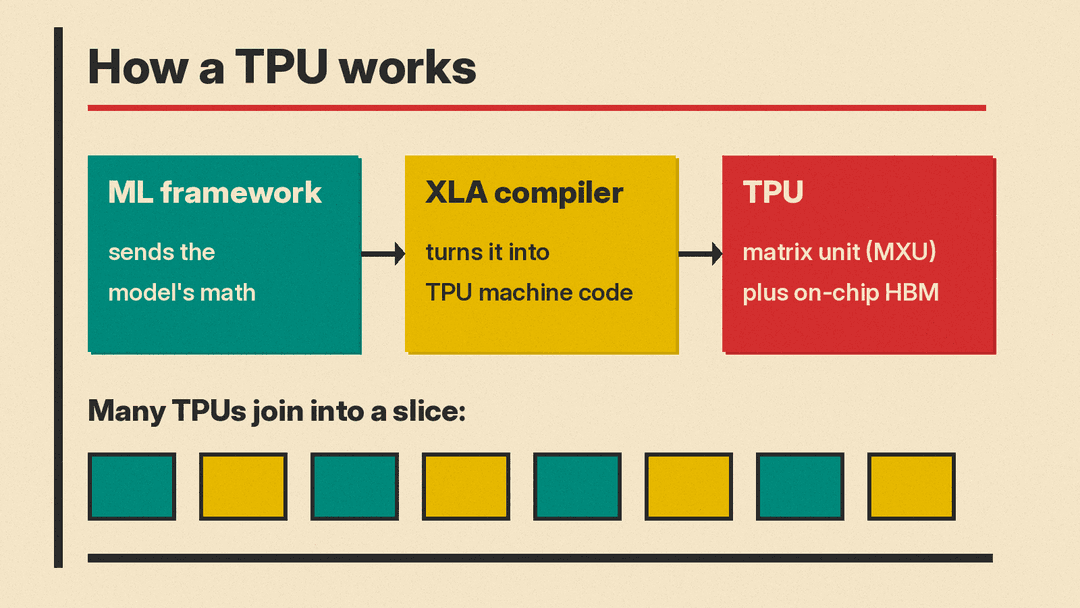
You do not program a TPU the way you program a normal computer. Google's documentation says code that runs on TPUs "must be compiled by the accelerated linear algebra (XLA) compiler."
Here is the flow in everyday terms:
- A developer writes a model in a machine learning framework.
- The framework produces a graph, a map of all the math the model needs.
- The XLA compiler turns the math in that graph into TPU machine code, just in time.
- The TPU runs that math. The rest of the program runs on the TPU host machine.
The compiler plans the work in advance. Google notes that if the shapes of the data change from one batch to the next, the model does not work, because recompiling every time "is too slow." Models with changing, "dynamic" shapes are a poor fit.
Slices: many TPUs working as one
Google says TPUs "can be connected in groups called slices that scale up your workloads with little to no code changes." Our explainer on Google's Gemini 4 Argon lists Google TPUs as its training hardware.
Pods, slices and Multislice
Three words come up whenever people talk about TPUs at scale. Google's architecture page defines them this way:
- Pod: "a contiguous set of TPUs grouped together over a specialized network." The number of chips in a pod depends on the TPU version.
- Slice: a group of chips inside one pod, linked by fast connections called inter-chip interconnects (ICI). Google says a job can run on one slice or several.
- Topology: the physical layout of the chips in a slice, written as a grid such as 2x4 or a cube such as 4x4x4.
A slice can be small enough to sit on one host machine, or large enough to span many hosts. Google says that to move between TPU types with a different number of chips, developers "will need to perform significant tuning and optimization," so scaling up is not completely free.
For jobs bigger than one slice, Google offers Multislice. Chips inside each slice still talk over ICI, while separate slices exchange data through their host computers over the data center network (DCN). Google says developers do not have to write that cross-slice networking code themselves, because the XLA compiler generates it.
TPU vs GPU vs CPU
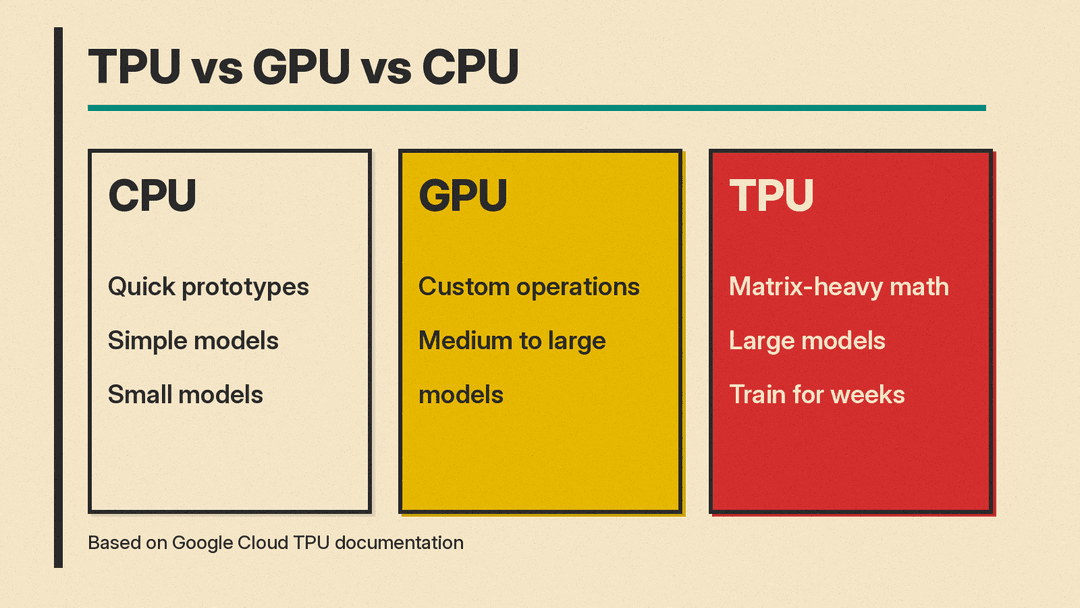
Google's documentation gives a clear guide to which chip suits which job. In short:
- CPUs suit quick prototyping that needs maximum flexibility, simple models that train quickly, and small models.
- GPUs suit models with many custom operations that must run at least partly on CPUs, and medium-to-large models.
- TPUs suit models dominated by matrix math, large models with large batch sizes, models that train for weeks or months, and recommendation systems with very large embeddings.
Google also lists what TPUs are not good at: programs that need frequent branching, work that needs high-precision arithmetic, and neural networks with custom operations inside the main training loop.
In short, Google lists TPUs as a fit for models dominated by matrix computations, and suggests GPUs or CPUs for some other workloads.
Google's research papers add more detail on the trade-offs. The 2017 ISCA paper argues that the TPU's predictable, step by step way of running was "a better match to the 99th-percentile response-time requirement" of Google's neural network applications than the features CPUs and GPUs use to raise average speed. In plain terms, the paper says a TPU is steadier about how long each answer takes, which suited the response-time limits of those applications better than a higher average speed.
Google's TPU v4 paper reports that, for similar sized systems, TPU v4 was 1.2 to 1.7 times faster than the Nvidia A100 GPU and used 1.3 to 1.9 times less power. Those are Google's own numbers for a 2020 chip against a GPU of the same period, not an independent test, and Google has released several newer TPU versions since, as its architecture page shows.
The flip side is flexibility. Google describes the GPU as a general-purpose processor that has to support many different applications, while TPU code has to go through XLA and works well when shapes stay fixed and the work is mostly matrix math.
Who can use TPUs?
Google offers Cloud TPUs through its cloud. According to its documentation, you can use TPUs through Compute Engine, Google Kubernetes Engine and Gemini Enterprise Agent Platform.
Under the hood, Google Cloud provides TPUs through TPU VMs. Google's architecture page describes a TPU VM as a Linux virtual machine that is physically connected to the TPUs, which developers can reach over SSH. Where the introduction lists Gemini Enterprise Agent Platform, the architecture page lists Vertex AI.
On the software side, Google lists PyTorch and JAX as frameworks for running workloads on TPUs, and its introduction also mentions TensorFlow models. JAX describes itself as "a Python library for accelerator-oriented array computation and program transformation" in its documentation. Google has a step by step guide for running a first calculation with JAX. As of October 2026, Google's docs say PyTorch/XLA is deprecated and replaced by TorchTPU, and Google's PyTorch on Cloud TPU page recommends starting new workloads with TorchTPU and moving existing PyTorch/XLA workloads to it. Google says TorchTPU, built with the PyTorch team at Meta, runs operations eagerly by default and compiles model graphs into TPU machine code through OpenXLA when developers use torch.compile.
Google's introduction also gives practical tips that explain why TPU code often looks a certain way. Google says a program dominated by non-matrix operations, such as add, reshape, or concatenate, "will likely not achieve high MXU utilization." When a matrix is too small to fill the MXU, the compiler pads it with zeros, which wastes compute and memory. Google advises that the batch size or a feature dimension should be a multiple of 128.
To run AI models on hardware you own, see our guide to running an AI model on your own laptop.
Edge TPU and Coral
Not every TPU lives in a data center. Google's Coral project offers hardware built around a much smaller chip called the Edge TPU. Coral's FAQ describes it as "a small ASIC designed by Google that provides high performance ML inferencing for low-power devices."
Coral says a single Edge TPU performs 4 trillion operations per second "using only 2 watts of power." That speed is a fraction of a Cloud TPU's, and Coral says the two are "very different." In Coral's description, Cloud TPUs run in Google data centers and suit training large, complex models, while the Edge TPU is designed for small, low-power devices and is primarily intended for running trained models (inference).
The Edge TPU is also more limited in software. Coral's FAQ says it supports TensorFlow Lite only, models must be quantized (converted to use simpler whole numbers) and compiled for the chip, and on-device training is limited to retraining the final layer. Coral offers it in forms such as a USB Accelerator that plugs into a Linux computer and a Dev Board that works as a complete small computer.
Why TPUs matter for AI
Google designs TPUs itself and offers them through its cloud. For one example of TPU news, see our report on the TPU v9 tape-out reportedly slipping. Knowing what a TPU is makes that kind of news much easier to follow.
Key terms
- TPU (Tensor Processing Unit): Google's custom chip for machine learning.
- ASIC: a chip designed for one specific type of work.
- MXU (matrix unit): the part of a TPU that does matrix multiplication.
- HBM (high-bandwidth memory): fast memory on the chip that holds model data.
- XLA: the compiler that turns a model's math into TPU machine code.
- Slice: a group of connected TPUs that work together on one job.
- TensorCore: a processing block inside a TPU chip that holds the matrix, vector and scalar units.
- Pod: a contiguous set of TPU chips joined by a specialized network.
- Multislice: Google's way of running one job across several slices.
- Edge TPU: a small, low-power TPU for running models on devices.
Sources
- Introduction to Cloud TPU (Google Cloud documentation)
- TPU architecture (Google Cloud documentation)
- Cloud TPU Multislice overview (Google Cloud documentation)
- Run a calculation on a Cloud TPU VM using JAX (Google Cloud documentation)
- JAX documentation
- Run a calculation on a Cloud TPU VM using PyTorch (Google Cloud documentation)
- PyTorch on Cloud TPU (Google Cloud documentation)
- TPU transformation: A look back at 10 years of our AI-specialized chips (Google Cloud blog, 2024)
- In-Datacenter Performance Analysis of a Tensor Processing Unit (Jouppi et al., ISCA 2017)
- TPU v4: An Optically Reconfigurable Supercomputer for Machine Learning with Hardware Support for Embeddings (Jouppi et al., ISCA 2023)
- Edge TPU frequently asked questions (Coral)
