
A photo shoot does not end when you put the camera down. You still have to cull the frames, edit them in a consistent style, clean up noise from dark venues and retouch portraits. The tools below use AI for parts of that post-shoot work, and one of them sits inside software many photographers already use.
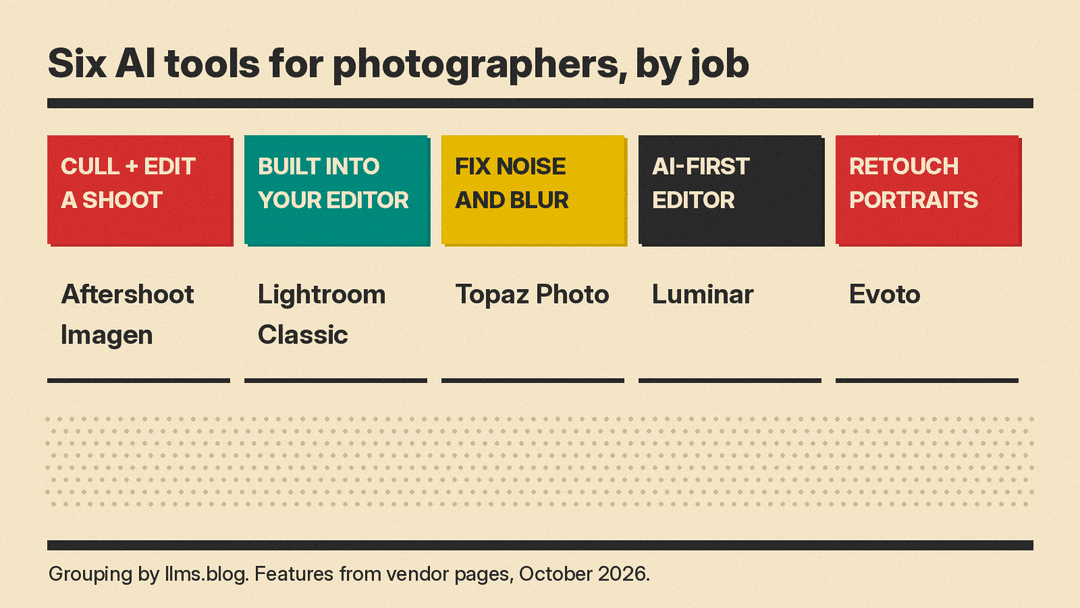
This guide covers six real tools, grouped by the job they do. Features and prices below come from each vendor's own pages when we checked them in October 2026. Plans, credits and sale prices change often, so check the vendor's page before you buy. If you also make video for clients or social media, see our best AI tools for YouTubers guide, and if you sell prints online, our best AI tools for Etsy and Shopify sellers guide.
Start with the editor you already use: Lightroom Classic
Adobe Lightroom Classic
If you already edit in Lightroom Classic, several AI tools are built in. Adobe's help page for the Remove tool says Generative Remove is "powered by Adobe Firefly generative AI." You brush over an object, and Lightroom Classic removes it and the shadow around it, then offers three variations to choose from. Adobe's note on that page says "Generative credits will not be deducted for using Generative Remove," and that an internet connection is required, while the Remove, Clone and Heal tools can work offline.
Adobe's Lightroom Classic release notes list other AI work in recent versions:
- Assisted Culling, which got a Faces panel that shows every detected face in a photo with Eyes open and Eyes sharpness scores.
- Denoise, now with "improved performance supported by Apple Neural Engine."
- AI-focused Library filters such as Has AI, Has Generative AI and Needs AI Update.
- Cleaner reflection removal for windows, glass and water, in the September 2026 release (version 15.6).
Adobe's Lightroom plans page says you can get Lightroom "by itself or as part of a multi-app plan." Check that page for current prices.
Good for: photographers who want AI help without leaving their current catalog.
Cull and edit whole shoots: Aftershoot and Imagen
These two tools are built for high-volume work such as weddings and events, where you shoot thousands of frames and need a consistent look across all of them.
Aftershoot
Aftershoot covers four steps: cull, edit, retouch and deliver. For culling, it offers AI Automated Culling for a hands-off first pass, or AI Assisted Culling if you want to stay in control, plus duplicate grouping. For editing, Aftershoot says you can import your edited photos so it learns to edit like you, turn a Lightroom preset into a profile, or pick from 30+ pre-built styles. Its retouching covers skin, stray hair, glasses glare, backgrounds and cloth creases, and you can sync one retouch across a gallery. It also has client galleries with face detection and a print store.
Aftershoot's FAQ says it works locally on your Windows or Mac computer and can run offline. It processes RAW, JPEG and TIFF files and exports to Lightroom and Capture One, among others.
Pricing is flat, not per image. On Aftershoot's pricing page, the Complete plan (Select, Edit and Retouch) is $55 per month on monthly billing, $45 per month on yearly billing, or $50 per month on the "Annually Billed Monthly" option. Aftershoot says that option is a 12-month plan with a $30 fee if you cancel in the first 6 months. Single tools are cheaper: Select is $15 per month on monthly billing or $10 on yearly. Aftershoot offers a 30-day free trial, and its homepage says no credit card is needed.
Good for: wedding, event and portrait photographers who want one app from cull to delivery.
Imagen
Imagen says it "applies your creative choices across every project." Its toolkit adds AI culling, composition tools (Straighten, Crop, Portrait Crop and HeadShot Crop), cleanup and retouch tools (Object Removal, Denoise, Smooth Skin, Face Retouch and Hair Removal), and Subject and Background masks. The pricing page says: "Get started with 1,000 free edits. No credit card needed."
Imagen's pricing page lists two individual plans. Pay-as-you-go starts "at US$0.05 / photo" with a "US$7/monthly base fee," and any unused balance rolls over as editing credit. AI tools such as Crop and Smooth Skin cost US$0.01 per photo on that plan, and AI culling is an add-on "From US$12/mo." The Limitless plan is US$129 per month billed annually or US$165 per month billed monthly, and includes all editing, retouching and AI tools plus AI culling. Imagen says Limitless is built for solo photographers who shoot and edit their own work; studios with several photographers go on a Business plan.
Good for: photographers whose volume varies, who can start on pay-as-you-go and move to a flat fee later.
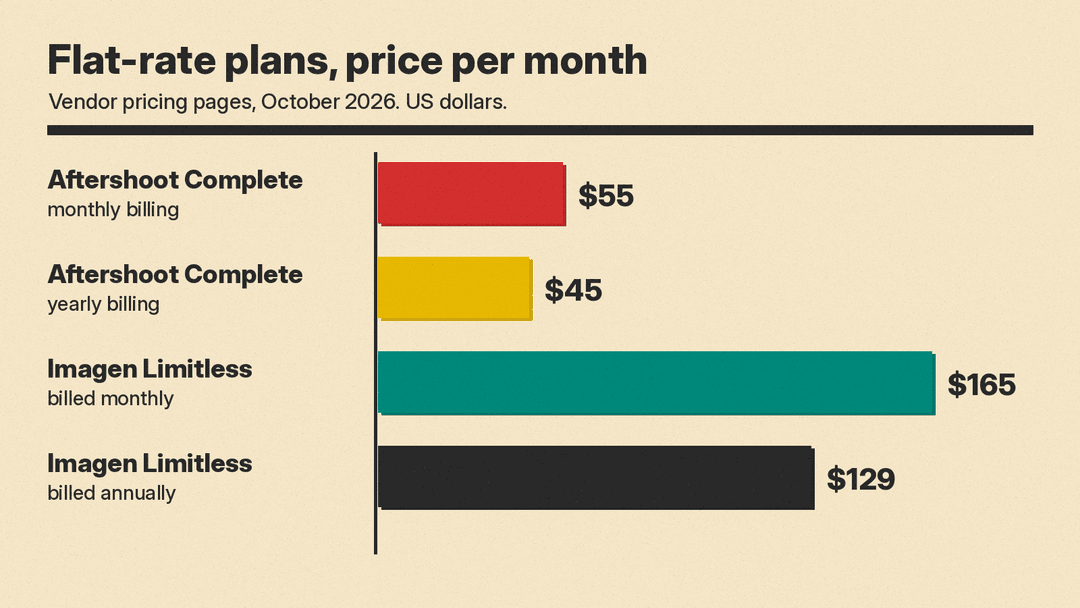
The two plans are not identical. Aftershoot Complete bundles its Select, Edit and Retouch tools. Imagen Limitless includes all editing, retouching and AI tools plus AI culling, and Imagen lists cloud backup as a paid add-on. Compare the feature lists, not only the price.
Fix noise, blur and low resolution: Topaz Photo
Topaz Photo
Topaz Photo from Topaz Labs is image enhancement software. Topaz says you can "Choose from 11 AI-powered tools" to sharpen details, restore focus and adjust levels, or let Autopilot get you started. Its examples include denoising high ISO shots and sharpening motion blur in indoor shots with poor lighting. Topaz says its Wonder model can "Upscale, sharpen, and denoise all in just one click," and calls it "Perfect for photos with extremely low resolution."
You can use Topaz Photo as a standalone app on Mac and Windows, or as a plugin for Photoshop, Lightroom Classic, Capture One and Apple Photos. Topaz offers both local rendering on your computer and unlimited cloud rendering.
On Topaz's pricing page, Topaz Photo was listed at $39/mo, and the Topaz Studio bundle (Topaz Video, Topaz Photo, Topaz Gigapixel, Topaz for Mobile and Topaz for Web) at $69/mo or $399/yr. Check the license terms: the standard plans say "Limited commercial use," defined as "Personal and commercial use for orgs under $1M USD annual revenue." Topaz Studio Pro lists "Full commercial use."
Good for: photographers who need to rescue noisy, soft or low-resolution frames.
An AI-first editor: Luminar
Luminar
Luminar from Skylum is a photo editor for macOS and Windows that runs as an app and as a plug-in. Its AI tools include an AI Assistant, AI Masking, and generative tools that Skylum names Restoration, GenErase, GenSwap and GenExpand.
Luminar is sold as a one-time purchase rather than a subscription, in three license tiers: Desktop Only, All Platforms and Max. Read the fine print on the AI tools. Skylum's FAQ says the Desktop Only license gives "1-year access to the AI tools" (Restoration, GenErase, GenSwap, GenExpand and AI Assistant), and that the AI tools "operate on an auto-renewal model" with Luminar Prime after 365 days. Skylum was running a sale when we checked, so we do not quote prices.
Good for: hobbyists and enthusiasts who want an AI-first editor without a monthly subscription for the core app.
Portrait retouching at volume: Evoto
Evoto
Evoto describes its Photo Editor as AI-powered photo editing software for portrait retouching, backgrounds, colors and batch processing. Evoto says its retouching works per face rather than as a global filter, to smooth skin and remove blemishes while it keeps real texture. It also offers photo culling, color grading, background adjustments, batch processing and gallery sharing. Evoto runs on desktop, iPad, mobile and in the browser. Evoto describes its Evoto Instant product as an automated workflow from tethered shooting to instant editing and delivery, for high-volume photographers such as weddings, events and studios.
Evoto's pricing is credit-based. Its FAQ says "Most features cost 1 credit per exported image," and some generative tools may cost more. You can buy credit packs as you go or take an annual subscription with lower per-credit prices. Evoto's FAQ also says most features require images to be uploaded to its cloud servers for processing, so factor that into client agreements.
Good for: headshot, newborn, maternity and fashion photographers who retouch many faces.
How to choose
- Already in Lightroom Classic: try its built-in Generative Remove, Denoise and Assisted Culling first, since they need no new app.
- Shoot weddings or events in volume: compare Aftershoot and Imagen on a real past shoot. Both have free trials (Aftershoot 30 days; Imagen 1,000 free edits).
- Rescue noisy, blurry or small files: Topaz Photo, as a plugin to the editor you already use.
- Retouch many portraits: Evoto for per-face retouching, or the retouch tools in Aftershoot and Imagen.
- Want to avoid a subscription for the editor itself: Luminar, but note the 1-year term on its AI tools.
- Work under NDAs: check where each tool processes files. Aftershoot and Topaz describe local processing; Evoto says most features use its cloud.
Whichever tool you pick, check its culls and retouches yourself before you deliver a gallery to a client.
