
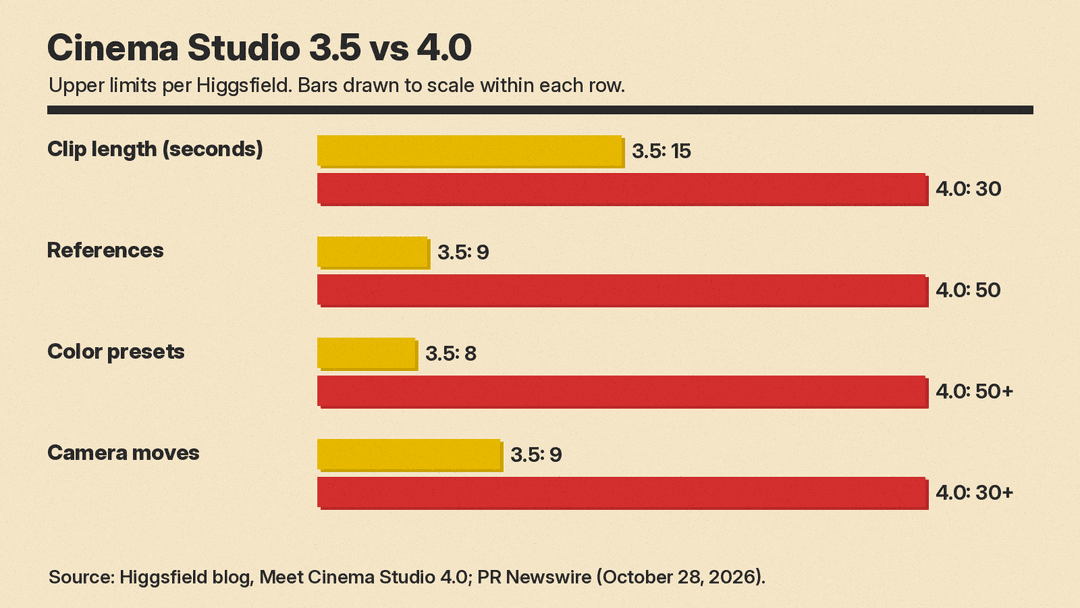
Higgsfield detailed Cinema Studio 4.0 in a press release on October 28, 2026. It is the company's AI filmmaking workspace, and the headline change is length: one generation can now run up to 30 seconds and draw on up to 50 references. Version 3.5 stopped at 15-second clips and nine references.
The bigger change is where the work happens. Camera, lens, lighting, pacing and a character's emotion become settings you pick before you generate, instead of words you hope the model reads correctly in a prompt.
What changed from version 3.5
Higgsfield's own guide to the release, dated August 12, 2026, lists ten changes. The main ones:
- Clip length: up to 30 seconds per generation, up from 15.
- References: up to 50 per generation, up from nine. The press release says these can be uploaded images and videos, characters from Higgsfield's Soul Cast, and elements made in earlier Cinema Studio versions.
- Color: more than 50 color presets, up from eight.
- Camera movement: 30+ presets, up from nine, including POV, robot arm and helicopter shots.
- Camera type: four options (Modern, DV Camcorder, 35mm Film and 8mm Film), up from three.
- Lenses: five lenses that Higgsfield says are now "optically modeled at generation time" rather than applied as filters.
- New controls: Tempo, an Era selector, the Emotion Wheel, and Forward/Backward Extend.
The FAQ in Higgsfield's guide says Cinema Studio 4.0 supports up to 1080p.
The Director's Panel
The press release groups the pre-generation settings under a Director's Panel. Creators choose from seven genres, set a scene in a decade from the 1960s through the 2020s, and set an editing tempo that runs from a single shot to "a fast, chaotic sequence."
The blog guide gives the detail. Genre options are General, Action, Epic, Drama, Comedy, Horror and Noir, and Higgsfield says the choice changes how the model handles light, blocking, motion and pacing. Tempo has four settings (Chaotic, Dynamic, Calm and Single Shot) plus Auto. Single Shot removes cuts entirely, which Higgsfield calls "the hardest pacing option to execute well."
Lighting goes past presets. Creators can set color, brightness, diffusion and angle by hand, or pick presets such as Silhouette, Practicals, Window and Contre-jour. Aperture has three settings, from f/1.4 wide open to f/11 deep focus.
The Emotion Wheel directs character performance. You tag a character in the prompt with an emotion, for example @character_name Joy, and the model shapes that character's face and body language to match. The guide lists eight emotions: hope, anger, joy, trust, fear, surprise, sadness and disgust. Higgsfield's stated reason is that AI characters "tend to default to a neutral, unreadable expression" without it.
If you write prompts for other video models, this changes the job. Our beginner's guide to AI video prompts spends a lot of space on camera and lighting language. In Cinema Studio 4.0, Higgsfield says, the prompt "only needs to cover scene description, not technical direction," because the panel has already set those choices.
Fixing a shot without starting over
Two tools work on footage after the first pass:
- Forward/Backward Extend continues an uploaded video past its end, or builds a lead-in before its first frame. Uploaded videos can be up to 30 seconds long.
- Edit Video changes one part of a clip, such as an object or a face, without regenerating the whole video.
Native audio adds speech, sound effects and background music in the same pass as the video.
Higgsfield's guide explains why so much of this landed together: "Fifteen seconds hides a drifting face or a shaky light source. Thirty seconds doesn't." Longer clips make drift easier to see, so the company tightened the controls that hold a face, a light and a look in place.
What it costs
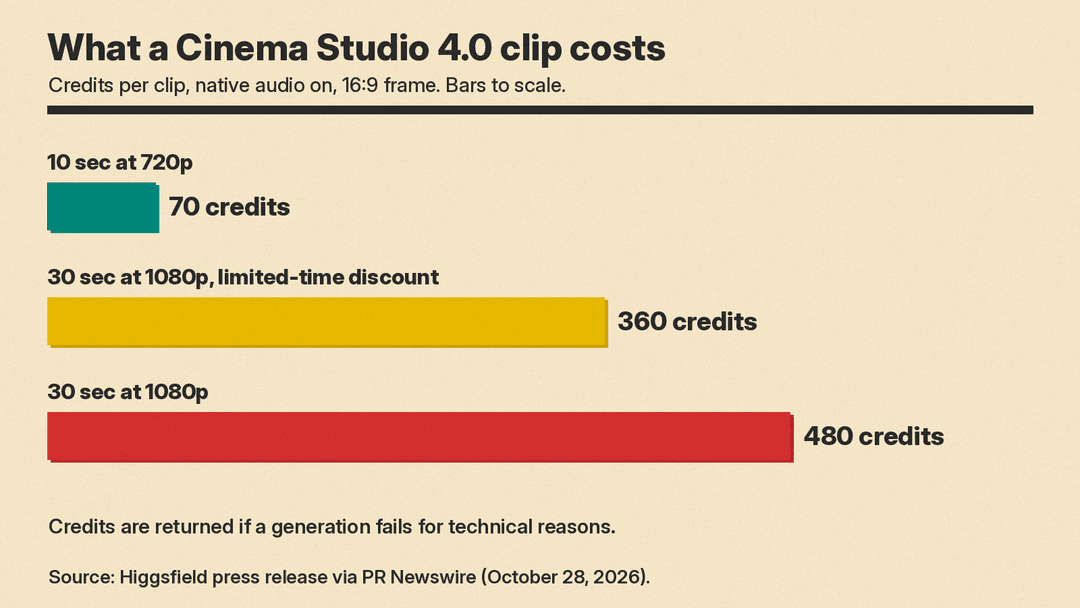
Cinema Studio generations are charged in credits, separate from the unlimited model access in Higgsfield plans. The press release gives these examples, with native audio on and a 16:9 frame:
- A 10-second clip at 720p costs 70 credits.
- A full 30-second clip at 1080p costs 480 credits, or 360 credits under a current limited-time 1080p discount.
Higgsfield says costs depend on resolution, clip length and the underlying model, and that the credit cost is shown before you generate. Credits come back automatically if a generation fails for technical reasons. Model access varies by plan; current plan prices are on Higgsfield's pricing page.
The API version
Developers can call the same workflow through Higgsfield's API. The Cinema Studio 4.0 API docs list a few limits that differ from the web app:
- Duration runs from 4 to 30 seconds, with a 5-second default.
- The resolution options are 480p and 720p, with 720p as the default.
- References are capped at 30 images, 10 videos and 10 audio files, with at most 50 items in total.
- Aspect ratios include 16:9, 9:16, 1:1, 4:3, 3:4 and 21:9.
- The endpoint only makes new videos. Per the docs, "Editing and extension use the separate Seedance 2.5 endpoints."
That last line ties Cinema Studio to ByteDance's model. The blog guide also says Seedance 2.5 is available inside the environment alongside Higgsfield's own Cinema Studio models. For background on that model, see our Seedance 2.5 explainer.
Teams, safety and the wider platform
The guide lists team features: AI Cast actors with a consistent look, live multi-user generation in one project, shared elements, a shared canvas and project brief, and a Personal Assistant that can break a script into shots with camera settings filled in.
On safety, the press release says Cinema Studio screens every generation for real faces and protected IP. A flagged generation is blocked, and the creator sees a "May contain protected content" notice.
Cinema Studio can run alone or inside Higgsfield Supercomputer, the company's agentic workspace. There, a creator describes a project in plain language and Supercomputer plans it, sends each step to a workspace and assembles the result. Higgsfield says the platform has more than 40 million users across 238 countries and territories. We covered the company's earlier funding round here.
Why it matters
Seven of the ten changes in Higgsfield's guide are new or wider controls. Genre, era, tempo, lens and emotion are now named settings, so a creator can change one variable and keep the rest fixed. In the press release, Higgsfield content lead Adil Alimzhanov says "Cinema Studio works more like a film studio." Named settings should also make a look easier to repeat across a series or an ad campaign.
The open questions are practical. Higgsfield's examples are its own, and the press release has no independent tests of how well characters hold across a full 30-second scene. Credits also go fast at 1080p: the Plus plan's 1,200 credits a month ($47 a month billed annually, or $59 billed monthly, on Higgsfield's pricing page as of October 28, 2026) cover two full-rate 30-second 1080p clips. Version 4.0 is now the default whenever Cinema Studio opens. Test a short clip before you commit a campaign to it.
