
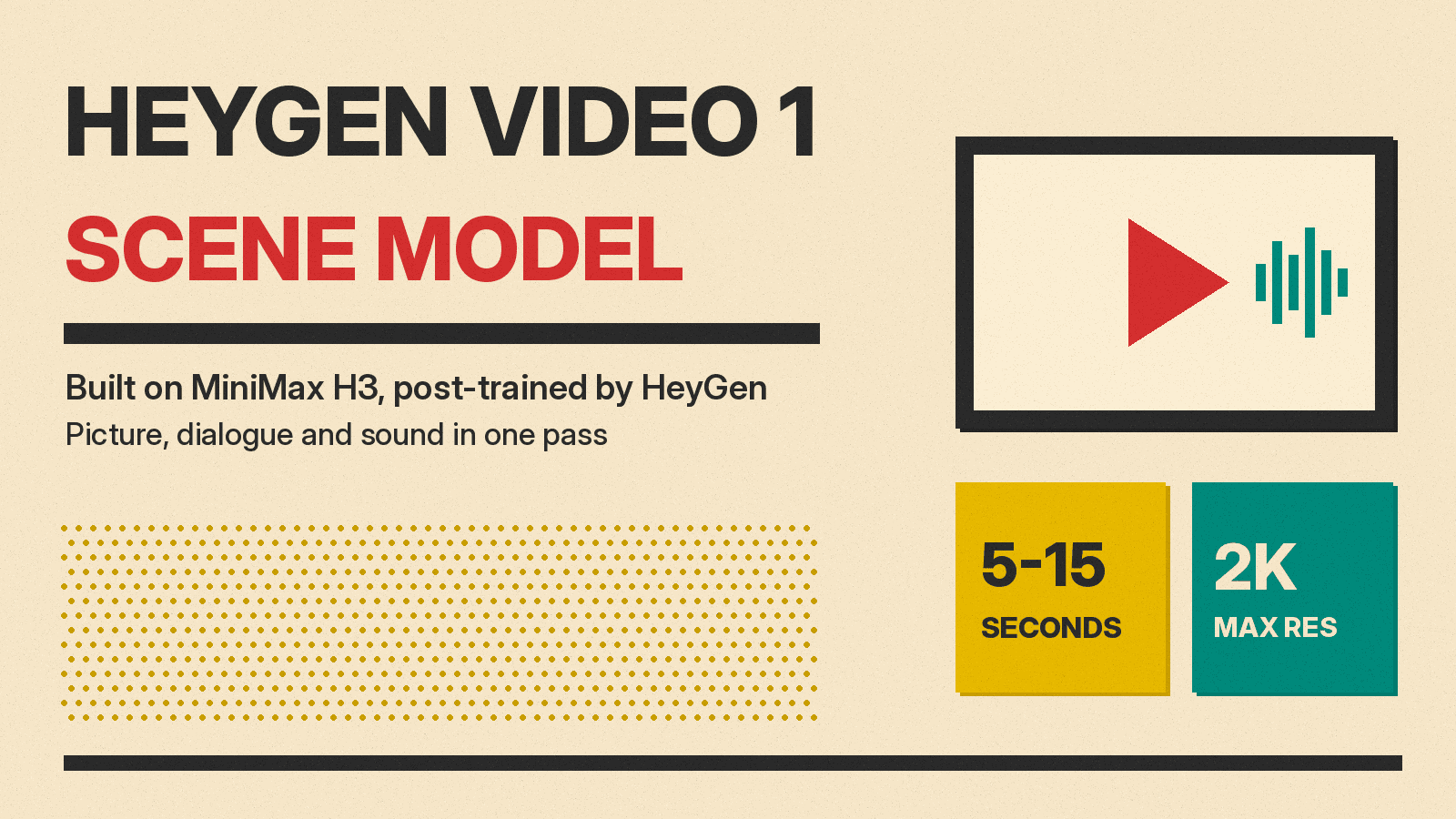
HeyGen, whose core product has been AI avatars, now has a general-purpose video model of its own. HeyGen Video 1 (API name heygen-video-1) turns a text prompt, a still image or a set of reference clips into a short scene, and it generates the picture, the dialogue and the sound effects in one pass. On October 22, 2026, HeyGen announced that the model ranked first in Artificial Analysis' blind text-to-video test, and on October 26 Artlist published a guide to using it on its platform.
The headline claim is a leaderboard result. On Artificial Analysis' blind text-to-video test with no audio, HeyGen Video 1 is in first place. With audio, it sits in a tight pack just behind the leaders. Here is what the model is, what it costs, where it is weak, and how much weight the ranking can carry.
What HeyGen Video 1 is
According to Artlist and to Dealroom's summary of HeyGen's announcement, HeyGen Video 1 is built on MiniMax H3 and post-trained by HeyGen. So it is not a model trained from scratch. HeyGen took MiniMax's video model and tuned it further. Our MiniMax H3 launch post covers the base model.
What it does, per HeyGen's model page:
- Makes 5 to 15 second clips at up to 2K resolution.
- Generates picture, dialogue and sound effects together, so there is no separate voice or lip sync step.
- Takes text, a start image, or references as input.
- Handles styles from live action to anime, claymation and screen print.
HeyGen's API documentation adds detail for developers. There are three modes: text_to_video, image_to_video and reference_to_video. Reference mode accepts images, video and audio. The developer guide caps them at 9 images, 3 videos and 3 audio clips, 12 in total, while the API reference says up to fifteen. Resolution options are 480p, 768p (the default), 1080p and 2K. The docs list six aspect ratios, from 21:9 to 9:16. Output is an MP4 at 24 frames per second with AAC stereo audio. The docs also allow whole-second durations from 5 to 30 seconds for compatible text-to-video and image-to-video requests, and 5 to 15 seconds otherwise. So the 15-second limit in HeyGen's marketing is the safe number, and longer clips depend on the settings.
The leaderboard result, read carefully
Artificial Analysis ranks video models by Elo, built from blind votes. Its evaluators see two clips made from the same prompt and pick one without knowing which model made which. It now runs two text-to-video boards: one that judges clips with generated audio, and a silent one.
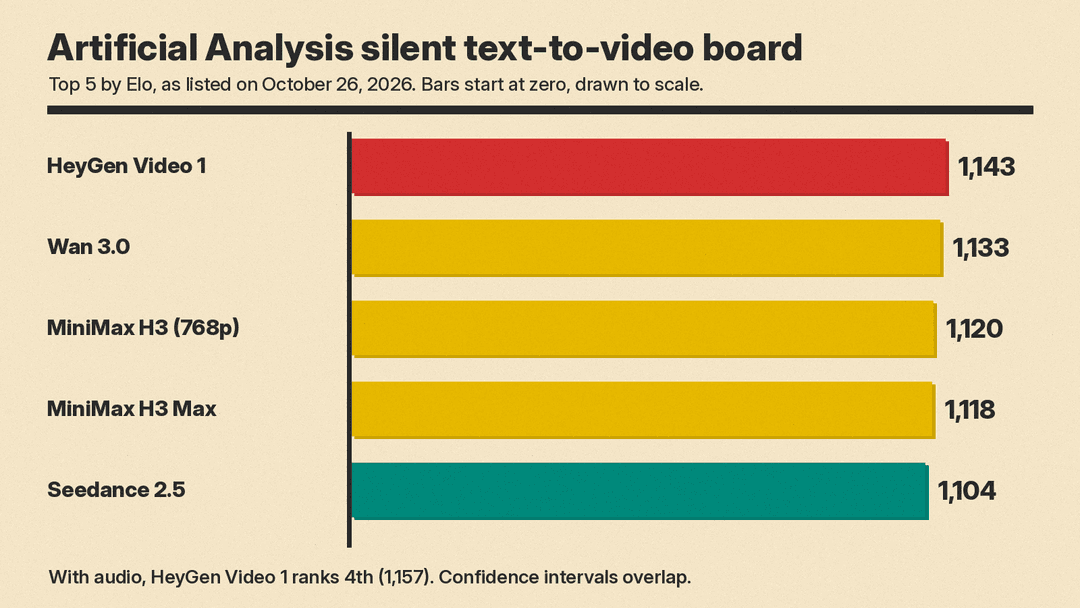
On the silent board, as listed on October 26, the top five were:
- HeyGen Video 1: 1,143
- Wan 3.0: 1,133
- MiniMax H3 (768p): 1,120
- MiniMax H3 Max: 1,118
- Dreamina Seedance 2.5: 1,104
On the board with audio, the picture is different. Wan 3.0 leads at 1,174, followed by Utopai X at 1,168, MiniMax H3 (768p) at 1,158 and HeyGen Video 1 at 1,157, with Seedance 2.5 at 1,156 and FLUX 3 Max (720p) at 1,155. Artificial Analysis gives HeyGen Video 1 a rank range of 2 to 7 on that board, which means it cannot be cleanly separated from most of the models around it.
Three points matter here. First, the scores move. At launch, Dealroom reported 1,144 on the silent board and third place (1,160) on the audio board, so the exact rank shifts as votes come in. Second, on the audio board HeyGen Video 1 is roughly level with MiniMax H3, the model it is built on, while on the silent board it is about 23 points ahead. Our read: HeyGen's post-training seems to have helped the picture more than the sound, though the benchmark does not say why. Third, this is one benchmark of short clips. It does not test long scenes, editing control or consistency across shots.
If you want the wider field, our guide to the best AI video generators covers the main tools, and our FLUX 3 Max explainer looks at another model in the same tight cluster at the top.
What it costs (as of October 2026)
There are three ways in, per HeyGen's model page:
- A free demo on the page itself: 5-second clips with sound at 768p, in four styles. A free HeyGen account gets 2 clips a day.
- The HeyGen app, free to start. Longer clips, your own images and 2K are there, and you can build scenes around your HeyGen avatar.
- The API, with seeds and webhooks.
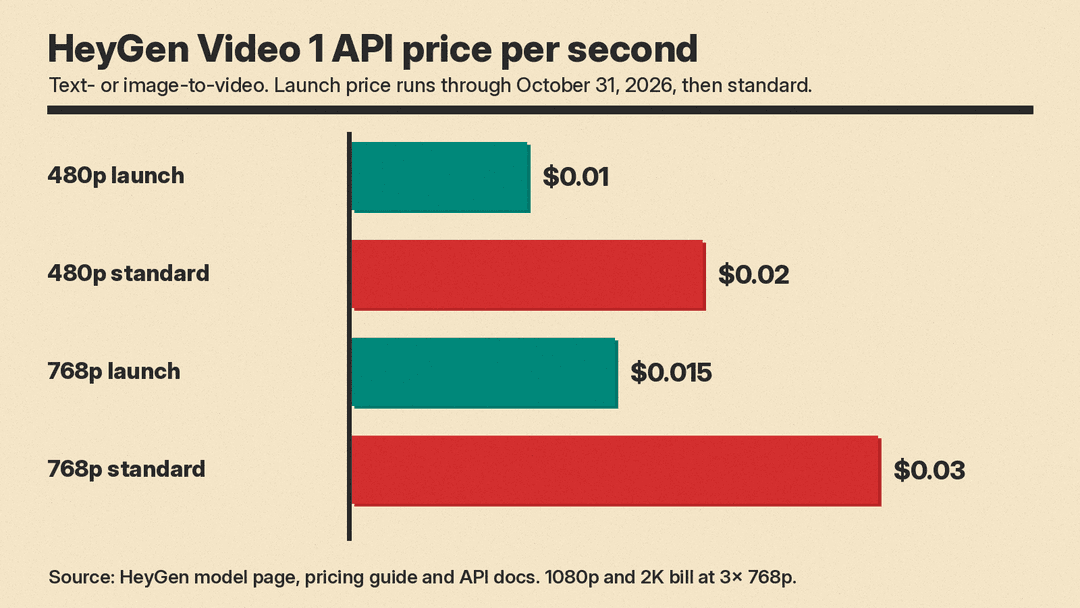
HeyGen's model page gives the API price as $0.01 per second, a launch price through October. HeyGen's AI video cost per second guide lists standard rates of $0.02 per second at 480p and $0.03 at 768p, the API default, with 768p at $0.015 per second through October 31, 2026. The same guide lists reference mode at $0.06 per second at standard rates, and the API docs say 1080p and 2K bill at 3 times the 768p rate. Because the launch price ends with October, check the page before you budget.
Artificial Analysis lists HeyGen Video 1 at $2.40 per minute of 1080p video at default settings on the creator's API. On the board with audio, that is the lowest listed price among the top ten models. On the silent board, Agnes-Video-2.5 also lists $2.40. For comparison, the same table lists Wan 3.0 at $12.00 and Seedance 2.5 at $34.12 per minute. For how these per-second and per-minute prices compare across tools, see our AI video generator pricing comparison.
Where it is strong and where it slips
Artlist's guide lists limits. It says the model is strongest on single, contained shots with a locked or slow camera: presenters, products and short social clips. It lists these weak spots:
- Hands operating objects, loose hair and fabric are the least reliable parts of a shot.
- Faces drift toward retouched skin.
- Plain surfaces can pick up invented logos unless the prompt rules them out.
- If you do not specify the sound, the model chooses it and may add music.
- Prompt Enhancement can change details of a full brief.
Inside Artlist, the only image input is a start frame. There is no end frame, reference image or reference video there, and text-to-video offers 16:9 and 9:16 only.
How to prompt it
HeyGen's advice is to write a prompt like a shot list, in four parts: subject and action, camera, look, and sound and limits. Its examples are plain: one subject doing one thing, a named lens and camera move, a light and colour grade, then what you hear and what to leave out ("no music, no logos, no lettering").
Artlist adds a few practical rules:
- Name the camera, lens and support, and say when the camera stays still. In Artlist's words, "Cinematic" does little.
- Budget about 2.5 spoken words per second, so about 12 words in a 5-second clip. Quote the line and attach it to a described person.
- End with an "Audio:" line that places sounds close, mid and far. Write "No music" to rule it out.
- In commercial prompts, exclude retouching, beauty filters and logos.
- Turn Prompt Enhancement off once your prompt is a complete brief.
Why it matters
HeyGen built its business on avatar video and, per Dealroom, passed $100 million in annual recurring revenue in October 2025. Per Dealroom, a general scene model puts it up against Alibaba, ByteDance, Google, Black Forest Labs and MiniMax itself. Dealroom quotes investor Sarah Guo of Conviction reacting: "you can actually just win on model".
The other story is the base model. HeyGen Video 1 shows a pattern that FLUX 3 Max and MiniMax H3 Max also follow: Artificial Analysis lists each as based on an existing video model (FLUX 3 or MiniMax H3), and each sits in the top seven on the board with audio. Artificial Analysis lists MiniMax H3 as an open-weights model, and it lists Utopai X and Agnes-Video-2.5 as based on MiniMax H3 too. For creators, the practical result is more good options at low per-second prices. For short, still-camera shots with talking and sound, HeyGen Video 1 is worth testing now, while the launch price lasts.
Sources
- HeyGen: HeyGen Video model page
- HeyGen: AI video cost per second guide
- HeyGen developer docs: HeyGen Video
- HeyGen API reference: Create HeyGen Video
- Artificial Analysis: text-to-video leaderboard
- Artlist: HeyGen Video 1.0 guide
- Dealroom: HeyGen's first general-purpose video model tops Artificial Analysis' silent text-to-video leaderboard
