
An AI portfolio is a small set of finished projects that show what you can build, how you think, and how you explain your work. For career changers, students and self-taught engineers, it can be the main evidence you can point to when your résumé is thin. This guide covers what to put in a portfolio, project ideas by level, how to write each project up, and where to host a live demo for free, using the official docs for each tool as of October 2026.
The advice here is ours, not a hiring rule from any company. Where a company or an expert says something about hiring, we quote them and link the page.
Why a portfolio helps
A portfolio gives an interviewer something concrete to ask about. OpenAI's interview guide and Chip Huyen's interview book point in that direction.
- The OpenAI interview guide says: "We are not credential-driven." It says the company wants "to understand your unique background and what you can contribute to our team." It describes "high potential" as people "who have demonstrated the ability to ramp up quickly in a new domain and produce results."
- The same guide tells candidates in introductory calls to "Be prepared to discuss your work and academic experience, motivations and goals." Its skills-based assessment formats "may include: pair coding interviews, take-home projects, technical tests, etc."
- For engineering interviews, the guide says OpenAI generally looks for "well-designed solutions to the challenge, high-quality code, optimal performance, and good test coverage."
- Chip Huyen's online book Introduction to Machine Learning Interviews book describes open-ended ML systems design questions that "test your problem-solving skills as well as the extent of your experiences in implementing and deploying machine learning models."
A project you built, deployed and can explain in detail covers several of those points at once. It also gives you real material for the interview stories covered in our guide to AI and ML interview questions.
What a strong portfolio looks like
Quality beats volume. Three finished projects that you can defend line by line are more useful than ten half-done notebooks. A good target for each project:
- A public code repository with a clear README.
- A live demo that someone can try in a browser in under a minute.
- A short write-up: the problem, the data, what you tried, the results, and what failed.
- Honest limits: where the model breaks, and what you would do next.
Pick projects that match the job you want. Huyen's chapter on different machine learning roles lists roles such as machine learning engineer, data scientist, ML/AI platform engineer, research engineer, solutions engineer and developer advocate. A data scientist portfolio can lean on analysis and clear charts. An AI engineer portfolio should show an app that works end to end. A developer advocate portfolio benefits from tutorials and clear writing.
Project ideas by level
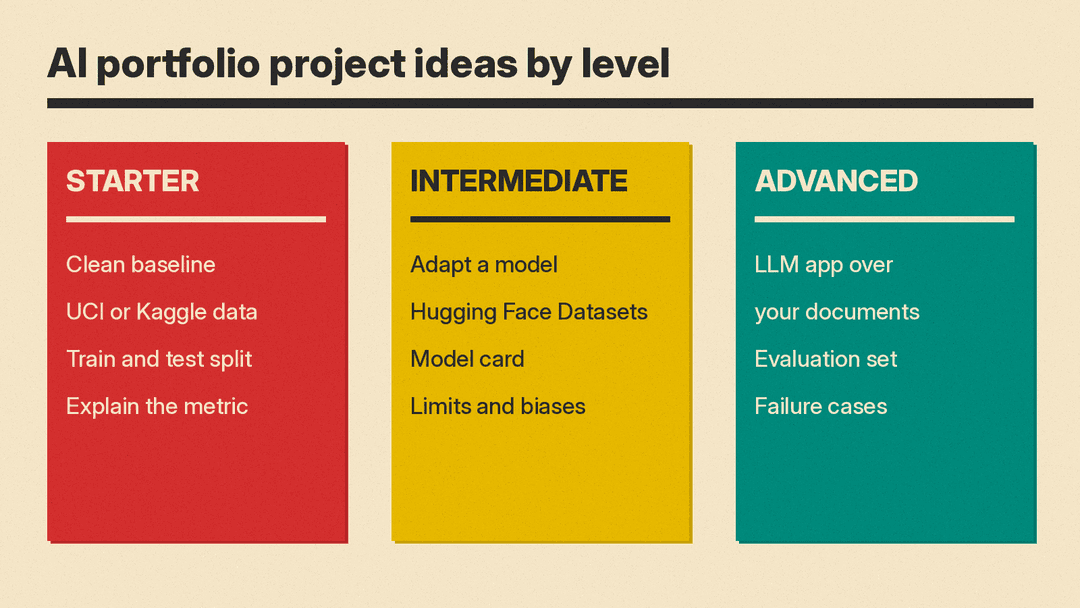
Starter: a clean, explained baseline
Use a small public dataset and focus on doing the basics well: a proper train and test split, a simple baseline, one better model, and a clear explanation of the metric you chose.
- The UCI Machine Learning Repository lists classic datasets such as Wine Quality, whose goal is "to model wine quality based on physicochemical tests," and Bank Marketing, where "the classification goal is to predict if the client will subscribe a term deposit."
- Kaggle Datasets is another place to search for public datasets.
The point of a starter project is not the score. It is showing that you can avoid data leakage, pick a metric that fits the problem, and explain the tradeoff. If you need free compute, our list of free GPU and cloud credits for AI covers Colab, Kaggle and student programs.
Intermediate: a model with a model card
Fine-tune or adapt an existing model for a narrow task, then document it the way a real team would.
- The Hugging Face Datasets library is "a library for easily accessing and sharing AI datasets for Audio, Computer Vision, and Natural Language Processing (NLP) tasks." Its docs say you can "Load a dataset in a single line of code."
- Publish the result with a model card. Hugging Face says the model card should describe the model, "its intended uses & potential limitations, including biases and ethical considerations," the training parameters, which datasets were used, and "the model's evaluation results."
Writing a model card makes you state limits, and interviewers can probe them.
Advanced: an LLM app with an evaluation set
Build a small application on top of a language model, such as a question-answering tool over a set of documents you are allowed to use. Our plain-English RAG explainer covers how retrieval-augmented generation works.
What makes this kind of project stand out is not the chat window. It is the evaluation: a fixed set of test questions with expected answers, a way to score them, and a record of how each change to the prompt, retrieval or model moved the score. Add a section on failure cases with real examples from your test set.
For more datasets to start from, see our guide to free datasets for machine learning projects.
Write a README people will read
The README is often the first thing a reviewer sees. GitHub's own guide to READMEs says "A README is often the first item a visitor will see when visiting your repository." It says README files typically include information on:
- What the project does
- Why the project is useful
- How users can get started with the project
- Where users can get help with your project
- Who maintains and contributes to the project
For a portfolio project, add four things to that list: a link to the live demo, a screenshot or short animation, the headline result with the metric named, and a "Limitations" section. Keep setup steps short and test them on a clean machine.
GitHub also lets you add a profile README. Its profile README docs say GitHub shows it on your profile page when you have created a repository with a name that matches your username, the repository is public, it contains a file named README.md in its root, and that file has content. Use it to list your best three projects with one line each.
Ship a live demo
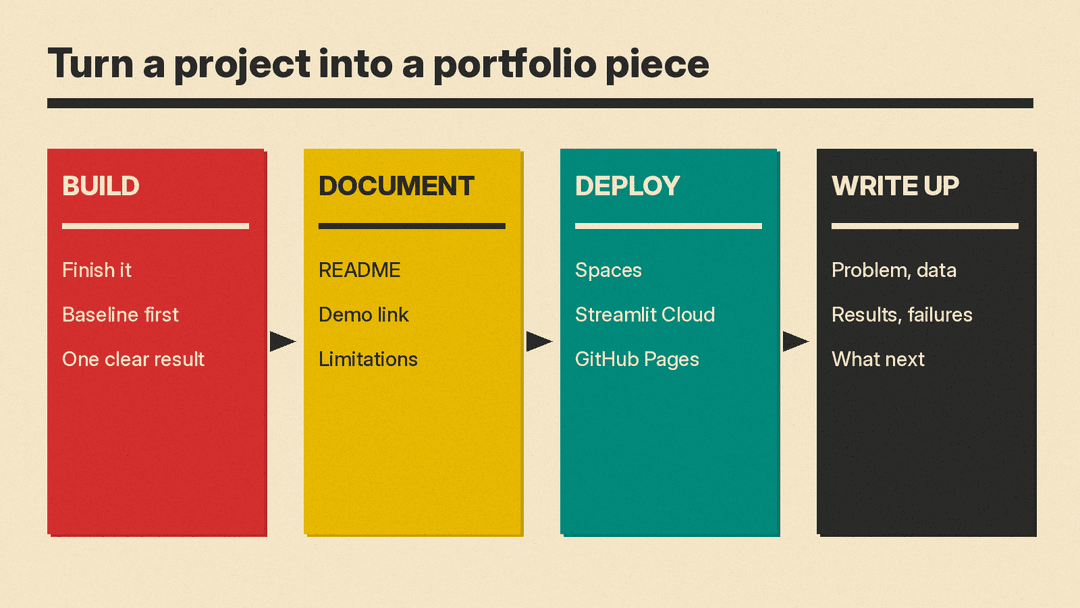
A demo lets a busy reviewer see your work without installing anything. Three options with a free path:
- Hugging Face Spaces. The Spaces overview says Spaces let you "create and deploy ML-powered demos in minutes," with three SDK options: Gradio, Docker and static HTML. Check the plan rules on that page before you start: it says "Static Spaces are free for everyone. Gradio and Docker Spaces run on compute and require a paid plan to create," and that "Free personal accounts in good standing can still host up to 2 Gradio Spaces running on ZeroGPU." It also says a Space on free hardware will "go to sleep" after a period without use, so test that your demo wakes up cleanly.
- Streamlit Community Cloud. The Community Cloud docs say you can create, deploy and manage Streamlit apps "all for free," and that your account "connects directly to your GitHub repositories (public or private)."
- GitHub Pages. GitHub's docs on what GitHub Pages is describe it as "a static site hosting service that takes HTML, CSS, and JavaScript files straight from a repository on GitHub." A user site lives at
<owner>.github.io, which makes it a simple home page that links to every project.
Keep API keys out of your code. The Spaces docs say: "do not hard-code them inside your app," and tell you to add secrets in the Space settings instead. They also say "Spaces owners are warned when our Spaces Secrets Scanner finds hard-coded secrets." If your demo calls a paid API, set a spending limit with that provider and consider a rate limit so a public demo cannot run up a bill.
Write it up
A short write-up turns a repo into a story you can tell in an interview. Structure it the way you would explain it out loud:
- The problem and who it is for.
- The data, where it came from, and any cleaning you did.
- The baseline, what you tried next, and why.
- The results, with the metric named and the test set described.
- What failed, and what you would change with more time.
Huyen's book says its open-ended design questions "are the questions that candidates often find to be the hardest." A write-up that walks through problem setup, data, modeling and deployment is practice for exactly that kind of question.
Common mistakes
- Tutorial clones with no change. If a project follows a well-known tutorial step by step, add your own data, a new evaluation, or a deployment, and say what you changed.
- No demo, or a broken one. Check every link before you apply anywhere.
- A score with no context. Say which metric, on which test set, against which baseline.
- Hiding limits. A clear "Limitations" section reads as judgment, not weakness.
- Claiming tools you cannot discuss. Only list what you can explain in detail.
- Secrets in the repository. If a key was ever pushed to a public repo, rotate it with the provider.
A checklist before you share it
Choose the role. Decide which job you are aiming for and pick projects that match it.
Build three projects. One starter baseline, one documented model or analysis, and one end-to-end app, each finished rather than started.
Document each one. A README with the demo link, a result, and limits; a model card where it fits.
Deploy and test. Put each demo on Spaces, Streamlit Community Cloud or GitHub Pages, and open it from a logged-out browser.
Publish a home page. A GitHub profile README or a GitHub Pages site that links all three projects with one line each.
Rehearse. Explain each project out loud in two minutes, then answer "what would you do differently?" for each.
If you are still building skills, our roadmap on how to become an AI engineer lists free courses to work through first.
If you do not have a computer science degree, our guide to AI jobs without a CS degree covers what hiring data shows and which entry routes are documented.
Sources
- OpenAI interview guide
- Chip Huyen, Introduction to Machine Learning Interviews
- Chip Huyen, Different machine learning roles
- UCI Machine Learning Repository
- Kaggle Datasets
- Hugging Face Datasets documentation
- Hugging Face model cards
- Hugging Face Spaces overview
- Streamlit Community Cloud
- GitHub: About READMEs
- GitHub: Managing your profile README
- GitHub: What is GitHub Pages?
