
Google wants to turn its collection of work assistants and specialized tools into one agent that takes on whole assignments. At its Gemini at Work 2026 event on October 8, Google Cloud CEO Thomas Kurian announced the Gemini agent, which Google calls "your new single, universal agent for work." It runs inside Gmail, Docs, Sheets and the rest of Google Workspace, it can work for hours or days on its own, and it can be set up as a "coworker agent" with its own email address and calendar.
This guide covers what the agent does, how it shows up in Workspace, what is known about who gets it and what it costs, and the questions a team should ask before it plans around it. The short version: it is in private preview for selected customers, Google says it will come at no extra charge with Gemini Enterprise, and several pricing questions about coworker agents are still open.
What the Gemini agent is
Google describes the Gemini agent as one agent that "answers your questions, handles your knowledge work, creates your images and media, and writes and runs code," all from one prompt box and one API. The pitch is delegation: "You give it objectives, not instructions."
The Google Cloud keynote post lists the main design points:
- One agent, three modes. You can chat with it, assign it an objective to complete on its own, or have it write code. You can also schedule tasks or have it respond to events.
- Access from many places. Google lists web, iOS, Android, Windows and Mac desktops, the command line, Google Workspace, Microsoft 365 and Slack. It can also run as a headless agent inside other apps.
- Runs in the cloud. It keeps one set of memories and context across devices, and work that takes hours or days keeps running after you close your laptop.
- Sub-agents. For multi-step jobs it can create temporary, job-specific sub-agents, each with its own identity, and coordinate parallel and sequential steps.
- Model choice. Google says the agent is separate from the model under it. It picks a model per job from the Gemini family and from Anthropic's Claude models today, with other private and open models planned.
On the model side, the keynote names Argon for frontier reasoning, Flash for speed and volume, Omni for generative media, and Gemma for edge workloads. Our Gemini 4 Argon explainer covers that model in detail.
How it works inside Google Workspace
For most office teams, the Workspace part is what matters. Google says Gemini works inline "in the email thread, in the document, and in the chat space," across Gmail, Drive, Docs, Slides, Sheets, Chat and Calendar. It describes three ways it works there.
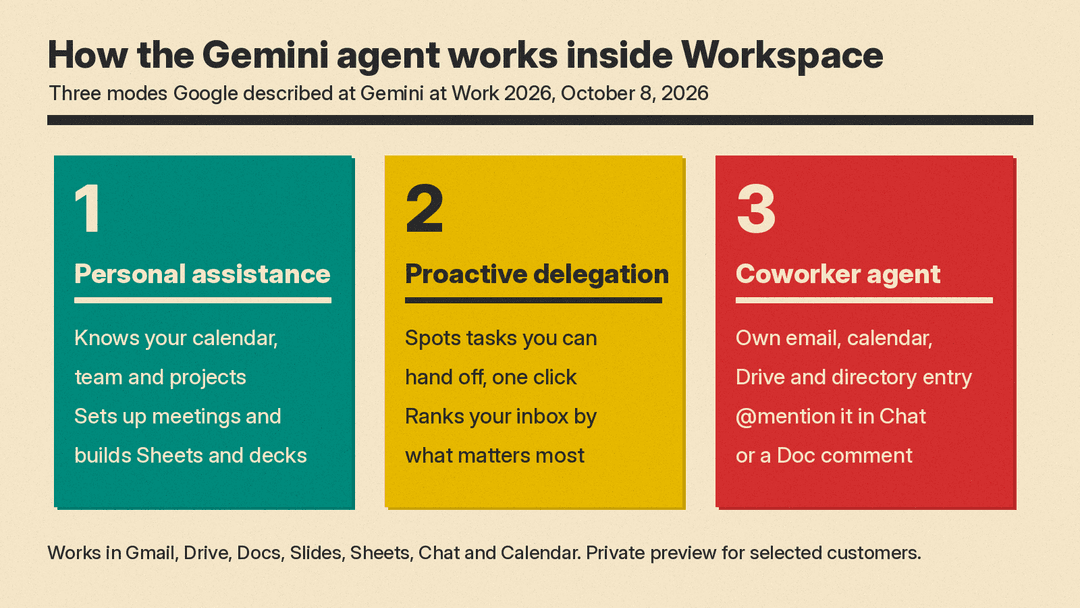
1. Personal assistance. Gemini already knows your calendar, team, projects and how your documents relate. Google's example: ask it to set up a meeting with "the usual team of regional event leads" next week without giving any names. Gemini works out who they are from your chat space and the thread from your last event, checks calendars, and starts an email thread to find a time, including with external participants. Google also gives a cross-app example: research market trends, build a financial model in Sheets, then make a deck that presents both.
2. Proactive delegation. Gemini suggests tasks you could hand off. If your manager emails asking for a project update as a slide deck, Google says Workspace Intelligence spots that and offers a one-click option to pass it to Gemini. It also ranks your inbox by what matters most rather than what arrived last, and explains why.
3. A coworker agent on your team. You describe a role and Gemini creates an agent for it. That agent gets its own Workspace account: an email address, calendar, Drive, and a listing in the company directory. Colleagues add it to a Chat space or @mention it. In Google's example, a marketing manager asks an events coordinator agent to draft a launch readiness document, and the agent posts it back to the group. Tag it in a Doc comment and it can suggest an edit and reply in the thread, under its own name in version history.
The keynote says coworker agents get their own "@agents.company.com" email addresses and their own persistent storage. Google also says a coworker agent "acts under its own identity rather than yours, and it sees only what you share with it."
Skills, tools and memory
Three pieces let the agent use company knowledge, according to Google:
- Tools. Connections to Confluence, Microsoft Office, Teams, Slack, Workspace, Git, Jira, Salesforce, ServiceNow, BigQuery, Databricks, Postgres, Snowflake, and files on your desktop. It can also use any Model Context Protocol (MCP) server, and teams can publish tools to a company registry.
- Skills. Reusable instructions or workflows stored as modular prompts. Gemini ships with a library of skills, and teams can publish their own to a shared registry.
- Memory. Google lists four kinds: session memory for the current task, semantic memory built from documents and conversations, procedural memory for how a job gets done, and episodic memory of past work.
For business users who live in spreadsheets, Google also announced operational reporting skills tied to BigQuery and its Knowledge Catalog. You ask for a report in plain language, Gemini builds and saves the query, and Google says saved reports can then run on demand "without incurring token costs."
Who gets it, and when
The Gemini agent is not generally available. A Google Cloud spokesperson told VentureBeat that it launched in private preview to a select group of customers, with wider availability promised but no date given. The Verge also reports it is only available to enterprise customers in private preview, and that it will live in the Gemini Enterprise app.
When it does roll out, VentureBeat reports it will be built into Gemini Enterprise with no separate app, website or setup. Google likened the rollout to a software version update.
This is the work version. The Verge notes that Google launched a separate consumer agent, Gemini Spark, in May, which runs in its own interface in the Gemini app.
What it costs
Google told VentureBeat the Gemini agent will be included "at no additional charge for customers where Gemini Enterprise is available, including through existing Google Workspace business and enterprise subscriptions."
Here is what Google's own pages list for the plans in question, as of October 19, 2026:
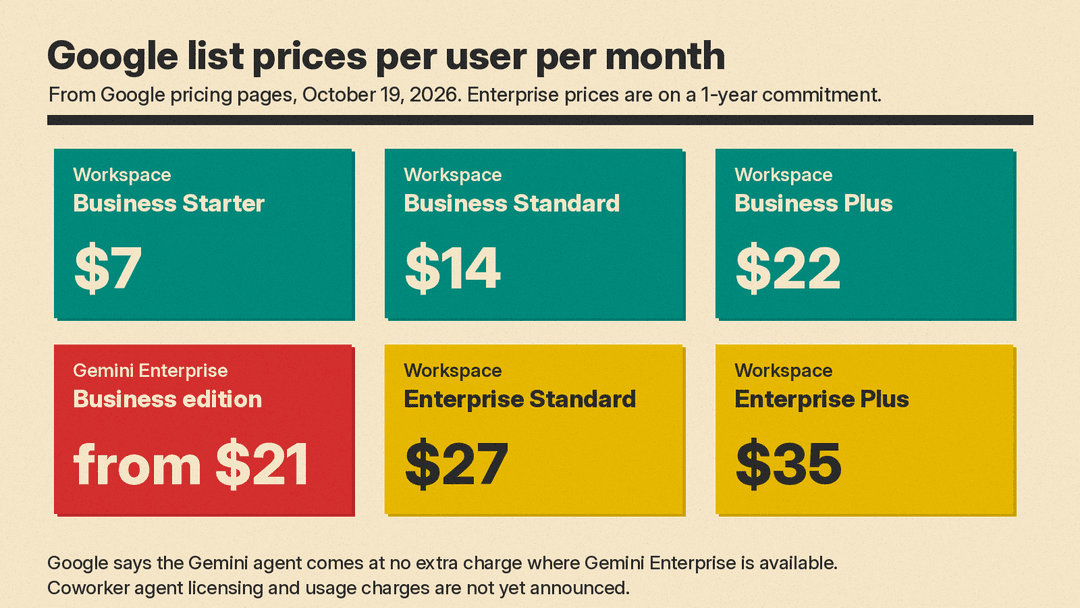
- Google Workspace business editions: "starting at $14 per user per month," per Google's Gemini for work page. The Workspace pricing page lists Business Starter at $7, Business Standard at $14 and Business Plus at $22 per user per month.
- Gemini Enterprise Business edition: "starting at $21 per user per month," on the same Gemini for work page. Google describes it as AI agents and Gemini chat grounded in your data across Workspace, Microsoft 365 and more.
- Workspace Enterprise Standard: $27 per user per month on a 1-year commitment, or $32.40 billed monthly, per the Workspace Enterprise page.
- Workspace Enterprise Plus: $35 per user per month on a 1-year commitment, or $42 billed monthly.
What is not known yet matters more for budgeting. VentureBeat reports Google has not said whether persistent coworker agents with their own Workspace accounts need separate licenses, whether usage-based charges apply to long autonomous tasks and sub-agents, or how many coworker agents an organization can deploy. Google said it will share more pricing details closer to the wider release. The announcement also does not include a tier-by-tier list of which Workspace plans get the agent.
The keynote does describe cost controls. Smart Routing sends each workload to the model that gives the best performance at the lowest cost. Real-time spend caps let you set a hard limit on a project's AI spend in the Cloud Billing Console; if a cap is hit, that project's agent pauses until you resume it. Because tracking is per project, companies can charge AI costs back to departments. VentureBeat notes that project-level spend limits were first announced in August.
Security and governance
Google frames governance as four questions: who the agent is, what it is allowed to do, what it did, and what it should never touch. Its answers, per the keynote:
- Identity. Every agent gets its own cryptographically attested identity with least-privilege permissions, stamped into its logs.
- Permissions. Security admins approve role-based access for each agent. Connections to outside systems pass the agent's identity through standards such as OAuth.
- Audit trail. Every action is logged and attributed to the agent, not a person.
- Agent Sandbox and Agent Gateway. Agents run in a sandbox with its own network boundary, and all traffic passes through Agent Gateway, which Google calls an AI network firewall. You write a policy once, such as "agents may not open documents classified Need to Know," and it applies to every agent.
A Google spokesperson told VentureBeat that agents can access only files explicitly shared with them through Workspace permissions, and that admins can control which AI models agents may use. VentureBeat also notes Google did not detail data retention and residency terms when third-party models such as Claude process a task.
How it compares
Google is not alone. VentureBeat lists the recent moves: Microsoft introduced an updated Copilot on September 25 with Home, Cowork, Code and an Autopilot agent that works in the background; OpenAI introduced its always-on dots agents on September 29 (see our OpenAI dots explainer); and Anthropic announced Claude integration with Google Docs, Sheets and Slides on October 6.
On the Microsoft side, buying is also changing. Microsoft's partner announcements for October 2026 say that from December 1, new Microsoft 365 Copilot and Copilot Business offers can be bought without a qualifying Microsoft 365 base subscription, at the same price as the current offers. For a side-by-side of the two suites as they stand, see our Microsoft 365 Copilot vs Gemini in Google Workspace comparison.
What to do now if your team runs on Workspace
You cannot turn the Gemini agent on today unless you are in the private preview. You can prepare:
- Check your plan. Confirm whether your organization has Gemini Enterprise through its Workspace subscription, since that is the condition Google gave for no-extra-charge access.
- Review sharing. Google says a coworker agent sees only what you share with it, and access follows your existing sharing and membership. Check who and what can see a folder or Chat space before you add an agent to it.
- Pick one test role. Google's examples are an events coordinator and a finance analyst. Choose one narrow, repeatable job with a clear owner before you create a dozen agents.
- Ask about coworker pricing. Before you plan headcount around agents, get answers on licensing for agent accounts, usage charges for long tasks, and limits on agent count.
- Decide model policy. If your data rules restrict third-party models, set which models agents may use, and ask how data is handled when a task runs on Claude.
Google's customer list is long. The keynote says nearly 90% of the Fortune 100 use Gemini Enterprise, and cites deployments at BNP Paribas, SOMPO and others. VentureBeat points out that those deployments do not necessarily mean use of the new agent, and that Google has not published independent benchmarks on how reliably it finishes long, cross-app assignments. Treat the preview as something to test, not yet something to budget around.
Sources
- Google Cloud Blog: Gemini at Work 2026: Introducing Gemini agent
- VentureBeat: Google Cloud unveils persistent Gemini Agents for long-running tasks
- The Verge: Google is launching a one-stop Gemini agent for your work tasks
- Google Cloud: Gemini for work
- Google Workspace pricing
- Google Workspace Enterprise plans
- Microsoft Learn: October 2026 Partner Center announcements
