
You can ask ChatGPT, Claude, Gemini or any other chatbot to write SQL for you, and it will answer in seconds. Whether the answer runs, and whether it returns the right rows, depends a lot on what you put in the prompt. The short version: paste your real table definitions, name your database, show a few sample values, and ask the AI to write its assumptions down.
We tested this on a small shop database. A one-line request produced queries that failed to run in every one of 4 tries. A prompt with the schema and sample values produced the correct top 5 customers in all 4 tries. Below is the prompt we used, what went wrong without it, and a step-by-step way to check any AI-written query before you trust it.
Why AI gets SQL wrong
SQL looks simple, but every query depends on facts the AI cannot see:
- Your table and column names. Is the key
idorcustomer_id? Is the date columnorder_dateorcreated_at? If you do not say, the model guesses. - Your database. SQLite, PostgreSQL, MySQL and SQL Server each have their own syntax for dates, limits and text. A query that works in one can be a syntax error in another.
- Your business rules. Does "spending" include cancelled orders? Refunds? Orders that have not shipped yet? Only you know.
- How your data is stored. In SQLite, for example, there is no separate date type. The SQLite documentation says it "does not have a storage class set aside for storing dates and/or times" and that its built-in date and time functions can store them as text, real numbers or integers instead.
A chatbot will still write a confident, tidy query when it is missing all four. That is the trap.
What we tested
We built a small SQLite database with four tables: customers, products, orders and order_items. It holds 12 customers and 122 orders from September to November 2026. Each order has a status: completed, cancelled, refunded or pending.
The question was the kind people ask every day: who were the top 5 customers by total spending in October 2026?
We planted two traps:
- A large cancelled order on October 31. If a query counts cancelled orders, that customer jumps to second place.
- A completed order at 2:05 pm on October 31. A query that filters with
BETWEEN '2026-10-01' AND '2026-10-31'skips it, because the stored value has a time on the end, and two customers swap places.
We sent two prompts to DeepSeek V4.1 Flash through OpenRouter, 4 runs each, 8 calls in total. Then we ran the first query from every reply against the real database and compared the output with the correct answer.
Prompt A, the plain request:
Write a SQL query to find the top 5 customers by total spending in October 2026. My tables are customers, orders, order_items and products.Prompt B, the schema prompt: the template in the next section, with our four CREATE TABLE statements pasted in.
The SQL prompt template
Copy this, replace the parts in brackets, and paste your real schema where it says to.
You are helping me write one SQL query.

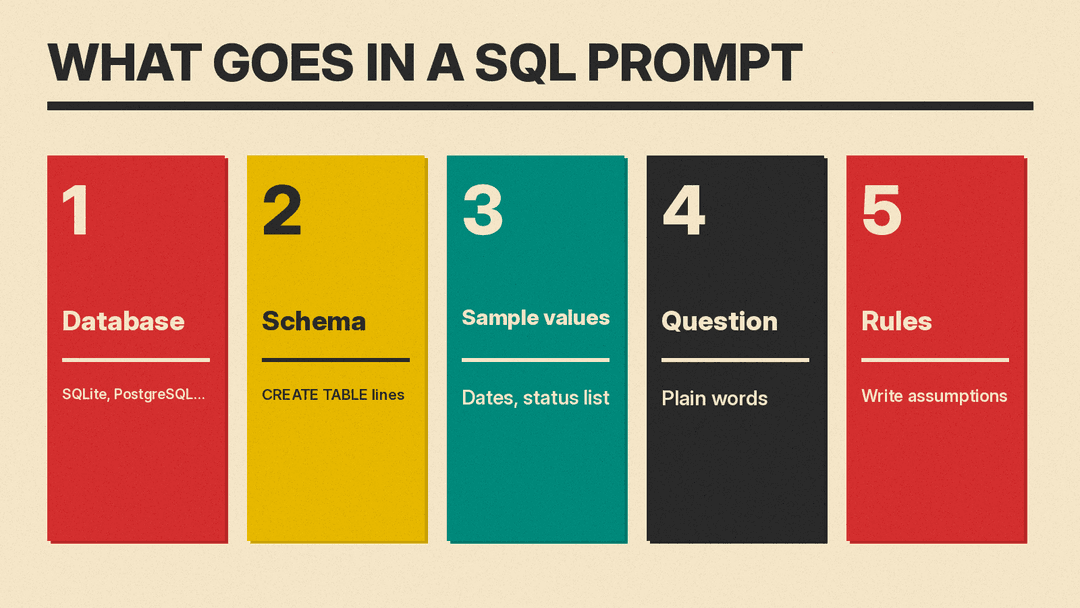
Database: [SQLite / PostgreSQL / MySQL / SQL Server, and version if you know it]
Schema:
[paste the CREATE TABLE statements for every table the query needs]

Sample values:
- [a date column] looks like '[paste one real value]'
- [a status or type column] is one of: [list the real values]
- [any column whose meaning is not obvious, in one line]

Question: [your question in plain words, plus the columns you want back]

Rules:
- Use only the tables and columns above. Do not invent columns.
- If a business term is unclear, pick the most common meaning and list each assumption as a SQL comment at the top.
- Return one query in one code block, then at most 3 short lines on how to check it.
Here is the exact version we tested:
You are helping me write one SQL query.

Database: SQLite.
Schema:
CREATE TABLE customers (id INTEGER PRIMARY KEY, name TEXT NOT NULL, email TEXT, signup_date TEXT);
CREATE TABLE products (id INTEGER PRIMARY KEY, name TEXT NOT NULL, category TEXT, price REAL);
CREATE TABLE orders (id INTEGER PRIMARY KEY, customer_id INTEGER REFERENCES customers(id), order_date TEXT, status TEXT);
CREATE TABLE order_items (id INTEGER PRIMARY KEY, order_id INTEGER REFERENCES orders(id), product_id INTEGER REFERENCES products(id), quantity INTEGER, unit_price REAL);

Sample values:
- orders.order_date looks like '2026-10-31 14:05:00'
- orders.status is one of: completed, cancelled, refunded, pending
- products.price is the current list price; order_items.unit_price is the price paid

Question: Who are the top 5 customers by total spending in October 2026? Show customer name and total spent.

Rules:
- Use only the tables and columns above. Do not invent columns.
- If a business term is unclear, pick the most common meaning and list each assumption as a SQL comment at the top.
- Return one query in one code block, then at most 3 short lines on how to check it.
Notice what the prompt does not do: it never tells the AI to exclude cancelled orders. It only lists the status values and asks the model to write down its assumptions.
What happened
Plain request (A):
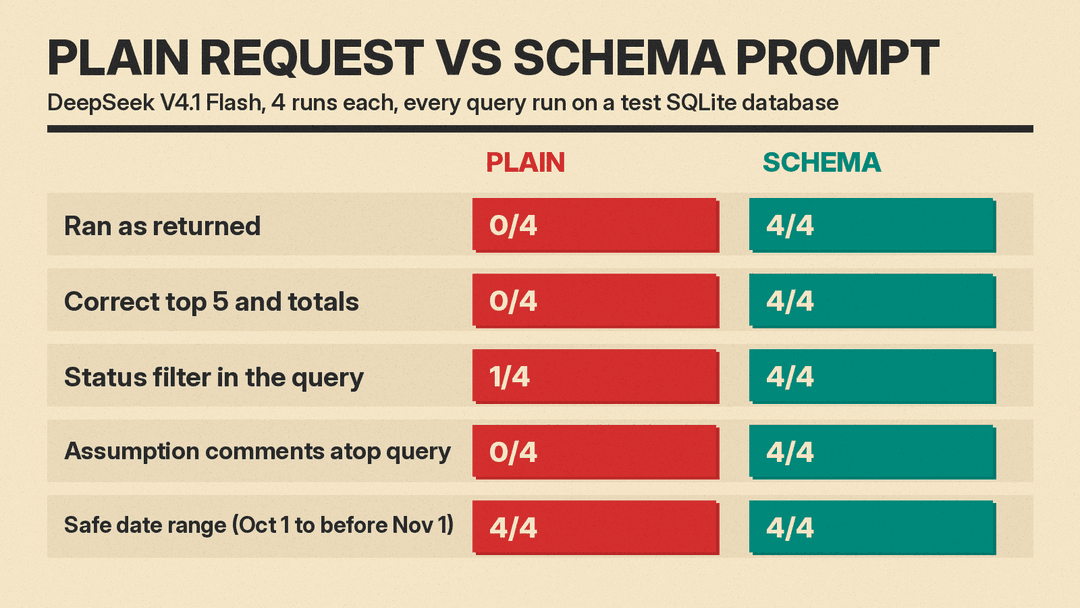
- Ran as returned: 0 of 4. Three replies used the form
DATE '2026-10-01', which SQLite rejected with a syntax error. The fourth used a column calledcreated_at, which does not exist in our table. Three of the four also guessedcustomer_idandorder_idas key names; ours areid. - Still wrong after fixing the names. We renamed the guessed columns to the real ones and removed the
DATEkeyword to check the logic. All 4 returned the wrong top 5. Three counted every order, so the customer with the big cancelled order landed in second place. The fourth excluded "cancelled" and "returned" (a status our table does not use) but still counted refunded and pending orders. - The warning was there, but off to the side. Three replies suggested excluding cancelled or refunded orders "if you have a status column" or similar, as a note below the query. Only one put a status filter in the query itself.
Schema prompt (B):
- Ran as returned: 4 of 4.
- Correct top 5 with correct totals: 4 of 4.
- Assumptions written down: 4 of 4. Every reply opened with a comment block saying it counted only completed orders, summed quantity times unit_price, and used October 1 up to (but not including) November 1. That is the part you can read and correct in five seconds.
- Two of the four also added a tiebreaker to the sort order, so results stay stable when two customers have the same total.
Two things went better than we expected. All 8 replies, plain and schema alike, used the safe date range (on or after October 1 and before November 1), so the BETWEEN trap caught none of them. And all 8 summed the price paid rather than the current list price, though in the plain runs that was a lucky guess: the model assumed a column called unit_price, which happened to match ours.
The schema prompt was not more expensive in any way that matters. Replies to it used 420 to 858 output tokens, against 602 to 814 for the plain request. Its input was longer, 504 tokens against 278, because of the pasted schema.
Step by step: write a query with AI
1. Copy your real schema
Do not describe your tables from memory. Most database tools can print the exact definitions:
- SQLite: in the
sqlite3command-line shell,.schemashows the CREATE statements. The SQLite CLI documentation lists it as.schema ?PATTERN?, so.schema ordersshows one table. - PostgreSQL: in
psql,\d ordersshows the columns, types and attributes such as NOT NULL, per the psql documentation. - Other databases and GUI tools usually have a "show CREATE TABLE" or "copy DDL" option.
Paste only the tables the question needs. Five relevant tables beat fifty irrelevant ones.
2. Name the database
One line ("Database: PostgreSQL 16") tells the AI which syntax to use. Three of our four plain runs wrote date syntax (DATE '2026-10-01') that SQLite does not accept, because the prompt never said it was SQLite.
3. Show real sample values
In our test, the schema prompt never said which orders count. It only listed the status values, and all 4 replies to it counted only completed orders. Paste one real date value so the AI sees the format, and list the real values of any status or type column. If a column's meaning is not obvious (list price vs price paid, gross vs net), say so in one line.
Do not paste customer names, emails or other personal data to show a format. A made-up row in the same shape works just as well.
4. Ask for assumptions, not just a query
"List each assumption as a SQL comment at the top" turns hidden guesses into lines you can check. If the AI writes "only completed orders count" and you meant completed plus pending, you fix one word instead of debugging a wrong report.
5. Run it somewhere safe and check it
- Run the query on a copy of the data or with a read-only account first, especially anything with UPDATE, DELETE or DROP in it.
- Remove the LIMIT and look at the full ranking. Does anyone surprising show up near the top?
- Spot-check one row by hand. Pick one customer and add up their October orders yourself.
- Remove one filter at a time (status, date) and see how much the totals move. Big jumps tell you which assumption matters.
More SQL prompts to try
We did not test these four. They follow the same rules: give the schema, name the database, and ask for one clear output.
Explain a query you inherited:
Database: [name]. Schema: [paste].
Explain this query in plain English, one line per clause, then say in one sentence what question it answers. Point out anything that could return wrong results, such as missing filters or joins that can duplicate rows.
[paste query]
Fix an error:
Database: [name]. Schema: [paste].
This query fails with the error below. Explain the cause in one sentence, then give the corrected query. Change nothing else.
Query: [paste]
Error: [paste the exact error text]
Speed up a slow query:
Database: [name]. Schema with indexes: [paste].
This query is slow. Here is the query plan: [paste plan output].
Suggest at most 3 changes, most impact first. For each, say what it changes and how I can confirm it helped.
[paste query]
In SQLite the plan comes from EXPLAIN QUERY PLAN, which the SQLite documentation describes as "a high-level description of the strategy or plan that SQLite uses to implement a specific SQL query."
Convert between databases:
Convert this query from [source database] to [target database]. Keep the same results. List every syntax change you made as a comment at the top.
[paste query]
Common mistakes
- Asking with table names only. Our plain request named all four tables and still failed to run in all 4 tries, because the model had to guess the columns.
- Leaving business rules unsaid. In our plain runs, 3 of 4 queries counted every order. If cancelled, refunded or test orders should be left out, list the status values and ask for assumptions.
- Trusting a clean-looking result. A wrong query still returns five tidy rows. Check one by hand.
- Running AI-written changes on live data. Read the query first, and test anything that changes data on a copy.
If you are new to working with AI this way, our guides to writing a system prompt and using XML tags in prompts cover the same idea: structure beats length. For spreadsheet work, see our ChatGPT prompts for Excel formulas, and for building whole apps by description, what vibe coding is.
The same habit helps with regex. In our test of how to write regex with AI, naming Google Sheets as the place the pattern runs led to 4 of 4 patterns that Sheets can load.
How we tested
- Model: DeepSeek V4.1 Flash (deepseek/deepseek-v4.1-flash-1017) through OpenRouter, reasoning effort low, no system prompt, on November 12, 2026.
- 2 prompts x 4 runs = 8 calls. Each reply's first SQL block was run against the same SQLite database with Python's sqlite3 module and compared with a reference query.
- This is a small test on one model and one question. Other models and harder schemas will behave differently, but the failure we saw (guessing columns and business rules) is the one the template is built to prevent. For how production systems handle large schemas, see our technical guide to text-to-SQL in production.
Sources
- SQLite: Datatypes In SQLite (date and time storage)
- SQLite: Command Line Shell For SQLite (.schema)
- SQLite: EXPLAIN QUERY PLAN
- SQLite: SELECT
- PostgreSQL: psql documentation (\d)
- llms.blog test, November 12, 2026: 8 calls to DeepSeek V4.1 Flash via OpenRouter, every query run against a test SQLite database
