
Microsoft's VS Code 1.143 release notes make one change that affects every Copilot user who starts a new agent session: the Copilot harness is now the default. The same release adds a preview mode that runs one coding task through several models and harnesses, including Claude and Codex, and an experimental option to run a Copilot coding model on your own GPU.
Here is what changed, what you have to switch on yourself, and what IT admins should check.
The Copilot harness is now the default
A harness is the layer that turns a model into an agent: it runs the loop, calls tools, edits files and runs commands. According to the release notes, the Copilot harness "is now the default for new sessions in VS Code." Microsoft describes it as "built on the Copilot SDK, a shared foundation that helps align behavior, capabilities, and improvements across Copilot products."
In practice, Copilot harness sessions can keep running in the background, and you can open them from both the normal editor window and the separate Agents window. The notes say these sessions run through the Agent Host, which the VS Code team describes in its agent host architecture post. The agent harnesses docs explain how to pick a harness per session.
Microsoft also says user reports of long waits before chat responses "helped us reduce delays caused by MCP servers that don't finish loading their tools."
One known gap: reviewing agent edits in the editor was hard with the new harness, by Microsoft's own account. 1.143 adds an experimental file-level working set (setting chat.editor.workingSet.enabled) where you select Keep to mark a file's changes as reviewed. File-level Undo is planned for later releases, so it is not in this one.
Compare Models: one prompt, several agents
The most notable new feature is Compare model results, a preview in the Agents window only. You turn on sessions.chat.compareAgents.enabled, then pick Compare Models in the model picker.
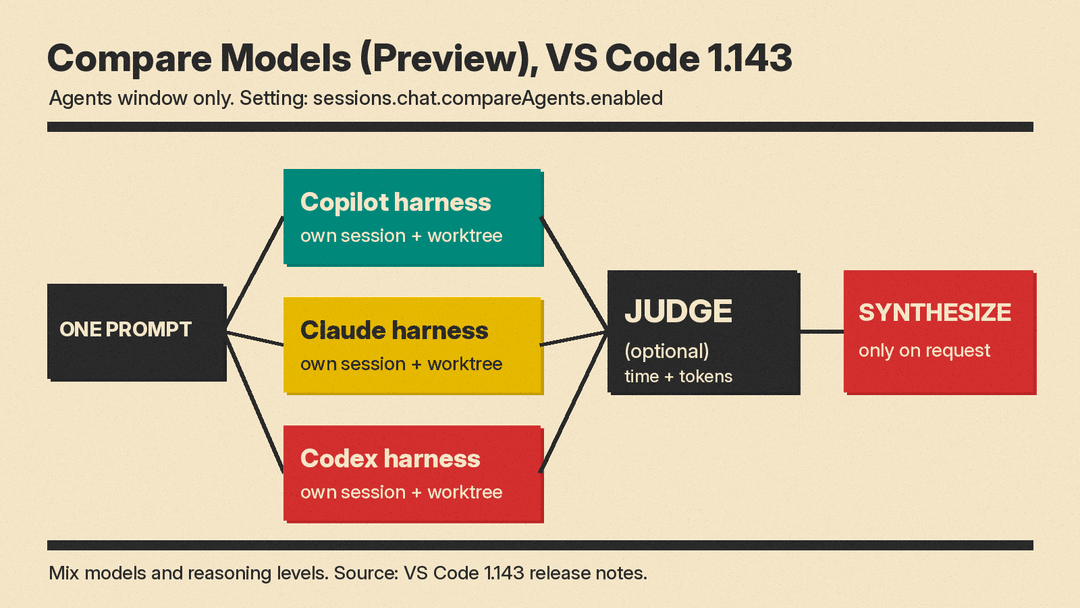
The flow, per the release notes:
- Select two or more models. You "can mix Copilot, Claude, and Codex harnesses and configure different reasoning levels."
- Enter one prompt. All attempts start together.
- Each attempt runs in its own session, so you can open its worktree or changes at any time.
- Optionally pick a Judge model. Its scorecard "shows time and token usage, with expandable rationale, validation evidence, and links to each attempt."
- Select Synthesize to build on the recommended attempt with ideas from the others. "Synthesis starts only when you request it."
Why it matters: this lets you compare agents on your own repository and your own task. If you are still deciding between tools, our Cursor vs Claude Code vs Codex comparison covers prices and plans. The release notes do not say how parallel attempts are billed. The judge's scorecard does show each attempt's time and token usage.
On-device MAI Code 1.1 Flash (experimental)
VS Code can now download MAI Code 1.1 Flash from a new On This Device tab in the model picker and run it in Copilot harness sessions. Per the release notes, responses that run on your device are labeled On-device and "don't use AI credits." You can also let Auto route suitable requests to the local model with cloud fallback.
The hardware bar is high. The notes say on-device models "require GitHub sign-in and an NVIDIA GPU with 96 GB or more of GPU memory." Microsoft points to laptops "powered by NVIDIA RTX Spark with up to 128 GB of unified memory" as an example; we covered those machines in our RTX Spark explainer. Setup also needs a llama.cpp build that supports the model, with chat.copilot.localModel.llamaServerPath pointing to its llama-server and chat.copilot.localModel.enabled turned on. The language models docs have the details.
Smaller changes worth knowing
- Faster large chats. Microsoft's own tests (median of three runs on macOS) show one chat with about 1,150 requests going from 35.6 s to 9.0 s on a cold open, with the longest unresponsive stretch falling from 28.3 s to 0.6 s.
- Worktree cleanup (experimental). Chat: Open Worktree Cleanup shows the disk space inactive agent worktrees use and lets you delete them. Active, running, needs-input and pinned sessions are protected.
- Background shells. Dev servers and watchers that the agent starts in detached shells now stream output, and you can stop them.
- Discard per changeset. In the Agents window you can now discard Branch, Session or Last Turn changes, not only uncommitted ones.
- Voice Mode with your own key (preview). You can use your own OpenAI API key and a live model, such as
gpt-live-1, instead of the hosted backend. - Copilot CLI in the installer. The Windows installer offers to install GitHub Copilot CLI, and the Linux installers add a
copilotcommand to the user path.
What admins should check
The Enterprise section matters for teams. When policy requires the Copilot harness, the older Local harness stays visible but disabled. The notes say the Copilot harness is required to enforce nonempty managed permissions.deny rules or sandbox.enabled: true, unless a temporary override applies.
The temporary setting vscode.temporaryAllowLocalHarness set to false "prohibits Local, Claude, and Codex harnesses." Microsoft calls these controls "temporary while Local is retired" and warns that "Local cannot enforce runtime-only permission and sandbox controls." When Copilot is required, existing Claude and Codex sessions stay visible and can continue with the Copilot harness, but new Claude or Codex sessions stay disabled.
Other enterprise changes: organization-required agent plugins now install automatically for the session, managed model defaults override a user's chat.defaultModel for new Copilot harness chats, and admins can supply short-lived headers for OpenTelemetry exports. On sandboxing, users can turn it off for one session only if managed policy permits bypass. For background on Copilot's sandbox rules, see our Copilot local sandboxing explainer.
The takeaway
VS Code is making the Copilot harness the default and retiring the old Local harness. The Compare Models preview is the user-facing benefit: Claude and Codex harnesses still run side by side with Copilot, unless your organization's policy turns them off. Most of the headline features are preview or experimental and need a setting, so check the setting names above before you look for them in the UI.
