
Computer vision is the part of AI that works with pictures and video. It is what lets a phone unlock when it sees your face, a car spot a traffic light, or a hospital system flag a chest X-ray for a closer look. This guide explains what computer vision is, why it is hard, how a model learns to "see," the main tasks it handles, and where to start learning it.
What is computer vision?
IBM defines computer vision as "a subfield of artificial intelligence (AI) that equips machines with the ability to process, analyze and interpret visual inputs such as images and videos." The same page says it uses machine learning to help computers "derive meaningful information from visual data."
Hugging Face's Community Computer Vision Course puts the core idea in one line: taking an image as input and turning it into information "is the core of computer vision."
IBM describes the field as three processes that work together:
- Recognition: identifying actions, objects, people, places and writing in images or videos.
- Reconstruction: working out the three-dimensional characteristics of those things.
- Reorganization: inferring the relationships between them.
Computer vision is one branch of AI. If the terms AI, machine learning and deep learning blur together, our guide to AI vs machine learning vs deep learning sorts them out.
Why is it hard to teach computers to see?
People recognize objects without thinking. Writing that skill down as rules is another matter. The Hugging Face course uses a ball as its example. Balls range from tennis balls to Zorb balls, so size does not help. Rugby balls are not perfectly round. Bubbles, candies and even our planet are round, yet none of them is a ball. A shuttlecock is used in play, yet we do not call it a ball.
The course's point is that humans "generalize from related concepts and rely on context clues," while "systems governed by rigid, hard-coded rules" do not. That, it says, "is why the field is so closely related to artificial intelligence." Instead of following hand-written rules, a computer vision model learns patterns from many labeled examples, usually with a neural network.
The course also notes that computer vision "is not constrained to the creation of systems that replicate human vision." It can take on problems that would be "too tedious, time-consuming, expensive, or error-prone for humans to do."
How does computer vision work?
IBM walks through a hypothetical example: training a system to tell whether a chest X-ray shows pneumonia. The workflow has four steps.
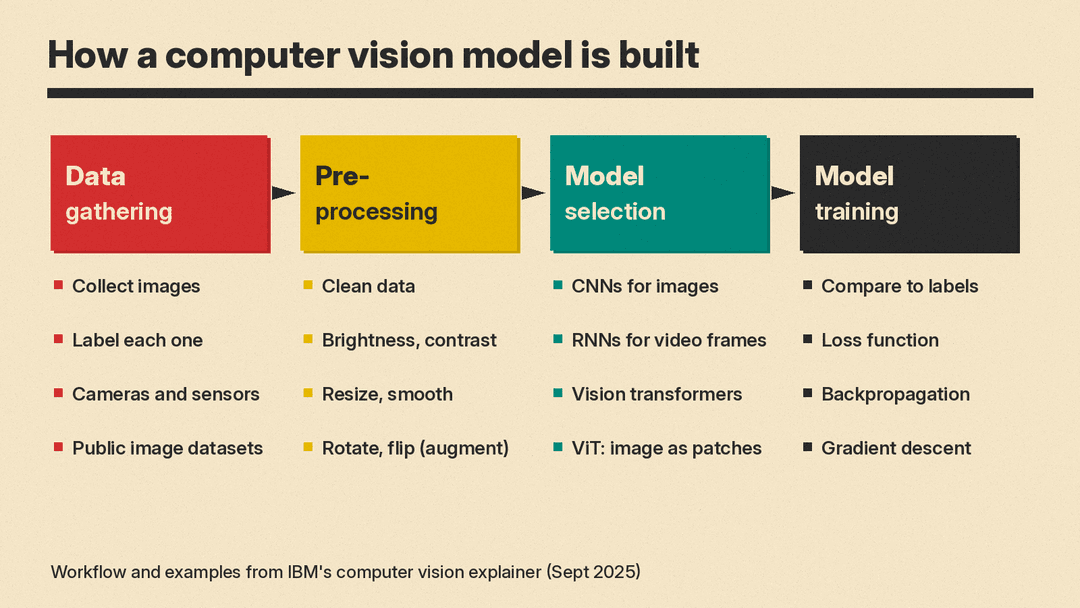
Data gathering. The team collects X-rays and labels each scan as normal or pneumonia. For other uses, images can come from cameras and sensors. IBM names COCO, ImageNet and Open Images as datasets that "provide large collections of annotated images."
Preprocessing. IBM says "an AI model is only as good as the data used to train it." Preprocessing cleans the data and adjusts brightness or contrast, resizing and smoothing. Data augmentation, such as rotating or flipping X-rays, makes the dataset larger and more varied.
Model selection. Per IBM, convolutional neural networks (CNNs) "continue to be the primary deep learning model for image processing tasks," while recurrent neural networks (RNNs) suit sequential data such as video frames. IBM also describes a shift toward transformer models. A vision transformer (ViT) cuts an image into patches and treats them as a sequence, "similar to tokens in a language transformer," then applies self-attention. IBM says ViTs "often match or exceed the performance of CNNs" on tasks like image classification. Our plain-English guide to transformers and attention explains the underlying idea.
Model training. The model runs on training data, its answers are compared with the correct labels, and its parameters are adjusted to improve over time.
What happens inside a CNN?
IBM breaks a CNN into three kinds of layers:
- Convolutional layer. The computer sees an image as a grid (matrix) of pixel values. A small grid of weights, called a filter or kernel, slides across the image and calculates dot products. This produces a feature map. Each filter responds to a pattern such as edges, shapes or textures. In the X-ray example, IBM lists features like asymmetric lung contours and cloudy or opaque lung areas.
- Pooling layer. It shrinks the feature map by keeping the maximum or average value in each small group of cells, which keeps the most important features.
- Fully connected layer. It makes the final call, outputting a probability for each class (here, normal or pneumonia).
During training, a loss function measures how far the prediction is from the true label. Backpropagation works out how each weight contributed to the error, and gradient descent updates the weights. IBM says the final output indicates a pneumonia-positive scan if the likelihood passes a set threshold.
What are the main computer vision tasks?
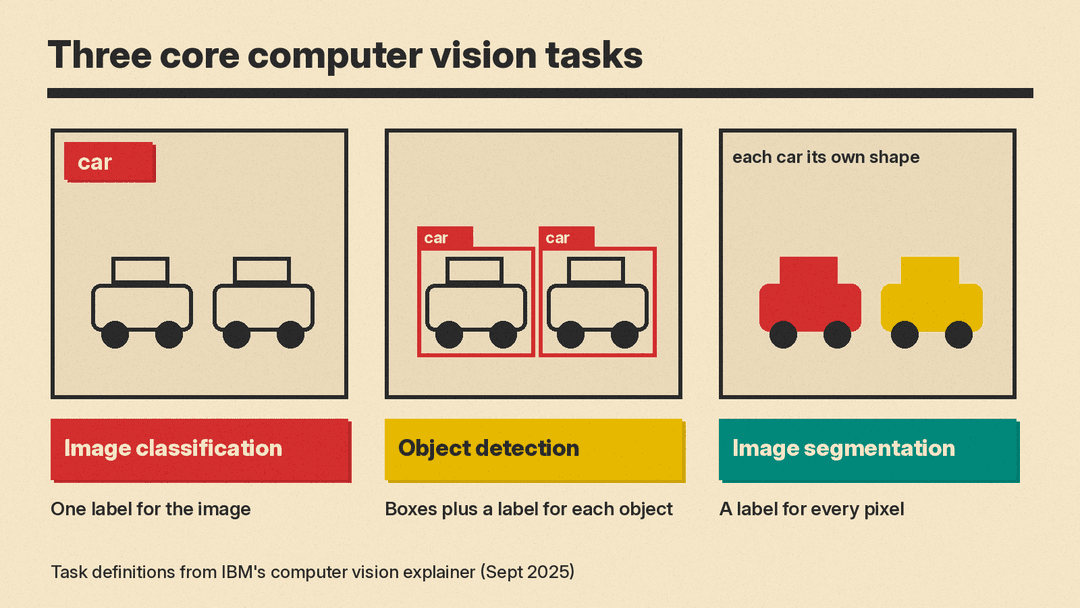
IBM lists these common tasks:
- Image recognition: the broadest form, identifying people, places, objects and other things in images. It underpins the next three tasks.
- Image classification: sorting an image into predefined classes, as in the X-ray example.
- Object detection: finding where objects are, by drawing bounding boxes, and labeling each one. IBM names R-CNN, which works in two stages, and YOLO ("you only look once"), which works in a single pass and is "swift enough for real-time object detection."
- Image segmentation: a pixel-level version of detection. Semantic segmentation gives each pixel a class. Instance segmentation outlines each separate object. Panoptic segmentation does both. In IBM's street example, semantic segmentation "might treat cars parked one in front of the other as one long car segment," while instance segmentation separates them.
- Object tracking: following an object across video frames.
- Scene understanding: predicting relationships, actions and events between objects, such as a taxi moving in front of a car.
- Facial recognition: matching facial geometry, for example to unlock a smartphone.
- Pose estimation: tracking the position of body parts. IBM cites NASA software that gives robotic arm operators on the International Space Station real-time pose estimation for grappling targets.
- Optical character recognition (OCR): pulling text out of images and scanned documents into a machine-readable form.
- Image generation: creating new images with diffusion models, generative adversarial networks (GANs) or variational autoencoders (VAEs).
- Visual inspection: spotting defects, such as corrosion on hard-to-reach parts of bridges or faulty connectors in electronics.
Where is computer vision used?
IBM gives these examples of real-world use:
- Healthcare: finding possible signs of disease in X-rays and CT, MRI and ultrasound scans, and outlining organs, tissues and tumors.
- Self-driving cars: building a 3D model of the surroundings from cameras, lidar, radar and sensors, then detecting pedestrians, lanes, traffic lights and signs.
- Manufacturing: scanning items for inventory and catching defects in real time for quality control.
- Retail: Amazon's Just Walk Out technology, per IBM, uses computer vision to track customer selections so shoppers can leave without lining up to pay. Online stores also use virtual try-on for clothes, eyewear and makeup.
- Agriculture: analyzing images from cameras, drones and satellites to check plant health and find pests and weeds.
- Robotics and space: helping robots navigate warehouses and pick ripe produce, and helping spacecraft and rovers avoid hazards.
How does computer vision relate to LLMs?
Text is the domain of natural language processing. Computer vision handles images. The two now meet in vision language models (VLMs). IBM describes VLMs as a "pairing of large language models (LLMs) with vision transformers" that can recognize objects in an image and describe them, including where they sit relative to each other. IBM adds that VLMs can also generate images from a text description.
Models that handle more than one kind of input this way are called multimodal. See our explainer on multimodal AI for how that works. For the technical details of how a VLM connects a vision encoder to a language model, see our deep dive on vision-language model architectures.
A short history of computer vision
IBM calls computer vision "one of the earliest disciplines of AI." Its timeline:
- 1950s to 1960s: neurophysiologists recorded cats' brain activity while showing them images and found the animals responded first to lines. Around the same time, the first computer image scanning technology appeared.
- 1982: neuroscientist David Marr established that vision works hierarchically and introduced algorithms to detect corners, curves and edges.
- 1980s: computer scientist Kunihiko Fukushima built the "neocognitron," a pattern-recognition network that included convolutional layers.
- 2000: the field's focus had moved to image classification and object recognition.
- 2009: the ImageNet dataset was introduced, with millions of labeled images for training.
- 2012: a University of Toronto team created AlexNet, a CNN trained on ImageNet that "significantly reduced the error rate for image recognition," which IBM says paved "the way for today's computer vision models."
Which tools do people use for computer vision?
IBM lists five popular tools:
- OpenCV: an open-source library under the Apache 2 license with more than 2,500 optimized algorithms, per its own site. It is written in C++ and has C++, Python, Java and MATLAB interfaces.
- torchvision: part of the PyTorch ecosystem, with image transformations, datasets and models for classification, detection and segmentation.
- TensorFlow: Google's open-source machine learning platform, which IBM says includes vision datasets and functions.
- Keras: a deep learning API that runs on JAX, TensorFlow or PyTorch, per its own site, with tutorials for image classification, segmentation, object detection and OCR.
- scikit-image: an open-source set of image processing algorithms for Python. IBM says "its simplicity makes it accessible for beginners."
How can I start learning computer vision?
Three places to start, each checked on its own page in November 2026:
- Hugging Face Community Computer Vision Course. A community-driven course with theory and hands-on tutorials in Google Colab notebooks. Its units run from CNNs and vision transformers to multimodal models, generative models, video, 3D vision, and ethics and biases. The welcome page asks for "some experience with Python programming" and familiarity "with transformers, machine learning, and neural networks." It says "currently we don't offer certification for this course."
- Stanford CS231n: Deep Learning for Computer Vision. The Spring 2026 course lists instructors including Fei-Fei Li and Justin Johnson. It is a 10-week course. Prerequisites are Python, college calculus, linear algebra, and basic probability and statistics. Current lecture videos are for enrolled Stanford students, but the course page says recordings from previous years are on YouTube, such as the Spring 2017 lecture collection. The course notes are public.
- OpenCV Bootcamp. OpenCV calls it a "free OpenCV course" that teaches how to manipulate images and videos and detect objects and faces "in just about 3 hours."
For more options across AI, see our list of free AI courses with verified picks.
Bottom line
Computer vision is how AI turns pixels into labels, boxes, outlines and descriptions. Rules alone cannot capture what things look like, so models learn from labeled images, mostly with CNNs and, increasingly, vision transformers, per IBM. The same ideas power face unlock, medical image analysis, self-driving features and vision language models. To learn it, start with Python and neural network basics, then pick one of the courses above.
Sources
- IBM: What is computer vision?
- Hugging Face Community Computer Vision Course: Vision (motivation)
- Hugging Face Community Computer Vision Course: Welcome
- Stanford CS231n: Deep Learning for Computer Vision
- CS231n course notes
- CS231n Spring 2017 lecture collection (YouTube)
- OpenCV: About
- OpenCV Bootcamp
- Amazon Just Walk Out
