
Suno can write a whole song from one sentence, but the song it writes is not always the one in your head. The gap is the prompt. Suno reads a few separate boxes, and each one has its own job. Put the right words in the right box and the results get far closer to what you meant.
This guide explains where each kind of instruction goes, what Suno's own help pages say about each control, and gives copy-paste templates you can adapt. Everything about how Suno works comes from Suno's help center and release notes, as of October 2026. The templates are our own starting points, not Suno recommendations.
If you are new to Suno, start with our Suno v6 explainer for the model lineup, and our best AI music generators roundup if you are still choosing a tool.
Two ways to prompt: Simple and Custom
Suno has two starting points.
- Simple Mode takes one description. Suno's help article on Simple Mode gives the example "A synth pop song about having fun all night" and says you can also try "mashing up genres and including ideas about instrumentation and song structure." Suno writes the lyrics and picks the style for you.
- Custom Mode splits the job apart. In Suno's own description, you "write or paste your own lyrics, set a detailed Style of Music, add a title, and dial in exactly what you want." APMonster's Suno prompt guide notes that Suno's newer pages call this Advanced mode, while its older help articles say Custom mode.
Use Simple Mode when you want ideas fast. Use Custom Mode when you already know the words, the structure, or the exact sound.
What goes in each box
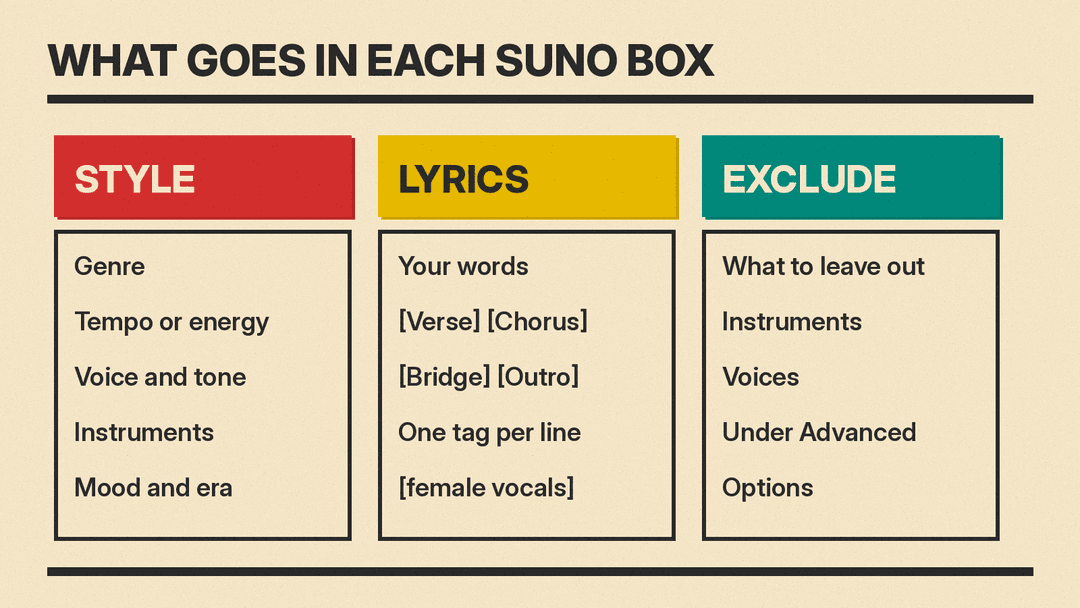
A good habit is to keep each instruction in its own box.
- Style of Music: the sound. Genre, mood, voice, instruments, era, tempo. Suno says its latest models "read rich, conversational prompts, so you can describe mood, instrumentation, structure, and texture in plain language."
- Lyrics: the words, plus section tags in square brackets, such as
[Verse]and[Chorus], one per line above the lines they label. APMonster's guide says Suno's own pages show tags like[Intro],[Verse 1],[Chorus]and[Bridge]. - Exclude (under Advanced Options): what you do not want. Suno's Exclude help article says to "enter any information (instruments, etc) that you do not want in your track."
- Title: the song name.
Avoid writing "no drums" in the Style box. Style describes what you want; Exclude is the box for what you want left out.
How to write a Style prompt
Suno's v6 FAQ says that across all three v6 models, v6 "understands more of the language and building blocks musicians use, from vocals, instrumentation and structure to mood, references and the overall feel of a song." In practice, that means you can be specific.
A useful order for a Style prompt:
- Genre and subgenre
- Tempo or energy
- Lead voice and its tone
- Two or three named instruments
- Mood and era
APMonster's guide writes Suno styles as "two to four short, specific sentences, most important first," and keeps them under 900 characters. It says the Style box accepted 1,000 characters when it checked Suno's Create form on Sept. 17, 2026; Suno itself publishes no limit.
Weak Style prompt:
pop, happyStronger Style prompt:
Bright synth pop, upbeat and fast. Clear female lead, playful and confident. Analog synth bass, gated drums, sparkling arpeggios, late-1980s feel.The second version tells Suno what to do with the voice, the instruments and the era instead of leaving those choices open.
How to write Lyrics that Suno follows
Section tags give the song a shape. A simple structure looks like this:
[Intro]

[Verse 1]
Streetlights hum along the avenue
Every window holds a different view

[Chorus]
Stay until the lights go down
Stay until the lights go down

[Verse 2]
Coffee cold and the radio low
Nowhere else I'd rather go

[Chorus]
Stay until the lights go down
Stay until the lights go down

[Bridge]
Say it once, say it slow

[Chorus]
Stay until the lights go down

[Outro]
Tips that help:
- Write the chorus as a short, repeatable line. Repeat it each time you want the chorus to return.
- Keep the words you want sung in the Lyrics box. Instructions about the sound belong in Style.
- You can also use a bracket tag for the voice. Suno's Exclude Styles release note suggests "including [female vocals] in the Lyrics section and excluding 'male vocals' in Exclude Styles."
- If you have no lyrics yet, Suno's feature list says Write with Suno can "generate lyrics from a topic or description," and that you can "edit, rewrite, and rearrange freely before you generate."
The sliders: Weirdness, Style Influence and Variety
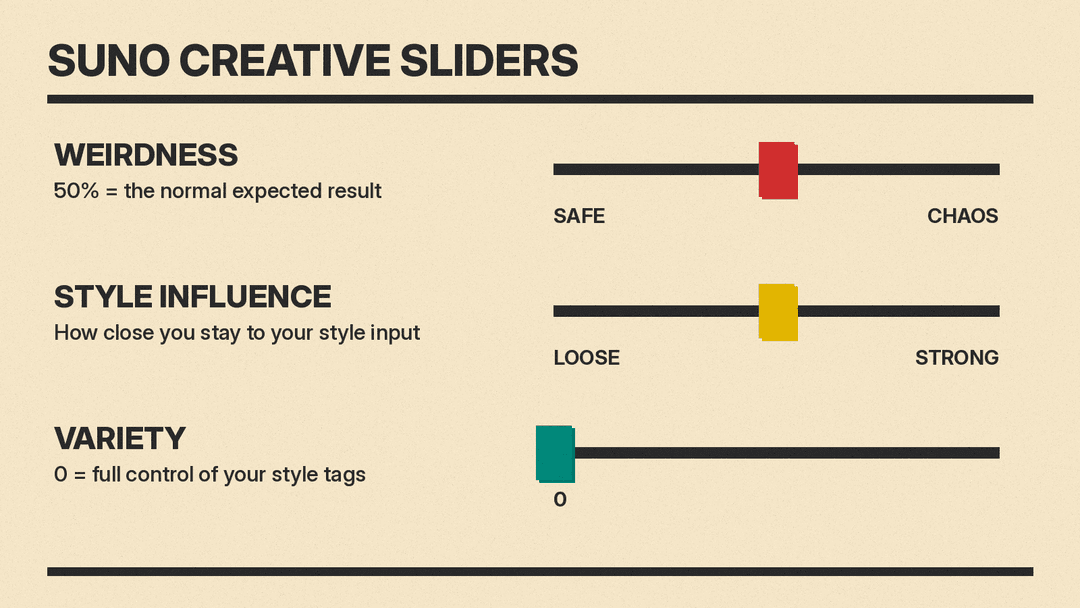
Suno's Creative Sliders article describes two controls in Custom Mode:
- Weirdness "goes from Safe to Chaos, where 50% is the 'normal' expected result."
- Style Influence "lets you choose how close you stay to your style input from Loose to Strong."
Suno's v6 FAQ adds a third: "The Variety slider is designed to introduce variety in your outputs by adjusting and updating your style prompts. If you'd like to retain full control of your style tags, reduce the Variety slider to 0."
That last point matters if you wrote a careful Style prompt. With Variety above 0, Suno may change your words.
A practical way to use them together:
- You know exactly what you want: precise Style prompt, Style Influence toward Strong, Variety at 0, Weirdness near 50%.
- You want to explore: short Style prompt, Style Influence toward Loose, Weirdness above 50%.
APMonster suggests its own starting points, for example Weirdness about 20% and Style Influence about 75% on v6. Treat those as one guide's settings, not Suno's.
Pick the right model for the prompt
The v6 FAQ describes three models:
- v6: "our flagship model for Pro and Premier subscribers. It's reliable, precise and consistently delivers polished music genres and styles."
- v6-wild: "built for exploration," and "less predictable and more varied."
- v6-mini: "our fastest and free version of our premium v6 models," available to all users.
A detailed Style prompt pairs naturally with v6. A loose one is a better fit for v6-wild. The FAQ also says each generation makes two songs for 10 credits in total, and that adding many images and videos to a prompt can raise the cost.
Prompting in plain language with v6
v6 also accepts edit requests written as sentences. The v6 FAQ lists examples such as:
- "Change the chorus so it's sung by a gospel choir"
- "Take the vocals from x, drums from y and add new lyrics about losing control, make it 80s synthwave"
- "Sample the riff at 0:45, isolate the guitar, build a beat around it"
- "Make a song that feels like midnight on a rooftop"
- "Change the lyric from 'love' to 'light'"
The FAQ says that in Simple Mode, "you don't need to know which tool to reach for (like Cover, Remix, Extend)." So if a first take is close, try describing the change before you start over.
For longer songs, the FAQ describes Max Mode, which "costs more credits" and is best for "songs longer than two minutes," covers that should stay close to the original, and "keeping vocals and style consistent through the whole track."
Copy-paste Suno prompt templates
Replace the parts in capitals. Each template lists a Style prompt and, where useful, an Exclude line.
1. Simple Mode, one sentence
A GENRE song about TOPIC, with a MOOD feel and a VOICE TYPE singer.2. Lo-fi study track (instrumental)
Style:
Lo-fi hip hop, slow and relaxed. Dusty drum loop, warm electric piano, soft vinyl crackle. Calm, late-night mood.Exclude:
vocals, heavy bass3. Acoustic singer-songwriter
Style:
Acoustic folk, mid-tempo. Intimate male vocal, gentle and close. Fingerpicked guitar, light upright bass. Warm, honest, 1970s feel.4. Upbeat pop chorus
Style:
Bright pop, fast and energetic. Confident female lead with stacked harmonies on the chorus. Punchy drums, synth bass, clean guitar. Summer, carefree mood.5. Cinematic score
Style:
Epic orchestral film score, slow build. Full strings, low brass, choir, big timpani hits. Tense, then triumphant.Exclude:
electric guitar, synth6. Birthday or gift song
Style:
Warm acoustic pop, mid-tempo. Friendly, smiling vocal. Ukulele, hand claps, light percussion. Cheerful and sweet.Lyrics: put the person's name in the chorus, and write it the way it is said if Suno mispronounces it.
7. Podcast or video intro
Style:
Short upbeat indie rock intro. Driving drums, bright electric guitar riff, bass. Energetic and clean.Turn on Instrumental, then trim the take in the Song Editor.
8. Plain-language edit (v6)
Keep everything, but make the bridge quieter with only piano and voice.When the song still is not right
- Wrong voice: name the voice in Style, add a bracket tag such as
[female vocals]in Lyrics, and list the other voice in Exclude, as Suno's release note suggests. - An unwanted instrument keeps appearing: list it in Exclude, not in Style.
- Suno changed your style words: set the Variety slider to 0.
- Too generic: add specific instruments, a voice description and an era to Style, and move Style Influence toward Strong.
- Too predictable: move Weirdness above 50%, or try v6-wild.
- One line or one section is off: ask v6 to change only that part, using the FAQ's plain-language edit examples, instead of generating a new song.
Suno also offers a prompt helper. Its feature list says Prompt enhancement lets you "drop in a rough idea and let Suno expand it into a rich, fully formed style prompt with one tap," and My Taste builds "a tailored style prompt" from your listening and creation history.
Prompt from Claude or ChatGPT
You can now also make Suno songs from inside an AI chat. Our Suno MCP explainer covers the beta that connects Suno to Claude, ChatGPT and other assistants. The same rules apply there: describe the sound, give the lyrics a structure, and say what to leave out. For a side-by-side look at Suno's main rival, see Suno vs Udio.
