
Suno has opened a beta of the Suno MCP, a connector that lets you make songs from inside an AI assistant instead of on suno.com. Suno's release note, dated October 28, 2026, names Claude, ChatGPT and Claude Code, and the setup page adds Gemini and Cursor. You describe a song in the chat, the assistant works out lyrics and style with you, and Suno generates the track.
Access is not open to everyone yet. Suno says the beta is "available on all Suno plans", but you have to sign up for early access first.
What the Suno MCP does
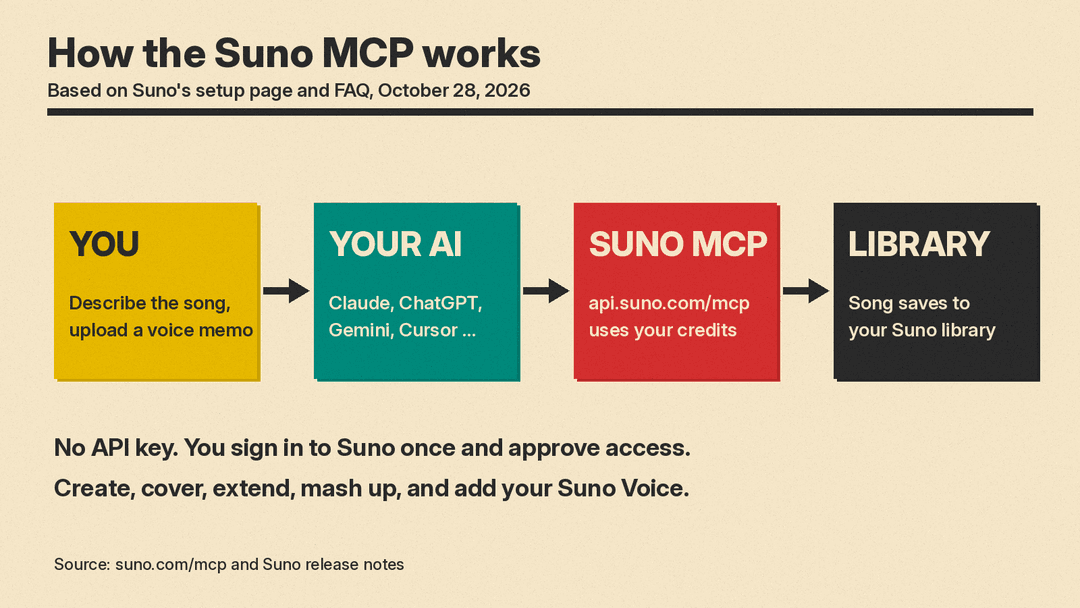
MCP stands for Model Context Protocol. Suno's FAQ calls it "an open standard that lets AI assistants work with other apps." The FAQ says the Suno MCP connects your Suno account to the AI assistants you already use, so you can ask your assistant to make a song, extend it or cover it in the conversation. If MCP is new to you, our post on Apple Creator Studio's MCP support shows the same idea in another creative app.
Suno's setup page lists four things you can do through the connector:
- Create songs conversationally. Describe the song in plain words and work on lyrics and style with your AI. Suno then makes the song.
- Start from your own audio. Upload a voice memo or a loop and turn it into a full song.
- Remix songs. Make covers, extensions and mashups of songs already in your Suno library.
- Use your Voice. The setup page says you can add your Voices from Suno to any track you create with your AI.
Every song goes into your Suno library, the same as a song made on suno.com, and Suno says you can add it to a playlist from the chat.
Why it matters
The main change is where the work happens. Suno's release note says you can create music "in the workspace you're already in, no tab-switching needed." Its FAQ adds that your assistant "can use everything you've already discussed (lyrics, a project, a video plan) so you don't have to re-explain your idea." If you already draft lyrics or plan a video in Claude or ChatGPT, you no longer need to copy that text into a second tab.
It also puts Suno inside coding tools. Claude Code and Cursor are on the list, so you can ask for a track without leaving your coding tool. Suno has also shipped other features since September, including the v6 music models and the Speech beta. The MCP pages do not mention a new model. They describe a new way to reach Suno from other apps.
How to set it up
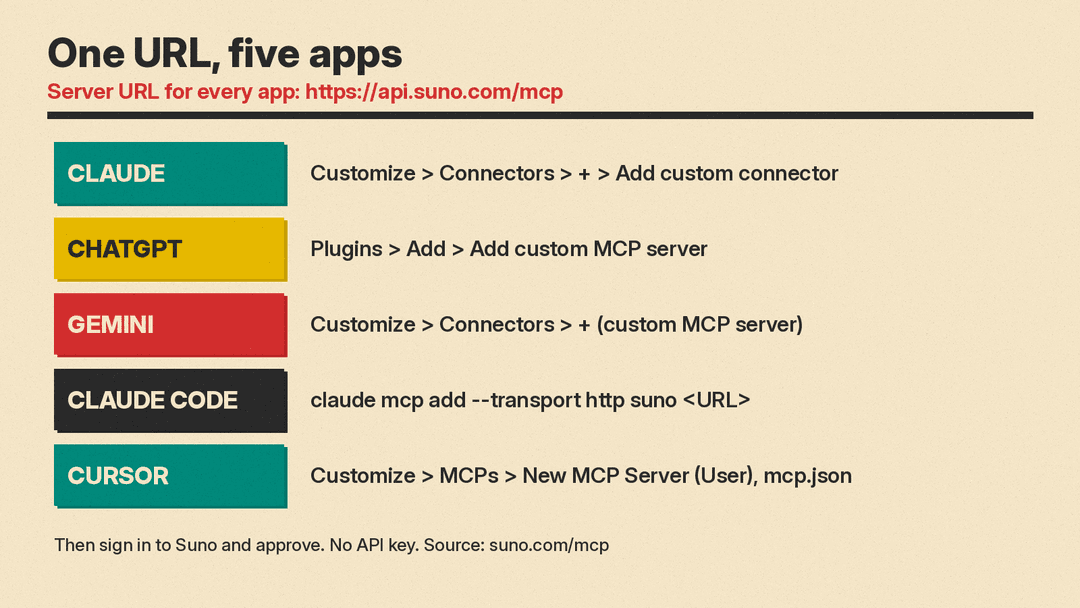
Suno says there is no API key and no code. You connect by signing in to your Suno account and approving access. Every app uses the same server URL: https://api.suno.com/mcp. Suno's steps for each app, as written on its setup page:
- Claude: open Customize, then Connectors, then +, then Add custom connector. Name it Suno, paste the URL, click Connect, sign in to Suno and approve the connection.
- ChatGPT: go to Plugins, then Add, then Add custom MCP server. Name it Suno, set Connection (Server URL) to the URL, click Create as a plugin, then connect Suno and authorize it.
- Gemini: go to Customize, then Connectors, and click + to add a custom MCP server. Paste the URL, click Create, then mention @Suno in a chat to use it.
- Claude Code: run
claude mcp add --transport http suno https://api.suno.com/mcpin your terminal, then run /mcp in a Claude Code session to sign in. - Cursor: go to Customize, then MCPs, then New MCP Server (User), and add the Suno URL to the mcp.json file that opens.
For other tools, Suno says to find the setting for a custom connector or custom MCP server and add the same URL.
What it costs
The connector itself has no separate price. Suno's FAQ says songs made through the MCP "use the credits on your current Suno plan, just like songs you make on suno.com," and that you can ask your AI tool how many credits you have left. Our Suno vs Udio comparison covers what each Suno plan includes.
There is a second cost to check. Suno's FAQ notes that "some apps only let you add connectors on certain paid plans." Suno does not say which plans, so check the connector settings in your own assistant before you request beta access.
What we do not know yet
Suno's release note and setup page leave some questions open:
- Who gets in, and when. The beta is behind an early-access signup. The pages give no date for wider access.
- Model choice. The pages do not say which Suno model version the connector uses, or whether you can pick one from the chat.
- Limits. The pages list no rate limits or caps for songs made through the connector.
- Rights. Suno does not describe separate terms for songs made through the MCP. The pages say songs use your plan's credits and save to your library like songs made on suno.com.
Try these prompts
Suno's setup page suggests three prompts to start with after you connect:
- "Take my last song in Suno and make a slowed-down acoustic cover."
- "Turn this voice memo into a full indie-folk track. Keep my melody."
- "Make a lo-fi beat for studying, then give me three variations with different moods."
It suggests follow-ups such as "Make it slower", "Add a bridge" and "Give me three more", the same way you would refine any other chat answer.
The bottom line
The Suno MCP lets you make, remix and extend Suno songs from Claude, ChatGPT, Gemini, Claude Code or Cursor. It uses your existing Suno credits and saves every song to your library. For now it is a beta with an early-access list. If you want to try it, the way in is the early-access signup on Suno's MCP page. Check first that your assistant's plan lets you add custom connectors.
