
As of October 2026, picking an AI music generator is no longer only about sound. Some services meter downloads, one has switched them off, and several tie commercial use, streaming releases or copyright to a specific plan. The major labels have settled with some companies and are still suing others. This guide compares 10 tools on what decides whether a track is usable: current model, free tier, cheapest paid plan, commercial rights and downloads, and one notable limit each.
For a deeper look at the two best-known song generators, see our Suno vs Udio comparison. For Suno's new spoken-word mode, see Suno Speech explained. For still images, see our guide to the best AI image generators.
The short answer
- Songs with vocals you want to release: Suno Pro, at $10 a month, with commercial use rights and 20 song downloads a month.
- Music for ads and social video: ElevenLabs Eleven Music. Its new Instant Soundtracks feature scores an uploaded video and adds timed sound effects.
- Background tracks in volume: Soundraw Creator, with unlimited monthly downloads.
- Free and casual: the Gemini app, which runs Google's Lyria 3.5.
- Working with an AI producer in chat: Google Flow Music (formerly ProducerAI, and before that Riffusion).
- Long tracks and a DAW plugin: Stable Audio.
- Editable MIDI: AIVA.
- Running a model on your own GPU: ACE-Step 1.5.
- If you need audio files, skip Udio for now. Its help center says downloads are disabled.
How we picked
We checked each tool's own pricing page, help center and launch posts on October 19, 2026, and used press coverage for legal news. We did not run blind listening tests, so quality claims below are each vendor's own. Prices are as of October 2026, in US dollars unless noted. Where we could not read a price, we say it is not listed. Plans change often, so check the linked page before you subscribe. For voice and music plan prices side by side, see our AI voice and music pricing comparison.
Suno
- What it is: a text-to-song generator for full tracks with vocals, plus a production suite, Suno Studio, on the top plan.
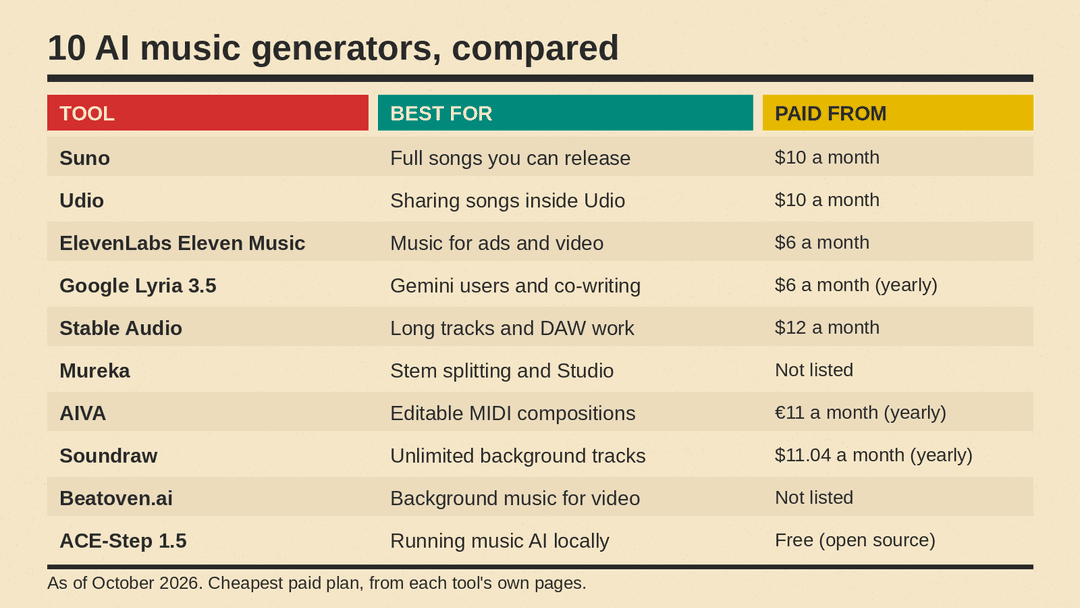
- Best for: Full songs you can release
- Current model: the v6 family, released September 9, 2026: v6 and v6-wild on paid plans, v6-mini for everyone.
- Free tier: 50 credits per day on v6-mini, with no commercial rights and no monthly song downloads, per the pricing page.
- Cheapest paid plan: $10 a month (Pro), or $8 a month billed yearly, for 2,500 credits a month. Premier is $30 a month and adds Suno Studio.
- Commercial use and downloads: Yes on Pro and Premier. Pro gets 20 song downloads a month and Premier 60. Free accounts get up to 7 lifetime trial downloads for personal, non-commercial use, per Suno's help center.
- Notable limit: a song in a paying subscriber's library cannot be released, sold or licensed until a download has been spent on it, Music Business Worldwide reported.
Suno is the most complete option here for original vocal songs that leave the platform. Treat the download allowance as your monthly release budget.
Udio
- What it is: a text-to-song generator from Uncharted Labs, with tools to extend, remix and edit tracks.
- Best for: Sharing songs inside Udio
- Current model: the pricing page does not name a model version, and the latest post on the Udio blog is from November 19, 2025.
- Free tier: 10 credits per day and 100 per month, with a limit of 3 full-length (2:10) generations per day.
- Cheapest paid plan: $10 a month (Standard), or $8 a month billed yearly, for 2,400 credits a month. Pro is $30 a month.
- Commercial use and downloads: Downloads disabled. Udio's help center says downloading of audio, video and stems has been disabled as part of its Universal Music Group partnership.
- Notable limit: you can create and share songs on Udio, but you cannot take the files elsewhere.
ElevenLabs Eleven Music
- What it is: the ElevenLabs music model, offered in ElevenCreative, the separate ElevenMusic app and the API.
- Best for: Music for ads and video
- Current model: Music v2.5, released September 11, 2026 (API model ID
music_v2_5). Music v2 remains available. - Free tier: 10,000 credits a month, shared across all ElevenLabs products, per the pricing page. The music pricing table marks Free as "Personal use only". The ElevenMusic app has its own rules: ElevenLabs says Free users there get five lossless downloads a day and "can use what you make commercially as long as you credit ElevenMusic."
- Cheapest paid plan: $6 a month (Starter), with 30,000 credits. ElevenLabs lists Eleven Music at about 900 credits per minute.
- Commercial use and downloads: Yes from Starter, with limits. The music table lists Starter as "Commercial, no streaming". Release to Spotify and Apple starts with Creator ($22 a month, $11 for the first month).
- Notable limit: on self-serve plans, commercial use is permitted "except for film, TV, and Studio Games", per the music page FAQ.
On October 15, 2026, ElevenLabs launched Instant Soundtracks. You upload a video, the model scores it, finds moments that call for a sound effect and places effects on the timeline as separate layers. The API accepts up to 10 videos per request, combined up to 200 MB and 10 minutes. For short-form video and ad work, this is the most direct workflow in this list. ElevenLabs says that in a blind test across 47,885 pairs, v2.5 was "the preferred take the majority of the time". That is a vendor claim.
Google Lyria 3.5 (Gemini app and Flow Music)
- What it is: Google's music model, offered in the Gemini app (tracks from a prompt or photo), in Google Flow Music (a studio where you chat with an AI "Producer") and in the Gemini API.
- Best for: Gemini users and co-writing
- Current model: Lyria 3.5, which Google calls "our best-sounding music generation model". It reached Flow Music on July 29, 2026 and the Gemini app and API on September 4, 2026. Google's API docs also point to Lyria RealTime for streaming music generation.
- Free tier: the Gemini app makes tracks up to three minutes long for users 18 and older, and "Limits apply", per Google's Lyria overview. Flow Music's pricing page lists a $0 plan with daily top-up credits, and marks downloads (mp3, wav, m4a) and stem downloads on every plan, including Free.
- Cheapest paid plan: $6 a month (yearly), the Flow Music Starter price shown with yearly billing selected, for 3,000 credits a month (about 600 songs, per the page). We could not read the monthly-billing price. On the Gemini API, Lyria 3.5 costs $0.08 per song.
- Commercial use and downloads: Yes on Flow Music paid plans. A Google One help page lists "Commercial use rights" among the Flow Music Starter benefits that Google AI Plus members get, and Flow Music help says Google AI Plus, Pro and Ultra members get the Starter, Plus and Member plans. The Gemini app's music help page says you can download and share tracks but does not address commercial use.
- Notable limit: tracks carry a SynthID watermark, and the API's safety filters block prompts that request specific artist voices or copyrighted lyrics.
Flow Music is the former ProducerAI, which joined Google Labs on February 24, 2026 and was renamed in April. ProducerAI launched in July 2025 as the successor to Riffusion, The Verge reported. The Gemini app is the easiest free start, and Flow Music is better for iterating on a track and taking files out.
Stable Audio
- What it is: Stability AI's web app and DAW plugin for generating and editing music, including multi-track generations.
- Best for: Long tracks and DAW work
- Current model: the Stable Audio 3.0 family, which Stability says is "trained on fully licensed data". Small, Small SFX and Medium have open weights. Large is offered through the API and enterprise deployments.
- Free tier: 50 credits a month, about 12 full-mix generations, for "Personal, non-commercial use", per the pricing page.
- Cheapest paid plan: $12 a month (Solo), for 660 credits a month and tracks of any length up to 6 minutes.
- Commercial use and downloads: Yes on all paid plans. Each paid tier lists a "Commercial license", and audio made on a paid plan stays covered under the original license after you cancel.
- Notable limit: unused credits do not roll over.
Stability also publishes open weights for the smaller 3.0 models. Its launch post says you own outputs under its Community License, and organizations with more than $1M in annual revenue need its Enterprise license.
Mureka
- What it is: a song generator with a studio editor, remixing, stem splitting and a DAW assistant called Mureka Co.
- Best for: Stem splitting and Studio
- Current model: V9.5, per Mureka's subscribe page. The Pro plan also lists V9, V8 and O2.
- Free tier: the page offers a free trial ("Try free now") but does not show free-tier limits.
- Cheapest paid plan: Not listed. The plan table loads its prices with JavaScript, and we could not read them. The page says yearly billing saves 20%.
- Commercial use and downloads: Yes for subscribers. The FAQ says Pro includes "commercial rights to monetize your music", and the member features say every song "comes with full commercial rights and unlimited downloads in all formats."
- Notable limit: per the FAQ, Mureka Studio, 12-stem splitting and MIDI/WAV exports come with Premier, the higher plan.
AIVA
- What it is: an AI composition assistant that generates tracks in more than 250 styles and exports MIDI as well as MP3.
- Best for: Editable MIDI compositions
- Current model: AIVA's pricing page does not name a model version.
- Free tier: €0, with 3 downloads per month, non-commercial use only, credit to AIVA required, and copyright owned by AIVA.
- Cheapest paid plan: €11 a month (yearly), plus VAT, for Standard billed annually. Pro is €33 a month billed annually.
- Commercial use and downloads: Full rights on Pro only. Standard offers "Limited monetization", which AIVA recommends for creators who monetize only on YouTube, Twitch, TikTok and Instagram, with 15 downloads a month, and AIVA keeps the copyright. Pro gives you the copyright, "Full monetization" and 300 downloads a month.
- Notable limit: track length is capped at 3 minutes on Free, 5 minutes on Standard and 5 minutes 30 seconds on Pro.
AIVA suits people who want MIDI files they can edit, and it states plainly who owns the copyright on each plan.
Soundraw
- What it is: a royalty-free beat and background music generator that you shape with a mixer (instruments, intensity, length).
- Best for: Unlimited background tracks
- Current model: not named. Soundraw says its AI is "trained only on music we create in-house", per its homepage.
- Free tier: the homepage invites you to try it for free. The pricing page lists only paid plans.
- Cheapest paid plan: $12.99 per month (Creator) on monthly billing, or $11.04 per month billed annually, per the pricing page. Both are discounted prices shown next to crossed-out list prices of $19.99 and $16.99 per month.
- Commercial use and downloads: Yes on all paid plans. Creator includes unlimited monthly track downloads as mp3 for background use.
- Notable limit: distributing songs on Spotify, Apple Music and TikTok starts with Artist Starter at $25.99 per month on monthly billing, or $19.49 per month billed annually, which allows 10 downloads a month. WAV and stems start with Artist Pro at $38.99 per month, or $23.39 per month billed annually.
Soundraw fits YouTubers and podcasters who need many background tracks under a simple license.
Beatoven.ai
- What it is: a background music generator built on maestro, its "homegrown AI model", plus a sound effects tool.
- Best for: Background music for video
- Current model: maestro, per the homepage.
- Free tier: not stated on the homepage.
- Cheapest paid plan: Not listed. The homepage says "Pay per track or subscribe for additional download minutes", but the site's pricing link returned a 404 error on October 19, 2026.
- Commercial use and downloads: License with each download. Beatoven says each download comes with a "non-exclusive perpetual licence" to monetize your video or audio content, while Beatoven remains the owner of the track. Files come as MP3 or WAV.
- Notable limit: Beatoven does not allow direct distribution of its music on streaming platforms such as Spotify and Apple Music.
It fits licensed background music for content, not songs to release.
ACE-Step 1.5 (open model)
- What it is: an open-source music model, co-led by ACE Studio and StepFun, that you run on your own machine.
- Best for: Running music AI locally
- Current model: ACE-Step 1.5, with a larger 1.5 XL series released April 2, 2026, per the project's GitHub page.
- Free tier: the project is licensed under MIT.
- Cheapest paid plan: Free (open source). There is no paid plan; you supply the hardware.
- Commercial use and downloads: Allowed, per model card. The Hugging Face model card says you can use generated music for commercial purposes and describes the training data as licensed, royalty-free and synthetic. The README asks users to verify originality and get permissions when adapting protected styles.
- Notable limit: the standard model runs in less than 4GB of VRAM, but XL models need at least 12GB with offload and quantization, or 20GB without offload.
ACE-Step supports lyrics in more than 50 languages and tracks from 10 seconds to 10 minutes. Its README places its quality "between Suno v4.5 and Suno v5", a developer claim. For MusicGen, YuE and other open models, see our open-source music model comparison.
Licensing and copyright: what to know
- The label lawsuits are not over. UMG, Sony Music and Warner sued Suno and Udio in 2024, Music Business Worldwide notes. Warner partnered with Suno on November 25, 2025, and BMG signed a deal with Suno on August 12, 2026. UMG and Sony filed a new suit against Suno alleging that v6 still infringes, Variety reported. These are allegations, not findings.
- Udio settled with UMG and Warner. UMG announced its agreements with Udio on October 29, 2025, and Warner settled on November 19, 2025, Reuters reported. Sony's case against Udio continues, as Udio's answer in that case shows.
- Other vendors point to licensed training. ElevenLabs says Eleven Music was "Created in collaboration with labels, publishers, and artists" (docs) and has announced a multi-year agreement with UMG. Stability says Stable Audio 3.0 is trained on fully licensed data and cites partnerships with UMG and Warner. Soundraw trains on its own catalog. Beatoven says it is Fairly Trained certified.
- Distributors set their own rules. TuneCore says it only distributes GenAI music made with models trained on fully licensed datasets, and it names Google Flow Music as an approved partner.
- Commercial permission is not a copyright guarantee. A plan that grants commercial use tells you what the vendor allows. It does not settle whether a track is protected by copyright where you live, or free of third-party claims.
This is not legal advice. Before you release or license AI-generated music, read the current terms for the exact plan you are on.
How to choose
- Decide where the track will end up. A streaming release, a client ad and a YouTube video need different rights. ElevenLabs Creator and Soundraw Artist plans allow streaming releases. ElevenLabs Starter and Beatoven do not.
- Check downloads, not just credits. Suno and AIVA cap downloads per month, and Udio does not allow them. Soundraw Creator includes unlimited downloads, and Mureka says the same for members.
- Check who owns the copyright. AIVA Pro gives you the copyright, and AIVA Standard keeps it with AIVA. Beatoven keeps ownership and licenses the track to you.
- Match the tool to the job. Vocal songs: Suno, Mureka, Flow Music or ACE-Step. Background music for video: Soundraw, Beatoven or Eleven Music. Notes you can edit: AIVA.
- Try the free tier with your own prompts before you pay.
Sources
- Suno pricing
- Suno: Introducing v6
- Suno help center: Upcoming Changes FAQ
- Suno: Warner Music Group partnership
- Udio pricing
- Udio blog
- Udio help center: Changes associated with the UMG partnership
- ElevenLabs pricing
- ElevenLabs: Eleven Music and music pricing
- ElevenLabs: Introducing Music v2.5
- ElevenLabs: Introducing Instant Soundtracks
- ElevenLabs docs: Eleven Music
- Google: Lyria 3.5 in Gemini
- Google: Lyria 3.5 in Google Flow Music
- Google: Lyria in the Gemini app
- Gemini Apps Help: Generate music
- Gemini API: music generation
- Gemini API pricing
- Google Flow Music
- Google Flow Music pricing
- Google Flow Help: subscription plans
- Google One Help: Google AI Plus benefits
- Google: ProducerAI joins Google Labs
- 9to5Google: ProducerAI becomes Google Flow Music
- The Verge: ProducerAI is joining Google
- Stable Audio pricing
- Stability AI: Stable Audio 3.0
- Stability AI: Meet Stable Audio 3.0
- Mureka subscribe page
- AIVA pricing
- Soundraw homepage
- Soundraw pricing
- Beatoven.ai homepage
- ACE-Step 1.5 on GitHub
- ACE-Step 1.5 model card
- Music Business Worldwide: Suno's BMG deal, download caps and more
- Variety: Sony Music and UMG sue Suno over v6
- Universal Music Group: UMG and Udio agreements
- Reuters: Warner Music Group and Udio settle
- Udio's answer in Sony v. Uncharted Labs (PDF)
- TuneCore: GenAI Music Content Framework
