
Suno now makes spoken audio, not only songs. On October 1, 2026, the company opened Speech (beta) to all users. Chief Product Officer Jack Brody calls it "the first audio model that generates voice and music together as one cohesive track."
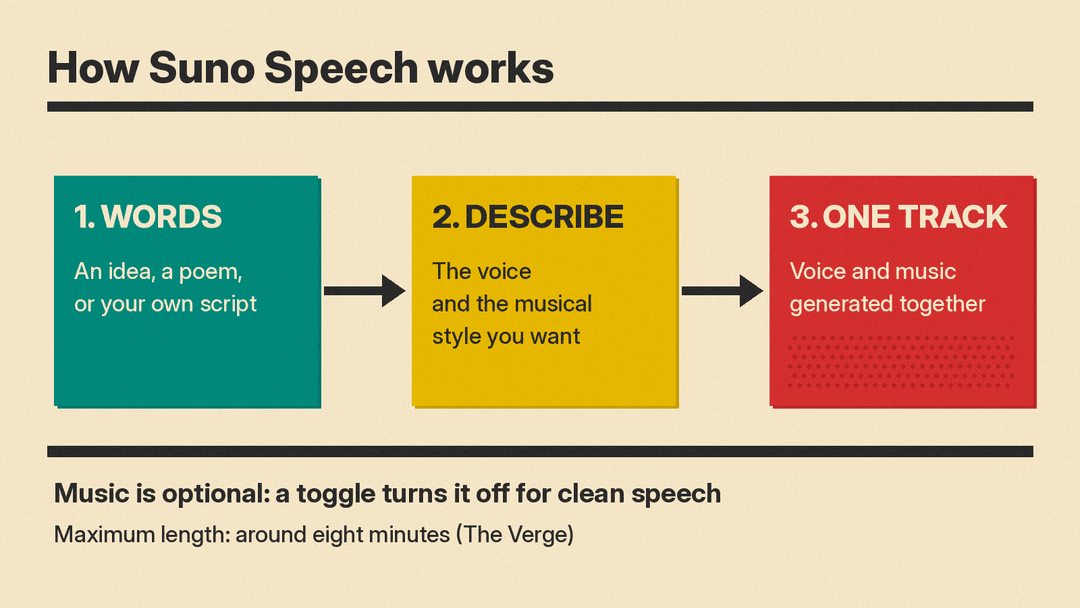
The pitch is simple. You give Suno words, describe a voice and a musical style, and it returns one track with the narration and the score already combined. This post explains how Speech works, how to use it, what Suno has not said yet, and where it fits next to dedicated text-to-speech tools.
What Suno Speech is
Speech is a new creation mode inside the Suno app. According to Suno's announcement, it "lets you create spoken audio set to original background music." You type an idea, a poem, or something you have written, and then describe the voice and the musical style you want.
The difference from a normal voiceover workflow is the single step. With most tools you generate a narration in one app, find or generate a backing track in another, and then mix the two. Suno's claim is that its model produces both at once, as one piece of audio.
The music is optional. The Verge reports that a toggle turns the background music off if you only want clean speech. That makes Speech a plain text-to-speech tool as well as a narration-plus-score tool.
Suno tested Speech with a small group of users for about a month before the public beta, the company says. The Verge reports that it is available on Suno's web and mobile platforms.
How to use Speech
Based on The Verge's walkthrough, the flow is:
- Open the Create tab in Suno and choose the Speech option.
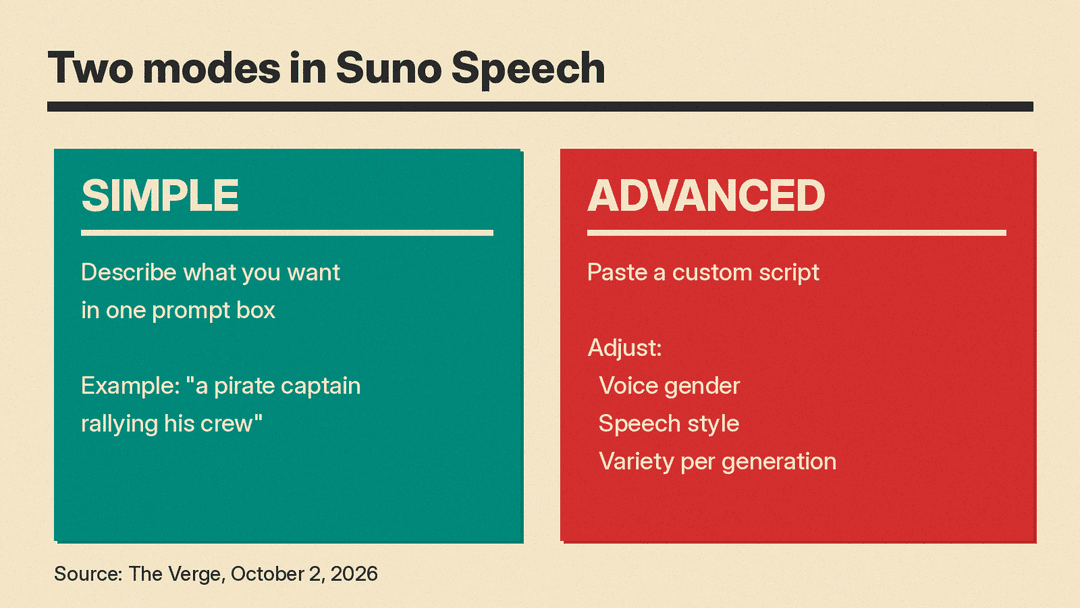
- Pick a mode. Simple mode gives you a prompt box where you describe what you want, for example "a pirate captain rallying his crew." Advanced mode lets you paste your own script when you know exactly what the voice should say.
- In Advanced mode, adjust the settings. The Verge lists the gender of the AI voice, the speech style, and how much variety each generation has.
- Decide whether you want background music. Leave it on for a scored track, or switch it off for speech only.
- Generate. The Verge puts the maximum length at around eight minutes.
A practical tip: use Simple mode to explore a voice and a mood, then move to Advanced mode once you have a script. A fixed script makes it easier to compare takes, because only the voice and the music change between generations.
What people are making with it
Suno's own examples lean toward personal, playful audio rather than production voiceover work. In the launch post, Brody says the team turned friends' texts into dramatic readings, gave voice notes "unnecessarily epic scores," and made meditations, poems, pep talks, and bedtime stories for their kids.
The Verge describes the intended fit the same way: a calm soundtrack under a poem, or something more energetic under a dramatic voiceover or a motivational speech.
Suno frames all of this as "creative entertainment," which it says will define the next wave of consumer technology. People already use Suno for birthday songs, wedding songs, and inside jokes, the company says. Speech extends that to spoken word.
Known limits in the beta
Suno is direct about the rough edges. "Beta really does mean beta," Brody writes. "Occasionally, British accents can wander off to Australia and back. Dramatic pauses may be very dramatic."
Some details are also missing from the announcement:
- Plans and credits. The launch post does not say which Suno plans include Speech or how many credits a generation costs. Suno's pricing page lists its Free, Pro, and Premier plans and the v6 models, but does not break out Speech.
- Rights. The post does not say whether Speech output follows the same commercial-use terms as songs on each plan. If you plan to use Speech audio in a paid project, check your plan terms first.
- Voices. Nothing in the post or The Verge's report describes using your own voice in Speech. The controls described are prompts, scripts, gender, style, and variety.
- End of beta. Suno gives no date for leaving beta. It says it will keep improving Speech as it learns what people love and what does not quite work yet.
Why it matters
Speech moves Suno into a market that ElevenLabs and others already serve. The Verge notes that AI speech is "hardly new," pointing to DeepMind's decade of speech synthesis research, Adobe's text-to-speech tool, and ElevenLabs. It also suggests the move is likely an attempt to diversify Suno's platform, given the lawsuits its music generator has drawn. That is The Verge's reading; Suno's post does not give a business reason.
It is also not Suno's first speech model. In April 2023 the company published Bark, a text-prompted generative audio model, on GitHub, and moved it to the MIT license in May 2023. Speech is different in that it lives inside the consumer app and pairs the voice with Suno's music models.
For creators, the useful part is the combined output. Short-form video, meditation content, kids' stories, and podcast intros all need a voice over a bed of music. Today that usually means two tools and an editing step. If Suno's model keeps the narration and the score in sync on its own, it removes that step. If it does not, a dedicated TTS tool plus a separate music generator still gives you more control over each layer.
ElevenLabs is moving in from the other side. Its Instant Soundtracks feature adds AI music and sound effects to uploaded video. The two companies are converging on the same idea: one tool for every sound in a piece of content.
Who should try it
- Suno users who want spoken intros, outros, or skits. You can stay in one app instead of exporting to a voice tool.
- Parents and hobbyists. Bedtime stories, pep talks, and joke readings are the use cases Suno itself highlights.
- Short-form creators. A scored voiceover in one generation is useful for quick drafts, as long as you check the rights on your plan.
If you need exact control over pronunciation, timing, or a cloned voice, a dedicated TTS tool is still the safer choice for now. Our guide to open-source text-to-speech models covers self-hosted options. For music itself, see Suno vs Udio and our list of the best AI music generators.
