
Claude can write in your voice, but only if you show it what your voice is. A "write like me" prompt that describes the voice in a few vague words ("friendly but professional") gives Claude nothing to copy. This guide gives you 25 copy-paste prompts that start from real samples of your writing, plus the settings in the Claude app that save you from pasting them every time. As of October 2026.
Fill in the [brackets], paste your text inside the tags, and read every draft before you send it. We also ran five of the templates on a small local model to see where they break. That was a small test, not a test of Claude. The results are near the end. Our Claude prompts for coding guide uses the same method for code, and our list of the best AI tools for writers covers other apps.
The four rules behind these prompts
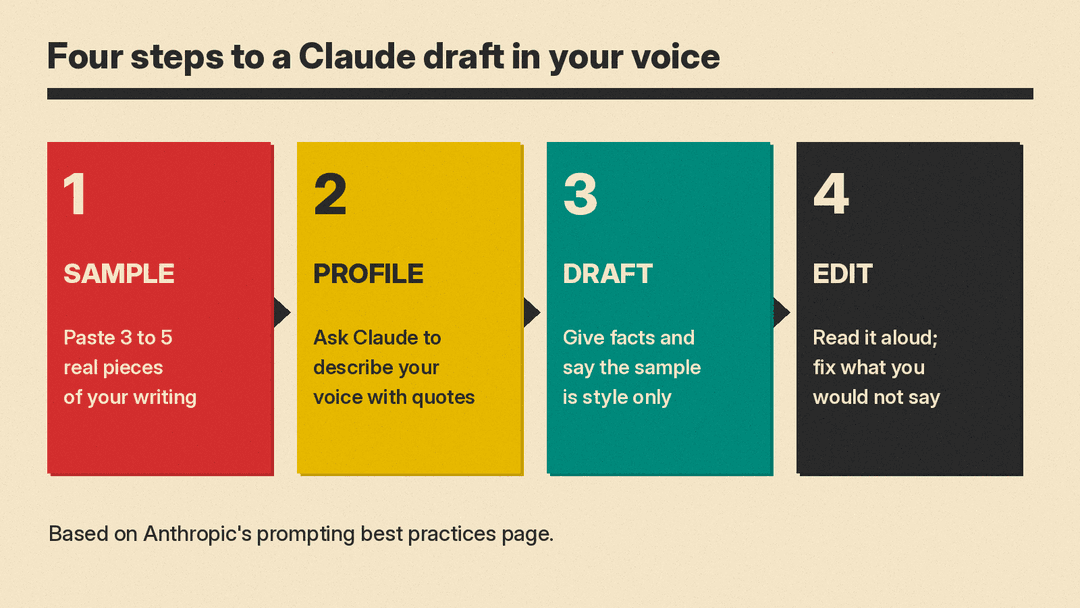
The templates follow Anthropic's own prompting best practices page. Four parts of it matter most for writing. For the basics that apply to any chatbot, start with our beginner's guide to writing better AI prompts.
- Show, do not describe. Anthropic calls examples "one of the most reliable ways to steer Claude's output format, tone, and structure." It suggests 3 to 5 examples, wrapped in
<example>tags so Claude can tell them apart from your instructions. For voice, your examples are real things you wrote. - Say why. The page's example: "NEVER use ellipses" works less well than explaining that the text will be read aloud by a text-to-speech engine that cannot pronounce them. Anthropic says "Claude can generalize from the explanation." So tell Claude who the reader is and why a rule exists.
- Say what to do, not what to avoid. Instead of "Do not use markdown in your response", the page suggests "Your response should be composed of smoothly flowing prose paragraphs."
- Match your prompt to the output. Anthropic notes that the formatting style of your prompt "might influence Claude's response style". A prompt full of bullet points can pull the answer toward bullet points. If you want relaxed prose back, write the instructions in relaxed prose.
One more test from the same page is useful before you hit enter: show the prompt to a colleague with little context. "If they'd be confused, Claude will be too."
Step 1: Collect your writing samples
Pick 3 to 5 pieces you wrote yourself, without heavy editing by anyone else. Use the same kind of writing you want back. Emails teach email voice. A blog post teaches blog voice. Mix subjects if you can: in our small test below, content from a sample leaked into a new draft.
Paste them in like this, and reuse the block in the templates below:
<writing_samples>
<example>[paste sample 1]</example>
<example>[paste sample 2]</example>
<example>[paste sample 3]</example>
</writing_samples>
Step 2: Build a voice profile (templates 1 to 5)
A voice profile is a short description of how you write, backed by quotes. You can save it and paste it into later chats, or into Claude's settings (see "Save your voice" below).
1. Describe my voice
[writing_samples block]
Read my writing samples. Describe my voice so another writer could copy it. Cover sentence length, word choice, tone, punctuation habits, and how I open and close. For each point, quote a short phrase from the samples as evidence. If a habit does not appear in the samples, do not list it.
2. Find my habits
[writing_samples block]
List 10 habits that make this writing sound like me and not like a generic writer. Include words I use often, words I never use, and how long my paragraphs are. Quote the samples for each habit.
3. Turn the profile into rules
Here is a description of my writing voice:
<voice_profile>[paste the answer from template 1]</voice_profile>
Turn this into 8 to 12 short rules that a writer could follow while drafting. Write each rule as something to do, not something to avoid.
4. Check the profile against a new sample
<voice_profile>[paste your rules]</voice_profile>
<new_sample>[paste something else you wrote]</new_sample>
Does the new sample follow these rules? Name any rule the sample breaks, and suggest how to change the rule so it fits how I really write.
5. Separate my voices
<work_samples>[paste 2 or 3 work emails]</work_samples>
<personal_samples>[paste 2 or 3 personal messages]</personal_samples>
Describe how my voice changes between these two groups. Then write one short set of rules for each.
Step 3: Draft in your voice (templates 6 to 12)
One failure to watch for is content leaking from your samples into the new draft. In our small test, a rewrite copied a couch and a truck from the sample into a message that never mentioned them. So every drafting template says, in plain words, that the samples are for style only.
6. Write a first draft from notes
[writing_samples block]
<notes>[paste your bullet notes or facts]</notes>
Write a [blog post / email / LinkedIn post] of about [number] words from my notes, in the voice of my writing samples. Use the samples only for style. Take every fact from my notes, and do not add facts that are not there. If a fact is missing, write [TK] and keep going.
7. Rewrite stiff text in my voice
[writing_samples block]
<draft>[paste the text]</draft>
Rewrite the draft so it sounds like my writing samples. Keep every fact in the draft. The samples are for style only: do not copy any of their content into the draft. Return only the rewritten text.
8. Reply to an email as me
[writing_samples block]
<email_to_answer>[paste the email]</email_to_answer>
Write my reply in the voice of my samples. The reply must say: [point 1], [point 2], [point 3]. Keep it under [number] words. Before you finish, check that each point is in the reply.
9. Write a social post as me
[writing_samples block]
Write a post for [platform] about [topic] in my voice. My point is [one sentence]. The readers are [who]. Keep it under [number] words. Give me three versions that open in different ways.
10. Write the hard message
[writing_samples block]
I need to tell [person] that [news]. They will probably feel [feeling]. Write the message in my voice. Be direct about the news in the first two sentences, then explain [reason]. Do not apologize more than once.
11. Keep my voice in a long piece
<voice_rules>[paste your rules from template 3]</voice_rules>
<outline>[paste your outline]</outline>
Write section [number] of this outline, about [number] words. Follow the voice rules. When you finish, list any rule you found hard to follow in this section.
12. Write for a new audience without losing my voice
[writing_samples block]
<text>[paste text]</text>
Rewrite this for [new audience, for example "customers who have never used our product"]. Change the vocabulary and the examples to fit them, but keep my sentence rhythm and tone.
Step 4: Edit drafts so they sound human (templates 13 to 19)
13. Remove phrases I would never use
<text>[paste text]</text>
Edit this text so it sounds like a person wrote it. Remove these phrases if they appear: [list, for example "it's important to note", "moreover", "delve"]. Keep the meaning. Return the edited text, then a list of each phrase you removed.
14. Turn bullets into prose
<text>[paste a bulleted draft]</text>
Rewrite this as smoothly flowing prose paragraphs. Keep every point. Connect the points with the reasons that link them, as a person would when explaining it out loud.
This one uses Anthropic's own suggested wording from the formatting section of its prompting page.
15. Cut it by a third
<text>[paste text]</text>
Cut this to about [number] words. Keep my voice and every fact that a reader needs to act. Remove repetition first, then throat-clearing openings, then adjectives.
16. Read it like my editor
[writing_samples block]
<draft>[paste draft]</draft>
You are my editor. Mark each sentence in the draft that does not sound like my samples. For each one, quote it, say why in one line, and suggest a version that sounds like me.
17. Match the length of my sentences
[writing_samples block]
<draft>[paste draft]</draft>
Compare the sentence length in my samples with the draft. Rewrite only the sentences in the draft that are much longer than my usual sentences. Leave the others unchanged.
18. Fix the opening and the ending
[writing_samples block]
<draft>[paste draft]</draft>
Rewrite only the first paragraph and the last paragraph so they open and close the way my samples do. Do not change the middle.
19. Check the facts did not change
<original>[paste your notes or first draft]</original>
<edited>[paste Claude's edited version]</edited>
List every fact, name, number and date in the original. For each, say whether the edited version keeps it, changes it, or drops it. Then list anything in the edited version that is not in the original.
Run template 19 after any rewrite you plan to publish or send. It checks for the leaks described above.
Step 5: Everyday writing jobs (templates 20 to 25)
20. Newsletter intro
[writing_samples block]
Write a 100-word intro for this week's newsletter. The main story is [topic]. The other items are [list]. Sound like my samples, and end with one sentence that makes the reader want to scroll down.
21. Cover letter that sounds like a person
[writing_samples block]
<job_post>[paste job post]</job_post>
<my_experience>[paste your CV points]</my_experience>
Write a cover letter in my voice, under 300 words. Use only experience from my list. Connect two of my experiences to two needs in the job post, with one specific example each.
22. Bio in three lengths
[writing_samples block]
<facts_about_me>[paste facts]</facts_about_me>
Write my bio in three lengths: one sentence, 50 words and 150 words. Use only the facts I gave you. Write it in the first person in my voice.
23. Product description in our brand voice
<brand_samples>[paste 3 product descriptions you like from your own site]</brand_samples>
<product>[paste product facts]</product>
Write a product description of about [number] words in the voice of the brand samples. Use only the product facts. Do not add claims about quality or results that are not in the facts.
24. Thank-you note
[writing_samples block]
Write a short thank-you note to [person] for [what they did]. Mention [specific detail]. Under 80 words, in my voice. No more than one exclamation point.
25. Speech or toast
[writing_samples block]
Write a [number]-minute [toast / talk] for [event]. I want to say: [points]. It will be spoken, so use short sentences that are easy to say out loud, and mark where I should pause with a line break.
Template 25 follows Anthropic's "say why" rule: telling Claude the text will be spoken lets it choose words that work out loud.
Save your voice so you do not paste it every time
The Claude app has three places to keep voice instructions, according to Anthropic's help page on personalization features.
- Instructions for Claude. Account-wide instructions that apply to all your conversations. You set them in Settings, under "Your Claude" ("Account" in the older settings layout). Your voice rules from template 3 can go here if you want every chat in your voice.
- Project instructions. These apply only to chats inside one project. Use a project for one kind of writing, such as your newsletter, and paste your samples and rules there.
- Skills. Anthropic says skills can "adjust the tone and format of Claude's responses" and "apply communication patterns based on your own writing or preferences."
Skills live under Customize, then Skills, and need code execution turned on, according to Anthropic's Use skills in Claude help page. If you prefer not to use skills, put the same tone and format guidance in your instructions for Claude, which the personalization page says apply to all of your conversations.
What a small test showed
We ran five templates on Gemma 3 1B, a small open model, on our own computer on October 27, 2026 (temperature 0). We used a short writing sample we wrote for the test, about moving house. We used the small model to look for weak spots in the prompts. These results do not tell you how Claude will do.
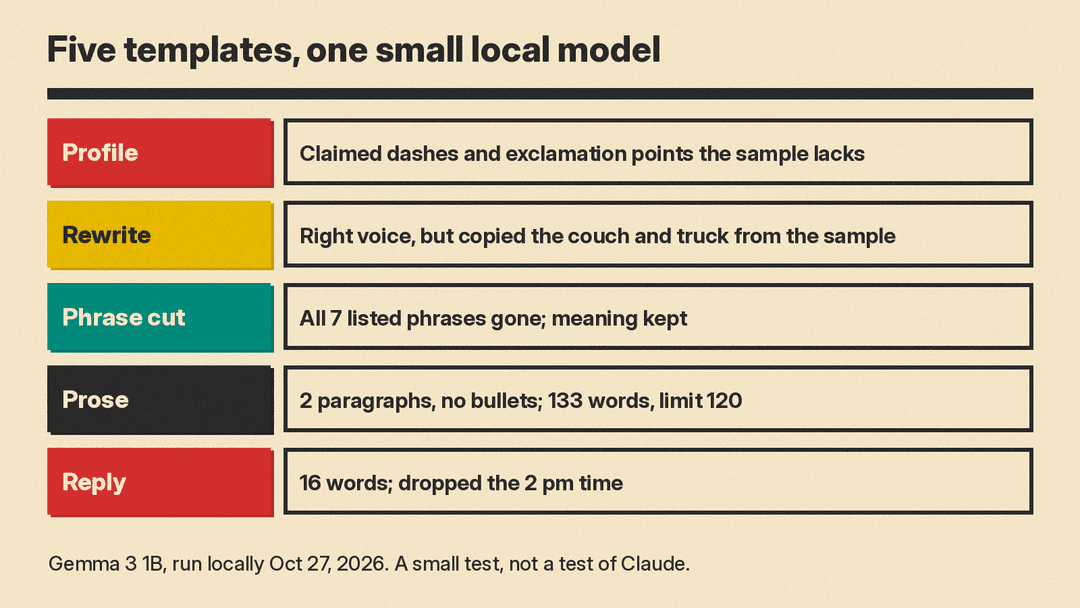
- Describe my voice (template 1, earlier wording). The profile read well but invented habits. It said the sample uses exclamation points and dashes. The sample has neither. That is why template 1 now says "If a habit does not appear in the samples, do not list it", and why template 4 checks the profile against a new sample.
- Rewrite in my voice (template 7, earlier wording). The voice was close: short sentences, plain words. But it copied content from the sample into the draft, including the couch and the truck. The earlier wording said "do not add new facts"; the final template names the leak directly, and template 19 checks for it.
- Remove phrases (template 13). All seven listed phrases were gone from the edited text, and the meaning stayed. Its list of "removed phrases" quoted whole sentences instead of phrases.
- Prose (Anthropic's wording, as in template 14). It returned two paragraphs and no bullets, as asked. It ran to 133 words against a 120-word limit, and it used "crucial" and "furthermore", which show why template 13 exists.
- Email reply (template 8, earlier wording). The reply was 16 words, well under the 50-word limit, but it dropped "after 2 pm", one of the three points. Template 8 now ends with a check that each point is in the reply.
The pattern from five runs: the structure helped with format, one run went over its word limit, and the other misses were facts, either added or dropped. Read every draft for facts, not only for tone.
Quick checklist
- Use 3 to 5 real samples of the same kind of writing you want back.
- Say the samples are for style only.
- Give the facts yourself, and mark gaps with [TK].
- Say who the reader is and why each rule matters.
- Run a fact check (template 19) before you publish or send.
