
Replying to customer reviews is one of those chores that matters and never gets done. A reply is public, so future customers read it. It also takes real thought, because a five-star "great service" and a furious one-star need very different answers. AI can draft both in seconds. The risk is that it drafts both in the same bland voice, and readers notice.
This guide shows how to use an AI assistant (ChatGPT, Gemini, Claude, Copilot or any other chat tool) to reply to reviews faster without sounding like a bot, and where the rules draw a line. The advice follows Google's own guidance for Business Profile owners, plus a short note on what the US Federal Trade Commission rule on fake reviews does and does not cover.
What Google says a good reply looks like
Start with the platform, since most small businesses see their reviews there first. Google's help page on tips to get more reviews has a section on writing better replies. Its main points:
- Be professional and polite, and keep replies clear and helpful.
- Keep it short and simple. Google notes that if a reply is too long, people might stop reading before the main point.
- Do not send the same "thank you" to everyone. Google suggests focusing on reviews where you can share a helpful update or answer a question.
- Be conversational, not promotional. Reviewers are already customers, so avoid using the reply to offer deals. Share a detail that reinforces their experience and encourages a return visit.
For negative reviews, Google's tips are more specific:
- Never share a reviewer's private information or engage in personal attacks. If the situation is complex, politely ask the reviewer to contact you by phone or email.
- Be honest and explain limitations. Acknowledge mistakes, but do not take responsibility for things outside your control.
- Apologize when appropriate, and show empathy.
- Personalize the reply: use the reviewer's name, acknowledge their specific feedback, and sign off with your name or initials.
- Respond in a timely manner.
Notice what that list asks for: specific details, a human sign-off, restraint. A generic AI draft fails most of those tests unless you feed it the right input. That is the whole job of this workflow.
The workflow: AI drafts, you decide
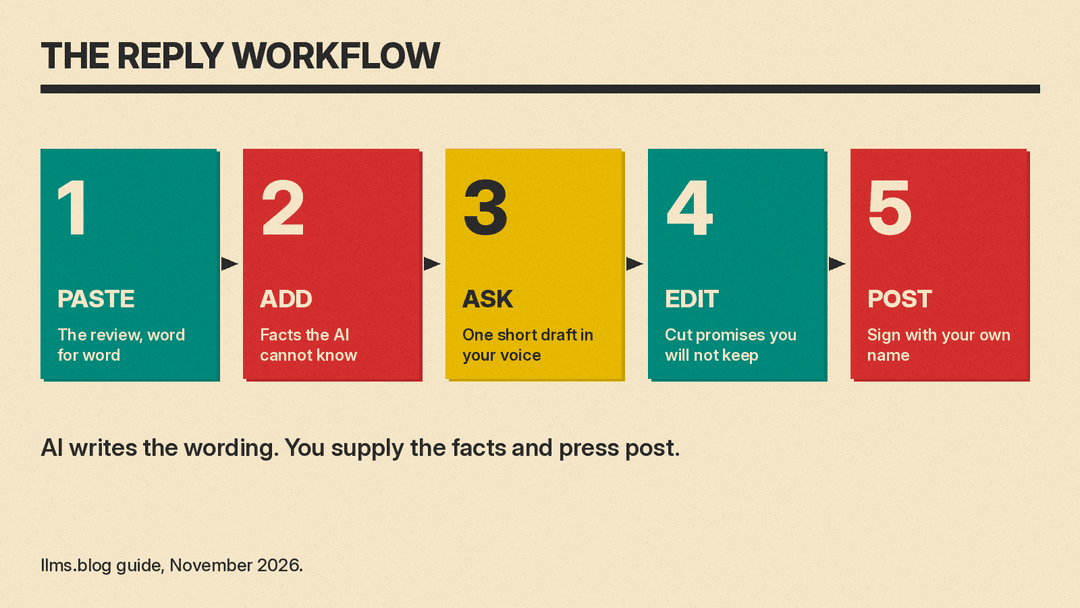
The pattern that works is simple. You supply the facts and the voice. The AI supplies the wording. You read the result, fix it and post it yourself.
- Paste the review text. Copy it exactly, so the draft answers what the customer actually wrote.
- Add the facts the AI cannot know. What happened, what you can offer, who handled it, what you changed. If you leave this out, the AI will invent something plausible, and an invented apology or refund promise is worse than no reply.
- Describe your voice in one sentence. For example: "We are a family-run bakery. We write like a friendly neighbor, short and warm, no corporate phrases."
- Ask for one short reply, not three. Long options tempt you to paste the longest one.
- Edit before you post. Add the reviewer's first name if the review shows it, remove anything you cannot stand behind, and sign with your own name.
A reusable instruction you can save in your notes app:
You help a small business owner reply to customer reviews.
Rules: write 2 to 4 sentences. Use the reviewer's first name if I give it.
Mention one specific detail from their review. Do not offer discounts or
promotions. Do not promise anything I did not write in the facts. Do not
use phrases like "we value your feedback" or "valued customer". Sound like
a real person who owns the place. End with my first name.
Then for each review, send the review text and a short facts block:
Review (3 stars): "Pastries were great but we waited 25 minutes for coffee."
Facts: Saturday rush, one barista was out sick. We have since added a
second person on weekend mornings. Reply from Dana, the owner.
The result should name the wait, own it, mention the staffing change and end with "Dana". If the first draft sounds stiff, tell the AI what to change ("shorter, less formal, no exclamation points") rather than starting over.
Positive reviews: avoid the copy-paste feel
Positive reviews are where bots give themselves away, because the temptation is to use one template for all of them. Google's tip applies directly: skip the identical "thank you" and look for one real detail.
Ask the AI to pick up something concrete from the review. If a customer praises the lemon cake, the reply can mention the lemon cake. If a customer says the technician explained the repair clearly, say that you will pass that on to the technician. You do not need to reply to every five-star rating with a paragraph. A short line with a specific detail beats a long generic one.
Per Google's tips, keep these replies conversational and not promotional. A reply that says "come back for 10 percent off" turns a thank-you into an ad, which Google's guidance specifically warns against.
Negative reviews: where a human must stay in charge
For a one-star review, use the AI as a calm first-draft writer. Angry reviews make owners defensive, and a draft written in a neutral tone gives you something to react to instead of a blank box.
Before you post, check the draft against Google's list:
- Privacy. Strip out names, order numbers, medical or financial details, and anything else the reviewer did not publish themselves. Also be careful what you paste into the AI tool in the first place. The review text is public, but your internal notes about the customer may not be.
- Tone. No sarcasm, no arguing about who is right, no personal remarks about the reviewer.
- Honesty. If you made a mistake, say so. If the complaint is about something you do not control, explain what you can and cannot do, as Google suggests.
- Offline fix. For anything complicated, the reply should invite the person to call or email you. Do not hash out a billing dispute in public.
A good prompt for this case adds one more line: "If the review is unfair or inaccurate, stay polite, state the facts once, and invite them to contact me directly."
If a review is fake, abusive or breaks the platform's rules, a reply is the wrong tool. Google says that if you believe a review violates its content policies, you can flag it, and the Manage customer reviews page links to the steps for reporting inappropriate reviews.
What to expect after you post on Google
A few details from Google's manage reviews page are worth knowing, since they shape how careful you should be:
- Before you can reply, you must verify your business.
- Google reviews your replies to make sure they follow its content policies. If a reply is not approved, you will be asked to edit it. Replies usually take up to 10 minutes to review, but sometimes it can take up to 30 days.
- Once approved, the reply is public under the customer's review and appears as if your business replied. Your personal name is not shown.
- The customer is notified when you reply, and customers can still change their review after reading your reply.
That last point is a quiet argument for good replies. A thoughtful answer to a negative review can lead the reviewer to update it.
The line you should not cross: fake reviews
Using AI to answer reviews is fine. Using AI to write reviews is a different matter, and both Google and US regulators say so clearly.
Google's content policy says reviews should reflect a genuine experience. It lists content that is not based on a real experience as fake engagement, and it does not allow merchants to offer incentives such as payment, discounts or free goods in exchange for posting a review or for revising or removing a negative one. It also says merchants should not discourage or prohibit negative reviews, or selectively solicit positive reviews from customers.
The FTC's final rule on consumer reviews and testimonials, effective October 21, 2024, goes after the same conduct. According to the FTC's announcement, it addresses reviews that misrepresent that they are by someone who does not exist, such as AI-generated fake reviews, or by someone who had no actual experience with the business. It also covers buying positive or negative reviews, undisclosed insider reviews, and review suppression, which includes using unfounded or groundless legal threats, physical threats or intimidation to prevent or remove a negative review.
The rule's text, 16 CFR 465.2, says a business may not write, create or sell a review or testimonial that materially misrepresents that the reviewer exists, that the reviewer had experience with the product or service, or what that experience was. The rule also leaves room for ordinary practice: its provisions on buying reviews and on procuring them from insiders do not apply to reviews that result from a business making generalized solicitations to purchasers to post reviews about their experiences.
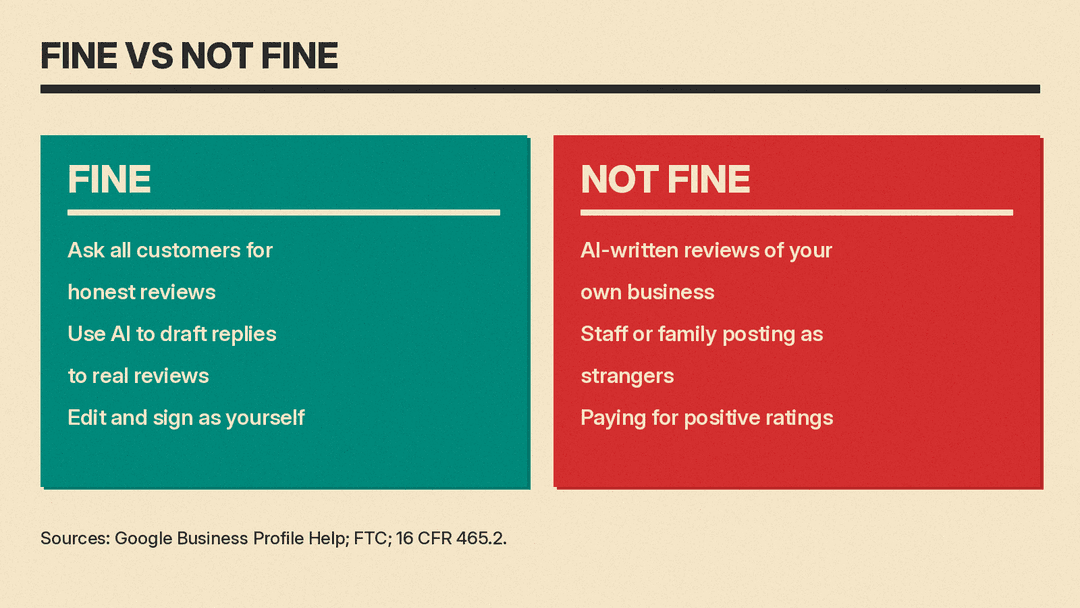
In practice, that gives you a simple test:
- Fine: asking all your customers for honest reviews, and using AI to help you write replies to what they wrote.
- Not fine: asking an AI to write a "customer review" of your own business, asking staff or family to post reviews that misstate who they are, or paying for positive ratings.
The FTC's questions and answers page adds that the rule has no blanket prohibition on AI-generated avatars in marketing. That is about avatars, not reviews, and it is a reminder that using AI is not the problem. Misleading people about who said what is. This article is a plain-language summary, not legal advice. If you are unsure about a specific situation, ask a qualified professional.
A short checklist before you hit post
- Did the reply mention something specific from this review?
- Does it sound like something you would say out loud?
- Is every promise in it one you actually intend to keep?
- Is it free of private details and personal remarks?
- Is it short enough to read in a few seconds?
- Does it end with a real name?
If you can say yes to all six, the AI saved you time and the reply is still yours.
Where this fits with your other AI workflows
Review replies are one piece of the customer-facing work AI can help with. Our guides on using AI for customer support and writing work documents people trust cover the same principle at a larger scale: let the AI draft, and keep a person accountable for what goes out. If you also run campaigns, see how to use AI for email marketing.
Sources
- Tips to get more reviews, Google Business Profile Help
- Manage customer reviews, Google Business Profile Help
- Prohibited and restricted content, Google Business Profile Help
- Federal Trade Commission Announces Final Rule Banning Fake Reviews and Testimonials, FTC
- The Consumer Reviews and Testimonials Rule: Questions and Answers, FTC
- 16 CFR 465.2, Fake or false consumer reviews, eCFR
