
A request for proposal, or RFP, can take up a lot of a team's time. A customer sends a long document of questions, and your team has to answer each one accurately, in the right format, before a deadline. Most of the answers already exist somewhere: in an old proposal, a security policy, a case study or a teammate's head. The slow part is finding, adapting and checking them.
That is a good fit for an AI assistant, with one condition. AI is useful for finding and shaping answers you already have. It is a poor source of new promises. This guide shows a safe way to use it for RFP responses and sales proposals, from the first read of the document to the final review, and when a dedicated RFP platform is worth looking at.
What AI does well in a proposal, and what it should not do
Think of the work in two layers. The first layer is mechanical: pull out the questions, sort them, match them to past answers, draft a first version and fix the tone. AI handles this kind of work well.
The second layer is commitment: what you promise, what it costs, what dates you can hit, what your security controls actually are. These statements become part of a contract conversation. A person who knows the facts must own them.
A simple rule keeps the two apart. Let AI draft from material you supply, and never let it fill a gap from its own general knowledge. If your notes do not say you hold a certification, the draft must not say it either.
Step 1: Decide whether to bid
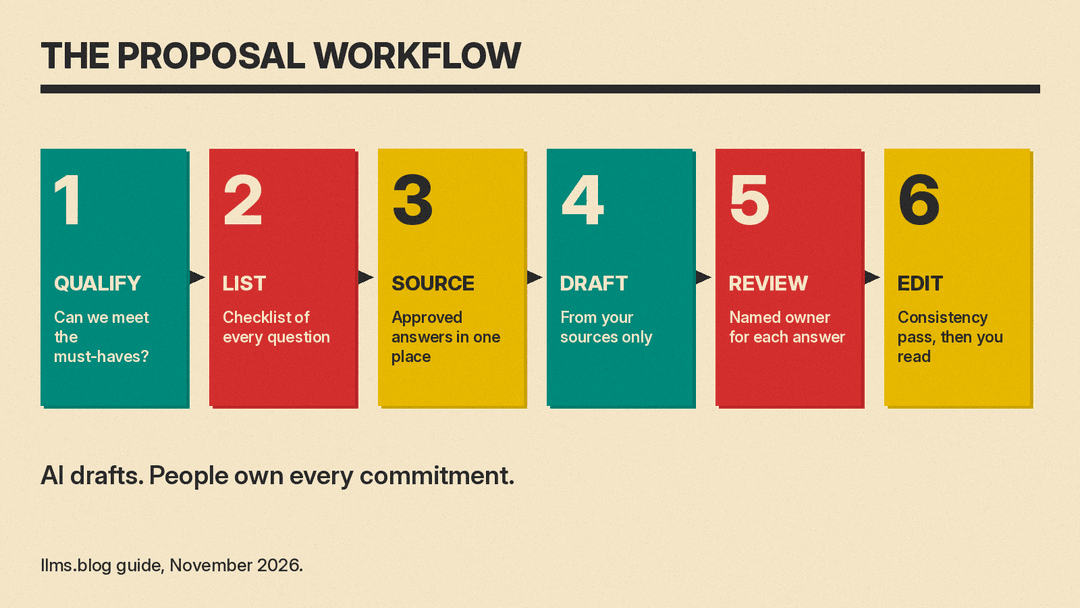
Before you spend hours, ask the assistant to help you qualify the opportunity. Paste in the requirements section and your company profile, and ask it to list the mandatory requirements, anything you cannot meet, the submission deadline and the evaluation criteria.
This is a quick check before you commit time to a bid. A quick read that shows three requirements you cannot meet is a good reason to pass, or to ask the buyer a clarifying question before the deadline.
Step 2: Turn the RFP into a checklist
Long RFPs hide requirements in appendices and in the middle of paragraphs. Ask the assistant to produce a numbered checklist of every question and instruction, with the section it came from and the format required (word limit, attachments, file type).
A prompt that works for most documents:
Read the RFP text below. Make a numbered checklist of every question,
requirement and instruction. For each item, give the section it came
from, any word or page limit, and whether it needs an attachment.
Do not answer anything yet. List anything ambiguous at the end
as questions for the buyer.

RFP text:
[paste]
Check the checklist against the original once. If the assistant missed a requirement, the whole response is built on a gap. The checklist then becomes your project plan: assign each item to an owner and a due date.
Step 3: Build a small answer library
The best input for AI is your own approved text. Gather the answers from your last few proposals, plus the documents that back them up: company overview, security and privacy policy, insurance details, case studies, team bios and standard terms.
Clean them up by hand once. Remove anything out of date, mark who owns each answer, and add the date it was last checked. Dedicated RFP platforms are built around this idea. Loopio describes a Library of reviewed and approved content, with a Freshness Score that flags answers that have gone stale. Responsive's FAQ describes AI that matches each question to its Content Library and fills in first drafts with cited responses. You can copy the principle without the software: one folder, one document per topic, a named owner and a review date.
Step 4: Draft each answer from your sources only
Now ask for the draft, one question at a time or a small group at a time. Paste the question, the buyer's word limit and the relevant source text from your library.
Answer the RFP question below for a buyer. Use only the source
material I pasted. Do not add facts, numbers, certifications,
customer names or dates that are not in it. Match the word limit.
Write in plain language and answer the question first, then support it.
If the source does not cover the question, say so and list what
information is missing.

Question: [paste]
Word limit: [number]
Source material: [paste]
The last two lines of that prompt matter most. A reply that says "the source does not cover this" is far more useful than a confident invention. It tells you which answers need a person to write them from scratch.
If you work in Microsoft 365, Microsoft's support page for Copilot in Word says you can ask for a first draft from a request, an outline, notes or reference files, and that you can point it at a specific file by typing a slash and choosing it. In Google Docs, Google's help page for Gemini says you can draft using information from your files in Drive, Chat, Gmail and the web, and that its changes appear as suggestions you accept or reject. Both are handy for the narrative parts of a proposal, such as the executive summary and the approach section, when your source files are already in your own account. Both need an eligible plan, so check what your account shows.
Step 5: Route each answer to the right reviewer
Generating text is fast. Review is the slow step, and it is where quality is decided. Anastasiia Krynytska of Luck My Sales compared Loopio and Responsive on one sanitized 50-question RFP. The write-up says both could speed up the first-draft stage, but neither removed the need for a content owner, subject-matter experts, Security or Legal, and that the bottleneck in the author's workflow was SME review, not generation. The author calls this one scoped comparison, not a market benchmark.
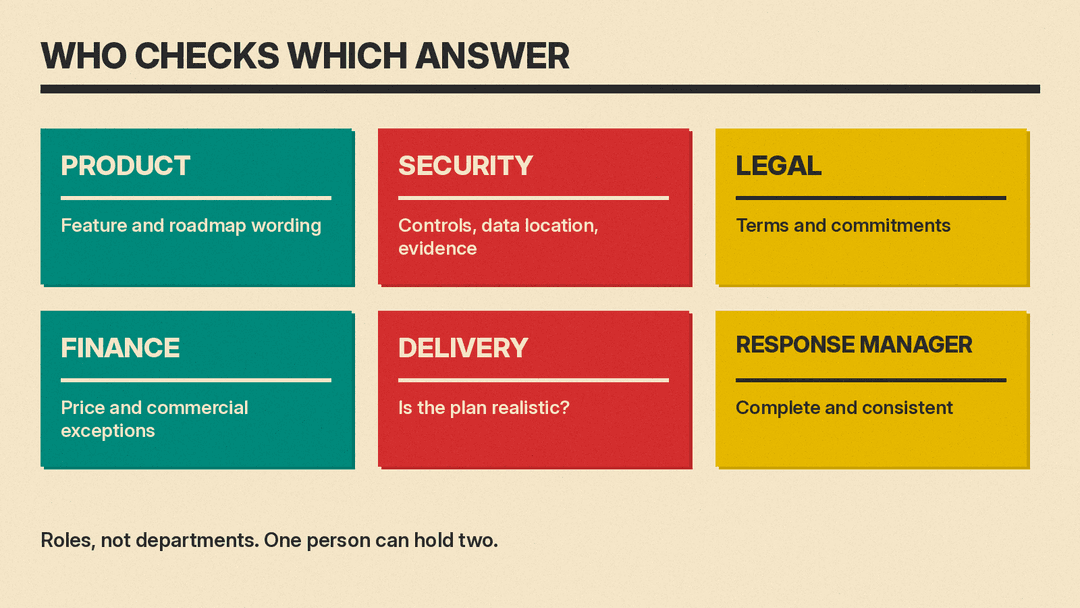
The same guide suggests routing answers by question and risk:
- Product checks feature and roadmap language.
- Security checks controls, data location and evidence.
- Legal checks terms and commitments.
- Finance checks price and commercial exceptions.
- Delivery checks whether the implementation plan is realistic.
- The response manager owns completeness and consistency.
A small company does not need six departments. It needs the same split of roles, even if one or two people fill them. Put the reviewer's name next to each checklist item so no answer goes out unseen.
Dedicated platforms build this into software. Loopio's product page says it surfaces confidence indicators and linked source citations so reviewers can prioritize medium and low confidence answers. Responsive's FAQ describes workflow automation that routes tasks to contributors and tracks progress. If you answer RFPs a few times a year, a shared spreadsheet with an owner and a status column does the same job.
Step 6: Run a final consistency pass
When all answers are in, ask the assistant to act as an editor on the full draft, not as an author. Useful checks:
- Do any two answers contradict each other, for example on support hours, data retention or pricing terms?
- Is every mandatory requirement from the checklist answered?
- Does each answer respect its word limit?
- Is the tone and the way the company is named consistent from start to finish?
Then read the final document yourself, top to bottom, with the original RFP open next to it. Confirm every number, date, certification and customer reference against a source. If the response includes a price, a person who owns the pricing should approve it. A smooth draft is easy to trust and hard to audit, so slow down at this step.
Protect the buyer's information and yours
RFP documents often contain confidential details, and your answers contain your own pricing and security information. Before you paste anything into an AI tool, check the buyer's confidentiality terms and your company's AI policy. Use the tool your company has approved, and where you can, replace the buyer's name with a label such as "the buyer." Never paste credentials or detailed security architecture into a public chat tool. This is general guidance, not legal advice. If the buyer's terms or an NDA are unclear, ask your legal team before you use any AI tool on the document.
When a dedicated RFP tool makes sense
A chat assistant plus your own library is enough for many small teams. Consider a dedicated platform when you answer many RFPs or security questionnaires, when many people contribute to one response, or when you need an audit trail of who approved which answer. As of November 2026, Loopio's own comparison page (dated August 21, 2026) describes an audit trail of who approved what and when, plus version control, and says its SmartFill supports more than 170 portal providers. Responsive describes AI that extracts requirements from an uploaded RFP and drafts answers from approved content. Both are vendor claims, so ask for a trial with one of your own past RFPs and judge the drafts on accuracy, not speed. The Luck My Sales guide says many enterprise products use quote-based or edition-based pricing, so ask each vendor for a quote that covers your own scenario.
When not to use AI for a proposal
Skip AI drafting, or keep it to light editing, when the answer is a legal commitment, a regulated claim, a security attestation or a pricing exception. Those answers should come from the person accountable for them. A plain answer written by the right person beats a polished one nobody can stand behind.
A weekly habit that makes every bid faster
The more organized your library, the better every future draft. After each bid, spend ten minutes saving the answers that were approved, noting what the buyer asked, and recording whether you won. Over time you build a reviewed source of truth, and AI can turn it into first drafts faster. For related workflows, see our guides to writing weekly status reports with AI and to AI-assisted work documents people trust.
Sources
- Responsive vs. Loopio: Which AI-Powered RFP Platform Is Right for Your Team?, Loopio
- RFP Content Automation, Loopio
- How does the Responsive platform automate RFP responses?, Responsive
- AI RFP Software: My Same-Input Comparison, Luck My Sales
- Draft and add content with Copilot in Word, Microsoft Support
- Write and edit with Gemini in Docs, Google Docs Editors Help
