
AI in customer support comes in two forms. One kind helps your human agents: it summarizes long tickets, cleans up a rough reply, or changes its tone. The other kind talks to customers directly: a chatbot or "AI agent" that answers questions from your help content and passes hard cases to a person.
This guide suggests starting with the first kind and adding the second slowly. It explains both, what the research says, and a step-by-step way to roll AI into a support inbox without hurting the customer experience.
What the research says about AI for support agents
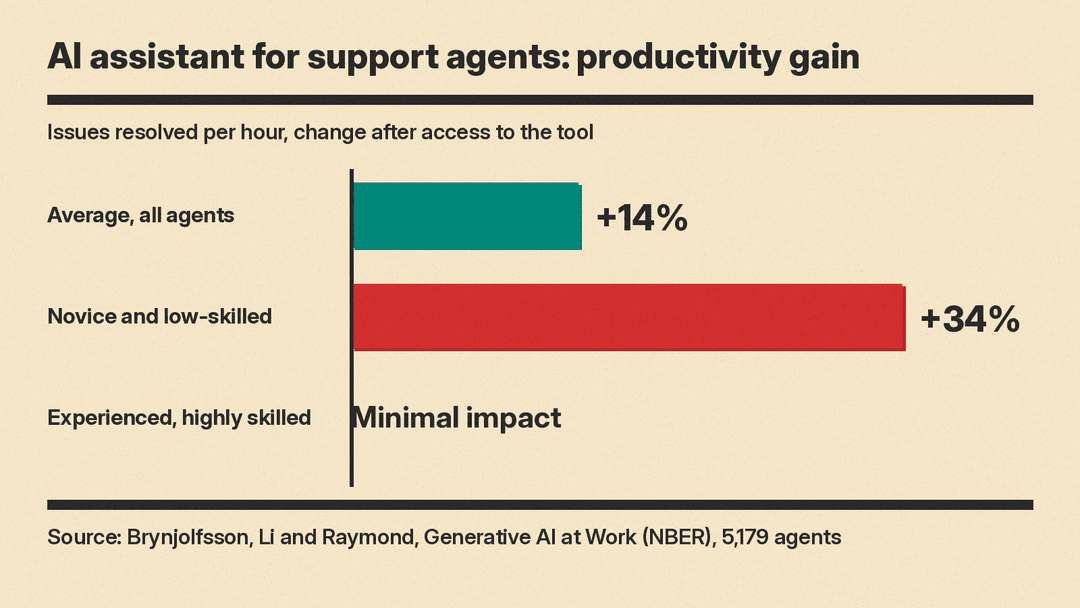
One large study on this is "Generative AI at Work" by Erik Brynjolfsson, Danielle Li and Lindsey Raymond, an NBER working paper later published in the Quarterly Journal of Economics. The authors used data from 5,179 customer support agents as a generative AI conversational assistant was introduced in stages.
What they found, per the paper's abstract:
- Access to the tool increased productivity, measured as issues resolved per hour, by 14% on average.
- Novice and low-skilled workers improved by 34%.
- Experienced and highly skilled workers saw minimal impact.
- AI assistance improved customer sentiment and increased employee retention.
The authors give "suggestive evidence" that the AI model spread the best practices of more able agents and helped newer agents move down the experience curve. For a small business, the takeaway is that the biggest gains in the study went to novice and low-skilled agents.
One study is not a promise, and it measured one AI assistant. Your results will depend on your tool and your team.
Kind 1: AI that helps your support agents
Help desk software can include writing and summary tools inside the ticket view. Zendesk is a good example because its help center documents each feature clearly.
According to Zendesk's guide to enhancing ticket comments with generative AI, agents can select text in a reply and:
- Expand it, which rephrases your comment with additional language.
- Simplify it, making it more concise.
- Make more friendly or Make more formal, to change the tone.
Zendesk's own example turns "Sorry to hear, products are checked so damage happened in shipping. Replacement model sent urgently with different company. Gift included in package." into a full, polite customer reply. Its instructions include a step that matters for any tool: read through the new text to verify that it says what you want to say.
Zendesk also offers AI ticket summaries that recap the public comments on a ticket, and internal notes if an admin turns that on. In its best practices article, Zendesk says summaries are most useful for agents who escalate and transfer tickets often, and for teams that triage many tickets. It says the writing tools help international teams with non-native English speakers, and that agents can use a custom prompt to proofread replies.
Plans and usage limits for these features change, so check your own help desk's current plan page before you count on them.
Where agent-side AI helps a small team most
- Long threads: read the summary first, then the last two messages, before you reply.
- Handoffs: paste a summary into the internal note when you pass a ticket to a colleague.
- Rough drafts: type the facts in shorthand, then expand and fix the tone.
- Second-language replies: draft, then simplify, then read it once more.
Where to stay careful
- Refunds, credits and promises. The AI can phrase a sentence; it cannot decide your policy. Check every number and date it writes.
- Angry or sensitive customers. A "friendly" rewrite can sound wrong in a serious complaint. Read it aloud before you send.
- Customer names and order details. Confirm them against the ticket, not the draft.
Kind 2: AI agents that answer customers
The second kind sits in your chat widget, email inbox or phone line and replies to customers itself. Intercom's Fin is a well-documented example. Intercom's Fin AI Agent explained page describes how it works:
- It learns from your content. Fin can use Help Center articles, internal support content, PDFs and webpages, and Intercom describes a retrieval-augmented generation system that searches that content before it writes an answer.
- You give it rules. A feature called Guidance lets you write custom instructions so it follows your support policies and style.
- You test it first. Intercom lists Simulations, batch testing with imported past conversations, answer rating, and a preview mode.
- It hands off to people. You configure when it passes a conversation to your team. Intercom says Fin always hands off automatically when that is the safest option, including high-risk medical, legal or financial advice.
- It covers several channels. The page lists email, chat, phone, Slack and Discord, and says Fin can answer in more than 45 languages.
- It reports back. A performance report shows its resolution rate, and an Optimize dashboard flags areas for improvement and uses AI to suggest fixes.
If you compare other AI agents, the parts above are the ones to look for in any tool: what content it reads, how you set rules, how you test it, and how it hands off.
The key point for a small business: Fin answers from the content you give it, so if your help center is out of date, the bot can repeat the old answer to every customer who asks.
A step-by-step rollout for a small team
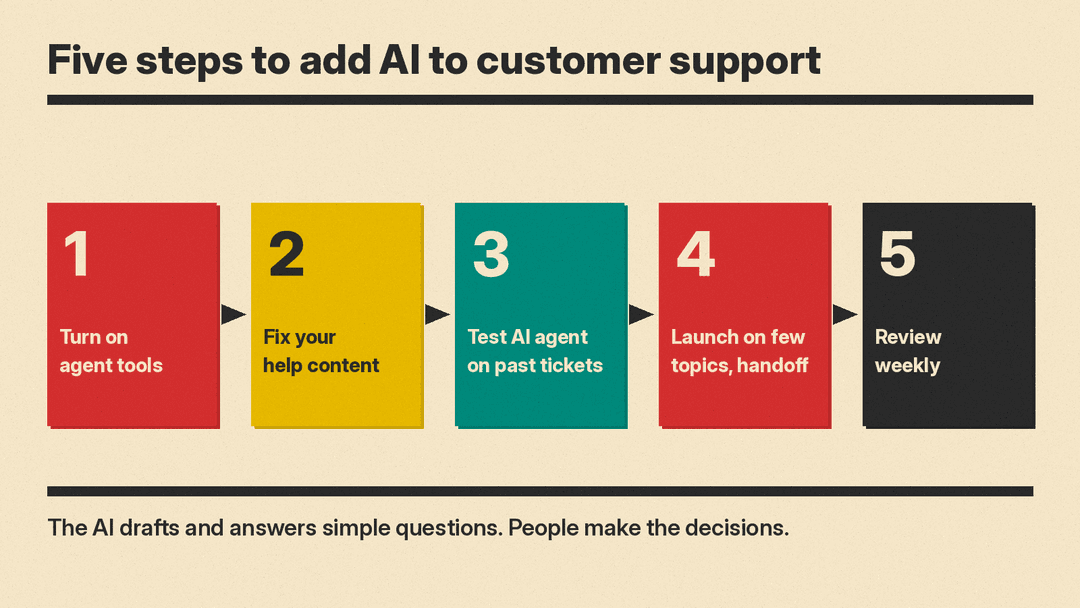
1. Turn on agent tools first. Start with summaries and writing help inside your current help desk. Your team keeps full control of every reply, and you learn where the AI is accurate and where it is not.
2. Fix your help content. List your 20 most common questions from the last month of tickets. Make sure each one has a current, clear help article. Clear articles help your human agents too.
3. Test the AI agent on past tickets. If your tool offers batch testing or simulations, run real past questions through it. Read the answers as a customer would, and check facts the way you would check any AI answer. Note every wrong or vague answer and fix the source article, not only the bot.
4. Launch on a narrow set of topics. Let the bot answer a few simple, low-risk question types, such as shipping times, password resets or opening hours. Send everything else to a person. Make the "talk to a human" path easy to find.
5. Review every week. Read a sample of bot conversations. Check which questions it could not answer and which customers asked for a person. Update the content and widen the topics only when the answers are good.
What to keep in human hands
Even with a good tool, some work should stay with your team:
- Decisions about money: refunds, credits, exceptions and billing disputes. Some customers now send AI agents of their own; in a test we covered, six AI assistants chased a train refund the user was no longer entitled to.
- Complaints that could become a public problem or a legal one.
- Customers who are upset, confused, or have asked twice for a person.
- Anything that needs a judgment call your written policy does not cover.
A short checklist before you start
- Do we know our top questions, and is there a current article for each?
- Have we read at least a sample of the AI's answers to real past questions?
- Is it clear to customers how to reach a person?
- Who on the team reviews bot conversations each week?
- Have we told the team that the AI drafts and they decide?
AI can make a small support team faster and more consistent, and the research suggests newer team members gain the most. The work that makes it succeed is not technical: clear help content, clear handoff rules, and a person who checks the results.
Sources
- Generative AI at Work (NBER Working Paper 31161), Brynjolfsson, Li and Raymond
- Fin AI Agent explained, Intercom Help
- Enhancing ticket comments using generative AI, Zendesk help
- Summarizing ticket comments using generative AI, Zendesk help
- Best practices for boosting agent productivity with AI features, Zendesk help
