
AI can turn a few bullet points into a polished memo in seconds. That speed is the problem. When every report, deck and status update looks finished, readers can no longer tell from the polish whether anyone did the thinking. This guide explains what researchers found about low-effort AI work, why it costs teams time and trust, and a simple workflow for writing documents with AI that people still believe.
The problem has a name: workslop
In September 2025, researchers from BetterUp Labs and the Stanford Social Media Lab described a pattern in Harvard Business Review. They called it "workslop": AI-generated work content that "masquerades as good work, but lacks the substance to meaningfully advance a given task," as CNBC reported.
BetterUp's summary puts it simply: workslop looks good but lacks substance. It shows up as slick slides, long reports, summaries that leave out what matters, or code without context. Instead of saving time, it moves the real thinking and cleanup onto the person who receives it.
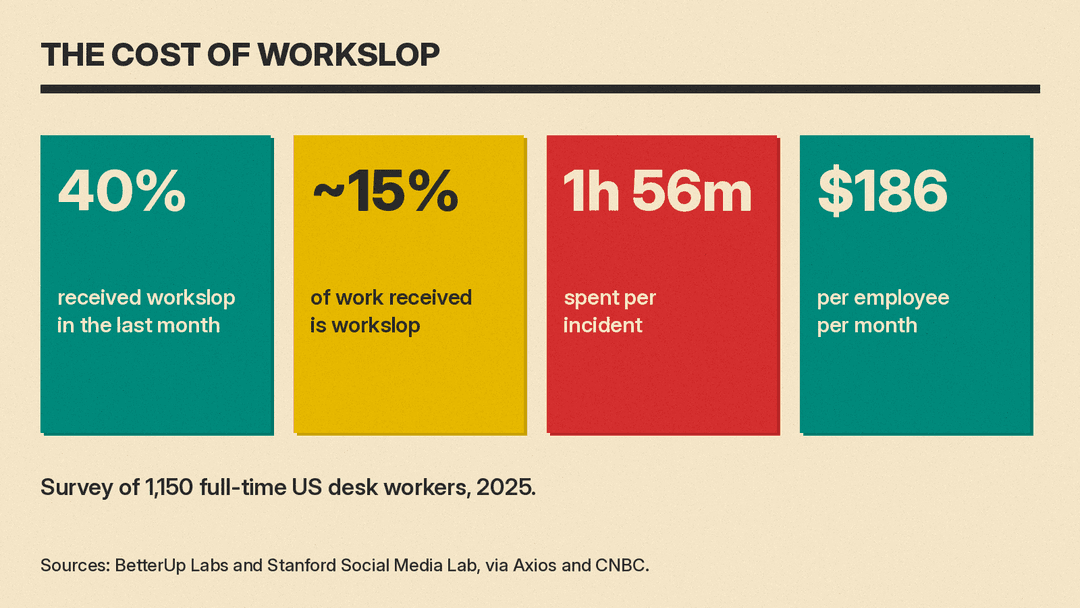
The researchers surveyed 1,150 full-time US desk workers, according to Axios. Key findings from that coverage and BetterUp's own pages:
- 40% said they had received workslop in the last month.
- Respondents estimated that about 15% of the work they receive is workslop (CNBC).
- They reported spending an average of 1 hour and 56 minutes dealing with each instance (Axios).
- The researchers estimated the cost at $186 per employee per month, and more than $9 million a year for a 10,000-person company (BetterUp).
- About half of respondents viewed people who send workslop as less creative, capable and reliable (Axios).
The last point matters most for anyone who writes at work. Low-effort AI output does not only waste a colleague's time. It changes how they see you. A good document builds credit with readers. A hollow one spends it.
Why AI documents lose trust
AI writing tools are good at form: headings, bullet points, confident sentences, a neat summary at the end. They are weaker at the parts a reader actually needs, unless you supply them:
- Your decision or point of view. The model does not know what you think or what you recommend. If you do not tell it, it writes something balanced and empty.
- Real facts from your work. Numbers, names, dates and status come from your systems and your notes, not from the model.
- What the reader needs to do. A model cannot guess who will read the document and what action they should take.
- Proportion. AI tends to give every point equal weight and equal length. Readers need to know which point matters most.
When those parts are missing, the reader has to rebuild them. That is the hidden time cost the survey measured. The fix is not to stop using AI. It is to keep the thinking with you and give AI the parts it does well.
A five-step workflow for documents people trust
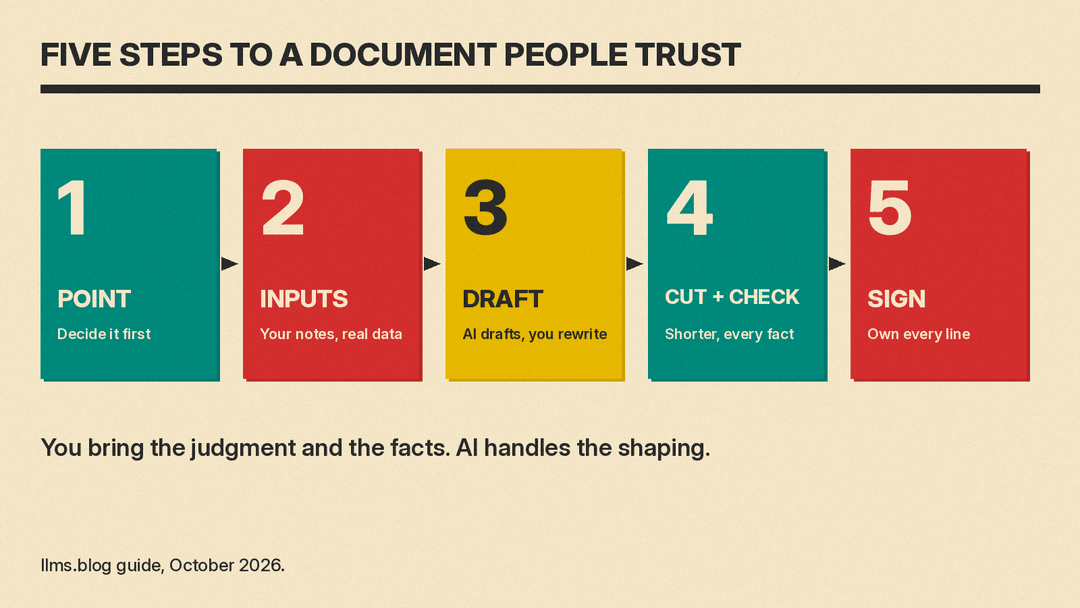
1. Decide the point before you open the AI tool
Write one or two sentences in your own words: what is this document for, and what should the reader do after reading it? For example: "We should move the launch two weeks. I need approval from finance by Friday." If you cannot write that sentence, the document is not ready to draft, and AI will only hide that.
2. Give the AI real inputs
Paste in the material the document must be built on: your notes, the meeting transcript, the actual numbers, the customer email. Tell the model who the reader is and how much time they have. A prompt such as "Write a one-page update for our finance lead. Use only the facts in my notes below. Lead with the decision we need" gives far better results than "write a project update."
Tools like Microsoft Copilot in Word, Gemini in Google Docs, ChatGPT and Claude all work the same way here: the more of your own context you provide, the less the output reads like a template.
3. Let AI draft, then rewrite the top
Use the draft as a starting point. Then rewrite the first paragraph yourself so it states your point and your ask in plain words. The opening is what most readers read. It should sound like you, not like a model.
4. Cut and check
This is the step that separates a useful document from workslop.
- Cut length. Delete sections that do not help the reader act. AI drafts are often two or three times longer than they need to be. Shorter documents signal that someone made choices.
- Check every fact. Every number, name, date and claim should trace back to a source you can point to. If you cannot verify it, remove it.
- Remove filler. Phrases like "in today's fast-paced landscape" and generic closing summaries add length without meaning.
- Read it as the recipient. Ask: would I know what to do after reading this? Would I need to ask a follow-up question that the document should have answered?
5. Sign it
Put your name on the document and be ready to answer questions about anything in it. If your team has an AI use policy, follow it on disclosure. Where there is no policy, a short note such as "Drafted with AI from my notes; I checked the figures" tells readers what to expect. The test is simple: if a colleague asks "why does it say this?", you should know the answer without opening the chat window.
A quick checklist before you send
- The first two sentences state the point and the ask.
- Every number and name comes from a source you checked.
- The document is as short as it can be.
- Nothing in it would surprise you if someone quoted it back to you.
- You could explain every section without the AI tool.
What managers can do
Individual habits help, but teams also set norms. Based on the problem the researchers described, a few practical steps for team leads:
- Ask for the point first. Encourage people to open documents with the decision or request, so polish cannot hide a missing argument.
- Reward short and correct over long and impressive. If long reports get praise, people will use AI to make reports longer.
- Make it safe to say "this is a first draft." Workslop often comes from pressure to look finished. A clearly labeled rough draft is more useful than a polished one with no substance.
- Give feedback on substance. When a document wastes your time, say what was missing (the decision, the data, the owner) rather than only that it "feels like AI."
Where AI helps most in work writing
Used this way, AI saves real time on the parts of writing that are slow but not hard:
- Turning rough notes or a transcript into a first structure.
- Rewriting a dense paragraph in plain language for a wider audience.
- Producing a short summary of a long thread for someone who missed it, which you then check.
- Suggesting what a skeptical reader might ask, so you can answer it in the document.
- Fixing grammar, tone and length after you have written the substance.
The common thread: you bring the judgment and the facts, and AI handles the shaping. Documents written that way still benefit from AI speed, and readers can trust them, because a person stands behind every line.
