
AI can now write a marketing email, suggest a subject line, pick a send time and guess which customers are about to churn. That does not mean it should run your newsletter on its own. The useful setup for most small teams is narrower: let AI do the first draft and the busywork, and keep a person in charge of the list, the offer and the final send.
This guide walks through a five-step workflow that works with the AI already built into common email platforms, and points out the rules your emails still have to follow no matter who, or what, wrote them. Product details are as of October 2026; check each vendor's page before you buy, because these features change often.
What AI is good at in email marketing
Email marketing has a lot of repeatable writing and analysis, which is where current AI tools help most:
- First drafts. Turning a product page, blog post or short brief into email copy. Mailchimp's AI content tool can build email sections from a URL or a text prompt, and HubSpot's AI email writer generates and edits drafts with slash and highlight commands inside its email editor.
- Variations. Writing several versions of a subject line, preview text or call to action so you can test them.
- Segment-specific copy. HubSpot says its writer can draft on-brand messaging for different audience segments, so one campaign can speak differently to new and repeat buyers.
- Pattern spotting. Klaviyo's AI features score customers on predicted lifetime value and churn risk, and its Composer assistant analyzes campaigns, segments and flows to suggest where the revenue opportunities are.
- Timing and delivery. Klaviyo lists personalized send time and channel affinity, and Mailchimp's AI tools page mentions send time recommendations and pre-send tips.
What AI is not good at: knowing your margins, deciding whether a discount is a good idea, or knowing that a customer complained last week. Those calls stay with you.
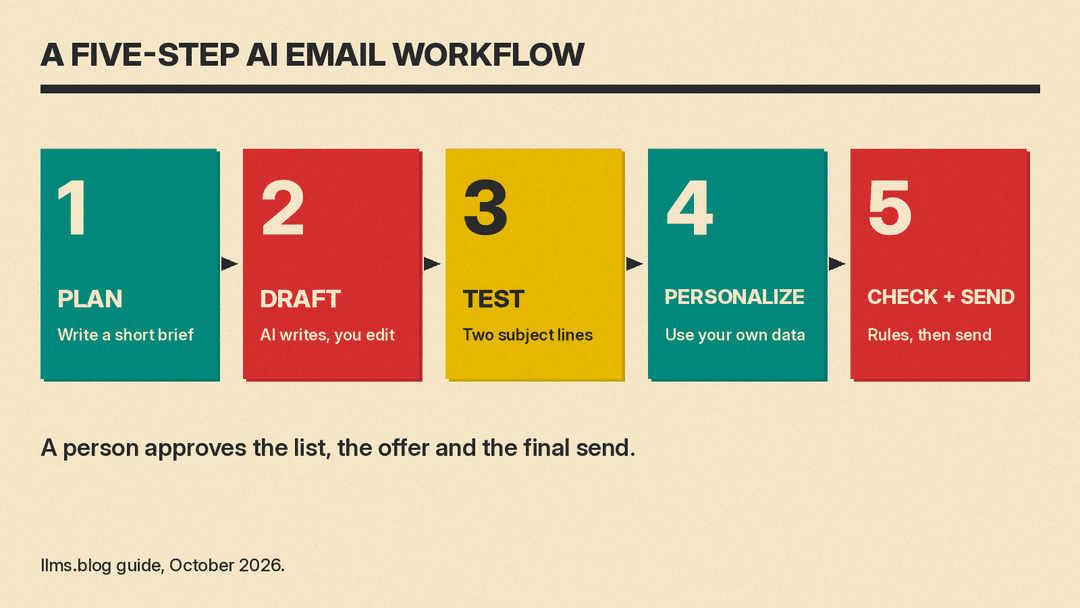
Step 1: Plan the campaign with a short brief
Before you open any AI tool, write a brief of four or five lines:
- Who the email is for (one segment, not "everyone")
- The single action you want readers to take
- The offer or news, with exact dates, prices and terms
- Tone, in a few words ("plain, friendly, no hype")
- Anything the email must not say
The brief matters more than the tool. Vague prompts produce vague drafts, and an AI model will fill gaps with invented details. If the brief contains the real price and the real deadline, the draft is far more likely to get them right.
Some platforms now take the brief directly. Klaviyo says you can tell Composer what you are trying to achieve and it will build the audience, draft the content and map out the send strategy for your review. That is a fast start, but treat its output as a proposal, not a decision.
Step 2: Draft with AI, then edit like an editor
Use the AI writer inside your email platform when you can, because it already sits next to your templates and brand settings. A general assistant such as ChatGPT, Claude or Gemini also works: paste the brief and ask for a draft.
A prompt that works well for a first draft:
Write a marketing email for [segment]. Goal: get them to [action]. Offer: [exact details]. Tone: [tone]. Length: under 150 words. Include one clear call to action. Do not invent product features, prices or dates that are not in this brief.
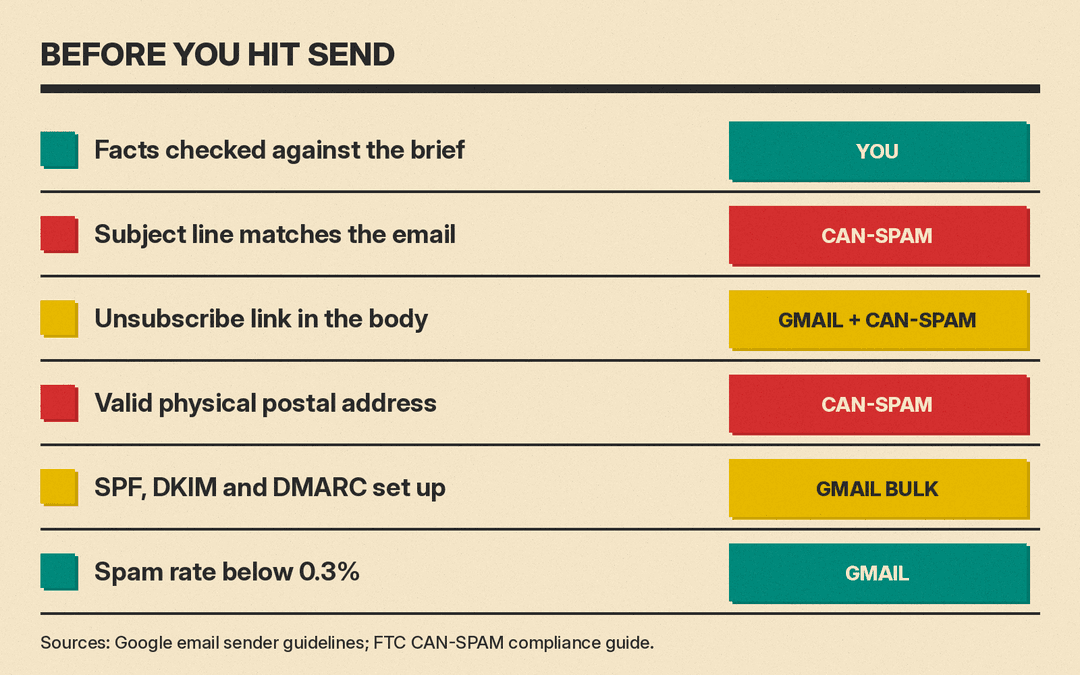
Then edit. Check every fact against the brief, cut filler sentences, and read it out loud once. HubSpot's own advice for AI copy is to proofread every message for spelling, brand voice and tone, and to send yourself a test email before it goes out.
If your platform has a brand voice setting, fill it in once. Mailchimp lets you edit a brand voice in its AI content tool, and Klaviyo lists brand voice AI among its content features. That saves rewriting the same tone notes in every prompt.
Step 3: Write and test subject lines
Subject lines are where AI variations pay off, because you can test them instead of guessing. Ask your assistant for 10 subject lines under about 60 characters, each with a different angle (benefit, curiosity, urgency, a plain statement of the news). Pick two that are clearly different and test them.
Mailchimp's Subject Line Helper gives a useful checklist even if you use another tool. It checks word and character count, punctuation, emoji use, industry patterns and spam risk, and Mailchimp suggests aiming for about nine words or around 60 characters. Its A/B test sends two subject lines to separate parts of your list and automatically sends the winner to the rest; Mailchimp says subject line tests are available on all its paid plans.
Two cautions. First, a subject line must match the email. The FTC's CAN-SPAM compliance guide says subject lines must not be deceptive and must accurately reflect the content of the message, so reject any AI suggestion that promises something the email does not deliver. Second, test one thing at a time. If the subject line and the body both change, you will not know which one moved the result.
Step 4: Personalize with your own data
Real personalization means using what you know about a customer, not just their first name. This is where the AI inside email and CRM platforms has an edge over a general chatbot, because it can see purchase history and engagement.
Examples of what platforms offer, as of October 2026:
- Klaviyo lists predicted customer lifetime value, RFM analysis, churn risk, product recommendations and personalized send times.
- Mailchimp offers AI-powered automation flow templates that use your brand kit to generate on-brand emails. Mailchimp's help page says this is a beta feature, needs a Standard plan or higher, requires a connected store such as Shopify, WooCommerce or Square, and requires an account mailing address in the United States.
- HubSpot builds its AI writer into its marketing and sales tools, so campaign results are logged to the HubSpot CRM.
Start with one or two automated flows where personalization clearly helps, such as a welcome series or a "you left something in your cart" reminder. Review every AI-generated email in the flow before you turn it on. Flows keep sending after you stop looking, so a mistake repeats.
A privacy note: if you paste customer data into a general AI assistant, check your workspace's data settings first, and do not paste more than the task needs.
Step 5: Check the rules, then send
AI does not change the rules for marketing email. Two sets matter for most senders.
Gmail's sender requirements. Google's email sender guidelines say every sender to Gmail accounts must set up SPF or DKIM authentication and keep the spam rate reported in Postmaster Tools below 0.3%. Senders of 5,000 or more messages a day to Gmail accounts must set up SPF, DKIM and DMARC, and their marketing and subscribed messages must support one-click unsubscribe and include a clearly visible unsubscribe link in the body. If you use an email service provider, Google says to verify that it authenticates your domain's email with SPF and DKIM. Google warns that mail that does not meet the requirements might not be delivered as expected or might be marked as spam.
CAN-SPAM in the United States. The FTC's guide lists the main requirements for commercial email, including:
- Accurate "From," "To" and "Reply-To" information
- Subject lines that are not deceptive
- Clear disclosure that the message is an ad
- A valid physical postal address
- A clear way to opt out, honored within 10 business days
The FTC also says you cannot contract away your responsibility: if you hire another company to send your email, both the company being promoted and the sender may be held legally responsible. The same logic applies to AI. If a tool wrote a misleading line, you sent it. This guide is not legal advice; if you email people in other countries, check the rules that apply there too.
Platform AI can help here as well. Klaviyo lists campaign deliverability monitoring, volume warnings and guided warming among its features, and Mailchimp mentions pre-send tips.
Choosing where to start
You do not need a new tool to start. A simple path:
- If you already use Mailchimp, Klaviyo or HubSpot, turn on the AI writing features in the editor you already use. HubSpot says its AI email writing features are free, with premium features in its paid Marketing Hub editions. Mailchimp lists generative AI features on its Standard and Premium plans.
- If you write emails in a plain tool, use a general assistant for drafts and subject line ideas, and keep the testing and sending in your email platform.
- If you run an online store, the store-connected features (product recommendations, abandoned cart flows, churn scores) are usually where AI saves the most time.
Whatever you choose, measure with your own results. Run each change as a test against your usual email, and keep the version that wins on clicks or sales, not on how clever it sounds.
A simple weekly routine
For a small team sending one or two campaigns a week, a workable rhythm looks like this:
- Monday: write the brief and ask AI for a draft and 10 subject lines
- Tuesday: edit the draft, pick two subject lines, build the test
- Wednesday: send, with the test running on part of the list
- Friday: review results and note what won, so next week's brief starts smarter
AI makes each of those steps faster. It does not make the judgment calls, and the emails still go out under your name.
Sources
- Google: Email sender guidelines
- FTC: CAN-SPAM Act, A Compliance Guide for Business
- Mailchimp: Create Email Content with AI
- Mailchimp: AI marketing tools
- Mailchimp: Use Intuit AI with Automation Flow Templates
- Mailchimp: Subject Line Helper
- Mailchimp: Pricing plans
- Klaviyo: AI features
- HubSpot: AI Email Writer
