
AI image tools build pictures from words. Most of the time you focus on what to add: a subject, a setting, a style. Sometimes the harder part is keeping things out. A stranger wanders into your empty street. A pepperoni pizza appears when you wanted a plain one. Random letters show up in the corner of a clean product shot.
Most tools handle exclusion poorly when you write it as a normal sentence. Typing "no people" inside the main prompt can backfire, because the model still sees the word "people" and may treat it as something to include. A negative prompt avoids this by moving the unwanted item into a separate instruction.
This guide explains what negative prompts are, why "no" inside the main prompt fails, how different tools handle exclusions, what to put in the field, and when rewriting the prompt works better. If you want the basics first, read how to write AI image prompts.
What is a negative prompt?
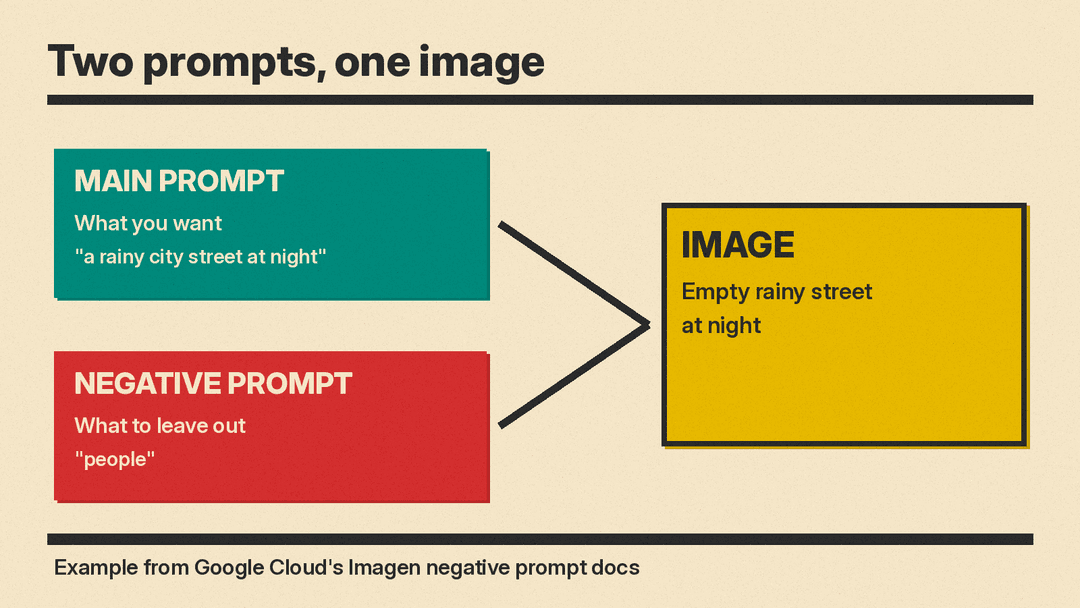
A negative prompt is a description of what you want to omit from a generated image. That is the definition used in Google Cloud's Imagen documentation. It sits next to the main prompt instead of inside it. The main prompt says what to include. The negative prompt says what to leave out.
The docs give a food example. Send the prompt "a pizza" with the negative prompt "pepperoni", and the tool generates a pizza while keeping pepperoni off it.
A second example covers a night scene. The prompt "a rainy city street at night" with the negative prompt "people" asks for a street with nobody in it. The same page lists four example negatives and what each one does:
- "animals" removes animals
- "blurry" makes the image clearer
- "text" removes text
- "cropped" removes cropped images
Two cautions are worth stating early. Not every tool has a negative prompt field, and support can shrink over time. As of November 2026, the Google page says negative prompts are a legacy feature on Imagen. Only three early Imagen 3 models support them, and they are not included in imagen-3.0-generate-002 or newer. The same page lists those three models among deprecated endpoints that Google asked users to move off by June 30, 2026, with gemini-2.5-flash-image as the replacement. Treat the feature as helpful when available, not as something every tool guarantees.
Why "no" in the main prompt often fails
Writing "with no people" or "without any fruit" feels natural, because that is how people speak. A plain way to describe the problem: the model reacts to the words it sees. So "no people" can still put people into the picture.
Google's Imagen docs use the street example to make this point. In the prompt "a rainy city street at night with no people", the model may read "people" as something to include. The better result comes from splitting the request in two: the prompt "a rainy city street at night" plus the negative prompt "people".
Midjourney's documentation shows the same failure from another angle. Its docs label two prompts as bad examples: "still life gouache painting without any fruit", and the same prompt with a polite request not to add fruit. The recommended version moves the exclusions into a dedicated parameter: "still life gouache painting --no fruit, apple, pear".
One detail from the Midjourney docs helps explain what the parameter does. Using --no is equivalent to giving that part of a multi-prompt a weight of -0.5. In plain terms, the listed words get a negative weight, so the image is pushed away from them.
How negative prompts work in different tools
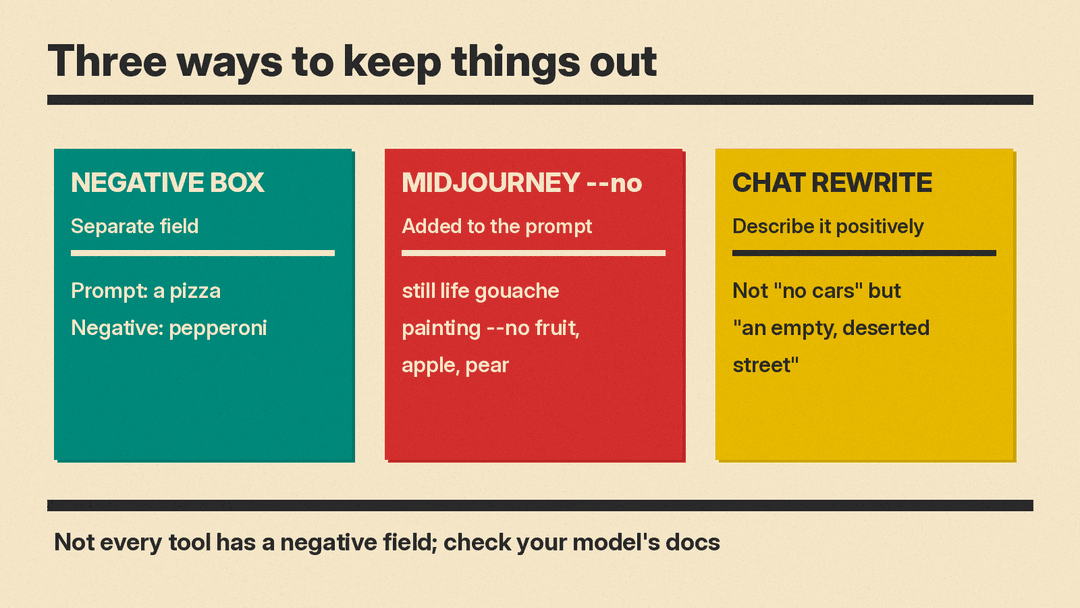
Tools handle exclusions in three common ways: a separate field, a parameter inside the prompt, or a positive rewrite in chat.
A separate negative prompt field. Google's Imagen docs describe a Negative prompt box in the Media Studio settings panel, for the older Imagen models that support it. Tools built on the Hugging Face Diffusers library work similarly. The Diffusers documentation says most of its pipelines steer image generation with classifier-free guidance and an optional negative_prompt. Classifier-free guidance is simply the mechanism that pushes the image toward your words. On Stable Diffusion family pipelines you pass two settings together: guidance_scale, which controls how closely the image follows the prompt, and negative_prompt.
A parameter inside the prompt. Midjourney uses a parameter instead of a separate field. On the web or in Discord, you add --no at the end of your prompt, followed by the things to leave out, separated by commas. For example: "still life gouache painting --no fruit, apple, pear".
A positive rewrite in chat tools. In chat-style tools such as Gemini, where you describe the image in plain language, Google's Gemini image generation guide recommends semantic negative prompts: describing the scene you intend in positive terms, such as writing "an empty, deserted street with no signs of traffic" rather than "no cars".
Support also varies by model age. The Diffusers docs note that on newer models such as Qwen-Image and Flux, negative prompts apply only when true classifier-free guidance is switched on, which means a setting called true_cfg_scale above 1 plus a negative_prompt. They advise checking each model's docs. And as mentioned, Imagen models from imagen-3.0-generate-002 on dropped the feature. The practical takeaway: not every tool has a negative field, and some newer models removed it, so confirm before you rely on it.
What should you put in a negative prompt?
Useful negatives fall into two groups. The first is objects and elements you do not want, such as people, animals, or text. The second is quality problems, such as blurry, distorted, low quality, or cropped.
The Diffusers docs show a quality-focused example: the prompt "a cozy reading nook with afternoon light" paired with the negative prompt "blurry, low quality, distorted".
Here are prompt and negative pairs you can adapt. The first three come from the documentation, and the rest are examples to try:
- Prompt "a pizza", negative "pepperoni", for a plain pizza.
- Prompt "a rainy city street at night", negative "people", for a deserted street.
- Prompt "a cozy reading nook with afternoon light", negative "blurry, low quality, distorted", for a cleaner interior.
- Prompt "a ceramic mug on a plain white background", negative "text, watermark, clutter", for a tidy product shot.
- Prompt "a mountain lake at sunrise", negative "cropped, blurry, people", for an empty landscape.
- In Midjourney, prompt "a still life gouache painting --no fruit, apple, pear", for a painting with no fruit.
Two pieces of advice apply to every list. Keep it short, because a few precise words are easier to reason about than a long pile, and you will know which word did the work. And change one thing at a time, then compare results, so a fix is not confused with luck.
A negative like "text" reduces the chance of stray letters, but tools differ in how they handle rendered words. If legible text in images matters to you, see Flux vs Midjourney vs Ideogram for text in images.
Common negative prompt mistakes
Long laundry lists. Pasting dozens of terms into the negative field makes results harder to interpret. If the image improves or degrades, you will not know which word caused it. Start with a short list and add items only when something unwanted appears.
Two-word phrases in Midjourney. Midjourney's moderation reads every word after --no separately. The docs warn that "--no modern clothing" is read as "no modern" and "no clothing", which can trigger a warning. Their suggested fix: describe the clothing you do want in the main prompt instead.
Using negatives to patch a weak prompt. A negative prompt removes; it does not build. If the scene itself is vague, the fix belongs in the main prompt. Describe the subject, the setting, and the style clearly first, then use negatives for the leftovers.
Guidance set too high. In Diffusers, a higher guidance_scale makes the image follow the prompt more closely, but values that are too high can look unnatural or oversaturated. If results look harsh after you add a negative, adjust the settings rather than piling on more negatives. Our guide to AI image settings like seed and guidance covers how these controls interact.
Expecting a hard guarantee. Treat a negative prompt as a strong hint, not a promise. If an unwanted item still slips in, regenerate or refine the main prompt.
When to skip the negative and rewrite instead
Sometimes the better move is to describe what you want so completely that the unwanted thing has no room to appear. Google's Gemini guide calls these semantic negative prompts. Instead of saying "no cars", you describe "an empty, deserted street with no signs of traffic."
This approach fits modern tools well. The Diffusers docs observe that newer models understand language better than keyword matching, and they recommend a structured narrative of subject, style, and context. Positive rewrites are also the only option when a tool has no negative field.
Rewrites to try:
- Instead of "no cars", write "an empty, deserted street with no signs of traffic".
- Instead of "no people", write "an empty beach at dawn".
- Instead of "no fruit", write "a still life of an empty wooden bowl on a table".
- Instead of "no text or watermark", write "a clean product photo on a plain white background".
- Instead of "no clouds", write "a small boat on a calm lake under a clear blue sky".
One more case does not need a new prompt at all. If you already have an image you like and it contains a single unwanted object, regenerating may cost you everything else about it. Editing the existing image can be the simpler fix. Inpainting lets you mark one region and change only that area, as covered in inpainting and outpainting explained.
Quick checklist
- Write the main prompt first and describe what you want in clear detail.
- Put exclusions in the negative field or the --no parameter if your tool has one.
- Keep the negative list short and specific, and change one item at a time.
- In Midjourney, avoid multi-word phrases after --no and describe the alternative instead.
- If your tool has no negative field, rewrite the prompt to describe the scene positively.
- Check guidance settings if results start to look unnatural or oversaturated.
- Use inpainting to remove one unwanted object from an image you already like.
- Confirm the feature exists for your model, since some newer models dropped negative prompts.
