
A tattoo is permanent, so the design deserves more time than the booking. AI image tools are a fast way to explore ideas, compare styles, and build a reference sheet before you sit down with a tattoo artist. They do not replace the artist. A licensed artist still has to adapt the design to your skin, your body shape, and the way ink settles over the years. Used well, though, AI can turn a vague idea into a clear picture you can show and discuss.
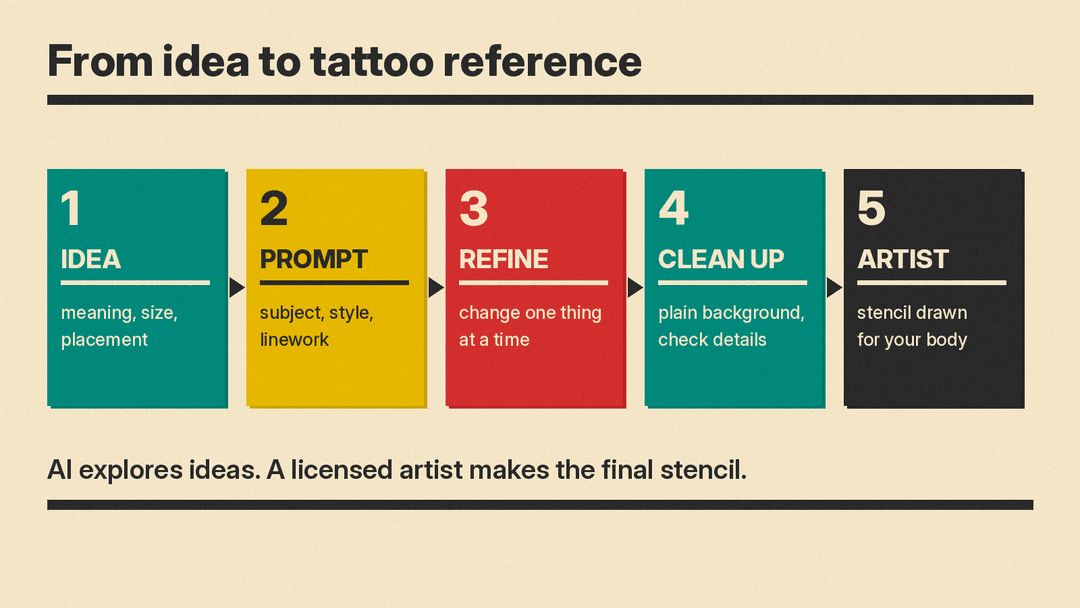
This guide covers the full process: deciding what you want, writing a tattoo prompt, refining the results, cleaning up the image, and taking it to an artist.
Can AI design a tattoo?
AI image tools create pictures from text prompts, and some can also edit an image you upload. OpenAI's image generation guide, for example, describes two basic jobs: generating images from a text prompt and editing existing images with a new prompt. That makes these tools good at sketching many versions of an idea quickly.
What they do not know is how a design behaves on skin. A tool can draw a rose with hundreds of tiny petals, but it cannot tell you whether those petals will stay readable on an ankle. Treat AI output as a reference and a conversation starter. The final stencil should come from your artist.
How do you decide what tattoo to get?
Before you open any tool, write down four things.
- Meaning. Why do you want this tattoo? A memory, a person, a value, a place? Keep it in one sentence. It will help you judge results later.
- Subject. What does the tattoo show? Be concrete. "Sparrow in flight" is more useful than "bird". "Peony with open petals" is more useful than "flower".
- Placement. Where on your body will it go? A forearm, a shoulder blade, a wrist and a ribcage all have different shapes and different amounts of space.
- Size. Roughly how big? Small designs leave little room for detail, so a busy idea may need a bigger area or a simpler drawing.
If you are unsure about size or placement, that is a good first question for an artist. You can still explore ideas with AI while you decide.
How do you write a tattoo prompt?
A prompt is the text you give the tool. General prompt advice applies here. If you are new to it, start with our beginner's guide to AI image prompts.
Adobe's Firefly prompt guide recommends using at least three words, skipping command words like "generate" or "create", and using simple, direct language with a subject, descriptors and keywords. Adobe's text-to-image lesson adds that complete sentences are not needed, that simple phrases separated by commas work, and that longer prompts are not always better.
Midjourney's Prompt Basics gives a similar checklist: subject, medium, environment, lighting, color, mood and composition. Its color examples include black and white and monochromatic, which suit many tattoo styles. It also says short, simple prompts often work best in Midjourney, and that specific numbers beat vague plurals ("three stars", not "stars").
For tattoos, build your prompt from these six parts:
- Subject: what the design shows
- Style: fine-line, traditional, blackwork, illustrative, script
- Linework: bold outlines or thin lines
- Color: black and grey, or a small set of named colors
- Placement: the body area, if it changes the shape (long and narrow for a forearm, round for a shoulder)
- Background: plain white, so the design is easy to read
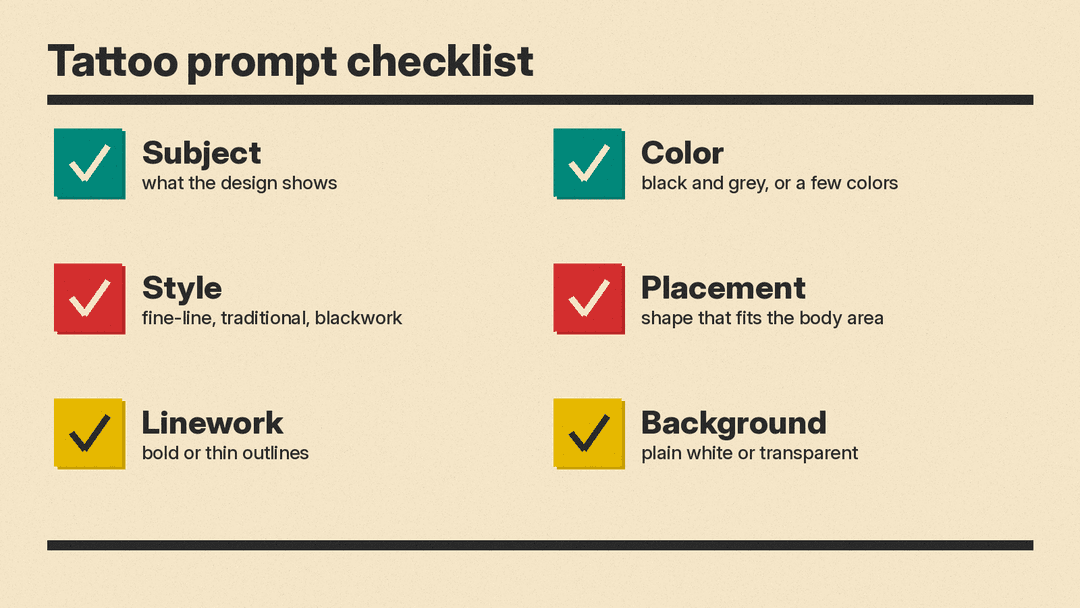
Adobe's structured prompt lesson explains why this helps: when each part of a prompt is its own section, you can edit one part without changing the rest. That is exactly what you want when you like a design but not its line weight.
This approach is close to designing a logo with AI. Both need a simple, bold image that still reads at a small size.
Sample tattoo prompts
Try these as starting points and change one part at a time:
- Fine-line botanical tattoo design, single lavender sprig, thin black lines, plain white background, long vertical shape for a forearm
- Traditional tattoo flash, swallow in flight, bold black outlines, red and blue accents, plain white background
- Blackwork geometric tattoo design, wolf head built from triangles, solid black fill, symmetrical, plain white background
- Minimalist tattoo design, mountain range drawn as one continuous line, black ink, plain white background, small and wide for a wrist
- Japanese-inspired wave tattoo design, curling wave with foam, bold outlines, black and grey, plain white background
- Script lettering tattoo design, the word "breathe" in flowing cursive, thin black lines, plain white background
If you write script or lettering, check every letter in the result. Text in AI images can come out misspelled or with extra strokes, and a typo on skin is hard to fix. You can use the AI image for layout and mood, then ask the artist to letter the words by hand.
How do you generate and refine tattoo ideas?
Start broad. Run your first prompt several times and look at the spread of results. Pick the version closest to your idea, and note what you like about it.
Then refine one change at a time. If the subject is right but the style is not, keep the subject and swap the style. If lines are too thin, ask for bold outlines. Adobe's guide gives the same basic advice: if you do not like the results, reword the prompt.
Describe what you want rather than what you do not want. Midjourney's Prompt Basics notes that asking for a party with "no cake" can still produce cake. To exclude something in Midjourney, use its no parameter at the end of the prompt instead.
If you already have a sketch, a photo of a meaningful object, or an older tattoo you want to extend, try image editing. Many tools can redraw an uploaded image in a new style or change one area. Our guide to inpainting and image-to-image editing explains how that works.
How do you clean up an AI tattoo design?
AI images often need cleanup before they make a useful reference. Check these points:
- Background. A plain white or transparent background makes the design easier to read and to place on a body photo. OpenAI's image guide says its API supports transparent backgrounds when you request PNG or WebP output.
- Linework. Look for broken lines, wobbly edges and lines that merge. Ask the tool for clean, even outlines, or mark the problem for your artist.
- Small details. Tiny text, very fine patterns and dense shading may not hold up at a small size. Ask your artist whether the detail suits the placement.
- Color. If you want color, keep the palette short and the shades clearly different. Your artist can tell you which colors work for your skin.
- Shape. Arms, legs and shoulders curve. A design that looks balanced on a flat screen may stretch on a curved surface. Print it or place it on a photo of the body area to check.
Line art for tattoos has a lot in common with printable outlines. Our guide on how to make coloring pages with AI has more tips for getting clean, closed lines from an image tool.
How do you work with a tattoo artist?
Bring your best two or three AI images, plus notes on what you like about each: the subject in one, the line weight in another, the layout in a third. A clear reference saves time and helps the artist understand your taste.
Expect changes. The artist may simplify details, thicken lines, resize the design, or rework it to follow the shape of your body. That is the point of the visit. Some artists draw their own version from a reference, so ask how they like to work before you book.
Do not use AI to copy another artist's existing tattoo or flash. If you love an artist's style, the respectful route is to book that artist.
Before you book
The FDA's tattoo safety page says tattoos are permanent and lists possible problems, including infections, allergic reactions and difficulties with removal. It also notes that the practice of tattooing is generally regulated by local jurisdictions. Choose a licensed studio, ask about aftercare, and talk to a doctor if you have health questions.
Common mistakes to avoid
- Treating the AI image as the final design. It is a reference. The stencil comes from your artist.
- Too much detail for the size. Simplify, or choose a larger placement.
- Not checking the text. Read every letter of any lettering in the image.
- Changing everything at once. Edit one part of the prompt per round so you can see what each change does.
- Rushing. Live with your favorite design for a while before you book. If you still like it later, that is a good sign.
