
You can learn the basics of AI from scratch with free courses, a browser and a few hours a week. The catch is order. Hands-on AI courses list Python and some math as prerequisites, so starting with one can stall you. This guide lays out a 12-week order that starts with no code and ends with a small project.
The 12-week split is our suggestion, not a requirement from any course. The time estimates, prerequisites and prices below come from each course's own page, checked in October 2026. Courses change, so check the page before you enroll.
Who this plan is for
This plan is for someone who uses tools like ChatGPT or Claude but does not know how they work, and wants to understand AI well enough to build something small. You do not need a computer science degree. You do need about four to six hours a week and a laptop with a modern browser.
If you already write code for a living, skip ahead to the "Learn how machine learning works" stage. If you want a full career path into AI engineering, our AI engineer roadmap goes further than this plan.
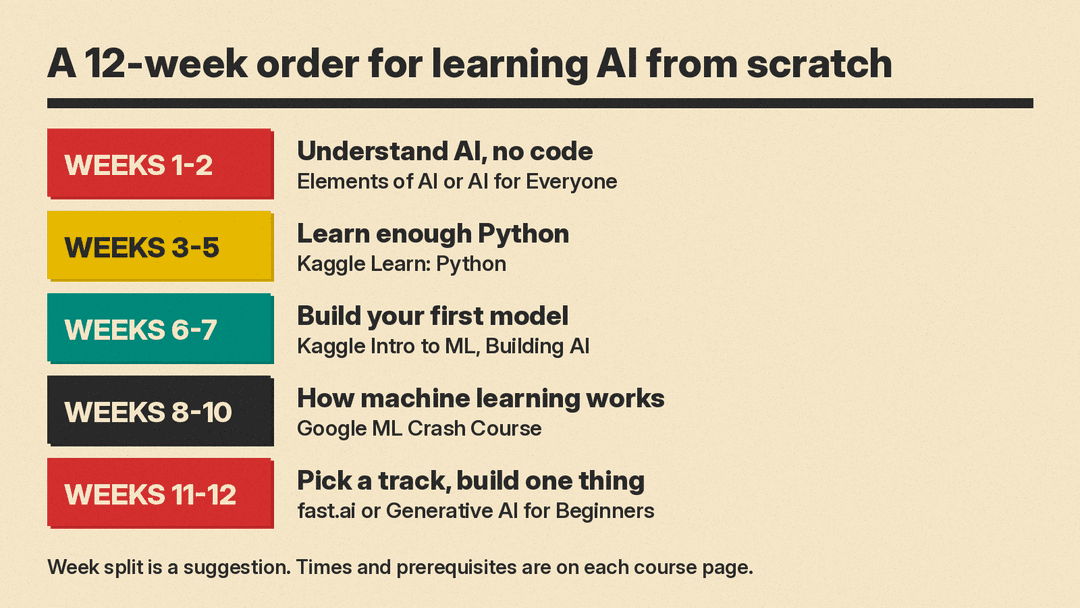
Weeks 1 and 2: Understand what AI is, with no code
Start with ideas before tools. Two courses are aimed at non-technical learners.
Elements of AI: Introduction to AI. Elements of AI is a series of free online courses created by MinnaLearn and the University of Helsinki. The site describes its Introduction to AI course as being for anyone who wants to learn what AI is, what it can and cannot do, and how it affects our lives, with no complicated math or programming required. The courses can be completed at your own pace and mix theory with practical exercises.
AI for Everyone. Andrew Ng's AI for Everyone is called a non-technical course by DeepLearning.AI. Its course page lists it as a beginner course of 6 hours 54 minutes, with 35 video lessons and 4 graded assignments marked PRO. DeepLearning.AI's free plan includes all course videos; the graded assignments and the certificate need a paid PRO membership. The same course is on Coursera, which lists it at 7 hours with "No prior experience required."
Pick one of the two. Elements of AI says its course covers what AI is and how it affects our lives. The AI for Everyone page lists skills such as AI terminology, AI strategy and the workflow of machine learning projects, and its later weeks cover building AI in your company and AI and society.
Optional: learn to work with AI tools. Anthropic's AI Fluency: Framework and Foundations was built with Prof. Joseph Feller (University College Cork) and Prof. Rick Dakan (Ringling College of Art and Design). The course has moved to Anthropic's Claude Academy, which lists 14 lessons, about 4 hours and one quiz; its old Anthropic Academy page lists it as free. Anthropic says it teaches you to collaborate with AI "effectively, efficiently, ethically, and safely," and a final assessment earns a completion badge.
Google's AI Essentials covers similar everyday use. Google lists it as under 5 hours across 5 modules with no experience required. It is not free: in the US and Canada, Google says the subscription costs $49 per month after a 7-day free trial.
Weeks 3 to 5: Learn enough Python
Almost every hands-on AI course uses Python, so this is the stage you should not skip.
Kaggle Learn: Python. Kaggle's Python course has 7 lessons, from "Hello, Python" to working with external libraries. Kaggle estimates 5 hours to earn the certificate, and lists the cost as "No cost, like all Kaggle Learn Courses."
If you have never written any code, the Python course page lists Kaggle's Intro to Programming course as the one it builds on. Start there.
The official Python tutorial. The Python Tutorial on python.org is free and thorough, but it says it "is designed for programmers that are new to the Python language, not beginners who are new to programming." Use it as a reference after Kaggle, not as a first course.
Five hours of lessons is not the same as five hours of learning. Give yourself the full three weeks to redo exercises and write small scripts of your own.
Weeks 6 and 7: Build your first model
Now put Python to work on real data.
Kaggle Learn: Intro to Machine Learning. Kaggle's Intro to Machine Learning has 7 lessons, starting with how models work and moving through data exploration, your first model, model validation, underfitting and overfitting, random forests and machine learning competitions. Kaggle estimates 3 hours and lists it at no cost.
Elements of AI: Building AI. The second Elements of AI course, Building AI, is free and covers "the actual algorithms that make creating AI methods possible." The site recommends some basic Python skills to get the most out of it, which you will have by now.
Weeks 8 to 10: Learn how machine learning works
Going by its prerequisites, this stage asks the most of you. It is where you learn what a model is doing, not only how to run one.
Google Machine Learning Crash Course. Google's Machine Learning Crash Course is a free introduction with animated videos, interactive visualizations and hands-on exercises. Its modules cover regression and classification models, working with data, neural networks, embeddings and an introduction to large language models, plus real-world topics like fairness and production systems.
Read the prerequisites page before you start. Google says the course "does not presume or require any prior knowledge in machine learning," but recommends that you be comfortable with "variables, linear equations, graphs of functions, histograms, and statistical means." It also says "You should be a good programmer," ideally with some Python. Programming exercises run in the browser on Google Colab with no setup.
Google suggests that people new to machine learning take its short Introduction to Machine Learning course first, and do its NumPy and pandas Colab tutorials if those libraries are new. The page also links background material on algebra, linear algebra and statistics, so you can fill gaps as they come up rather than front-loading math.
Weeks 11 and 12: Pick a track and build one thing
By now you know the core ideas. The last two weeks are about going deeper in one direction and finishing a small project. Pick one track.
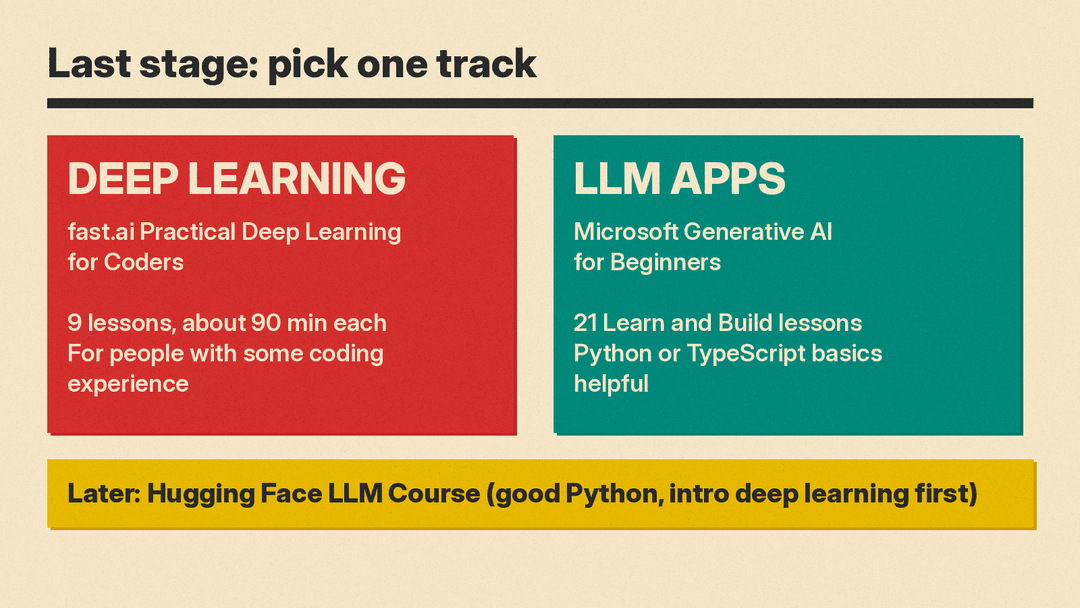
Track: deep learning. fast.ai describes Practical Deep Learning for Coders as a free course for people with some coding experience who want to apply deep learning and machine learning to practical problems. It has 9 lessons, each around 90 minutes, and is based on a book that is "freely available online." The site says you do not need special hardware or software, and that the course shows how to use free resources. Nine lessons will not fit in two weeks, so treat this as the start of the track. If you need free GPU time, our guide to free GPUs for AI covers Colab, Kaggle and student credits.
Track: building apps with large language models. Microsoft's Generative AI for Beginners is an MIT-licensed GitHub course of 21 lessons. Lessons are labeled "Learn" (concepts) or "Build" (concepts plus code examples in Python and TypeScript when possible), and each lesson covers its own topic, so you can start where you like. The repository says basic knowledge of Python or TypeScript is helpful. Later lessons cover topics such as AI agents and fine-tuning. Our explainer on what RAG is is useful background for the search and retrieval lessons.
Later: the Hugging Face LLM Course. The Hugging Face LLM Course is "completely free and without ads," and moves from the Transformers library to fine-tuning, dataset curation and reasoning models. It is not a beginner course. Hugging Face says it requires a good knowledge of Python and is better taken after an introductory deep learning course, and it names fast.ai's course as one example. Save it for after the 12 weeks.
Your project. Keep it small: a model trained on a public dataset, or a simple app that answers questions about your own notes. Write a short README that says what it does and what did not work. If you plan to use it in a job search, our guide on building an AI portfolio explains what to include.
How to stay on track
- Keep a fixed weekly slot. Four to six hours a week, on the same days, is easier to protect than a vague goal.
- Type the code yourself. After you run a notebook, try rewriting it from a blank cell and changing one thing at a time.
- Use a chatbot as a tutor, not a shortcut. Ask it to explain an error or a line of math, then close it and try again.
- Treat certificates as optional. Several courses here offer one, some only on a paid plan. If you want a credential, our guide to AI certifications compares cost and format.
- Slow down, do not skip. If the Machine Learning Crash Course stage feels too hard, go back to Python for another week. The plan bends; the order matters more than the dates.
For more options at each stage, see our list of free AI courses and our picks of YouTube channels for learning AI.
Sources
- Elements of AI (MinnaLearn and University of Helsinki)
- AI for Everyone, DeepLearning.AI
- AI for Everyone, Coursera
- AI Fluency: Framework and Foundations, Anthropic Academy
- AI Fluency: Framework and foundations, Claude Academy
- Google AI Essentials
- Kaggle Learn: Python
- Kaggle Learn: Intro to Machine Learning
- The Python Tutorial, python.org
- Google Machine Learning Crash Course
- Machine Learning Crash Course prerequisites
- Machine Learning Crash Course update, Google blog
- Practical Deep Learning for Coders, fast.ai
- Generative AI for Beginners, Microsoft on GitHub
- Hugging Face LLM Course
