
Ideogram has released Vector 1.0, its first model that outputs SVG files instead of flat pixel images. You can describe a logo, label or illustration and get back a vector file, or upload an existing image and have it converted. The company announced the model on October 22 and says it is live in the Ideogram app, through its API, and on partner platforms.
For anyone who has tried to turn an AI image into a usable logo, this targets the hardest step. Most image generators hand you a grid of pixels. Vector 1.0 hands you shapes you can select, recolor and resize.
What Ideogram Vector 1.0 does
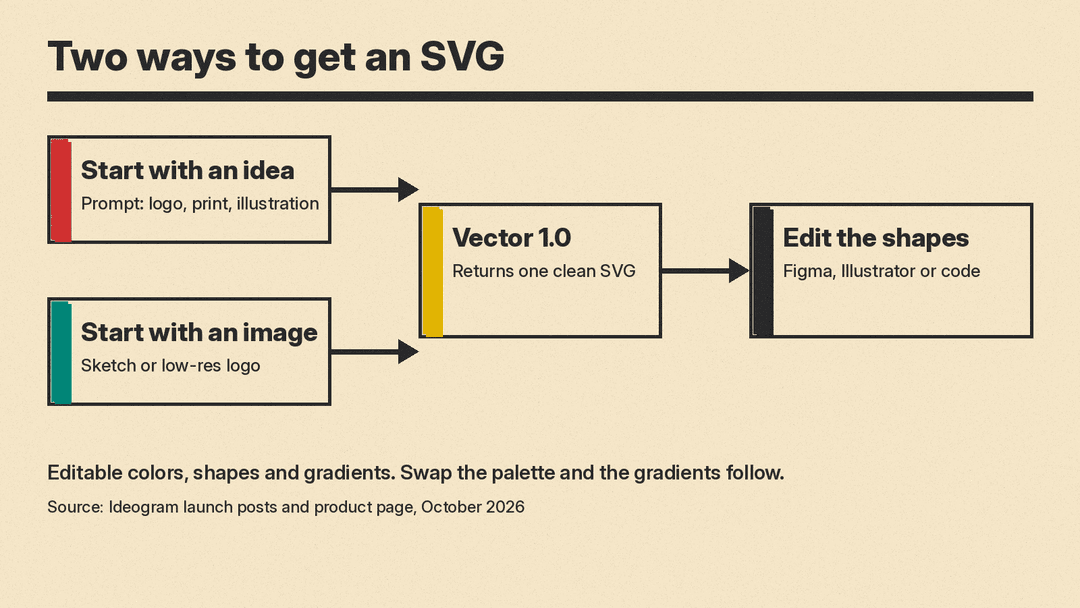
Ideogram describes two ways to start, on its Vector product page and in its launch post on LinkedIn:
- Start with an idea. Write a prompt for a logo, a print design or an illustration, and the model generates it as an SVG.
- Start with an image. Upload a sketch or a low-resolution logo, and the model returns a detailed vector you can scale and refine.
The company lists the kinds of work it is aimed at: logos, wordmarks, lettering, illustrations and technical drawings. Its product page groups examples into typography, illustrations, logos and branding, print and merch, and labels and stickers. Ideogram says illustrations come in several styles, including engraving, pop art, flat color and line art, and that each design is a single clean SVG.
The output keeps its parts separate. Ideogram says every design has editable colors, shapes and smooth gradients, and that when you swap the palette, the gradients follow.
Why an SVG matters
A normal AI image is a raster file: a fixed grid of colored pixels. Blow it up for a poster and it gets soft or blocky. Change the brand color and you are repainting pixels.
SVG works differently. MDN describes SVG as an XML-based markup language for describing two-dimensional vector graphics. In plain terms, the file is a set of instructions for drawing shapes, not a picture of them. Ideogram makes the same point in its launch post: "An SVG is code, so edits are exact."
That has three practical effects, all of which Ideogram highlights on its product page:
- Sharp at every size. The same file can go on a small label or a large poster with crisp edges.
- Brand colors. You can change the colors to match a brand, product or collection.
- Individual shapes. You can select and refine one element, such as an accent shape in a wordmark, in your vector editor.
Ideogram says the files can be edited in Adobe Illustrator or Figma, or in code. It also suggests asking a coding agent to restyle the file, which works because the SVG is text a program can read and change.
Text is the selling point
Ideogram built its reputation on spelling words correctly inside AI images. The launch post leans on that history: "Ideogram was the first to get text right in AI images. Vector 1.0 brings that to SVG." The company says the model handles expressive typography, from wordmarks to hand lettering to labels, drawn as clean shapes for print and digital.
That pairing is the useful part. A logo is usually a few shapes plus some lettering. If the lettering comes out as editable vector shapes, a designer can kern it, recolor it or swap one letter without redrawing the whole mark.
How to try it
Ideogram says Vector 1.0 is live on all plans in the Ideogram app. Developers can call it through the Ideogram API, and the company says it is also on partner platforms, though the launch posts do not name them.
The product page shows the kind of prompt that works. One example asks for "a heart-shaped logo made entirely from soft green lettering on a black background," with bold, rounded letters curving to fill the heart. Another asks for "a flat vector illustration of a woman relaxing in a beach chair under a blue-and-white umbrella." Both describe flat shapes, a small set of colors and a clear layout, which suits vector output better than a request for photographic detail.
If you are new to writing prompts for images, our guide on how to write AI image prompts covers the basics.
API pricing
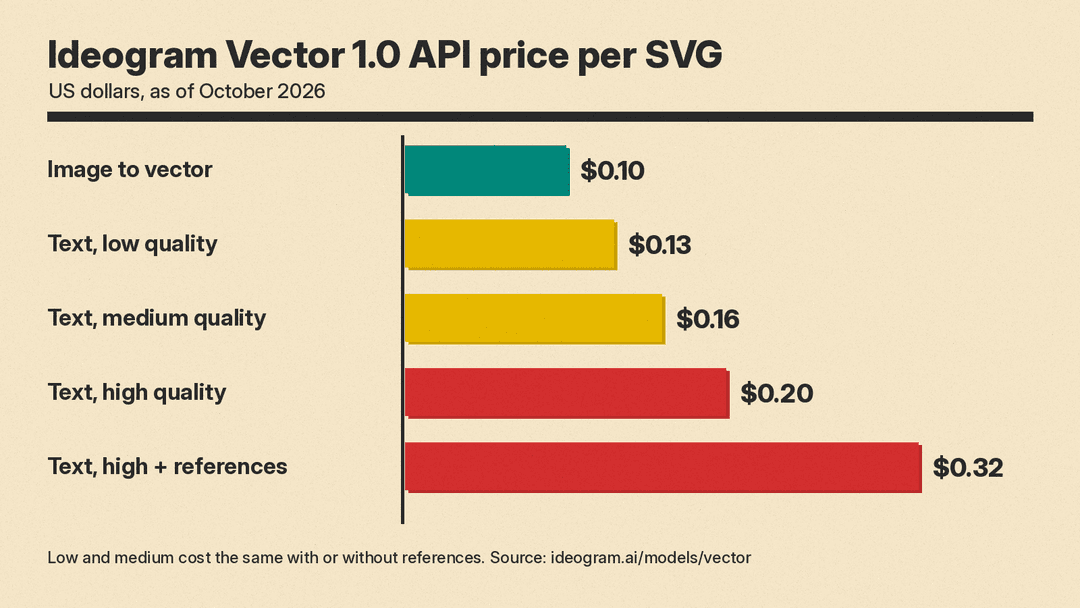
Ideogram publishes per-file API prices on the Vector page, in US dollars, as of October 2026:
- Text to vector, low quality: $0.13 per SVG, with or without references.
- Text to vector, medium quality: $0.16 per SVG, with or without references.
- Text to vector, high quality: $0.20 per SVG from a prompt only, or $0.32 with references.
- Image to vector (convert an existing image): $0.10 per image.
These are API prices. The launch posts say the model is on all app plans but do not say how vector generations count against plan limits in the app.
Where it fits
The release landed on a busy day for design AI. The Inference reported that Canva announced Craft, its first in-house image model, on the same day, October 22. Both companies are chasing the same goal: AI output a designer can keep working on, rather than a finished picture that has to be traced or redrawn. We covered Canva's model in Canva Craft Explained.
For small businesses and solo creators, Vector 1.0 shortens the path from idea to a usable logo file. You still need to judge the design, check that it is original, and clean up details. But a file that opens in Illustrator or Figma with every shape intact removes the tracing step that has made AI logos awkward to use.
For a full walkthrough of that process, see our guide to designing a logo with AI, which publishes on llms.blog this week.
Sources
- Ideogram: AI Vector Generator, Ideogram Vector product page and API pricing
- Ideogram on X: launch announcement, October 22
- Ideogram on X: typography post in the launch thread, October 22
- Ideogram on X: illustration styles post in the launch thread, October 22
- Ideogram on X: gradients and availability post in the launch thread, October 22
- Ideogram on LinkedIn: Introducing Ideogram Vector 1.0
- The Inference: Canva launches its own Craft image model as Ideogram prices editable design files
- MDN Web Docs: SVG
