
Canva has built its own image generator. Canva Craft, announced on October 22, is the first image model that Canva Research, the company's in-house AI lab, has built and trained from scratch. Until now, Canva has used a range of image models for generation on its platform, TechCrunch reports. Canva says Craft is built specifically for design, and lists posters, social posts, flyers, ads and presentation visuals among its uses.
This guide covers what Craft is, how it works, how it ranks, where you can use it and what is still missing.
What Canva Craft is
Craft is a text-to-image model built for design. According to Canva's announcement, it:
- Generates images at up to 2K resolution.
- Supports more than 30 aspect ratios, or a custom size you enter yourself.
- Accepts prompts in any language and can render text inside the image in 55 languages.
- Is available to all Canva users globally, starting on launch day.
Canva says researchers from Leonardo.ai, the image platform it acquired in 2024, contributed to the model, according to TechCrunch.
How it works: plan first, then draw
Canva says conventional image models generate pixels directly from a prompt. Craft splits the job in two.
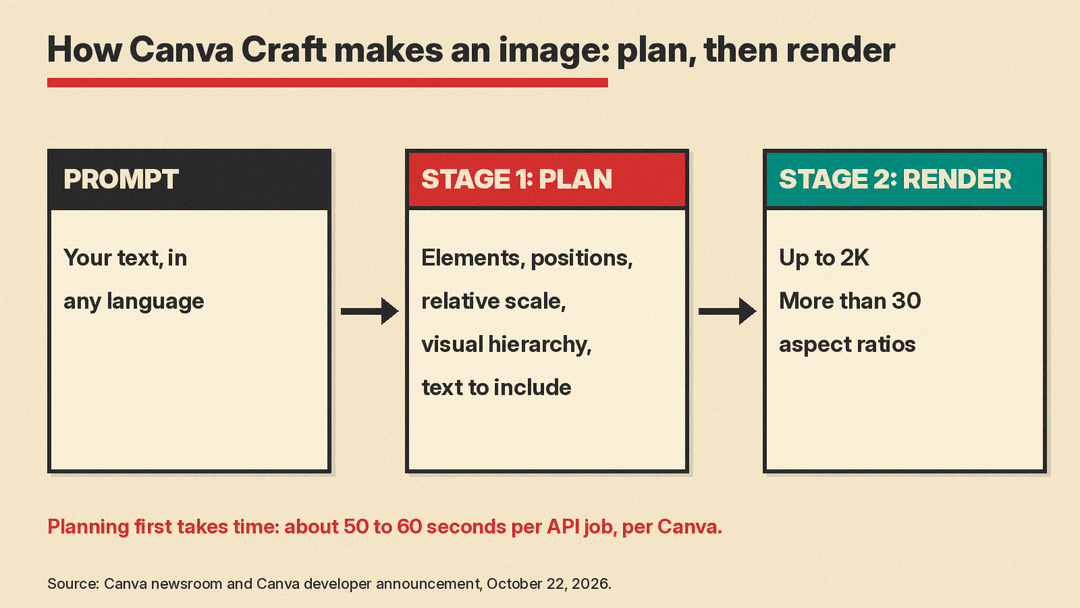
- Stage 1, planning. An image planning model reads your prompt and writes a detailed plan of the composition: which elements appear, where they sit relative to each other, their relative scale, the visual hierarchy, and any text that must appear.
- Stage 2, rendering. A separate image rendering model turns that plan into the final image, at up to 2K across more than 30 aspect ratios.
Canva's argument is that planning the layout and typography before rendering gives more legible text, more precise object placement and more consistent relationships between elements. The company also says the structure allows targeted changes to one element without altering everything else.
There is a cost to this approach. Canva's developer announcement says that because Craft plans before it renders, a job takes longer than with the other models in its API: roughly 50 to 60 seconds end to end.
Trained on templates, not only photos
The second difference is the training data. Canva says most image models are trained mainly on photographs, while Craft's training puts much more weight on design. Its data includes millions of human-made templates from Canva's content library, including posters, social posts, presentations, infographics, menus and typography-heavy layouts. MOSS-Image, an open-weight model, also targets this kind of work; see our MOSS-Image explainer on text-heavy posters and infographics.
The idea is that a template shows the model how layout, hierarchy and type fit together, not just what a finished image looks like. After pre-training, Canva says it tuned Craft with supervised fine-tuning and reinforcement learning, using feedback from its professional designers to improve instruction following, typography accuracy and overall visual quality. For internal evaluations, those designers and dozens of researchers compared more than 25,000 pairs of images head to head against leading models. Canva says that when automated scores and human judgments disagreed, it sided with the designer.
How Craft ranks
Canva cites DesignArena, a crowdsourced leaderboard for AI design. These are the company's own figures from launch:
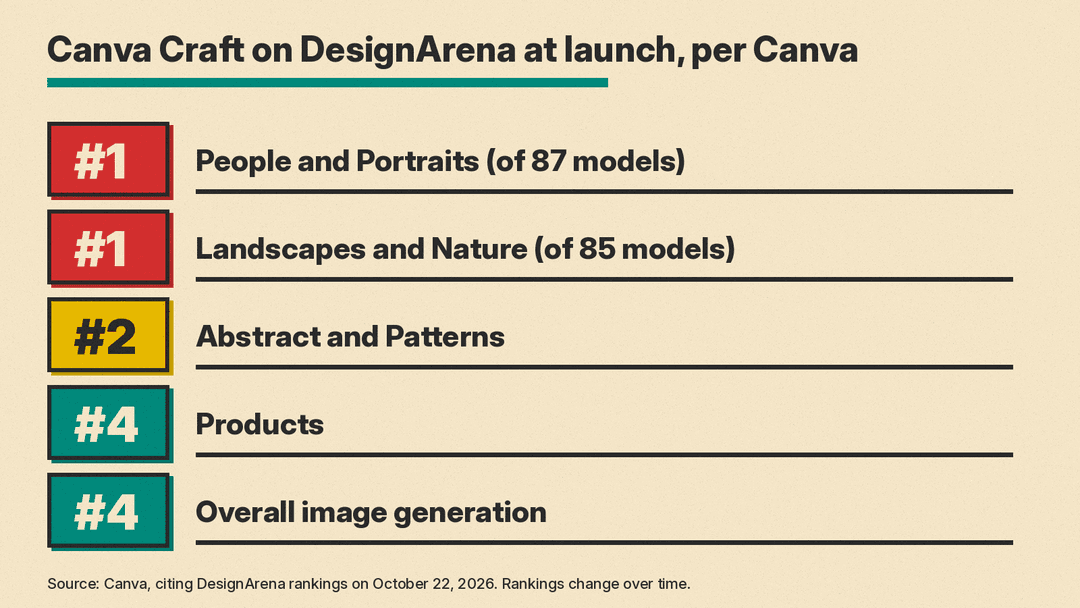
- Craft debuted as the fourth-ranked image generation model on DesignArena.
- That makes Canva Research the second-ranked lab for image generation, by Canva's reading of the rankings.
- First for People and Portraits (out of 87 models) and first for Landscapes and Nature (out of 85 models).
- Second for Abstract and Patterns, and fourth for Products.
Crowdsourced leaderboards move as new models arrive and votes come in, so treat these as launch-day positions. Canva's announcement does not list which models rank above Craft overall.
Craft and Magic Layers
The most practical part of the launch for designers is how Craft connects to Magic Layers, the Canva tool that turns a flat image into an editable, multi-layered design. Magic Layers restores text as live text boxes, separates objects into elements you can move, and keeps the background behind them.
Because Craft treats an image as a composition of layered elements, Canva says its outputs are especially well suited to Magic Layers. The announcement says "JSON boundary boxing" makes converting Craft images into editable layers more accurate and faster. In practice, that means you can generate a poster, then open it as a design and fix a headline or move an object without generating the whole thing again.
How to try Canva Craft
For regular Canva users:
- Open Canva and go to Dream Lab in the bottom left panel.
- Write a prompt and pick an aspect ratio, or enter a custom size.
- Name the elements you want. Canva's own example: ask for a purple sky, long shadows and a lone tree, and you should get all three, with the emphasis where you wanted it.
- If you need to edit text or move elements, convert the result with Magic Layers.
Canva lists the uses it has in mind: marketing assets such as posters, flyers, ads and presentation visuals; lifestyle and editorial photography; illustration in flat, vector, painterly and hand-drawn styles; portraits and groups; landscapes, interiors and architecture; and conceptual work.
For developers
Craft is also in Canva's public API. Per the developer post, which notes that the API is a preview and breaking changes may occur:
- Set the
modelvalue tocraft_v1_2kon the image generation endpoint to pin Craft. - Each job uses the user's AI credits, the same as other models.
- If Craft is unavailable when pinned, the job fails with
model_not_available. You can retry, or drop the pin and let Canva pick another model. - The API offers square, landscape and portrait aspect ratios for now, with more coming.
Canva also says Craft will connect to AI assistants and automated workflows through the Canva MCP Server, which is marked as coming soon. TechCrunch reports that Canva plans to support image generation in third-party chatbots such as ChatGPT and Gemini this way.
Safety
Craft sits under Canva Shield, the company's AI safety program. Canva says that covers input and output moderation, privacy and safety controls, and tools to report harmful or misleading content. The developer post adds that rejected prompts return an unsafe_input error.
What is still missing
- Faster versions. Canva says two cheaper, faster variants, Craft-fast and Craft-ultrafast, are coming but not yet released. It credits model distillation, which it says cut the number of inference steps to a fraction of the original model, and a custom inference engine for the planning stage, which it says made Craft an order of magnitude faster than its first internal version.
- Fine detail. Canva says it is still working on fine print and technical drawings.
- Editing and references. Canva describes advanced editing and reference-image features as coming in future releases.
- Pricing. The launch post does not list a per-image price for Canva users. In the API, jobs draw on the user's AI credits.
Why it matters
Canva already has a large audience. The company says more than a quarter of a billion people use it, creating over 400 designs every second. Canva told TechCrunch that, besides costs, its own model gives it better control over quality and speed. TechCrunch adds that the model is likely to help Canva save on API costs compared with relying on outside models.
For users, the bigger point is the design focus. Craft is Canva's bet that a model trained on templates, and that plans a layout before it draws, will produce images that work as designs, not only as pictures. Whether that holds up beyond leaderboards is something users can now test themselves in Dream Lab. To compare it with other tools, see our roundup of the best AI image generators.
