
Google has added a file editor to the Gemini app. In an announcement on October 29, 2026, the company said users can now "generate, preview, and edit" documents, PDFs, presentations, spreadsheets, code and more without leaving the chat.
The update builds on an earlier feature. In April, Google let Gemini create files such as PDFs, Word and Excel files, and Google Docs, Sheets and Slides from a prompt. For most formats, Google said, you could then download the file or export it to Drive. The new update adds a preview and an editor inside the chat.
What the update does
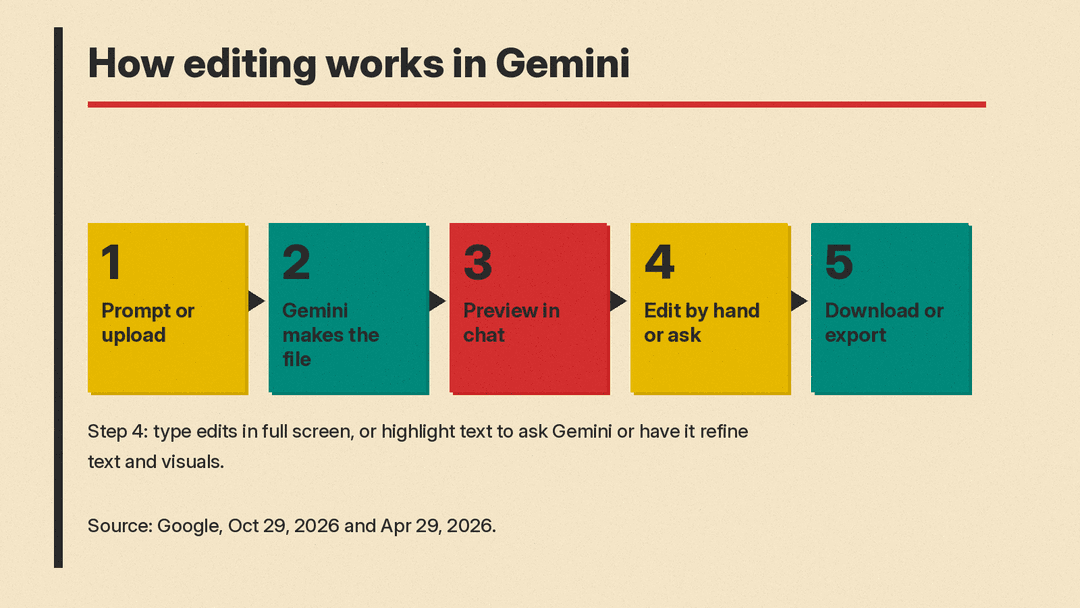
According to Google, you can work on a file in the chat in four ways:
- Preview it in the chat. Google says you can preview files right within your chat.
- Expand to full screen and type edits. Google says you can type edits directly.
- Highlight text to ask questions. Select a passage and ask Gemini about it.
- Ask Gemini to refine the file. Have Gemini make the changes. In Google's demo, the user highlights sections so Gemini can edit the text or visuals.
Google's example is a student workflow. In a demo video, a user uploads handwritten lecture notes, asks Gemini for a PDF study guide, then edits the guide by hand, highlights sections for Gemini to revise, and asks follow-up questions about the material.
Where it works
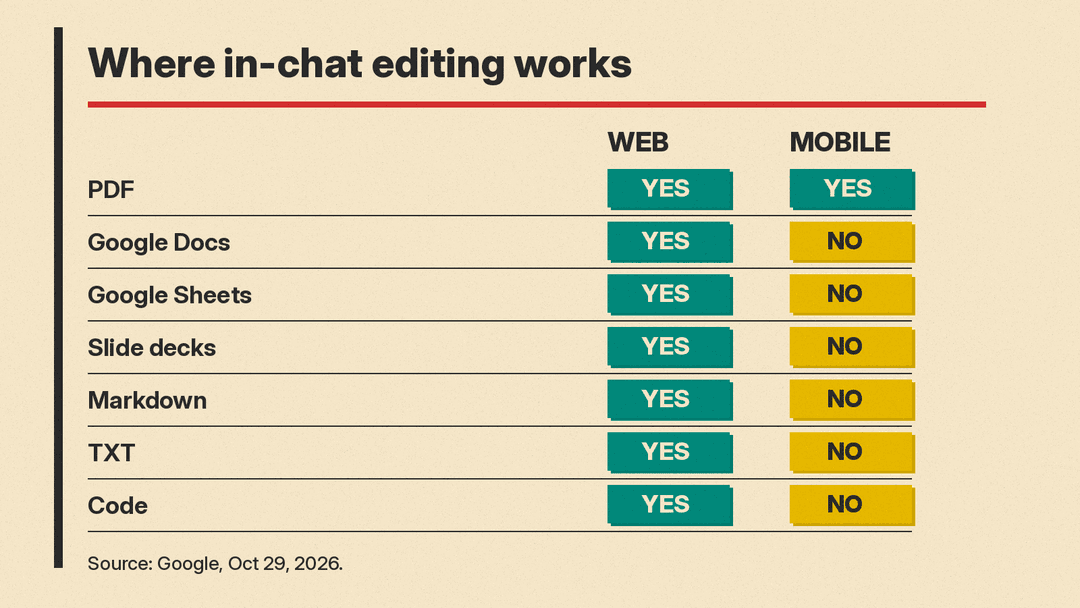
Support differs by platform, and this is the main limit to know about:
- PDFs: preview and editing work on both web and mobile.
- Everything else: Google Docs, Google Sheets, slide decks, Markdown files, TXT files and code are supported on the web only.
So if you mostly use Gemini on a phone, the new editor is mainly a PDF tool for now. Google did not say when, or whether, the other formats will come to mobile.
Who gets it
Google says the features are "now available to all users in all languages where Gemini app is available." The announcement does not mention a paid plan requirement. It does not describe a staged rollout either. The availability line is about languages; the post does not list countries.
How it fits with file creation and uploads
The editor sits on top of two features Gemini already had.
The first is file creation. Google's April post lists the formats Gemini can generate: Workspace files (Docs, Sheets and Slides), PDF, .docx, .xlsx, .csv, LaTeX, plain text, Rich Text Format and Markdown. For most formats you can download the result or export it to Drive.
The second is uploads. Gemini's help page on uploading files says you can add up to 10 files in one prompt, subject to availability. Each video can be up to 2 GB, and other supported files up to 100 MB. You must be signed in to upload, and Google AI plans get higher upload limits. That is how you get your own material, such as lecture notes or a draft report, into the chat so Gemini can turn it into something new.
With the editor in place, the loop becomes: upload or describe what you need, let Gemini produce a file, fix it in the preview, then download or export it. The new post does not say how export works for an edited file; the April post says most generated formats can be downloaded or exported to Drive.
Why it matters
Small fixes to a generated file, such as a heading, a cut paragraph or one wrong number, can now happen in the chat instead of in another app. That lets Gemini users fix a file and keep asking questions about it in one place. Gemini already had Canvas, a side panel where you can create or edit a doc, app, slides or code, per Google's Canvas help page. Google's new post does not say how the file editor relates to Canvas.
It also fits Google's education push. The same day, Google said Gemini Notebook now offers hundreds of textbooks from U.S. and Indian providers at no charge, and it published a study on Gemini as a tutor. A study guide that a student can edit and question in the chat fits that push.
There are limits worth stating plainly. Google's post is short and does not cover version history, collaboration, tracked changes, or how edits sync back to a Google Doc or Sheet that already lives in Drive. If you rely on those, keep your final copy in Docs or Sheets for now and treat the Gemini editor as a drafting space.
How to try it
Based on Google's description, the steps are:
- Open Gemini on the web for the widest format support, or the mobile app for PDFs.
- Ask Gemini to create a file, or upload your own material and ask Gemini to turn it into one, for example "Make a one-page PDF study guide from these notes."
- Open the file preview and expand it to full screen.
- Type your own edits, or highlight a passage and ask Gemini to rewrite it or explain it.
- When you are done, download the file or export it to Drive. Google's April post says most generated formats support this.
For more on working with files in AI tools, see our guide on how to summarize a PDF with AI, our look at Fill with Gemini in Sheets, and our explainer on Gemini Notebook.
Sources
- Google: You can now generate, preview, and edit documents, PDFs, presentations, spreadsheets, and more directly in Gemini
- Google: You can now generate files in Gemini
- Gemini Apps Help: Upload and analyze files in Gemini Apps
- Google: Gemini Notebook makes hundreds of textbooks available
- Gemini Apps Help: Create docs, apps and more with Canvas
