
Running an AI model "locally" means the model file sits on your own computer and your own processor works out the answers, not a company's servers. You download the model once. After that you can chat with it with the Wi-Fi off.
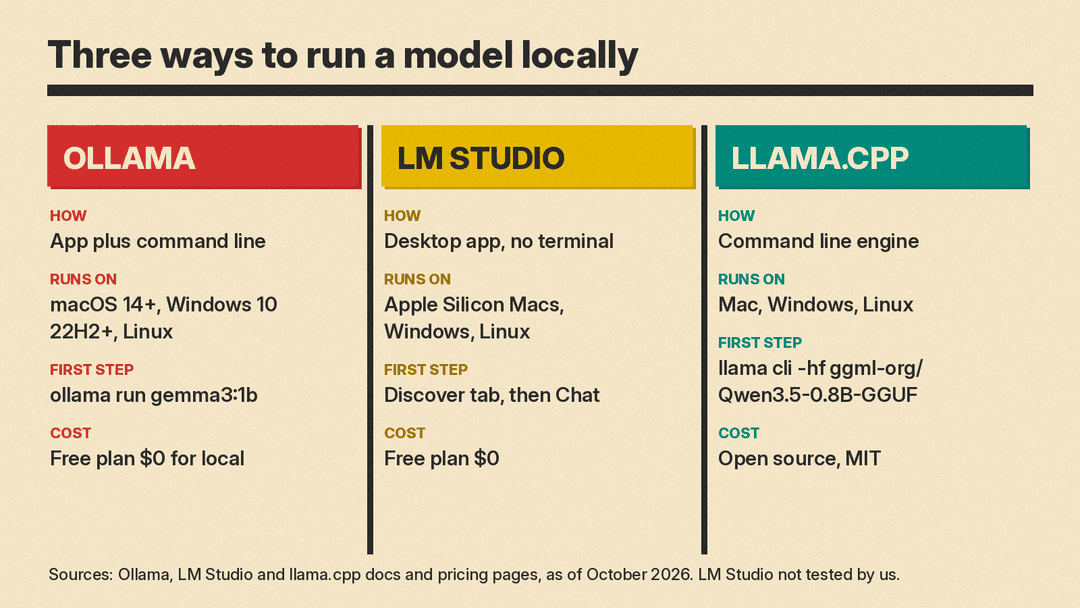
This guide covers three free ways to do that, as of October 2026: Ollama (an app plus a simple command line), LM Studio (a point-and-click desktop app) and llama.cpp (the open source engine, for people who like a terminal). We installed Ollama and llama.cpp on a Linux machine with no graphics card and ran small models on it. Our real commands, outputs and speeds are below. We did not test LM Studio; that section follows its official docs.
Why run a model on your own computer
- Privacy. Ollama's FAQ says: "Ollama runs locally. We don't see your prompts or data when you run locally." LM Studio's offline docs say that once a model is on your machine, "Nothing you enter into LM Studio when chatting with LLMs leaves your device."
- Offline use. LM Studio says chatting, chatting with documents and running a local server do not need the internet. Searching for and downloading models do.
- Cost. Ollama's pricing page lists a Free plan at $0 that includes running models locally; its paid plans add cloud usage credits and features. LM Studio's pricing page lists a $0 Free plan to "Run local LLMs on your machine." llama.cpp is open source under the MIT license.
The trade-off: models that fit on a laptop are much smaller than the ones behind the big cloud chatbots. Expect simpler answers and more mistakes.
What hardware you need
The vendors give these guidelines:
- LM Studio on a Mac (system requirements): Apple Silicon (M1 to M4), macOS 14.0 or newer, 16 GB or more of RAM recommended. LM Studio says you "may still be able to use LM Studio on 8GB Macs, but stick to smaller models and modest context sizes." Intel Macs are currently not supported.
- LM Studio on Windows: x64 or ARM (Snapdragon X Elite). x64 CPUs must support AVX2. At least 16 GB of RAM and at least 4 GB of dedicated graphics memory (VRAM) are recommended.
- Ollama on a Mac (macOS docs): macOS Sonoma (v14) or newer. Apple M series chips get CPU and GPU support; Intel Macs run on the CPU only.
- Ollama on Windows (Windows docs): Windows 10 22H2 or newer, Home or Pro. NVIDIA cards need driver 551.61 or newer.
- A mid-size model: Ollama's quickstart says the Gemma 4 E2B download is about 7.2 GB and recommends 8 GB of available VRAM, or unified memory on a Mac. With less, "Ollama can use system RAM, but responses may be slower."
- Disk space: Ollama warns that models "can be tens to hundreds of GB in size." The 1B-class models below are under 1.5 GB each.
You do not need a graphics card to start. Our test machine had none and about 4 GB of free RAM, and a 1B model ran. If you are shopping for hardware for much bigger models, see our post on the Apple M5 Ultra Mac Studio for local AI.
Option 1: Ollama, step by step
Ollama is a simple start if you are willing to type a command or two. Its code is on GitHub under the MIT license, and the repository is active, not archived.
Install it
- Mac: download from ollama.com/download, open
ollama.dmgand drag the app into Applications. On first start the app checks for theollamacommand and asks permission to add it if it is missing. - Windows: run
OllamaSetup.exefrom the same page. It does not need Administrator rights and installs in your home folder. Allow at least 4 GB of disk space for the install, plus space for models. Ollama then runs in the background, and theollamacommand works in Command Prompt or PowerShell. - Linux: run the installer from the Linux docs:
curl -fsSL https://ollama.com/install.sh | shOn Mac and Windows you can also just open the app and "follow the setup prompts." The quickstart says you can sign in to use cloud models or choose a local model. Local models need no API key.
Run your first model
Open a terminal (Terminal on Mac, PowerShell on Windows) and type:
ollama run gemma3:1bOllama downloads the model the first time (806 MB for this one) and opens a chat. Type a question and press Enter. Type /bye to leave.
Useful commands
From Ollama's CLI reference and FAQ:
ollama pull gemma3:1bdownloads a model without starting a chat.ollama lslists your downloaded models.ollama psshows loaded models and whether they sit in system memory (CPU) or graphics memory (GPU).ollama stop gemma3:1bunloads a model. By default Ollama keeps a model loaded for 5 minutes after use.ollama rm gemma3:1bdeletes a model from disk.- In a chat, wrap text in
"""to paste several lines.
Option 2: LM Studio, step by step
LM Studio is a desktop app for macOS, Windows and Linux with a chat window, so you never need a terminal. It runs models with llama.cpp and, on Apple Silicon Macs, can also use Apple's MLX (LM Studio docs). Its home page now leads with "LM Studio Bionic," an agent app; the plain LM Studio app is still on the download page, which listed version 0.4.26 when we checked. We did not install or test LM Studio. These steps follow its getting started guide:
- Download and install LM Studio. On Linux it comes as an AppImage.
- Open the Discover tab (Cmd+2 on Mac, Ctrl+2 on Windows and Linux). Pick a curated model or search by name, such as "gemma" or "qwen."
- Choose a download option. Names like
Q4_K_MorQ8_0are copies of the same model at different levels of "quantization," which, per the download guide, shrinks the file "while giving up some degree of quality." LM Studio's advice: "Choose a 4-bit option or higher if your machine is capable enough for running it." - In the Chat tab, open the model loader and select the model. Loading sets aside RAM for it.
- Start chatting.
You can also drag documents into a chat. The docs say that processing stays on your machine.
Option 3: llama.cpp, for people comfortable with a terminal
llama.cpp is the open source engine LM Studio runs on. It is MIT licensed and its repository is active. The README states its main goal as "to enable LLM (and VLM) inference with minimal setup and state-of-the-art performance on a wide range of hardware."
The README's quick start offers a one-line installer:
# Mac or Linux
curl -LsSf https://llama.app/install.sh | sh

# Windows (PowerShell)
irm https://llama.app/install.ps1 | iex
Prebuilt binaries, Docker and source builds are also listed. On Mac and Windows there is Llama, a menu bar or system tray app "by the llama.cpp team and Hugging Face" that its site calls free, open source and offline-capable.
Then download and chat with a model straight from Hugging Face:
llama cli -hf ggml-org/Qwen3.5-0.8B-GGUFllama serve -hf ggml-org/Qwen3.5-0.8B-GGUF starts a local server that other apps can call like the OpenAI API. For an engineer-level comparison of these engines, see our guide to local LLM inference frameworks in production.
Which model to start with
Start small. Sizes are from the Ollama library tag pages and Hugging Face, as of October 2026:
- gemma3:270m (Google): 292 MB, text only, 32K context window.
- gemma3:1b (Google): 806 MB, text only, 32K context window. The one we tested.
- qwen3.5:0.8b (Qwen): 1.2 to 1.3 GB in Ollama, text and image input, 256K context window. The ggml-org GGUF build for llama.cpp is 563 MB at Q4_0 and 834 MB at Q8_0.
- llama3.2:1b (Meta): 1.3 GB, text only, 128K context window. The 3B version is 2.0 GB.
- gemma3:4b: 3.4 GB, text and image input, 128K context window. A step up when 1B feels too limited.
- gemma4:e2b: 4.6 to 7.5 GB depending on the version. Ollama's quickstart uses it, so check your memory first.
The "context window" is how much text the model can keep in view at once. Each model has its own license. Gemma 3 ships with Google's Gemma Terms of Use, and the Qwen3.5 0.8B GGUF is listed as Apache 2.0. Browse more at ollama.com/library or in LM Studio's Discover tab.
Our test results
Tested October 19, 2026, on a CPU-only Linux machine (Debian 13, 8 CPU cores, about 4 GB of free RAM, no graphics card). The machine is shared with other jobs, so treat the speeds as rough. Only Ollama and llama.cpp were tested.
Ollama 0.40.6 with gemma3:1b
- The first install attempt stopped with "ERROR: This version requires zstd for extraction." After
sudo apt-get install zstd, the installer finished in about 10 seconds. - Our machine does not run systemd, so we started the server with
ollama servein a second terminal, as the manual install docs show. ollama pull gemma3:1bfailed on our sandboxed network, which routes downloads through a private address that Ollama refuses. This is specific to our setup. We fetched the same files from Ollama's registry with curl, checked their SHA-256 checksums, and ranollama pull gemma3:1bagain. It verified them and finished.- Once loaded,
ollama psshowed the 806 MB model using 1.2 GB of memory.
Commands were ollama run gemma3:1b "<prompt>" --verbose --nowordwrap. Real outputs, wrapped for width:
>>> Explain in two sentences what a large language model is.
Large language models are AI systems trained on massive amounts of text
data to understand and generate human-like text. They can then respond to
prompts, answer questions, and create different kinds of content based on
the patterns they've learned.
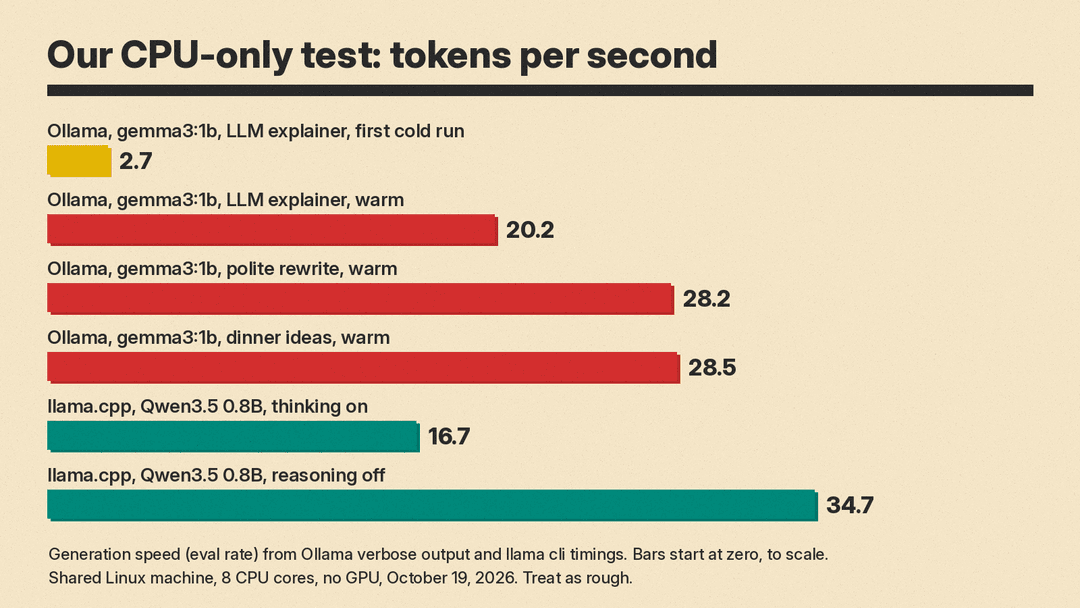
(48 tokens, 20.2 tokens per second, 2.5 seconds total)

>>> Give me three ideas for a quick vegetarian dinner. One line each.
1.  Sheet pan veggie and tofu with lemon and herbs.
2.  Black bean and corn quesadillas.
3.  Mediterranean vegetable pasta with chickpeas and olives.
(38 tokens, 28.5 tokens per second, 1.4 seconds total)

>>> Rewrite this sentence to sound more polite: Send me the report now.
Here are a few options for rewriting the sentence to sound more polite,
depending on the context:
Option 1 (Most generally polite): "Could you please send me the report now?"
Option 2 (Slightly more formal): "Would you mind sending me the report as
soon as possible?"
[two more options, then it asked who the message was for; trimmed]
(179 tokens, 28.2 tokens per second, 6.5 seconds total)
Those runs had the model already loaded. On the very first run, loading took 3.8 seconds and the answer came at 2.7 tokens per second (21.5 seconds total) while the machine was busy. In that first pass, one prompt sat almost 5 minutes before it began to answer. A token is roughly a word or part of a word.
llama.cpp with Qwen3.5 0.8B
- The
llama.appinstaller finished in about 6 seconds (build b11706). - Our first
llama cli -hf ggml-org/Qwen3.5-0.8B-GGUFrun, at default settings, was killed when the shared machine ran out of memory. Adding-c 4096(a 4,096-token context window) fixed it. llama.cpp picked the Q8_0 file. - By default the model "thinks" out loud first. It spent our whole 256-token limit planning and never reached the answer (16.7 tokens per second).
- With
--reasoning offit answered in 5.1 seconds at 34.7 tokens per second:
llama cli -hf ggml-org/Qwen3.5-0.8B-GGUF -c 4096 --reasoning off \
  -p "Explain in two sentences what a large language model is." -st -n 256

A large language model (LLM) is a sophisticated artificial intelligence
system trained on vast amounts of text data to understand, generate, and
recognize human language.
We asked for two sentences and got one. Expect slips like that from very small models.
Prompts to try on your local model
Small models do best with short, clear tasks. Paste these after ollama run gemma3:1b or into LM Studio's chat:
Explain what a VPN does in three short sentences, for someone who is not technical.Rewrite this email to sound friendly but firm: [paste your email]Summarize this text in five bullet points: [paste text]Give me a packing list for a two-day work trip. Short bullet points.Turn these notes into a to-do list, most urgent first: [paste notes]
For more on phrasing, see our beginner's guide to writing better AI prompts.
Limits and troubleshooting
- It is slow. Try a smaller model and close heavy apps. Run
ollama ps: Ollama's FAQ says "100% CPU" means the model is entirely in system memory, and its quickstart says responses from system RAM may be slower. The first answer after loading is slower than later ones. - It runs out of memory. Pick a smaller model or quantization (LM Studio suggests 4-bit or higher). A bigger context window needs more memory, per Ollama's context length docs; our llama.cpp crash went away with
-c 4096. Ollama defaults to a 4K context under 24 GiB of VRAM. - Free up memory now.
ollama stop <model>unloads a model instead of waiting 5 minutes. - Linux error about zstd. Install
zstd(for examplesudo apt-get install zstd) and rerun the installer. - Squares in the Windows terminal. Ollama's Windows docs say its progress display can show as unknown squares in some older Windows 10 terminal fonts. Change the font.
- Answer quality. A 1B model is not the same as the much larger models behind cloud chatbots. In our tests the models mostly followed instructions but missed one. Check facts, and do not rely on small local models for medical, legal or money decisions.
FAQ
Is it really free? The local parts are. Ollama's and LM Studio's Free plans are $0, and llama.cpp is MIT-licensed. Paid plans add cloud usage and extras.
Does it work without internet? Yes, once the model is downloaded. LM Studio's docs say search and downloads need a connection; chatting does not.
Do I need a graphics card? No. Our test machine had none. Ollama's docs note that without enough graphics memory it uses system RAM, and responses may be slower.
Which option should I pick? No terminal at all: LM Studio. Fine with one command: Ollama. Want the engine itself: llama.cpp or its Llama app.
Can other apps use my local model? Yes. Ollama serves an API at http://localhost:11434, LM Studio can run a local server with OpenAI-style endpoints, and llama serve does the same for llama.cpp.
Sources
- Ollama quickstart
- Ollama Linux install docs
- Ollama macOS docs
- Ollama Windows docs
- Ollama CLI reference
- Ollama FAQ
- Ollama context length docs
- Ollama pricing
- Ollama download page
- Ollama on GitHub
- Ollama library: gemma3
- Ollama library: qwen3.5
- Ollama library: llama3.2
- Ollama library: gemma4
- LM Studio docs
- LM Studio getting started
- LM Studio: download an LLM
- LM Studio system requirements
- LM Studio offline operation
- LM Studio pricing
- LM Studio download page
- llama.cpp on GitHub
- Llama app by the llama.cpp team and Hugging Face
- ggml-org/Qwen3.5-0.8B-GGUF on Hugging Face
