
A resume prompt that says "make my resume better" gets you a resume that sounds like everyone else's. The prompts below work differently. Each one gives ChatGPT your real material, a narrow job, and one hard rule: do not invent anything. You stay the author. ChatGPT does the first pass, the gap checks, and the rewording.
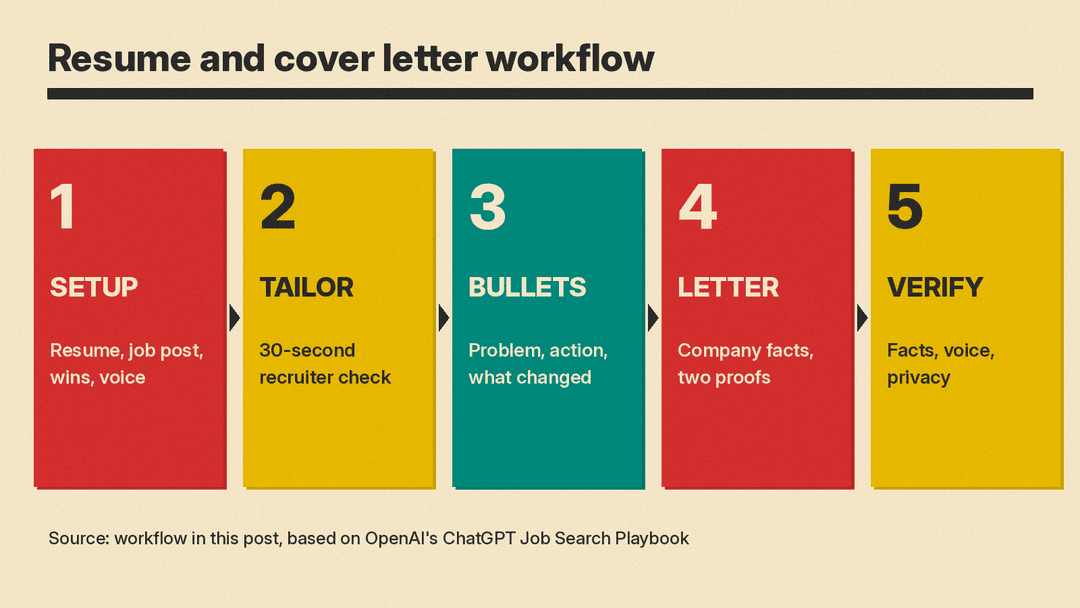
This guide has 30 copy-paste templates in five groups: setup, tailoring to a job post, resume bullets, cover letters, and final checks. The workflow follows OpenAI's own ChatGPT Job Search Playbook (OpenAI Forum, February 2026) and the Helping Job Seekers with ChatGPT prompt pack from Goodwill Keystone and OpenAI Academy. Where a prompt comes straight from one of those pages, we say so.
A note on testing: we did not run these templates for this post, and we show no sample outputs. Results change with the model, your plan, and what you paste in. Treat every output as a draft you check line by line.
What you need before you start
OpenAI's playbook suggests one dedicated ChatGPT thread for your whole job search, so context stays in one place. It also suggests a small "input bundle" you build once:
- Your current resume
- 2 to 5 target job descriptions (paste the text, or the key sections)
- 2 writing samples in your real voice (an email, a memo, a LinkedIn post)
- 8 to 12 work wins, projects, or proud moments, as rough bullets
- Your constraints and non-negotiables (location, pay, schedule, travel, values)
The wins list matters most. ChatGPT cannot know what you did. If the list is thin, the bullets will be thin, or worse, padded with claims you cannot defend in an interview.
Privacy first. The Goodwill and OpenAI Academy guide says to keep out SSNs, bank information, full addresses, and highly sensitive details. Strip your street address and phone number from the resume before you paste it; you can add them back at the end. If you do not want your chats used to train OpenAI models, OpenAI's Data controls help page says to open Settings, select Data controls, and turn off "Improve the model for everyone." Temporary chats, per the same page, do not appear in history and are not used to improve OpenAI models, but may be kept for up to 30 days for safety purposes.
If you are new to prompting in general, our beginner's guide to writing better AI prompts covers the basics these templates rely on.
Setup prompts (1 to 4)
Run these once, at the top of your job search thread.
1. Set the ground rules
The three rules in quotes come from OpenAI's playbook. Paste them first so every later prompt inherits them.
For this whole conversation, follow these rules:
"Preserve my voice based on these samples."
"Do not invent metrics, titles, tools, timelines, or scope."
"Flag anything that sounds generic, inflated, or unverifiable."

Writing sample 1:
"""[paste]"""
Writing sample 2:
"""[paste]"""

Reply only with "Ready" and a one-line summary of my writing style.
2. Load your evidence
Here is my current resume and my list of work wins. Do not rewrite anything yet.

Resume:
"""[paste resume, contact details removed]"""

Wins:
"""[paste 8 to 12 rough bullets]"""

List any win that is missing a detail a hiring manager would want: scope, the decision I made, or the result. Ask me one question per gap.
3. Set the output format
The playbook suggests three versions of every output: one to paste, one with notes, and a list of questions.
For every rewrite in this thread, give me three parts:
1. A clean version I can paste.
2. The same version with a short note on why each change was made.
3. A list of clarifying questions where information is missing.
4. Define your target role
Interview me about what I want next. Ask 10 questions, one at a time. When we finish, write a target profile with: top 3 role types, top 2 industries, top 10 search keywords, 5 strengths I will lead with, and 5 non-negotiables written as rules I can test (for example "No on-call rotation").The playbook's version asks for 20 questions. Ten is enough for a first pass; ask for more if the profile feels vague.
Tailoring to a job post (5 to 10)
5. The 30-second recruiter check
This prompt is quoted from OpenAI's playbook.
"Act as a recruiter with just 30 seconds. Here is the job description and my resume. List knockout risks, missing signals, and the top five fixes."

Job description:
"""[paste]"""
6. Explain the job in plain words
Adapted from the Goodwill and OpenAI Academy prompt pack, which uses it to make long postings readable.
Explain this job in plain words. List the top 5 tasks and the top 5 skills it needs, in order of how much the posting stresses them.

Job description:
"""[paste]"""
7. Map your experience to the job
Map my experience to the top 10 responsibilities in this job description. For each one, quote the evidence from my resume or wins list. If I have no evidence for a responsibility, write "No evidence" instead of stretching something.8. Reorder, do not rewrite
The playbook advises tailoring by "selecting and reordering bullets for each role type" rather than writing new claims.
Using only bullets that already exist in my resume and wins list, choose and reorder them so the first third of my resume matches this job's top priorities. Show the new order and say which priority each bullet supports. Do not change any wording yet.9. Find the keyword gaps you can honestly fill
List the skills and terms this job description uses that do not appear in my resume. Sort them into two groups:
A. Things my wins list shows I have done, so I can add the term honestly.
B. Things I have no evidence for.
For group A, suggest where the term fits. For group B, suggest nothing.
10. Translate your job title
From the playbook's role-discovery step, useful for career changers.
Given my experience summary below, propose 12 job titles across industries that fit my real work, including alternate titles recruiters use. For each, list the top 8 search keywords and 5 keywords to avoid because they pull irrelevant roles.

Experience summary:
"""[paste]"""
Resume bullets (11 to 17)
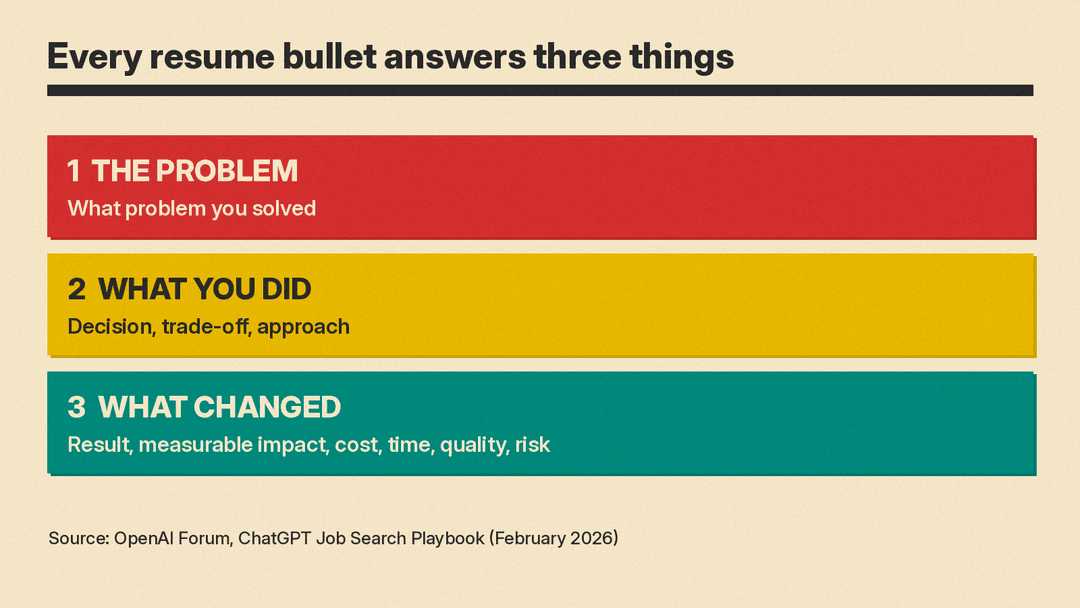
OpenAI's playbook says every rewritten bullet should cover three fields: the problem you solved, what you did that mattered, and what changed. It adds a check: every bullet answers "so what" in one line.
11. Rewrite bullets without changing facts
Quoted from the playbook.
"Rewrite these bullets for clarity and impact. Keep facts unchanged. Keep voice consistent with this writing sample."

Bullets:
"""[paste]"""
12. Replace vague phrasing
Also quoted from the playbook.
"Replace generic phrasing with specifics: scope, constraints, decisions, outcomes. Ask questions where details are missing."13. Force the three fields
For each bullet below, label the problem, what I did, and what changed. If one of the three is missing, ask me for it. Do not fill it in yourself. When I answer, write the bullet in one or two lines.14. Turn rough notes into bullets
Adapted from the Goodwill and OpenAI Academy pack.
Turn these notes into 4 resume bullets for this job. Each bullet starts with an action verb, says what I did, and includes one result if my notes give one. Do not add numbers my notes do not contain.

Notes:
"""[paste]"""
15. Find the numbers you forgot
Look at these bullets and list every place a number would make the result clearer: team size, budget, volume, time saved, error rate. For each, ask me what the real number was. If I do not know, help me describe the result without a number instead of guessing one.16. Build a spare-bullets list
The playbook recommends keeping spare bullets you swap in when a job description changes.
From my wins list, write 6 extra bullets I am not using in this version of my resume. Tag each with the kind of role it would suit best. These are my spares.17. Write a short summary section
Write a 2 to 3 sentence resume summary for this job, using only facts from my resume. No adjectives about my personality ("passionate", "driven"). Lead with the role I am targeting and the strongest proof I have for it.Cover letters (18 to 24)
A cover letter should add something the resume does not: why this company, and one or two proofs tied to the job's real problem. The prompts below keep ChatGPT away from generic openings by feeding it facts only you can supply.
18. Build a reusable skeleton
The playbook's goal for this step is "one tailored resume version per role type, plus a reusable cover letter skeleton."
Write a cover letter skeleton I can reuse for [role type] jobs. Use placeholders in brackets for: the company, one specific fact about them, the job's main problem, and two proof points. Keep it under 300 words. No sentence should work for any company without editing.19. Draft the letter from real facts
Write a cover letter for [job title] at [company].
Company facts I found myself (use only these):
- [fact 1, with where you found it]
- [fact 2]
The job's main problem, in my words: [one sentence]
Two proof points from my wins list: [paste]
Tone: match my writing samples.
Length: 250 to 300 words.
After the letter, list every factual claim in it so I can check each one.
The claim list at the end is the important part. It shows you which sentences rest on your facts and which ones you need to check or cut.
20. Cut the stock openings
Rewrite the first paragraph of this letter. Do not start with "I am writing to", "I am excited to", or "I am thrilled". Start with the company fact or the problem the job exists to solve. Give me 5 options in my voice.21. Remove the generic lines
Go through this cover letter and quote every sentence that could appear in a letter to any company. For each one, say what specific detail would fix it, and ask me for that detail.22. Frame a career change
I am moving from [old field] to [new field]. Rewrite this paragraph so my [specific old skill] reads as preparation for [specific requirement in the job post]. Do not hide the change and do not overclaim experience in the new field.23. Explain a gap in your work history
Adapted from the Goodwill and OpenAI Academy pack.
Help me explain a work gap in a simple, respectful way.
Reason for gap: [reason, in as much detail as you want to share]
Time out of work: [X months or years]
Now ready for: [full-time or part-time]
Write (1) a 2 to 3 sentence version for an application and (2) a short version I can say out loud in an interview.
24. Tailor a "why I fit" answer
Here is my general answer to "Why are you a good fit?" Keep the facts. Adjust it for this new job description and mention 2 or 3 of its key tasks or skills.

Answer:
"""[paste]"""
Job description:
"""[paste]"""
This mirrors prompt 4 in the Academy pack, which reuses one strong answer across similar jobs.
Final checks (25 to 30)
Do not skip these. The Academy guide's quality check asks three questions: does this match what the job needs, does it sound like the person, and can someone with lower reading skills still understand it. The prompts below turn that into a routine.
25. Fact audit
List every claim in my resume and cover letter that includes a number, a title, a tool, a date, or a scope ("led", "owned", "managed"). Next to each, say whether it came from my resume, my wins list, or my answers in this chat. Flag anything with no source.Fix every flagged line yourself. If ChatGPT added a number you never gave it, delete it.
26. Voice check
Compare my cover letter to my two writing samples. Quote any sentence that does not sound like me and rewrite it closer to how I write.27. Plain-language check
Mark any sentence in my resume that a non-specialist recruiter might not understand. Rewrite it in plain words while keeping it accurate for a hiring manager in the field.The playbook's version of this check is "technical detail readable by non-specialists while staying accurate."
28. Consistency check
Check my resume and cover letter against each other. List any mismatch in dates, job titles, company names, numbers, or tools.29. Interview-proof every bullet
For each bullet on my resume, write the hardest follow-up question an interviewer could ask about it. Then tell me which bullets I should be ready to defend with a specific story.This bridges into interview prep. The playbook's next step turns your wins into STAR stories (situation, task, action, result) and suggests practicing out loud in voice mode.
30. Mock recruiter screen
Quoted from the playbook.
"Run a mock recruiter screen for this role. Ask follow-ups. Score me on clarity, concision, and evidence of impact. Then rewrite my best answers."Common mistakes
- Asking for a full rewrite in one prompt. You lose track of what changed. Work section by section and keep the "notes on why" version from prompt 3.
- Letting ChatGPT fill gaps. When it asks a question, answer it. When it does not ask and adds a number anyway, that number is made up.
- One resume for every job. The playbook's advice is one tailored version per role type. Reorder bullets (prompt 8) and swap in spares (prompt 16) for each application.
- Pasting sensitive data. Remove your street address, phone number, and any ID numbers before you paste. Add them back in your own editor.
- Sending without a read-aloud pass. The Academy guide's coaching flow ends with reading the draft out loud and editing it. Do the same before you send.
Where this fits
These templates cover the writing side of a job search. For prompts you can use once you have the job, see our 50 best ChatGPT prompts for work. If you are early in your career, our piece on entry-level AI jobs and Anthropic's junior hiring data covers where juniors still get hired.
You can paste the same templates into Claude or Gemini. They lean on general prompting habits that OpenAI also lists in its prompt engineering best practices: put instructions first, separate them from pasted text with """, be specific about length and format, and say what to do instead of only what not to do.
