
A lesson-plan prompt that says "make a lesson on ecosystems" gets a lesson that could be for any class in any country. The prompts below fix that in a simple way. Each one tells ChatGPT the grade, what students already know, how much time you have, and what the finished thing should look like. You still make every teaching decision. ChatGPT does the first draft.
This guide has 30 copy-paste templates in six groups: setup, lesson plans, differentiation, rubrics, feedback on student work, and family messages. It ends with a short check you run before anything reaches a student. The structure follows OpenAI Academy's own teacher guides: Write Better Prompts for Teachers, Build a Complete Lesson Resource Pack and the K-12 Prompt Pack for Teachers. Where a prompt comes straight from one of those pages, we say so.
A note on testing: we did not run these templates for this post, and we show no sample outputs. Results change with the model, your plan, and what you paste in. Treat every output as a draft you check before class.
Which ChatGPT to use (and what not to paste)
If you teach at an accredited U.S. K-12 school or district, OpenAI offers ChatGPT for Teachers. Its help page says the plan is free for verified U.S. K-12 educators through June 2028, and that you verify at chatgpt.com/k12-verification with your school or district email. The same page says information shared with ChatGPT for Teachers is not used to train OpenAI's models by default, and that the plan is not for students.
The privacy point matters more than any prompt. The help page describes ChatGPT for Teachers as a place to use AI with classroom materials and student data, with protections that help schools meet compliance needs. A personal ChatGPT account is a different product. If you use a personal account, leave out student names, ID numbers, grades tied to names, and anything from an IEP or 504 plan. Replace names with "Student A" and "Student B". Check your district's AI policy first either way.
If you are new to prompting in general, our beginner's guide to writing better AI prompts covers the basics these templates use.
The pattern behind every prompt
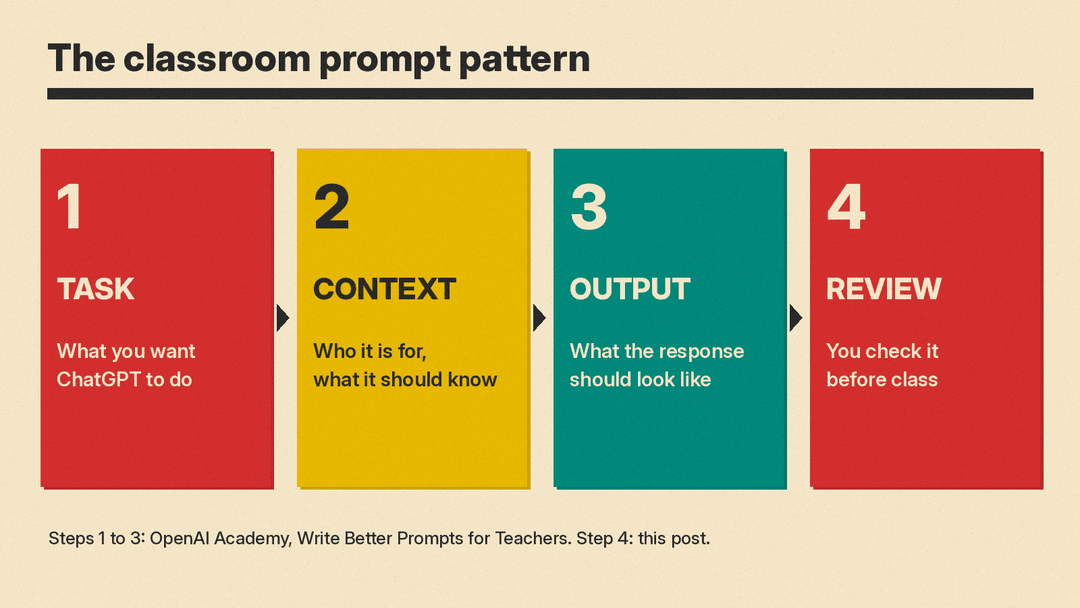
OpenAI Academy's teacher guide says a strong classroom prompt usually has three parts:
- Task: what you want ChatGPT to do
- Context: who it is for, and what ChatGPT should know
- Output: what the response should look like
Its example swaps "Help me plan a lesson on ecosystems" for a prompt that names a 45-minute lesson for a 5th grade science class, says the class already learned about producers, consumers and decomposers, and lists the parts the teacher needs. Every template below follows that pattern. Fill in the brackets, delete what you do not need, and keep the rest.
Setup prompts (1 to 3)
Run these once at the top of a chat, or save the answer to prompt 1 somewhere you can paste it again. On ChatGPT for Teachers, OpenAI says you can also tell ChatGPT to remember your grade level, curriculum and preferred format.
1. Describe your class once
I teach [grade] [subject] at a [type of school]. Class periods are [length] minutes.
We use [curriculum or standards, for example Common Core or NGSS].
My class has [number] students, including [for example: 5 multilingual learners at an intermediate level, 3 students with reading support plans, a few who finish early].
When I ask for materials, write in plain language a teacher can use tomorrow, use American English, and keep student-facing text at a [grade]-level reading level.
Reply only with "Ready" and a two-line summary of my class.
2. Set your rules
For this whole conversation:
- Do not invent facts, quotes, statistics or sources. If you are unsure, say so.
- Mark anything I should double-check with [CHECK].
- Do not include real student names, even if I make a mistake and paste one. Replace them with Student A, Student B.
- Ask me one clarifying question if a request is missing something important.
3. Improve your own prompt first
This one is from OpenAI Academy's teacher guide, word for word:
Help me improve this prompt. I want ChatGPT to create a lesson plan on [topic] for [grade level]. Rewrite my prompt so it includes the task, classroom context, and the output format clearly.Read the rewritten prompt, fix anything that does not fit your class, then run it.
Lesson plan prompts (4 to 9)
4. A lesson you can teach tomorrow
Adapted from OpenAI Academy's ecosystem example:
Create a [length]-minute lesson outline on [topic] for a [grade] [subject] class.
The class has already learned [prior knowledge].
Include a clear objective, materials, a warm-up question, a main activity, one check-for-understanding question, and an exit ticket.
Keep the language practical for a teacher to use tomorrow.
5. The full resource pack
This is the "Try It" prompt from OpenAI Academy's resource pack guide, word for word:
Create a classroom-ready resource pack for [grade level] students on [standard or topic]. Include a lesson objective, a 45-minute lesson flow, teacher directions, a student worksheet, three discussion questions, an exit ticket, and differentiation supports for students who need more scaffolding or more challenge. Keep the student-facing language clear and age-appropriate.The guide says the prompt works best when you give the standard, grade level, learning goal, timing and student needs.
6. A standards-aligned lesson
From OpenAI Academy's K-12 prompt pack:
Create a 45-minute 10th grade Algebra lesson plan on solving quadratic equations. Include objectives, a warm-up, guided and independent practice activities, and an exit ticket aligned with Common Core standards.Swap in your own grade, topic and standard.
7. Activities only
Suggest 5 interactive classroom activities to teach [concept] to [grade] students.
For each, give the setup time, group size, materials, and the one thing students should be able to say or do at the end.
Mark any activity that needs devices or extra supplies.
The first line follows a K-12 prompt pack example that asks for 5 activities on theme and main idea for 6th graders.
8. A week, not a day
Plan a 5-day sequence on [unit topic] for [grade] [subject], [length]-minute periods.
Day 5 ends with [quiz / project check / discussion].
Give each day an objective, the main activity, and how it builds on the day before.
Put it in a table with columns: Day, Objective, Main activity, Check for understanding.
9. A substitute plan
Write a substitute plan for my [grade] [subject] class for [date or "one day"], [length]-minute periods.
The sub may not know the subject. Students are working on [current topic].
Include a schedule, step-by-step directions the sub can read aloud, an independent activity that needs no tech, what to do with early finishers, and a short note form for the sub to fill in for me.
Differentiation prompts (10 to 14)
10. Three versions of one lesson
From OpenAI Academy's K-12 prompt pack:
Differentiate this 10th grade physics lesson on Newton's Laws to support advanced learners, English language learners, and students needing additional support. Use Universal Design for Learning (UDL) principles and include specific scaffolding strategies for ELL and SpEd students to align with common district expectations. Provide strategies, examples, and resources for each group.Paste your own lesson after it and change the subject line.
11. Same task, three reading levels
Rewrite this reading passage at three levels: [grade] grade, two grades below, and one grade above.
Keep the key facts and vocabulary words [list words] in all three versions.
Add three comprehension questions to each version that test the same ideas.
"""[paste passage]"""
12. Support for multilingual learners
Adapt this worksheet for [grade] students who are [beginning / intermediate] English learners whose first language is [language].
Keep the same learning goal. Add a word bank with simple definitions, sentence starters for each written answer, and one picture idea I could add next to each hard word.
Do not translate the whole worksheet unless I ask.
"""[paste worksheet]"""
13. Easier and harder versions of one question
OpenAI Academy's teacher guide lists this as a follow-up you can type after any first draft:
Add three easier and three harder versions of the same question.14. Directions students can read alone
Also a follow-up line from the same guide:
Rewrite the directions so students can read them independently.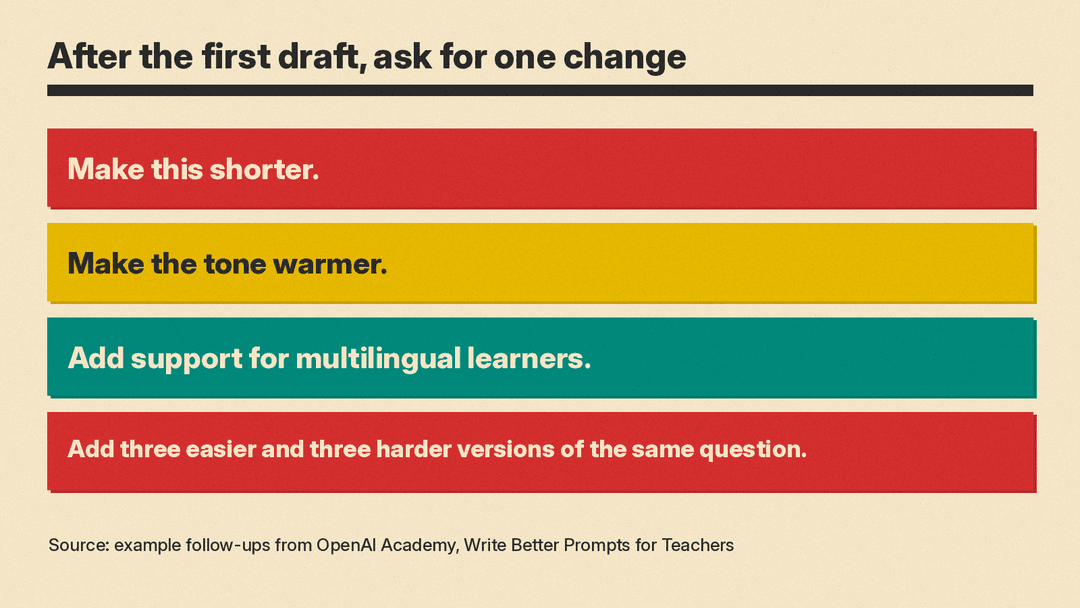
Rubric prompts (15 to 19)
15. A rubric from your assignment
Create an analytic rubric for this assignment for [grade] [subject].
Use [3 / 4] performance levels named [for example: Beginning, Developing, Proficient, Advanced] and [number] criteria.
Each cell should describe what the work looks like, not just "good" or "excellent".
Keep each cell under 25 words. Put it in a table.
Assignment: """[paste task and directions]"""
Standard: [paste standard]
16. A student-friendly version
Rewrite this rubric in student-friendly language for [grade] students, using "I can" statements.
Keep the same criteria and levels so the scores still line up with my teacher version.
"""[paste rubric]"""
17. Check a rubric for gaps
Review this rubric. Tell me:
1. Which criteria overlap, so one mistake would be penalized twice.
2. Which cells are too vague for two teachers to score the same way.
3. Whether every part of the assignment is covered.
Do not rewrite it yet. List the problems first.
"""[paste rubric and assignment]"""
18. A single-point rubric
Turn this rubric into a single-point rubric: one column of "proficient" descriptions in the middle, with blank columns on each side labeled "Areas to grow" and "Evidence of going beyond".
"""[paste rubric]"""
19. Exemplars for each level
Write short example answers for this prompt at each rubric level, for [grade] students.
Label each one with its level and one sentence on why it fits.
I will use these to calibrate my grading and to show students, so keep them realistic for the grade.
Prompt: """[paste]"""
Rubric: """[paste]"""
Feedback prompts (20 to 25)
Feedback is where a draft can do real harm if you paste it in unread. ChatGPT does not know the student. Use these to speed up your first pass, then edit every comment so it sounds like you and matches what you saw in class. Remove names before you paste student work into a personal account.
20. Rubric-based feedback on one essay
From OpenAI Academy's K-12 prompt pack:
Review the attached essay on U.S. foreign policy at the turn of the 20th century using the provided rubric. Give feedback on thesis, argument development, organization, textual evidence, writing mechanics, and offer actionable improvement suggestions. Keep the tone constructive and supportive.Change the topic and the list of criteria to match your rubric.
21. Glow and grow
Using this rubric, write feedback on this [grade] student's work in this format:
- Two specific strengths, each pointing to a line or part of the work.
- One next step the student can act on in the next draft.
- One question that pushes their thinking.
Keep it under 100 words, in second person, warm but direct.
Do not give a score.
Rubric: """[paste]"""
Work (Student A): """[paste]"""
22. Feedback themes across the class
Here are [number] anonymized short answers from my [grade] class to the question "[question]".
Group them by the main misconception or error. For each group, give: how many answers fit, one example quote, and a 5-minute reteach idea.
Do not grade individual answers.
"""[paste answers, labeled A, B, C...]"""
23. Compare two sections
Adapted from a K-12 prompt pack example:
Compare these anonymized results from Section A and Section B on [assessment].
Point out differences in [for example: thesis clarity, use of evidence, problem setup].
Give actionable recommendations for targeted reteaching or support.
Mark anything that might be noise because the groups are small.
"""[paste anonymized scores or notes]"""
24. Plan tomorrow from exit tickets
Here are today's anonymized exit tickets on [topic].
Sort them into: got it, partly there, and a misconception that needs reteaching.
Then draft a 10-minute opener for tomorrow that addresses the most common misconception, plus one extension task for students who got it.
"""[paste]"""
25. Make my comment shorter and kinder
Edit this feedback comment I wrote. Keep my meaning and my voice. Make it shorter, clearer, and kinder without making it vague. Keep the one specific next step.
"""[paste your comment]"""
Family and admin prompts (26 to 30)
26. A weekly update in two languages
From OpenAI Academy's K-12 prompt pack:
Write a short weekly classroom update for 3rd grade families in both English and Spanish. Adjust the reading level to ensure accessibility for families with varying literacy levels, and maintain a friendly and easy-to-understand tone. Include important dates, learning highlights, reminders, and a fun classroom moment. Keep it friendly and easy to understand.Ask a fluent speaker to check the translation before you send it.
27. A hard email to a parent
Help me write an email to a parent about [concern, described without names or private details].
Goals: share what I have seen, ask for their view, and suggest one next step we can try together.
Tone: calm, specific, not defensive. Under 180 words. No education jargon.
Give me two versions: one more formal, one warmer.
28. Reply to a frustrated message
A parent sent this message (names removed). Draft a reply that acknowledges their concern, answers the factual questions I list below, and offers a call or meeting.
Do not promise anything I have not listed.
Facts I can share: [list]
Message: """[paste]"""
29. Newsletter blurb from your notes
Turn these rough notes into a 120-word newsletter paragraph for families of [grade] students.
Keep every date and time exactly as written. Mark any date with [CHECK] if my notes look inconsistent.
Notes: """[paste]"""
30. Meeting agenda
Draft a 30-minute agenda for a [grade-level team / department / family conference] meeting about [topic].
List each item with a time, an owner, and the decision we need.
End with a 5-minute slot for next steps and who does what.
Before anything reaches a student
OpenAI Academy's resource pack guide says the goal "is not to publish the first response." Run this quick check every time:
- Facts. Read every fact, date, formula and quote. Chatbots can state wrong things with confidence. Our explainer on AI hallucinations shows how to catch them.
- Standards. Check that the standard code ChatGPT names matches your state's actual standard. Paste the real text if it does not.
- Reading level. Read student-facing text aloud. If it sounds like a textbook for an older grade, ask for a rewrite.
- Privacy. Search your chat for any real student name before you share the chat or a file from it.
- Your voice. Feedback and family messages should sound like you. If a parent would not recognize the tone, rewrite it.
You can also paste the draft back and ask: "List anything in this lesson that a [grade] student might find confusing, and any fact I should verify."
Where to go next
OpenAI Academy offers a ChatGPT Foundations for Teachers course for K-12 educators. Its page says it covers lesson planning, communication, rubric creation and student support, with a focus on reviewing outputs and data privacy. If you want to compare ChatGPT with other classroom tools, see our list of the best AI tools for teachers. For tools students use at home, see our guide to AI homework helpers.
Sources
- ChatGPT for Teachers (OpenAI Help Center)
- A free version of ChatGPT built for teachers (OpenAI)
- Write Better Prompts: Teachers (OpenAI Academy)
- Build a Complete Lesson Resource Pack (OpenAI Academy)
- K-12: Prompt Pack for Teachers (General, ELL, SpEd) (OpenAI Academy)
- ChatGPT Foundations for Teachers (OpenAI Academy)
