
Grammarly and QuillBot are the two AI writing tools most people try first. Both fix grammar, both rewrite sentences, both check for plagiarism and AI text, and both have a free plan. They still lead with different jobs. Grammarly's plans page leads with grammar, tone and full-sentence rewrites. QuillBot's Premium page leads with its paraphraser, a tool that rewords text you already have. This guide compares the two as of October 2026, using each company's own plan pages and privacy pages.
The short answer
- Pick Grammarly if you mostly write new text (email, documents, messages) and want corrections and tone help in many apps at once.
- Pick QuillBot if you mostly rework text (rephrase a paragraph, summarize a source, change the register of a draft) and want a lower listed price.
- Use the free plans first. Both free tiers are useful for basic grammar checks, and the limits show you quickly which tool fits your work.
Prices as of October 2026
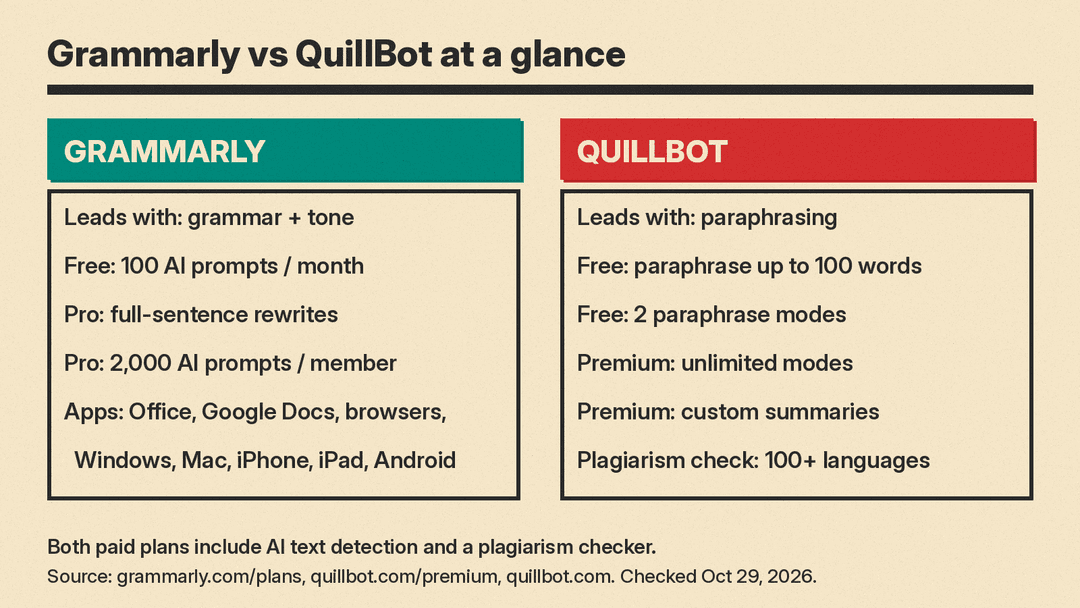
All prices below are copied from the vendors' plan pages on October 29, 2026. Plans change often, so check the page before you buy.
Grammarly (plans page):
- Free: "$0 USD / month". It lists "Write without mistakes", "See your writing tone" and "Generate text with 100 AI prompts".
- Pro: "$12 USD", with a free trial and an "Email reminder 2 days before trial ends". Grammarly's help page on Pro pricing explains the $12: it is the average monthly cost of the annual plan, $144 per member per year. Month to month, Pro costs $30 per member, and a quarterly plan costs $60 per member.
- Enterprise: "Contact Sales". The page says Enterprise is "available through Superhuman Go".
QuillBot (Premium page):
- Free: "$0 USD Per month".
- Premium: shown as "$8.33 USD Per month, billed annually" in one of our checks on October 29 and as "$9.16 USD" in another, so QuillBot may show different visitors different prices. The page opens with the "Pay annually" option selected and labels it "58% off", so a monthly plan costs more per month.
- Team Plan: no public price on the page. It links to a separate team page.
QuillBot also notes "Usage limits apply and may vary by surface" for its plans, so a feature can have different caps on the website, the extension and the apps.
What the free plans include
The free plans are where the difference is clearest.
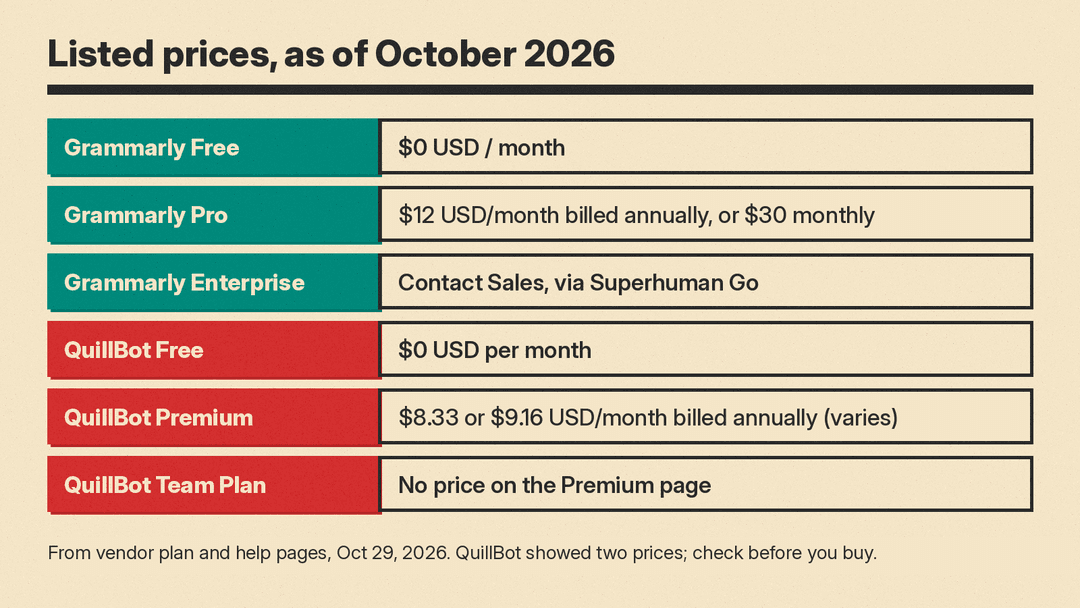
Grammarly Free checks spelling and grammar, shows the tone of your writing, and gives you 100 AI prompts a month for generating text, per its comparison table. Full-sentence rewrites, tone adjustment, plagiarism checks and AI text detection are marked as Pro features.
QuillBot Free is built around its paraphraser. Its plan card lists:
- Paraphrase up to 100 words
- Paraphrase in 2 modes
- Fix basic grammar errors
- Humanize up to 100 words, limited usage
- Generate basic summaries
- Access AI Detector (limited)
So the free QuillBot plan gives you a taste of rewriting and summarizing, while free Grammarly gives you broader everyday correction but no full rewrites.
What the paid plans add
Grammarly Pro adds, in the vendor's words: "Rewrite full sentences with a click", "Adjust your writing tone with ease", "Write fluently in English", "Unlimited personalized suggestions", "Detect plagiarism and AI generated text" and "Generate text with 2,000 AI prompts". The comparison table counts the 2,000 prompts per member per month. Pro also includes team features that, per the page's FAQ, were previously only in Grammarly's Business plan. Its comparison table gives Pro one style guide, one set of brand tones, snippets and Knowledge Share, plus priority support.
QuillBot Premium adds "Full access to paraphrasing", "Paraphrase in unlimited modes", "Get advanced grammar recommendations", "Full access to humanizing", "Create custom summaries", "Full access to AI Detector" and "Prevent accidental plagiarism". The same page says Premium has "10+ different modes" for paraphrasing, lets you create your own modes, and has a plagiarism checker that works "in 100+ languages". You can pause a Premium subscription instead of cancelling it, and use it on up to 10 devices at a time, per the page's FAQ.
Where each tool works
Grammarly's main strength is reach. Its site lists apps and add-ons for Windows, Mac, Chrome, Safari, Firefox, Edge, Microsoft Office, Google Docs, iPhone, iPad and Android. Once installed, it works inside those apps, so you do not need to copy text into a separate editor.
QuillBot is more of a workspace. Its home page lists a Paraphraser, Grammar Checker, AI Detector, Plagiarism Checker, AI Humanizer, Summarizer, Translator, Citation Generator, AI Chat, an image generator, a presentation maker and a set of PDF tools. It also offers a Chrome extension. If your work starts from a source text, such as research notes, a PDF or an old draft, QuillBot puts the rewriting tools in one place.
The overlap is growing. Grammarly's site now has its own paraphrasing tool, AI humanizer and AI detector pages, and QuillBot has a grammar checker. The difference is now more about which job each product puts first.
AI detection and plagiarism
Both paid plans include an AI text detector and a plagiarism checker. Neither result is proof of who wrote a text. Grammarly says on its detector page that "there is no AI detector that can conclusively or definitively determine whether AI was used to produce text". Our guide to AI detectors covers how these scores work and why they can flag human writing.
For students, the rules of your school or teacher come first. Rewording a source with a paraphraser does not remove the need to cite it. QuillBot's own Premium page pitches its plagiarism checker to "identify missed citations".
Privacy and AI training
This is where the two policies differ most, and it matters if you paste work documents or unpublished writing.
Grammarly. Its privacy page says: "We never sell the content you upload to our products, provide it for advertising purposes, or allow third parties to use it to train their models." Grammarly does use content to train its own models unless you opt out. Its Product Improvement and Training Control help page says this setting "is on for individual users by default" for Free, Premium and single-user Pro accounts. You can turn it off in your account's privacy or data settings. For Enterprise, Education and other accounts bought through Grammarly's sales team, the setting is off by default. For multi-user Pro accounts bought on the website, it starts on and an admin can turn it off.
QuillBot. QuillBot is "a Learneo, Inc. business", and its privacy policy is Learneo's. The policy says: "We may use all of the data we collect (including your personal data) to train our algorithms, AI models and AI products". It also says that for QuillBot Premium with a Team Plan, "we will not use your text inputs for the purposes of training our AI models". The policy adds that services "may offer you additional privacy settings or controls, such as the ability to opt-out of certain activities like storage or use of inputs for AI model training", and points to a QuillBot help center article on AI models and data training.
The practical rule for both: if the text is confidential, check your training setting before you paste it, or use a team or enterprise plan where training is off.
Which one should you choose?
- Students writing essays: start with Grammarly Free for grammar while you draft. Add QuillBot if you summarize many sources, and cite every source you reword. See also our list of AI tools for students.
- Office workers and email-heavy jobs: Grammarly. It runs inside the apps you already use, and Pro adds tone adjustment and full-sentence rewrites.
- Bloggers and content writers who rework drafts: QuillBot Premium for its paraphrase modes, custom modes and summarizer. Our AI tools for writers guide lists other options.
- Non-native English writers: both help. Grammarly Pro lists "Write fluently in English" as a feature; QuillBot's paraphrase modes help you try several phrasings of one sentence.
- Teams with sensitive text: compare Grammarly's sales-purchased plans, where training is off by default, with QuillBot's Team Plan, where text inputs are not used for training.
- Tight budget: both free plans cost nothing. QuillBot Premium had the lower listed price of the two paid plans in our checks, on annual billing ($8.33 or $9.16 a month against Grammarly Pro's $12).
You can also use both: Grammarly as the always-on checker, and QuillBot when a paragraph needs a full rewrite. If you only pay for one, pick the tool that matches the job you do most often. For more no-cost options, see our best free AI tools list.
Sources
- Grammarly: Prices and Plans
- Grammarly Support: How much does Grammarly Pro cost?
- Grammarly: How We Protect Your Privacy
- Grammarly Support: Product Improvement and Training Control
- Grammarly: AI Detector
- Grammarly: Paraphrasing Tool
- Grammarly: AI Humanizer
- QuillBot: Premium
- QuillBot: home page and tool list
- QuillBot (Learneo): Privacy Policy
