
Google changed a default in the Gemini API on October 26, 2026. New paid-tier projects that call the Generate Content API now store their requests unless the developer turns storage off. The change is one entry in the Gemini API release notes, but it decides where prompts and responses end up for every new paid-tier project that uses the Generate Content API.
What changed
The release note for October 26 says that new projects using the Generate Content API on the paid tier "now store requests by default (store=true), matching the Interactions API." The three methods in scope are generateContent, streamGenerateContent and batchGenerateContent.
Before this, the two Gemini API surfaces had different defaults. The Interactions API already stored requests by default. The Generate Content API did not. Google's Logs and datasets guide now says: "By default, both the Interactions API and the Generate Content API store requests (store=true)."
Who it affects
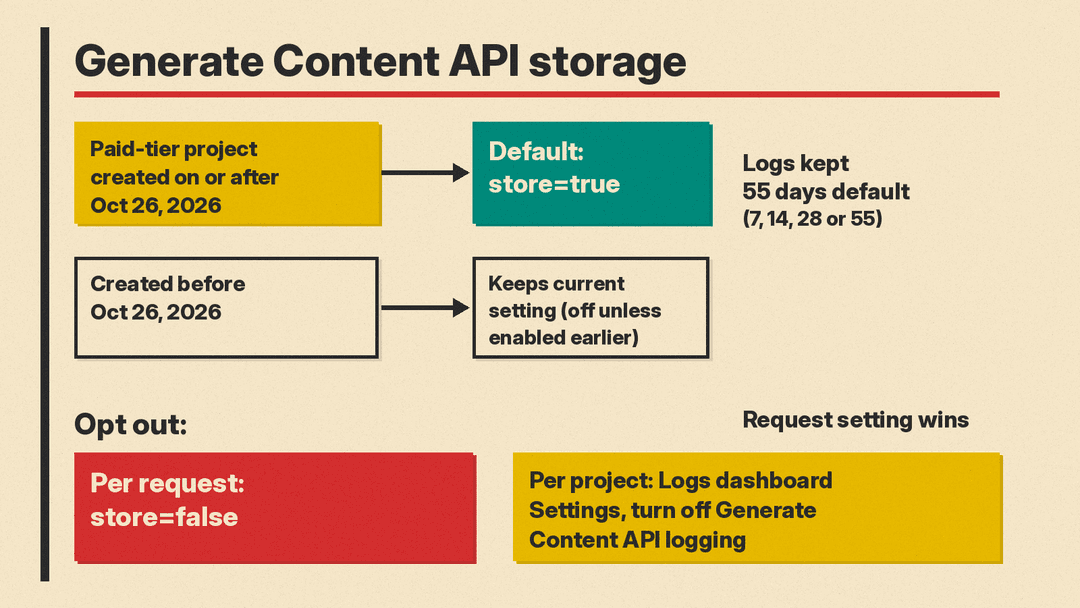
The change applies only to new projects. The guide gives the cutoff in plain terms:
- Projects created on or after October 26, 2026 store Generate Content API requests by default.
- Projects created before that date keep their existing setting. Per Google, that setting "is off (
store=false) unless previously enabled in AI Studio." - Log storage is only available for projects on the Gemini API paid tier, according to the same guide.
What "stored" means here
Stored requests appear on the Logs page in Google AI Studio. The guide says you can click an entry to "inspect the full prompt and response from Gemini, and the context from the previous turns."
On retention, the Logs and datasets guide says: "Logs will expire and be marked for deletion after a default retention window of 55 days (unless saved to a dataset, which don't expire)." A project owner can set the window to 7, 14, 28 or 55 days. The Interactions API docs give the same 55-day figure for paid-tier interactions and note that "a shorter retention may affect retrieval of past conversations."
Datasets are the exception. Logs saved to a dataset do not expire, and datasets can be exported as CSV, JSONL or to Google Sheets. The guide says: "You can contribute to Gemini research and development by choosing to share your datasets with Google as demonstration examples."
Logging does not cover every request. The guide lists exclusions, including Imagen and Veo models, Gemini embedding models, the Gemini Robotics model, inputs containing videos, GIFs or PDFs, and Public Preview Agents in the Gemini API.
Why it matters for privacy and data handling
For paid services, the Gemini API Additional Terms say Google "doesn't use your prompts ... or responses to improve our products" and processes them under its Data Processing Addendum. The same section says Google separately "logs prompts and responses for a limited period of time, solely for detecting and preventing violations of the Prohibited Use Policy to maintain the safety and security of the Services, and any required legal or regulatory disclosures." That abuse-monitoring logging is described in the terms; the project storage that store controls is described in the developer docs. The docs reviewed for this post do not say that the store setting changes the abuse-monitoring logging.
The practical point is about your own data handling. With storage on, full prompts and responses sit in project logs for up to 55 days by default. If your app sends customer records, support tickets or other personal data to Gemini, that data now has a second home that your privacy notice, retention policy and access controls may need to cover.
This is a different question from consumer data use. Our earlier post on Google's privacy policy change for connected Gmail and Photos data covers that side.
How to opt out
Google gives two controls, and the request-level one wins. The guide says: "The request-level store property takes precedence over the project-level setting."
- Per request: set
store=falseon the call. In Python this isconfig={'store': False}ongenerate_content. Google lists minimum SDK versions for this:google-genai2.33.0 or later for Python,@google/genai2.31.0 or later for JavaScript,google-genai1.79.0 or later for Java, andgoogle.golang.org/genai1.76.0 or later for Go. - Per project: open the Settings panel in the Gemini API Logs dashboard in AI Studio and turn off Generate Content API logging. The guide says you can toggle logging "independently for the
generateContentAPI and the Interactions API."
A minimal Python example, adapted from Google's guide:
from google import genai

client = genai.Client()
response = client.models.generate_content(
    model="gemini-3.8-flash",
    contents="Summarize this ticket.",
    config={"store": False},
)
How it fits with the Interactions API
On the Interactions API, storage does more than logging. The Interactions API docs say storage is on by default "in order to simplify use of server-side state management features (with previous_interaction_id), background execution (using background=true) and observability purposes." Setting store=false there "is incompatible with background execution and prevents using previous_interaction_id for subsequent turns."
The Generate Content API docs reviewed here describe storage only in terms of logs and datasets. The release note frames the change as making the two APIs match. Google's Interactions docs also say that "going forward, all new models, multimodal capabilities, tools, and agentic features will launch on the Interactions API." Our explainer on the Gemini API CLI covers another way developers call Gemini.
