
Google is turning off the Veo 3.1 preview models in the Gemini API on October 22, 2026. The Veo page in the Gemini API docs now opens with a notice that veo-3.1-generate-preview, veo-3.1-fast-generate-preview and veo-3.1-lite-generate-preview are deprecated and "will be shut down on October 22, 2026." Google tells developers to move to Gemini Omni Flash (gemini-omni-1.1-flash) or to the GA models on the Gemini Enterprise Agent Platform.
If your app, script or video pipeline calls one of those three model IDs through the Gemini API, it has about a day left. This post covers what is shutting down, what the replacement does differently, how the prices compare, and what to change in your code.
What is shutting down
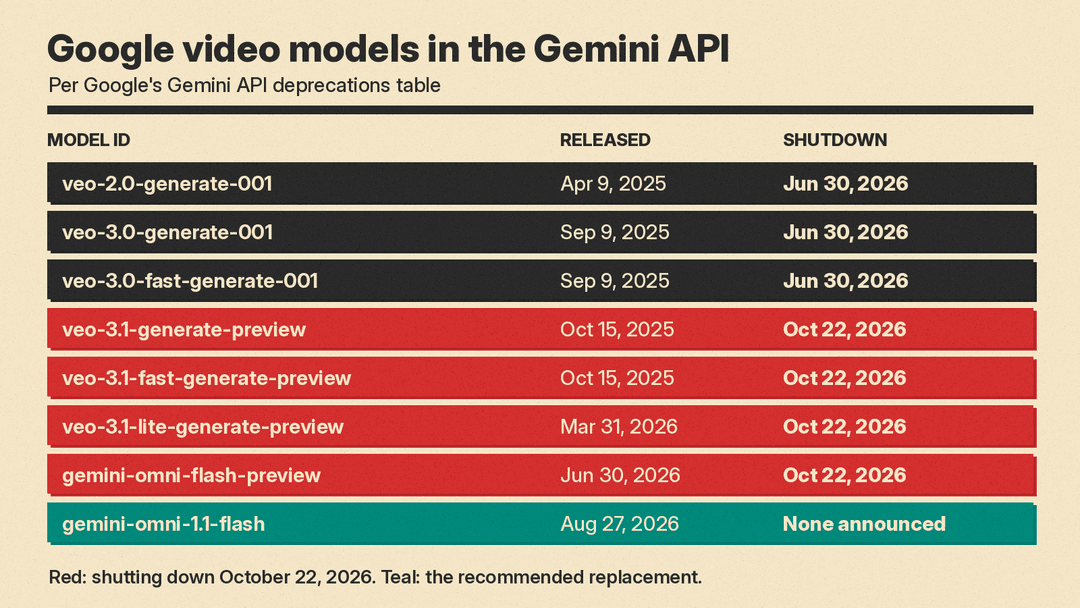
Google's deprecations table lists four video models with a shutdown date of October 22, 2026:
veo-3.1-generate-preview(released October 15, 2025), replacementgemini-omni-1.1-flashveo-3.1-fast-generate-preview(released October 15, 2025), replacementgemini-omni-1.1-flashveo-3.1-lite-generate-preview(released March 31, 2026), replacementgemini-omni-1.1-flashgemini-omni-flash-preview(released June 30, 2026), replacementgemini-omni-1.1-flash
The same table already lists veo-3.0-generate-001, veo-3.0-fast-generate-001 and veo-2.0-generate-001 with a June 30, 2026 shutdown date. Once the 3.1 previews go, the only video model in the Gemini API without a shutdown date is gemini-omni-1.1-flash, which the table says has "No shutdown date announced." The models page now describes Veo 3.1 as a "Legacy video generation preview model."
The notice is about these Gemini API model IDs. Google's pages here do not describe changes to Veo in other Google products, so check each place you use Veo on its own terms.
What Gemini Omni Flash is
Google's Omni Flash guide calls gemini-omni-1.1-flash "a high-performance multimodal model designed for high-speed video generation, editing, and cinematic control." The model card lists text, image and video as inputs (video up to 10 seconds for editing and extension) and video as output, at 3 to 10 seconds per clip, 24 FPS, in 360p, 720p, 1080p or 4K. The guide notes that 1080p and 4K output is upscaled; 720p is the default.
The features that map to old Veo workflows:
- Text to video, with audio generated from the description.
- Image to video, where you pass a reference image with the prompt and, in Google's words, "the model will decide how to use the image."
- First and last frame interpolation: two images in, an animated transition out.
- Extension: a 3 to 10 second continuation added to the end of a clip, either one the model generated or an uploaded video.
- Aspect ratio: 16:9 (default) or 9:16.
The new part is conversational editing. Through the Interactions API you can pass a previous_interaction_id and describe a change ("Make the violin invisible" is Google's example), and the model edits the earlier video without you uploading it again.
Veo 3.1 vs Omni Flash: the differences that break things
A different API call. The Veo docs use generate_videos and then poll a long-running operation until it is done. The Omni Flash guide uses client.interactions.create(model="gemini-omni-1.1-flash", input=...) and reads the video from interaction.output_video. Google notes that output_video is an SDK convenience field; raw REST callers read the video from the steps array. Expect to rewrite the request and response handling, not only the model string.
Clip length. Veo 3.1 takes durationSeconds of 4, 6 or 8, and it must be 8 for 1080p, 4K, reference images or extension, per the Veo docs. Omni Flash outputs 3 to 10 seconds.
Resolution. Veo 3.1 generated 720p, 1080p and 4K directly (no 4K on Lite), with extension limited to 720p. On Omni Flash, 1080p and 4K are upscaled from the model's output, according to the guide.
Negative prompts. The Omni guide says negative prompts are not supported and suggests putting them in the main prompt instead, for example "Do not do X."
Regional limits. Editing or extending uploaded videos is not currently available in the European Economic Area, Switzerland and the United Kingdom, per the guide. Editing or extending videos the model generated is supported there.
All Omni Flash videos carry SynthID watermarking, and the guide says English is fully supported while other languages "have not been evaluated."
Price per second
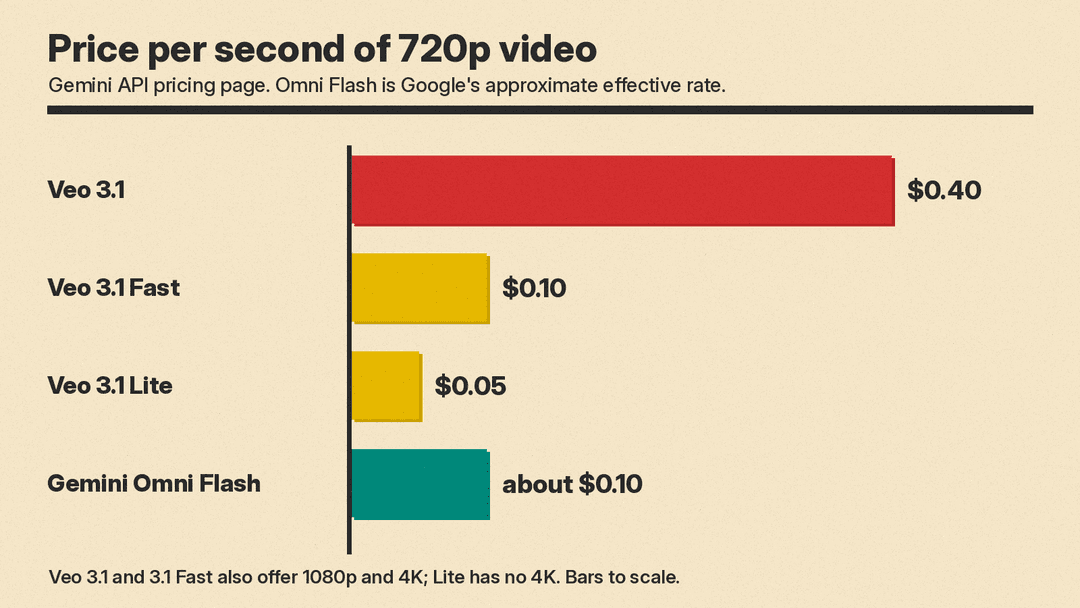
Veo 3.1 was priced per second of video. Omni Flash is priced per token. The Gemini API pricing page lists Omni Flash output at $17.50 per million video tokens and $1.50 per million input tokens, billed at 5,792 tokens per second of 720p video. Google says that "equates to an effective price of approximately $0.10 per second."
The Veo 3.1 rates on the same page, per second with audio:
- Veo 3.1: $0.40 (720p and 1080p), $0.60 (4K)
- Veo 3.1 Fast: $0.10 (720p), $0.12 (1080p), $0.30 (4K)
- Veo 3.1 Lite: $0.05 (720p), $0.08 (1080p)
So at 720p, a Veo 3.1 Fast user pays about the same on Omni Flash, a standard Veo 3.1 user pays roughly a quarter, and a Veo 3.1 Lite user pays about twice as much. The pricing page gives the effective rate for 720p only; check token counts if you plan to render at 1080p or 4K. For how these numbers sit next to Kling, Runway and others, see our AI video generator pricing comparison.
What to do today
- Search your code and configs for
veo-3.1-generate-preview,veo-3.1-fast-generate-preview,veo-3.1-lite-generate-previewandgemini-omni-flash-preview. Include environment variables and any no-code tools that store a model name. - Port one call to the Interactions API with
gemini-omni-1.1-flash. Start with a plain text-to-video prompt, then add your image, frame or extension inputs. - Fix length and resolution settings. Map your 4, 6 or 8 second clips into the 3 to 10 second range, and decide whether upscaled 1080p or 4K is good enough for your output.
- Move negative prompts into the main prompt text.
- Re-check cost if you were on Veo 3.1 Lite, which was half the effective Omni Flash rate at 720p.
- If you need Veo itself, Google points to the GA models on the Gemini Enterprise Agent Platform as the other option.
Why it matters
Google is not the only provider that retires models. OpenAI, for example, has set dates to shut off older text models. For anyone building on preview model IDs, the lesson is the same: preview names have end dates, and a video pipeline should treat the model ID as a setting, not a constant.
For creators who used Veo through the Gemini API, Omni Flash is a real step sideways rather than a rename. It adds conversational editing and longer clips than Veo's 8 seconds, but it upscales to 1080p and 4K and costs more than Lite. If you are weighing other options, our guide to the best AI video generators covers Kling 4.0, Seedance 2.5, Runway and more.
