
OpenAI has started letting some ChatGPT Pro users in the US text their dot, the always-on agent it added to ChatGPT, through iMessage on iPhone or RCS on Android. The feature is a limited beta. OpenAI's ChatGPT release notes put it plainly: "Your dot is now just a text away."
If you have not met dots yet, our explainer on OpenAI dots covers who gets them and what they do. In short, OpenAI's help center describes a dot as "an always-on agent in ChatGPT that can help you take a project from an idea to work you can use." It has its own cloud computer, works across apps you connect, and keeps making progress between conversations. Texting adds your phone's messaging app as one more way to reach that agent.
What texting your dot does
According to OpenAI's ChatGPT Learn page for the update, you can reach your dot "for one-to-one conversations with text, photos, and voice messages." The release notes add that your dot "will also text you proactively with updates that may be relevant for you."
The official ChatGPT account described it this way in its post on X: "Give it a task to take off your plate or something to keep an eye on, using text, photos, or even voice notes. It will text you proactively with relevant updates."
Three details shape how it works day to day:
- Same memory and plugins. The release notes say texting "shares the same memory and plugins as your dot in the ChatGPT app, so context carries over." A task you start by text can draw on what your dot already knows from the app.
- It picks the channel. The Learn page says your dot "uses context from your conversations to choose where to reach you." You can also tell it which channel to use, for example "texting you when something needs your attention and keeping routine updates in ChatGPT."
- Approvals stay in ChatGPT. "If your dot needs approval, it sends you a link to review the request in ChatGPT," the Learn page says. So you review those requests in ChatGPT, not in the text thread.
Who can use it
The beta is narrow. The help center says: "The beta is limited to Pro users in the US and is not available in Business or Enterprise workspaces. Access is limited and may not be available to every Pro user."
That is a smaller group than dots overall. Dots themselves are rolling out to Pro users aged 18 and older outside the European Economic Area, Switzerland, and the UK, and to Business Premium users in supported regions, with an Enterprise beta that admins must turn on. Texting, for now, is US Pro only.
The Verge noted that "OpenAI had promised this was coming for its AI agents." Engadget wrote that OpenAI promised texting when it debuted dots "late last month."
How to set it up
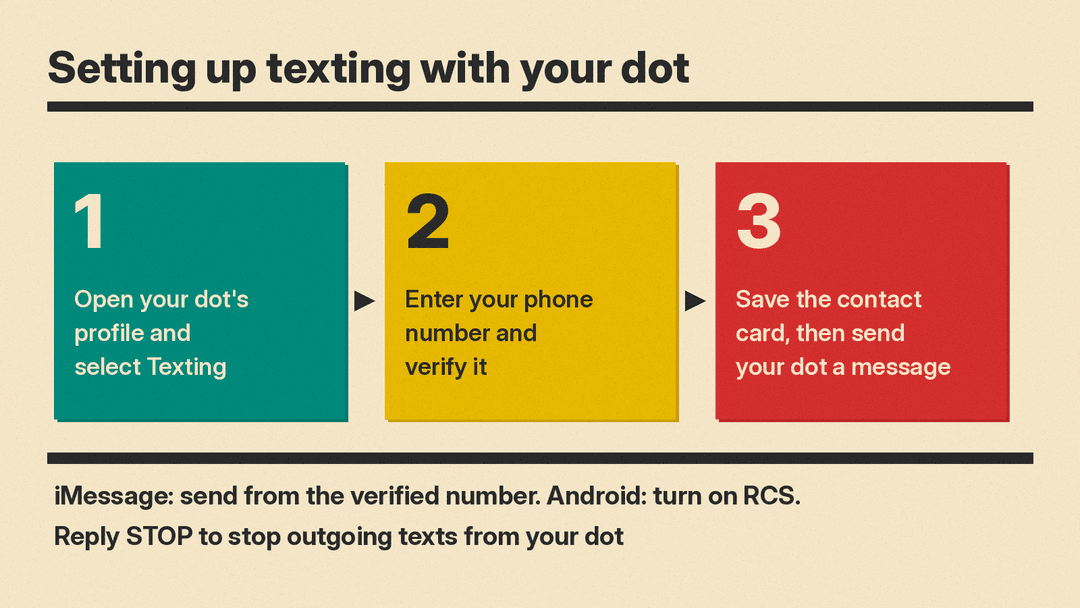
OpenAI's texting setup guide on ChatGPT Learn gives three steps:
- Open your dot's profile in the ChatGPT mobile app, desktop app, or a desktop web browser and select Texting.
- Enter your phone number and follow the steps to verify it.
- Save your dot's contact card when you receive it, then send your dot a message to start chatting.
For iMessage, the guide says to send from the phone number you verified. On Android, turn on RCS in your messaging app. The release notes give a shorter version: open your dot's profile, select Texting, and make sure iMessage or RCS is enabled. The help center's dot guide says that if texting is available for your account, "you can use the desktop app to connect your phone and follow the setup prompts," and that you should "use desktop to connect messaging channels, such as Slack or texting." So if you do not see Texting on your phone, try the ChatGPT desktop app. Group chats, phone calls, and FaceTime are not supported through texting, the Learn guide says. You can still call your dot in ChatGPT.
To stop it, the help center says: "Reply STOP to stop outgoing text messages from your dot." That stops outgoing texts. To delete your dot's conversations and saved memories, the help center points to Reset, which deletes the dot itself, including its conversations, saved memories, and scheduled tasks.
The help center also notes that "Message and data rates may apply" and says to review the notice when you enable texting, along with OpenAI's Terms of Use and Privacy Policy.
Privacy and security: what OpenAI says
Texting adds a new party to the chain. OpenAI says in its release notes: "We use Linq, a third-party messaging provider, to send and receive texts for your dot." It adds that "As part of our partnership with Linq, we've done extensive penetration testing with our frontier models and third-party security firms."
OpenAI also sets limits on who the dot can talk to. "Your dot can only text you, and you're the only one who can text your dot," the release notes say. "This doesn't give your dot or OpenAI access to your other text conversations."
The help center still includes a caution: "Exercise caution when sharing sensitive information through text messages." A dot can have access to connected apps and, if you allow it, your own computer. A text thread is a convenient way to give it instructions, but it is also a channel that runs through a third-party provider.
Why it matters
Texting lets a dot reach you without you opening ChatGPT to check on it. Anthropic's Claude Duet, which we compared to dots in our Claude Duet explainer, is also built to come to you and message you when something needs your attention. With iMessage and RCS, a dot shows up in the same app as your other texts, which can make it quicker to hand off a task or get an update.
It also raises the stakes on defaults. A dot that can text proactively can also interrupt you. OpenAI's answer so far is that the dot chooses the channel based on context, that you can tell it where to reach you, and that approvals route back to ChatGPT. On the same day, OpenAI also expanded its ServiceNow partnership, which brings ServiceNow workflows into ChatGPT for work.
For most ChatGPT users, nothing changes yet. If you are a US Pro subscriber with a dot, check your dot's profile for the Texting option. Access is rolling out and may not reach every Pro account.
