
Dots are OpenAI's always-on agents inside ChatGPT. OpenAI introduced them on September 29, 2026 for its Pro, Business Premium, and Enterprise plans. Three weeks later, personal Pro subscribers in Europe still cannot get one.
On October 18, OpenAI's Tibo Sottiaux answered a user on X with "EU sorry" and two promises: a dot created elsewhere will keep working if its owner travels to the EU, and "dots are coming to the EU in the future." He gave no date.
This guide covers what a dot is, which plans include one, where the European gap actually sits, how to set one up, and what safeguards OpenAI says it built in.
What a dot is
A dot is a persistent agent tied to your ChatGPT account. OpenAI's launch post says dots are powered by GPT-6 Astra, have "their own cloud computer," learn from feedback over time, and "can work towards your goals 24/7." Through OpenAI's plugin ecosystem they can connect to "over 4,000 apps."
The difference from a normal chat is that a dot keeps working between conversations. The Help Center setup guide describes it as an agent that can "keep making progress between conversations." You give it a goal and context, decide what it may do on its own, and it brings work back for review.
In practice, a dot can:
- Use its own cloud computer and browser, which you can open at any time to inspect.
- Use apps you connect, such as Slack or your personal email account.
- Run reminders and recurring checks you schedule, such as a morning calendar review.
- Do "proactive research" in the background using read-only tools.
- Start Codex cloud tasks, and, if you allow it, work on your own computer through the ChatGPT desktop app.
You can reach it in ChatGPT on desktop, web, and mobile, and in Slack and Teams. OpenAI's launch post says texting is "coming soon," and the Help Center now lists texting as a limited beta for some Pro users in the US. The Help Center also says a dot "cannot initiate calls to you at launch," though you can call it from its conversation.
The model under the hood is GPT-6 Astra, OpenAI's top model. Our GPT-6 Astra explainer covers its benchmarks and safety findings.
Who gets dots
OpenAI's Help Center lists three groups.
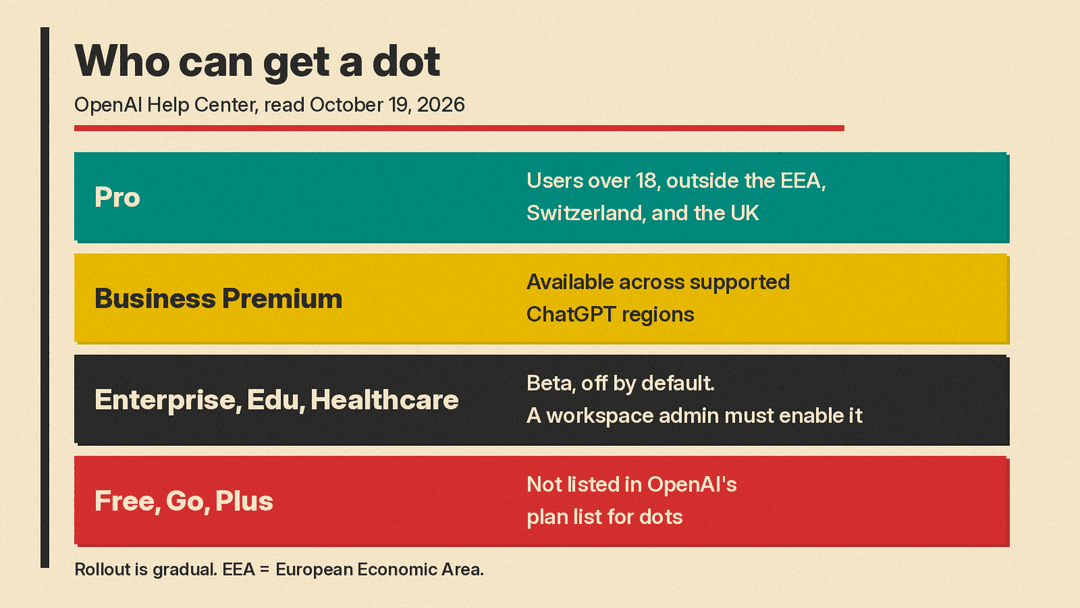
- Pro: available to users over 18 "outside the European Economic Area, Switzerland, and the United Kingdom."
- Business Premium: available "across supported ChatGPT regions."
- Enterprise, including Edu and Healthcare: a beta that a workspace admin must enable. It is "off by default."
Free, Go, and Plus are not on that list. On launch day, Sottiaux wrote on X that dots are included in all Pro, Business Premium, and Enterprise plans, including "the Pro 100 plan," and that OpenAI would be "looking to further expand access soon."
The first dot is included "at no extra cost," according to the launch post. The plan also includes "an allowance for deeper work," with extended limits for the first month after launch. OpenAI says that in the future you will be able to add more dots and scale each dot's output by increasing its speed or the amount of work it takes on per month. It has not published prices for that.
Usage limits work in two layers. Conversations with your dot "don't count toward your ChatGPT usage limits." Tasks the dot starts in Codex or ChatGPT Work do count, as usual.
The European gap, precisely
The exclusion is narrower than "no dots in Europe." OpenAI's own wording only names the Pro plan. Business Premium is listed for all supported ChatGPT regions, and Enterprise beta access has no region carve-out in the Help Center. So a company in Germany or the UK on Business Premium or Enterprise can, on paper, use dots. A person in the same country paying for Pro cannot.
The excluded list is also wider than the EU. OpenAI's wording names the European Economic Area, and it names the UK and Switzerland separately.
OpenAI's dots pages do not say why personal Pro accounts in those places are left out, or when that will change. What OpenAI has said comes from Sottiaux's October 18 reply:
- A dot created outside the EU "will keep working" if its owner is in the EU.
- Dots are "coming to the EU in the future."
His reply was to a user who wrote that their dot "stopped showing up" in the Codex desktop app. Sottiaux's answer only mentions the EU, not the UK or Switzerland.
What has changed since launch
Dots have had several updates in their first three weeks:
- October 9: the official ChatGPT account on X announced that you can create a dot from the ChatGPT app on iOS and Android. At launch, setup required the desktop app or a desktop browser.
- October 9: the same thread said a dot can now start work in Codex and follow up on existing threads, drawing on ChatGPT conversations, Codex threads, and automations. It can also review and edit Scheduled Tasks in ChatGPT Work.
- October 10 (Pacific time): replying to a user who asked whether anyone actually uses dots, Sottiaux wrote "1M dots running and doing things for their users." That is his figure, not an audited number.
On launch day Sottiaux also wrote that OpenAI's Agents API is "the same tech powering all our cloud agents, including dots." Developers who want to build something similar can read our Agents API explainer.
How to set one up
According to the Help Center:
- Open chatgpt.com/dots on an eligible account, or the ChatGPT desktop or mobile app. Mobile web is not supported.
- Follow the onboarding prompts and give your dot a name. Its handle becomes @yourname-agentname.
- Connect apps under Customize, then Plugins. Plugin permissions are shared with ChatGPT, ChatGPT Work, and Codex.
- Set Custom Rules for actions it may take, such as sharing, purchasing, or accessing things.
- Connect messaging channels such as Slack from desktop.
- Optionally, allow access to your own computer from the ChatGPT desktop app on that machine. This starts turned off.
Each Custom Rule uses one of four behaviors: "Take action without asking," "Take action if pre-approved," "Ask before taking action," or "Hand off to you." "Pre-approved" means you asked for the action in your prompt.
Safeguards and privacy
An agent that runs all day with access to your apps raises obvious questions. OpenAI's privacy, security, and safety FAQ describes several layers.
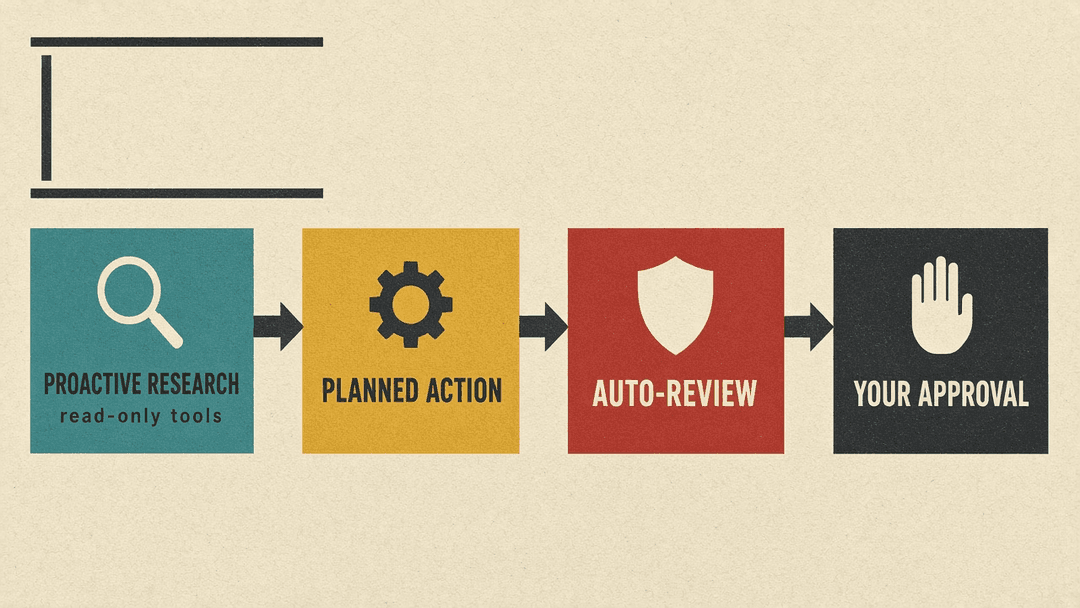
- Read-only background research. Proactive research tools cannot send messages, change content through plugins, or control a browser or computer. Any follow-up action goes through the normal rules.
- Auto-review. Certain planned actions are checked against your instructions, Custom Rules, and safety requirements before they run. OpenAI's example: before a dot sends an email, Auto-review checks the recipient and message.
- Hand-offs for sensitive actions. Changing a password or transferring money requires you to take over. Deleting data permanently or installing software may need approval each time.
- Passwords. For supported sign-ins, you type credentials into a secure form that sends them to the browser environment "without exposing them to the model."
- Monitoring. If OpenAI's monitoring detects a safety concern, the launch post says it "can pause or stop the dot's work."
The diagram above is a simplification. Depending on your Custom Rules, some actions proceed without asking, and some always need you to finish them yourself.
There are limits worth knowing before you connect anything:
- You "currently cannot view, delete or directly modify individual dot memories." The only way to clear a dot's context is to delete the dot.
- Disconnecting an app stops new access but "does not delete information your dot has already built into its context."
- On personal plans, the "Improve the model for everyone" setting controls whether dots' conversations and work may be used for training. Business, Enterprise, and Edu data is not used for training by default.
- Human review "may occur in limited circumstances, including safety-related cases," even with model improvement turned off.
- OpenAI says prompt injection protections "help reduce the risk" but "do not eliminate it."
Who should use one
If you already pay for Pro outside the excluded regions, or your company has Business Premium or Enterprise, a dot costs nothing extra to try. It fits recurring, multi-step work: watching a feed and drafting responses, keeping a document current as data changes, or following a project across Slack and ChatGPT.
Go slowly with access. Start with read-only plugins, keep the default approval rules, and review anything a dot sends or buys. OpenAI's own guidance ends the same way: "Dots can still make mistakes, so always review consequential work."
If you are a personal Pro subscriber in the EEA, the UK, or Switzerland, there is no supported way to get a dot today. OpenAI has said dots are coming to the EU without a date. Business Premium is the plan OpenAI lists for all supported regions.
Sources
- Introducing dots (OpenAI, September 29, 2026)
- Getting started with your dot (OpenAI Help Center)
- Dots privacy, security, and safety FAQs (OpenAI Help Center)
- Tibo Sottiaux on dots and the EU (X, October 18, 2026)
- Tibo Sottiaux on plans that include dots (X, September 29, 2026)
- Tibo Sottiaux: "1M dots running" (X)
- ChatGPT on creating dots from the mobile app (X, October 9, 2026)
- ChatGPT on delegating Codex work to dots (X, October 9, 2026)
