
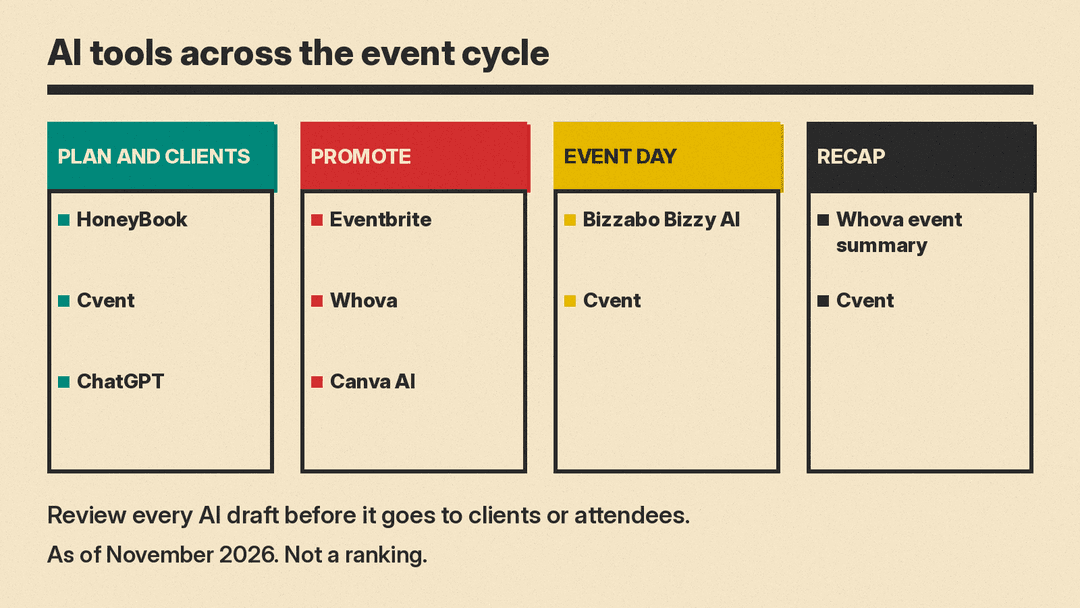
This guide is current as of November 2026 and covers AI tools for the whole event cycle: planning and client admin, promotion, the event day, and the recap. Some entries are full event platforms with AI built in. Others are design or general assistants that fit around whatever platform you already use.
How we picked
Every tool listed here has AI features described on the vendor's own product pages, blogs, announcements, or help docs, and we link to those pages in Sources. We did not test these tools hands-on, and this is not a ranked list. The order follows the event cycle, from corporate planning platforms through promotion and design to a general assistant. We list no prices. Check each vendor's pricing page for current plans and any limits on AI usage.
For each tool we cover what the AI part does, who it fits, and one caveat to check before you commit.
Cvent: AI event planning software for enterprise and venue teams
CventIQ is "the AI that powers" the Cvent platform, which Cvent says is purpose-built for the events industry. It lists uses such as handling registration updates and attendee requests faster, capturing session notes and key takeaways, turning survey comments into takeaways, and creating layout diagrams faster. It can turn event moments into follow-up content, let you ask your event data questions without building a report, and match attendees to people and sessions. For venues, it helps draft RFP responses faster. Cvent product news describes the Cvent Assistant, a permission-aware planning assistant across the platform, plus Feedback Insights, an AI chatbot for survey responses, and the Insights Assistant for plain-language questions about event and session data. A Cvent MCP Connector beta is live for Claude only, with Copilot, ChatGPT and others planned during the beta, so you can use CventIQ inside your own AI tool. Cvent says "nothing goes out until you say so". If you already link your apps with no-code workflows, our guide to AI automation tools covers that side. This fits enterprise and corporate event teams and venues. Caveat: the features sit inside the Cvent platform, and some are beta.
Bizzabo: AI event app copilot for conference attendees
Bizzy AI is an attendee copilot built into the Bizzabo mobile event app, described on Bizzabo's product page and its blog. It auto-ingests the agenda and session schedule, speaker profiles, the attendee directory, and scheduled meetings from Bizzabo. You can add a knowledge base with FAQs, venue info, and sponsor details. It answers questions about sessions, speakers, networking if enabled, and logistics, and it searches session descriptions semantically. It only suggests attendees who opted into the event community, and it caps suggestions at three per response. After the event, chat logs show what attendees asked. It does not take actions for attendees, so it will not book meetings or reserve seats, and it does not answer off-topic questions. This fits conference organizers who run Bizzabo. Caveat: it is attendee-side only, and Bizzabo says it is for in-person events that use its custom-branded app.
Whova: AI event descriptions and an automatic post-event summary
Whova's AI Writing Companion drafts event descriptions and invitation emails (the emails need Whova registration) from general event information. Whova's event trends post says you enter a few details about your event, including its goals, and can then make the text more exciting, concise, detailed, or professional. A second feature, the AI-Generated Event Summary, is enabled in the Basics section of the dashboard under Post-event Analytics and Highlights before the event start date. It produces a written summary about 2 days after the event ends, covering an overview, speakers, sessions, exhibitors, sponsors, attendee satisfaction, networking, and engagement. That summary suits organizers who report results to committees, sponsors, or members. This fits conferences, associations, and meetups that use the Whova app. Caveat: the summary must be turned on before the event.
Eventbrite: AI event marketing for ticketed public events
In May 2023, Eventbrite introduced AI-powered tools for creators. You fill in the event title, location, and dates, and AI generates event descriptions, summaries, and event images. The event type, category, and sub-category are filled in automatically. There is also AI-powered email writing for campaigns and AI ad copy for social media ads. Eventbrite said early results showed creators launching ad campaigns "30% faster" with AI-powered copy than without it. Eventbrite's current organizer feature set still lists these AI tools alongside its ticketing and registration features. This fits ticketed public events, workshops, and community events. If email is your main channel, compare the output with the tools in our guide to AI email assistants. Caveat: check generated text and images before publishing.
HoneyBook: AI for wedding planners and solo client admin
HoneyBook is a client management platform for small businesses, and it has a page for event planners. Its AI Composer drafts emails in your writing style. Predictive lead alerts flag the inquiries most likely to book. Task prioritization builds a daily action plan. There are AI meeting notes and summaries, and an AI chat side panel for questions about any project or client. Lead enrichment and follow-up suggestions round out the set. HoneyBook's help page notes that HoneyBook AI cannot complete actions on your behalf or answer questions about your membership, and that it "can make mistakes". This fits solo planners, wedding planners, and small agencies that handle inquiries, proposals, and payments directly with clients. Caveat: it is for client admin, not attendee management.
Canva AI: AI invitations, signage, social posts, and slides
Canva AI lets you describe what you want by text or voice, and it creates a design. You refine it by chatting or by editing it yourself. It can generate images, charts, and headlines, applies your brand kit, resizes designs, and schedules tasks. The invitations page covers one of the most common event uses. Canva's site menu also lists presentations, posters, flyers, and social media designs for session slides, signage, and promotion. Canva says Canva AI is available to everyone, with a range of AI tools on the Free plan and more usage and advanced features on paid plans. Canva also says it does not use your content to improve AI features unless consistent with your privacy controls. This fits planners of any size who need marketing and print collateral, and it sits alongside whatever platform handles your registration. Caveat: Canva says you may not have exclusive rights to AI-generated designs in commercial projects.
ChatGPT: general AI assistant for event drafts and reminders
ChatGPT is a general assistant rather than an events platform. You can use it to brainstorm themes, draft run-of-show outlines and agendas, write vendor emails, and build checklists. Scheduled tasks can run one-time or recurring tasks such as reminders. Free users can schedule a task no more than once per day, and hourly schedules and exact delivery times need an eligible paid plan. For recorded vendor calls and site visits, a dedicated tool from our list of AI note taking apps may fit better. It fits anyone, including solo planners and small teams that have no events platform, and it works as a supplement for teams that do. Caveat: it does not know your venue, your contracts, or your vendor availability, so check every detail before you act on its output.
How to choose
- Start with the size and type of events you run. Enterprise conferences and association meetings point to Cvent, Bizzabo, or Whova, and venue sales teams to Cvent. Workshops and community events fit Eventbrite with Canva AI for materials.
- Decide whether you sell tickets. Public ticketed events need listing copy, registration, and promotion. Client-led weddings and corporate programs need inquiry handling, proposals, and client communication instead.
- Decide whether you need an attendee app. Bizzabo puts its AI copilot inside the attendee app. The Whova AI features covered here are for organizers, and Cvent spreads its AI across planning, surveys, and reporting.
- Separate client admin from attendee experience. HoneyBook covers clients, leads, and follow-up. Cvent, Bizzabo, Whova, and Eventbrite cover the event and the attendees.
- Check data and privacy settings before you turn features on, and review AI drafts before you send them to clients, vendors, or attendees.
FAQ
Can AI plan an event for me?
No. The tools here draft descriptions, emails, agendas, designs, and summaries, and they answer questions from your event data. A planner still checks vendors, contracts, budgets, and details. Bizzabo's copilot does not take actions for attendees, and HoneyBook's help page says its AI cannot complete actions on your behalf.
What is the best free AI tool for event planning?
ChatGPT has a free tier with limits on scheduled tasks, and Canva says a range of AI tools is on the Free plan with more usage and advanced features on paid plans. Platform AI comes with the platform, so access depends on the events product you already pay for.
Is my event data used to train AI?
Canva says it does not use your content to improve AI features unless consistent with your privacy controls. Bizzabo says it does not use organizer or attendee content to train AI models. For the other tools here, check the vendor's privacy and AI policy.
Sources
- Cvent: CventIQ
- Cvent product news: beta programs and Cvent Assistant
- Bizzabo: Bizzy AI attendee copilot
- Bizzabo blog: Bizzy AI
- Whova: AI in event management best practices
- Whova: event trends in technology and AI
- Whova: AI-Generated Event Summary
- Eventbrite: AI-powered tools announcement
- Eventbrite: organizer features
- HoneyBook AI
- HoneyBook for event planners
- HoneyBook Help Center: AI chat
- Canva AI
- Canva: invitations
- ChatGPT
- OpenAI Help Center: Scheduled tasks in ChatGPT
