
Much of a product manager's week follows the same pattern: collect input, sort it, summarize it, decide, then write it down. AI tools now help with several of those steps. Common uses include synthesizing customer feedback into themes, drafting specifications and documents, planning and triaging the backlog, answering analytics questions in plain language, and building prototypes from a prompt.
This article groups tools by the job they help with rather than by vendor size or category. Each entry describes the product using only what the vendor itself publishes, as of November 2026. Nothing here is a ranking. Start with the section that matches the work consuming your time.
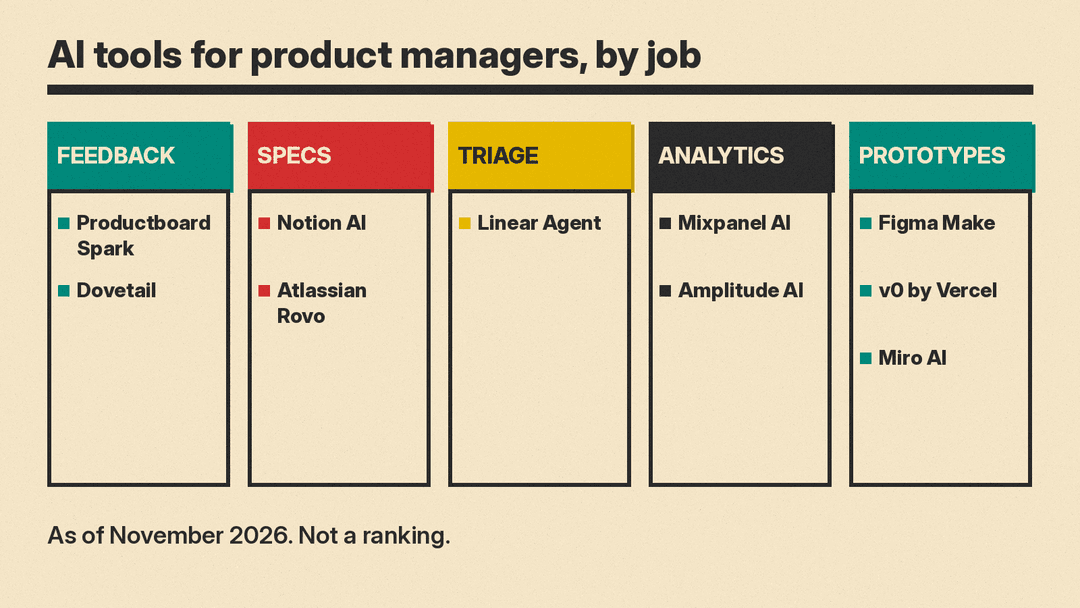
Best AI tools for customer feedback analysis
Productboard Spark Productboard describes Spark as an AI agent built for product managers. It surfaces product opportunities, synthesizes customer feedback, drafts product specifications, and measures post-launch outcomes. Productboard says it connects to 25+ native integrations and that its platform is SOC2-verified. Good fit if you want feedback synthesis, spec drafting, and launch review handled in the same tool.
Dovetail Dovetail calls itself an AI-native customer intelligence platform that continuously ingests, analyzes and acts on unstructured customer feedback. It classifies raw data into ideas, flags emerging issues, and answers questions across your customer data. It also offers Digital Twins, which let you talk with a replica of customer segments built from real data. Good fit if you accumulate research continuously and would rather query it than re-read transcripts.
Best AI tool for writing specs and searching team knowledge
Notion AI Notion says its AI can search, generate, analyze and chat inside Notion, and that it gives answers with citations. It can also run agents that complete multi-step tasks using context from Notion, connected apps and the web. Notion mentions AI meeting notes and search across connected apps such as Slack and GitHub. Good fit if your specs, docs and meeting notes already live in Notion.
Atlassian Rovo Rovo is Atlassian's generative AI product. Atlassian says teams use it through Rovo Search, Rovo Chat and Rovo Agents. It pulls context across people, projects and code, and its agents handle next steps inside workflows. Atlassian says admins get control over what the AI can access. Atlassian says Rovo is available to all customers with a Standard, Premium or Enterprise Cloud plan of Jira, Confluence, Service Collection or Teamwork Collection. Good fit for teams already working in Jira and Confluence.
Best AI tool for backlog triage and planning
Linear Agent Linear says its agent understands projects, issues, customer requests, docs and code. You can mention @Linear in Slack or Teams to turn a discussion into a scoped issue, ask it to summarize progress, risks and blockers into an update, or have it read the backlog to find repeated themes and suggest what goes into the next cycle. Triage Intelligence suggests assignees, teams, projects, labels and related issues. Agents can run on a schedule. Good fit if your issues and triage queue already live in Linear and you want summaries written from them.
Best AI tools for product analytics questions
Mixpanel AI Mixpanel says its AI proactively surfaces insights from your analytics, diagnoses problems and recommends what to do next. It also says you can ask Mixpanel Agent product questions in plain language. Good fit if you want answers to ad hoc product questions without writing a new report each time.
Amplitude AI Amplitude says its AI agents run complex analyses, investigate root causes, build dashboards, flag problems, recommend actions, and can keep in touch via Slack. It also brings behavioral context into AI tools such as Claude, Cursor and GitHub. Its AI Feedback feature looks at what customers say across channels, and Amplitude says it offers data controls. Good fit if you want analytics investigation and customer comments handled in the same place.
Best AI tools for prototypes and whiteboarding
Figma Make Figma Make is Figma's prompt-to-code tool. It builds prototypes with context and lets you move between design and code. Good fit if you want an interface idea to exist as something running before it reaches the build queue.
v0 by Vercel Vercel describes v0 as an AI assistant to design, iterate and scale full-stack web apps. It generates working applications from a prompt, connects to GitHub, and publishes to a live site with one-click deployment. Good fit if you need a shareable running prototype rather than a static mockup.
Miro AI Miro describes its canvas as an AI platform for teamwork where your team, your agents and your context come together. You can use the whole canvas as a prompt. Good fit for workshops, journey maps and planning sessions where the input is visual and scattered.
How to choose
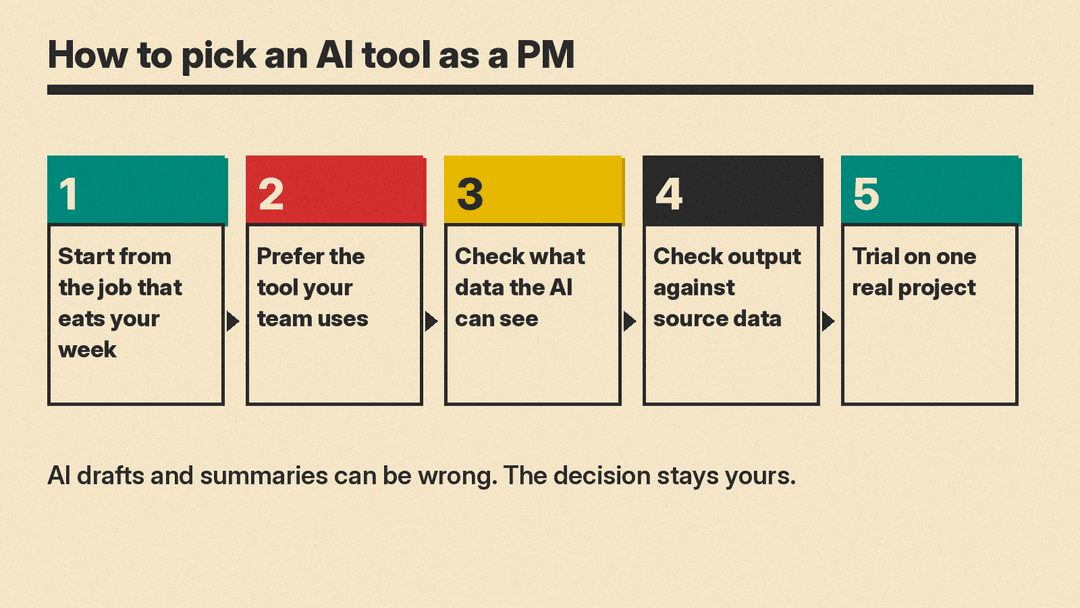
- Start from the job that eats your week. If feedback review takes most of your time, buy for that first. A tool that automates a task you rarely do will not change your workload.
- Prefer the tool your team already uses. Rovo is aimed at Jira and Confluence teams, Linear Agent at Linear teams, Notion AI at Notion teams. Adoption is usually easier where the data and the daily workflow already sit.
- Check what data the AI can access, and who controls it. Atlassian says admins control what Rovo can access, and Amplitude says it offers data controls. Before connecting anything, read the vendor's privacy, security and admin pages.
- Check output against the source data before you share it. A summary, a triage suggestion, or an answer to an analytics question should be traceable to the underlying feedback or events, especially when it goes into a spec, roadmap or executive update.
- Trial on one real project. Pick a single project with a defined end date, use one tool for its full cycle, and compare the result against how you did the work before. Then decide whether to widen it.
FAQ
Can AI write a PRD?
It can draft one. Productboard says Spark drafts product specifications, and Notion says its AI can generate content inside Notion. The decisions inside the document remain yours: what to build, what to cut, which customer problem the release actually solves. Treat a draft as a starting structure, and check every claim against your source data before it circulates.
Will AI replace product managers?
The tools in this list automate synthesis and administrative work. They group feedback, draft documents, summarize progress, answer analytics questions, and generate prototype code. The judgment calls, such as what to build, what to decline, and how to weigh conflicting evidence, stay with people. If you want to work on AI products yourself, our guide to the AI product manager role covers the skills and courses.
Is customer data safe in these tools?
Read each vendor's own privacy, security and admin pages before you connect customer data. Among the tools here, Atlassian says admins get control over what Rovo can access, Amplitude says it offers data controls, and Productboard says its platform is SOC2-verified. Where a vendor does not publish what you need, ask them directly, and check whether your own security review process applies.
