
An AI note-taking app listens to a meeting or a lecture, turns the audio into a transcript, and writes a summary with action items so you can stop typing and start paying attention. This guide covers eight tools worth knowing as of November 2026, how each one captures audio, who it suits, and the plan wording straight from each vendor's own page.
Plans change often, so check the vendor page before you pay. Where a vendor did not state something on its page, this guide says so instead of guessing. For a wider look at speech-to-text on its own, see our comparison of AI transcription tools.
How these apps capture a meeting
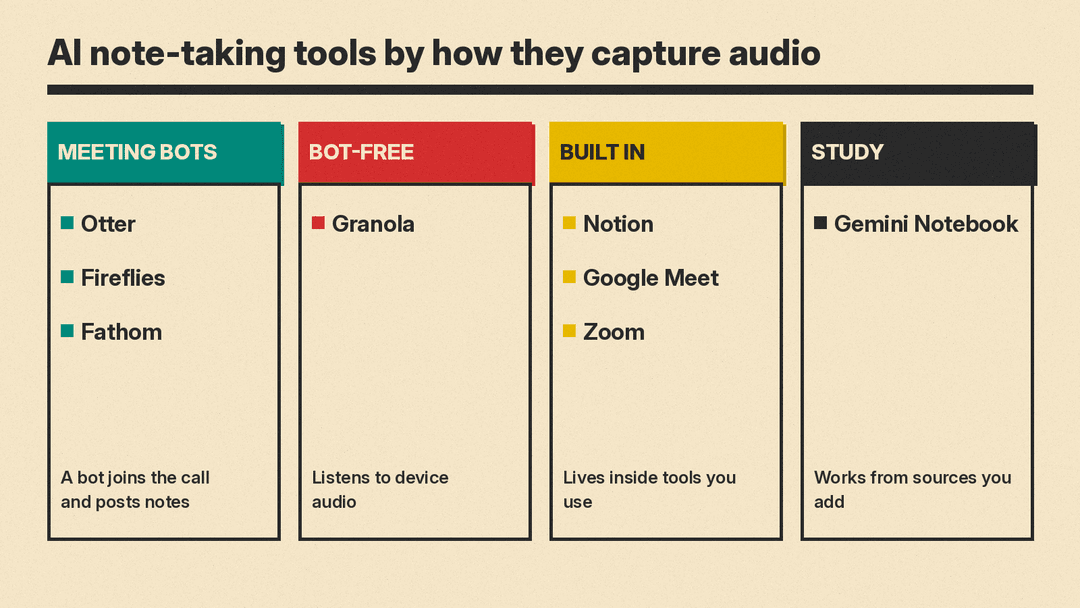
Before comparing features, it helps to know the three ways these apps get at the audio, because the choice affects who in the room knows you are recording.
- A meeting bot joins the call as a named participant, records, and posts the notes afterward. Everyone sees it join.
- A bot-free app listens to the audio on your own computer or phone, so no extra participant appears in the call. This also works for in-person talks.
- A built-in tool lives inside the video platform you already use, such as Google Meet or Zoom, and needs no extra app.
Whichever you pick, tell people you are recording. Several vendors say the same thing on their own pages, and some laws require consent. Ask the instructor before you record a lecture.
Meeting bots
Otter.ai, Fireflies.ai and Fathom can join a call as a named participant, record it, and post the notes afterward. Fathom's free plan includes unlimited recordings and transcription, and Otter's Basic plan lists 300 monthly transcription minutes, with a 20% discount on Pro for students who sign up with a .edu email address. Fireflies also lists a Chrome extension that can record without its bot joining the call. Our guide to the best AI meeting note takers compares these tools in more detail, with prices and plan limits.
Bot-free apps
Granola
Granola takes a different approach: its page lists bot-free, device-audio capture, so no extra participant joins the call. The page lists apps for desktop, iOS, Android and Apple Watch, speaker tagging, customized note templates and multi-language support.
Granola's Basic plan is listed at $0 per user per month, with meeting history limited to 30 days. Business is listed at $14 per user per month, with unlimited meeting history, pre-meeting briefs, follow-up emails and integrations with Notion, HubSpot, Attio, Affinity and Zapier. Enterprise is listed at $35 per user per month.
On privacy, the page says Granola does not allow third parties such as OpenAI or Anthropic to use your data to train their models, but that Granola trains on your anonymized data, and each user can opt out in settings. Enterprise has training off by default. The page also says audio is deleted after transcription and that Granola is SOC 2 Type II certified. It recommends always asking permission before transcribing other people.
Best for: people who dislike a bot in the call and want notes without anyone else seeing a notetaker join.
Notes built into tools you already use
Notion AI Meeting Notes
Notion's AI Meeting Notes page says it transcribes and summarizes in real time, identifies speakers, supports every video tool, syncs with your calendar and handles consent. Its main pitch is where the notes end up: next to your projects, docs and decisions, so they become searchable context for your team, and a recap that posts to Slack or email when the meeting ends. The page mentions SOC 2, TLS and SSO. It does not state a price in the text I read, so check Notion's plan page for what the feature costs on your plan.
Best for: teams that already keep their projects and docs in Notion.
Google Meet "Take notes for me"
Google's help page says the feature captures meeting notes in a Google Doc, offers a "Summary so far" if you join late, and emails the organizer a link to the recap. It requires an eligible Google Workspace edition or Google AI plan. The page also says it works for in-person meetings and on the go, and that Meet tells all participants when notes are being taken.
Notes come in two tabs: Quick notes, with the main takeaways and action items, and Full notes, with a summary, decisions, action items and details. Google recommends it for meetings of 15 minutes to 8 hours, and lists English, French, German, Italian, Japanese, Korean, Portuguese and Spanish as supported spoken languages. It supports one language at a time.
Best for: people on a paid Google plan whose meetings already run in Meet.
Zoom ZoomMate
Zoom's ZoomMate is the AI assistant inside Zoom. Its page describes My Notes, which captures meeting content automatically, covering Zoom and third-party meeting platforms, and says you can create your own formats for meeting summaries. The page lists a ZoomMate Basic allowance of meeting summaries for 3 hosted meetings per month and 3 uses per month of AI note-taking, and says larger use runs on a credit system. It points to Zoom's separate pricing page for paid plans, so check that page for current prices.
Best for: people who live in Zoom and want the notes without installing anything else.
For studying, not recording
Gemini Notebook (formerly NotebookLM)
Gemini Notebook works differently from the tools above. It does not sit in your meeting. You add sources to a notebook, then ask questions about them, and its answers are grounded in what you added. Google's page says NotebookLM became Gemini Notebook in July 2026 and is the same product, and that existing notebooks are still available.
For a course, that means you can load lecture notes, readings and transcripts into one notebook, then ask for a study guide, flashcards or a quiz. Google's help page lists reports, flashcards, quizzes, audio overviews, mind maps and slide decks among its outputs, and says each notebook is independent. It cannot read across several notebooks at once.
On privacy, Google's page says individual users' data is not used for training unless they share feedback. It says Workspace uploads, queries and responses are not used to train generative AI models, even if you submit feedback. Pricing was not stated in the text I read, so check the Plans link on the product page.
Best for: turning a pile of lecture notes and readings into study material you can quiz yourself on.
Which one to pick
- For a free start in online meetings: Fathom's free plan or Otter's Basic plan.
- For students: Otter with the .edu discount, plus Gemini Notebook for revision. Our guide to AI tools for students covers more options for coursework.
- For people who do not want a bot on the call: Granola, or Fathom's bot-free beta on Mac.
- For teams already in one platform: Notion, Google Meet or Zoom, since the notes stay where the work is.
- For a broader look at tools that save time at work, see our AI tools for productivity guide.
A few habits that make any of these better
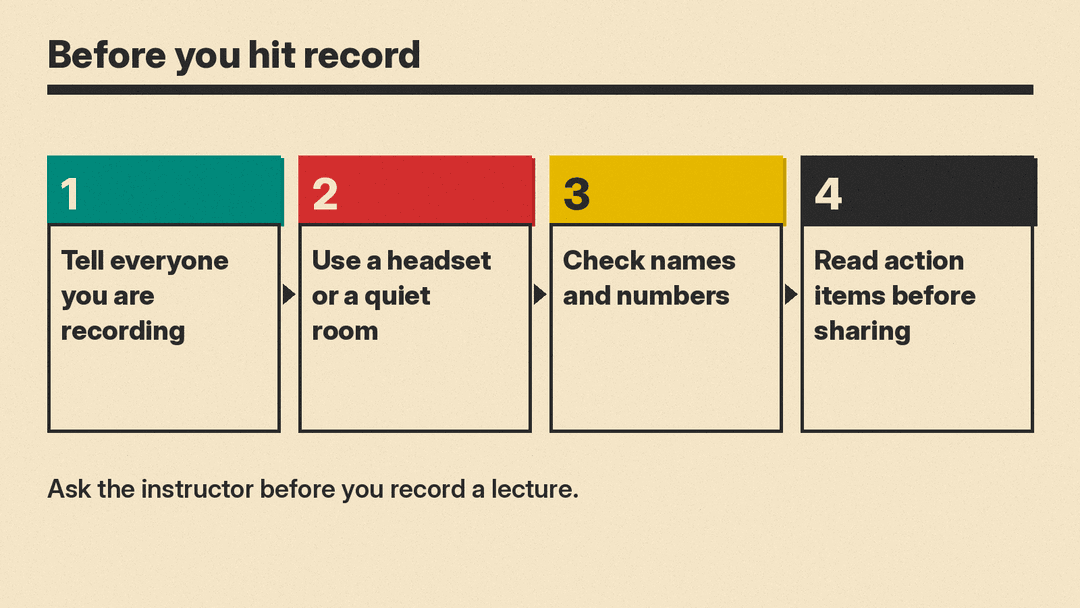
AI notes are only as good as the audio behind them. Use a headset or a quiet room, and spot-check names, numbers and dates against what was said before you send a summary to anyone. If a meeting covers confidential material, check the vendor's data-retention and training wording, since the vendors quoted above handle this differently. Last, treat the action items as a draft: the AI can miss who agreed to what, so a quick read before you share is worth the minute. Our guide on how to use AI to write meeting minutes has copy-paste prompts and a checklist for that read.
