
Most of an accountant's week is not advice. It is matching bank lines, chasing receipts, answering the same client email again and checking a tax rule for the third time this month. That is the work AI tools now go after, and most of them do it inside the ledger or practice software you already use.
This guide covers seven real tools for accountants, bookkeepers and the small firms they run, as of October 2026. Every plan name, price and limit below is copied from the vendor's own pricing or product page, and every privacy line is taken from the vendor's own page. Plans change often, so check the linked page before you buy. If your work lives in spreadsheets, also see our guide to AI tools for Excel and Google Sheets. For tools that run the rest of a small company, see AI tools for small business owners.
How these tools split up
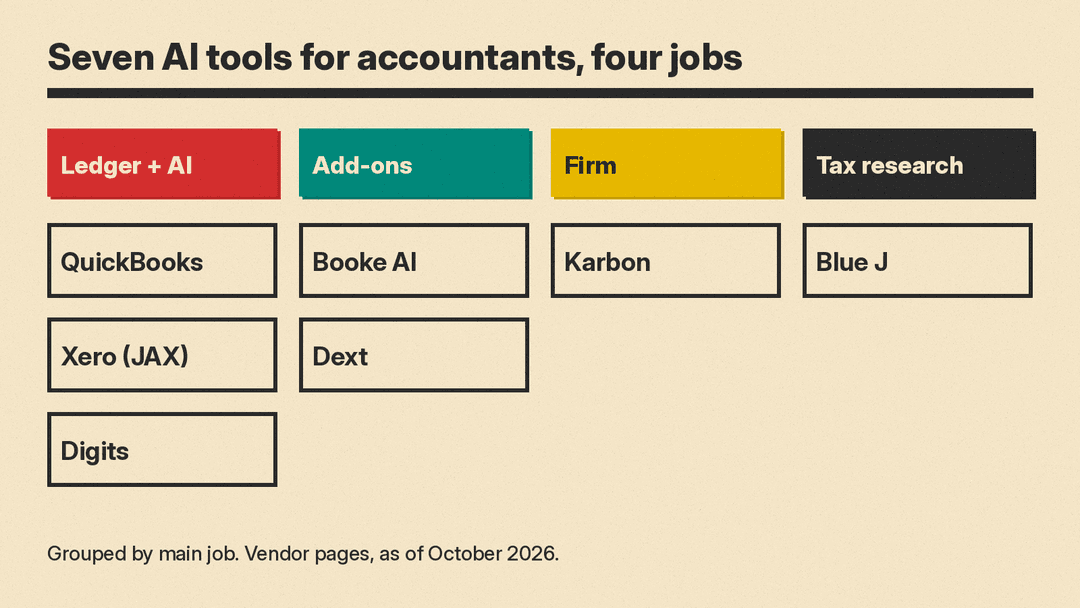
The seven tools fall into four jobs. Three are accounting ledgers with AI built in. Two are add-ons that do bookkeeping work inside a ledger you already have. One is practice management software for running a firm. One is a tax research assistant.
Before you pick, check four things:
- Where it runs: inside your ledger, or as a separate app that syncs to it.
- Who pays: per company file, per client business, per staff user or per document volume.
- Who reviews: whether the tool posts entries on its own or holds exceptions for a person to approve.
- Data use: whether the vendor says it trains AI models on your data.
Ledgers with AI built in
QuickBooks Online (Intuit Intelligence)
QuickBooks Online groups its AI features under the name Intuit Intelligence, and the features grow with the plan. The Simple Start plan lists "AI Chat for instant insights," marked beta with limited capacity, and says it "Categorizes expenses." Essentials adds "Cleans up your books, fast" with Accounting AI. Plus adds "Reconciles your books," "Finds and fixes anomalies" and "Catch discrepancies pre-filing" with Sales Tax AI. Advanced adds "Gives financial insights tailored to your business" with Finance AI.
Plans as listed: a Free plan at $0 a month for 1 user with no accountant access. Paid plans list at $38 a month (Simple Start), $85 (Essentials), $140 (Plus) and $340 (Advanced), and when we checked the page also showed lower introductory prices. Simple Start, Essentials and Plus include access for 2 accountants, and Advanced for 3. The FAQ says you can invite an accountant "to collaborate with you for free."
Best for: firms whose clients already run on QuickBooks.
Xero with JAX
Xero's AI assistant is JAX, short for Just Ask Xero. Its JAX page says you can ask questions such as "What was my total income in the last six months?" or ask it to create an invoice based on the last quote for a contact. The FAQ says JAX chat "is available to all Xero subscribers and users" and "There's currently no additional charge to Xero subscribers to use JAX chat experience."
On data, the same FAQ says "JAX chat doesn't use your data to train the LLMs it uses." For large language models it names third-party providers such as AWS, Microsoft Azure, GCP and OpenAI. At its August 2026 Xerocon US event, Xero said Auto Bank Reconciliation saves "accountants and bookkeepers around 50% of their monthly bank reconciliation time." That is Xero's own figure.
US plans as listed: Early at $27 a month, Growing at $59 and Established at $97, after an introductory discount for new US customers. Smart Document Capture is on every plan. Auto-reconcile is an optional $5.00 per month on Early and included on Growing and Established.
Best for: firms with clients on Xero, and anyone who wants a chat assistant at no extra charge.
Digits
Digits sells itself as AI-native accounting software. Every plan includes "24/7 AI Bookkeeping & Reconciliation" and Ask Digits, which the FAQ calls "a conversational AI assistant included in every plan that answers plain-language questions about your financials and accounting data." For firms, Digits offers what it calls Agentic Close to run the month-end close across clients.
Plans as listed: Essentials at $65 a month, Core at $100 a month and Pro at $250 a month, with Pro marked "Coming soon." There is a 30-day free trial. Firms are priced per client account, not per seat, and partner firms get Free Firm Books for their own books. Two limits to note: the FAQ says the service is "available only to U.S.-based entities," and "Digits itself does not file your taxes for you." The pricing page says Digits is "SOC2 Type II certified."
Best for: US firms that want to move clients to a newer ledger built around automation.
Bookkeeping add-ons
Booke AI
Booke AI is an AI bookkeeper that works inside QuickBooks Online and Xero, so you keep your current ledger. Its pricing page describes the flow as: invite AI Bookkeeper to QuickBooks Online or connect Xero, the AI Bookkeeper "works daily," and "you review exceptions." Listed features include daily bank feed categorization, missing document requests, custom thresholds and rules, "Exception review + audit trail" and OCR for bills, invoices and receipts.
Plans as listed: AI Bookkeeper (Business) at $129 per business per month. A firm plan adds multi-client management, a white-label client experience and custom pricing for your firm.
Best for: bookkeepers who want the categorizing done for them but still approve the odd cases.
Dext
Dext handles the paper side of bookkeeping. Clients send receipts, invoices and statements by mobile, email, WhatsApp or desktop, and Dext says it extracts the data "at over 99% accuracy," then categorizes it and syncs it to your accounting software. That accuracy figure is Dext's own claim. Its AI Assist feature learns your calls on suppliers, categories and splits and turns them "into automations for you to approve."
Dext says it connects with "36+ accounting software platforms," including QuickBooks Online, Xero, Sage and Zoho. On pricing, its FAQ says "You can customise your Dext plan to meet your needs depending on how many users and documents you have," and plans differ for businesses and for accounting firms. There is a 14-day free trial with no credit card. On data, the FAQ says Dext is "ISO/IEC 27001 certified" and GDPR compliant, and "All customer data is stored in the EU."
Best for: firms that lose hours to client receipts and missing documents.
Running the firm
Karbon
Karbon is practice management software for accounting firms: email, workflow, time tracking and billing in one place. Its AI features include email summaries, drafting and refining emails, a client summary that pulls emails, notes, work and billing data into one brief, and flags for missed time entries. Kai, which Karbon calls an AI coworker, and agentic workflows are marked Early Access. Meeting Intelligence is marked Coming Soon.
The AI page says Karbon AI "is currently available to all Karbon customers at no additional cost," is built on the Azure OpenAI Service, and that "Karbon does not use your firm's data to train AI models." Admins can turn AI off in firm settings.
Plans as listed on the pricing page: Team at $59 a month per user paid annually, or $79 paid monthly. Business at $89 a month per user paid annually, or $99 paid monthly. The page says "Monthly billing for 4+ users." Enterprise is a third plan.
Best for: firms with several staff who want AI help on client email and workload.
Tax research
Blue J
Blue J is an AI tax research assistant. It answers tax questions with in-line citations and can draft memos and emails, and its home page says it is "Powered by primary authoritative content, Tax Notes, and IBFD." Blue J says users save "3 hours" per user every week; that is the vendor's figure.
Plans as listed: the Individual Plan at $1,498 a year per user, with "Full US federal and SALT tax coverage" and "Unlimited questions, drafting, and file uploads." The Team Plan is "Contact for pricing" and adds SSO, onboarding and firm-wide usage insights. The pricing page says Blue J is "SOC 2 Type II compliant." There is a 7-day free trial with no credit card.
Best for: tax preparers and advisers who spend hours finding the right authority.
Starting prices at a glance
The units differ, so compare the unit first and the number second.
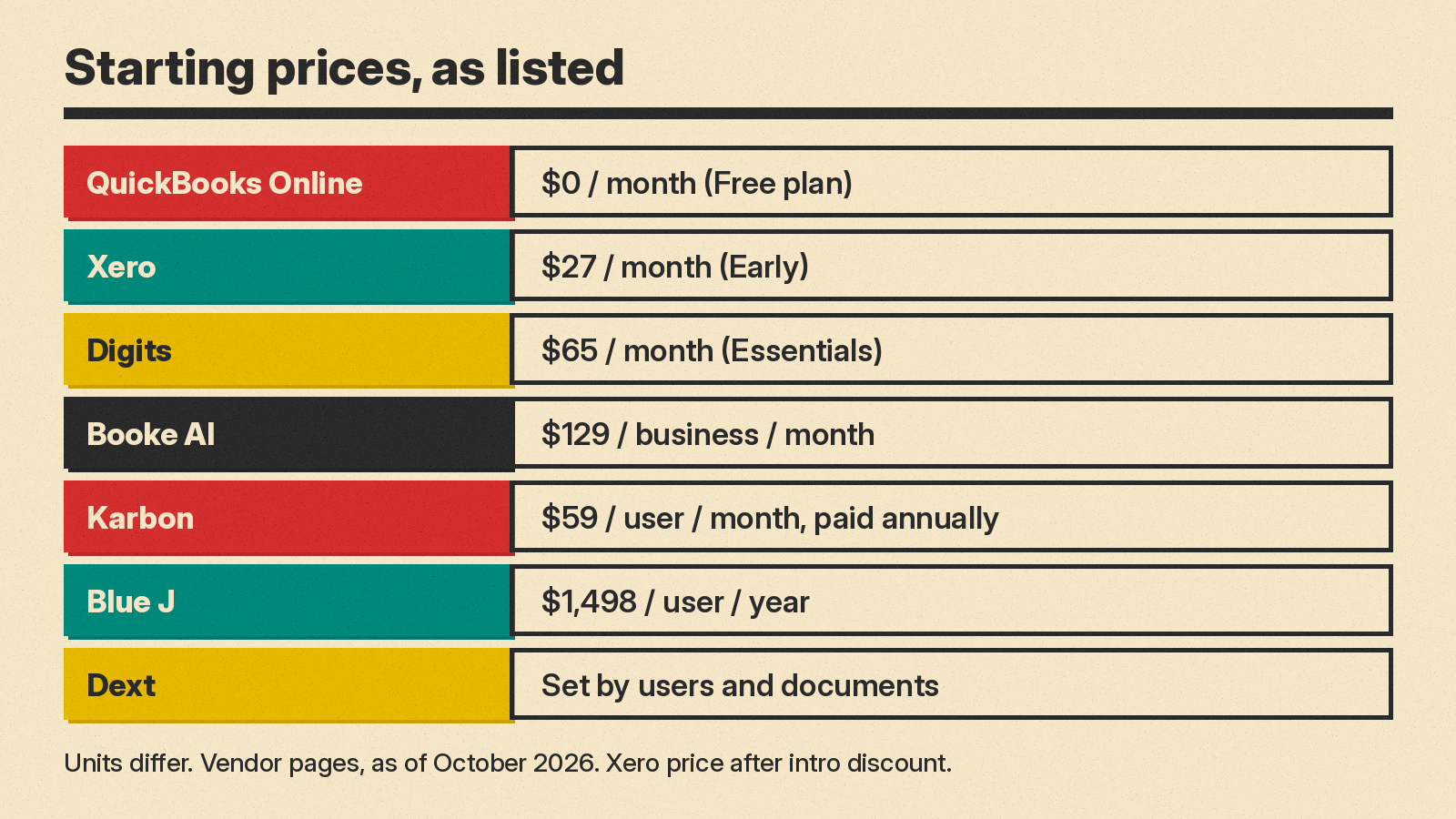
- QuickBooks Online: Free plan at $0 a month; paid plans list from $38 a month.
- Xero: from $27 a month (Early); JAX chat at no additional charge.
- Digits: from $65 a month (Essentials).
- Booke AI: $129 per business per month.
- Dext: set by users and document volume.
- Karbon: from $59 per user per month, paid annually; AI at no additional cost.
- Blue J: $1,498 per user per year.
What AI still leaves to you
None of these vendors sells its AI as a replacement for the accountant's sign-off. Booke AI's flow ends with "you review exceptions." Dext says "You review, you approve, you keep the final say." Digits says that for verified financials "you may want a professional to review and validate your books." Blue J describes itself as "Built for professional judgment."
A sensible way to start is with one tool on one task, such as bank reconciliation or receipt capture, on a few clients. Compare the hours spent and the number of corrections against a normal month before you roll it out across the firm.
