
Most spreadsheet work is the same handful of jobs: write a formula, clean a messy column, build a pivot table or chart, explain what the numbers say, and, for finance teams, build or update a model. AI now helps with each one, and the two biggest spreadsheet apps already ship their own assistants. This guide lists 10 real tools, grouped by job, with what each does, who it suits, its main limit, and a price only where we read it on the vendor's own page.
All features, plans and prices below are as of October 2026. Plans change often, so check the linked page before you pay.
How we picked
- Real, available products only. We loaded each tool's own site, pricing page or help docs in October 2026.
- Built for spreadsheet work. Each tool works inside Excel or Google Sheets, or takes an Excel or CSV file and returns formulas, tables, charts or analysis.
- Verified details only. Prices come from vendor pages. Where a vendor did not show a price we could read, we leave it out.
- A clear limit for each. Every entry names a caveat.
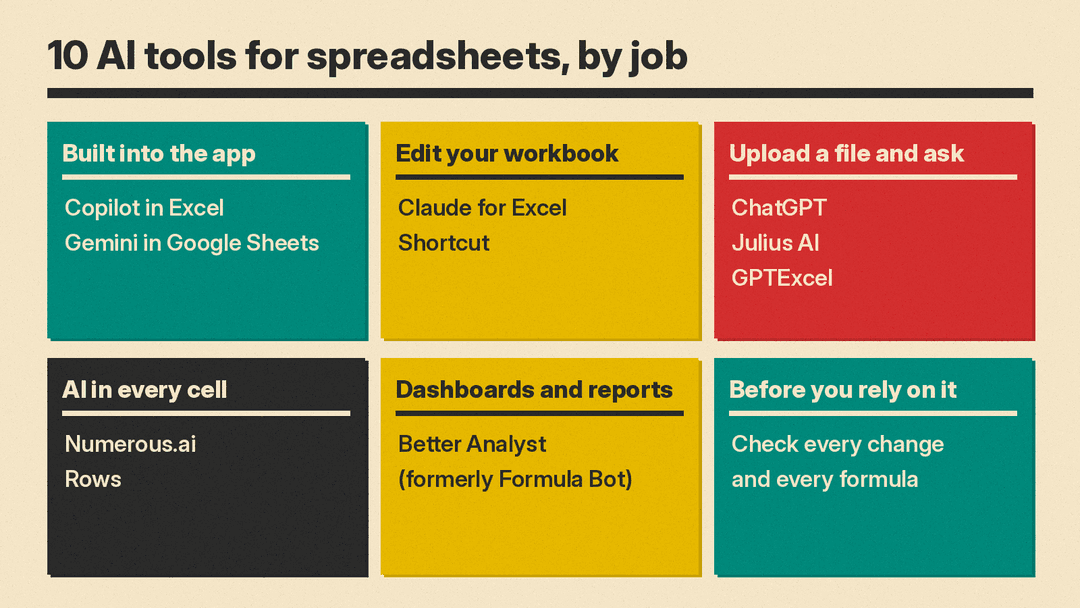
Start with the assistant your spreadsheet app already has
If you pay for Microsoft 365 or Google Workspace, you may already have an AI assistant in the grid. Try it before you buy anything else.
Copilot in Excel
Copilot in Excel builds and edits workbooks with Excel's own features: tables, charts, PivotTables and formulas. Microsoft's help page says it can add and rename worksheets, apply conditional formatting and data validation, apply formulas across multiple sheets, answer questions about your data as charts, PivotTables or summaries, search the web with citations, and pull data from other workbooks in OneDrive, SharePoint or on your computer. You can also save custom skills for tasks you repeat.
It has three modes. Edit mode, the default, changes your workbook directly and shows its reasoning as it works. Plan mode writes a step-by-step plan for you to approve first. Chat mode analyzes the data without changing anything. We covered how Copilot now runs inside the Copilot app in our Office in Copilot explainer.
- Who it suits: anyone who already works in Excel on Microsoft 365 and wants help with formulas, cleanup, charts and reports in the file itself.
- Limit: edit mode is on Windows, Mac and the web. Microsoft says iPad has chat and plan modes, iPhone and Android have chat mode, and edit mode support for iPad and iPhone is still rolling out. If you do not see Copilot, Microsoft says your subscription or your organization's settings may not include it.
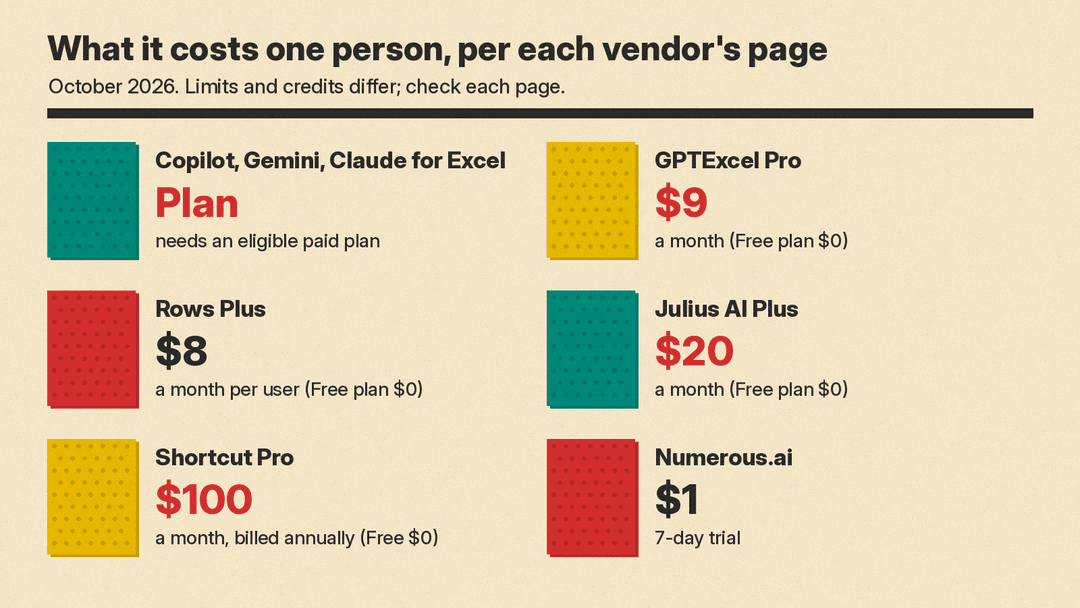
- Pricing note: Copilot needs an eligible Microsoft 365 license. We did not find a price we could read on a Microsoft page, so check your plan.
Gemini in Google Sheets
Gemini in Google Sheets opens in a side panel. Google's help page says it can create tables and formulas, fix formula errors (hover over the error cell and click Fix), analyze data, build charts, and summarize files from Drive and Gmail. It can also act on the sheet: apply conditional formatting, create pivot tables, dropdowns and checkboxes, sort and filter, find and replace, set number formats, insert or delete rows and columns, and solve optimization tasks. You can combine several of these in one prompt, and each action shows a preview card you apply or undo.
- Who it suits: people and teams who work in Google Sheets and want cleanup and analysis without leaving the tab.
- Limit: Google says it works best with native Sheets files, so you save an .xlsx file as Google Sheets first. Charts it inserts do not update when the original data changes. Your Gemini conversation is lost if you reload the browser or close the file, so insert what you want to keep.
- Pricing note: Google says this needs an eligible Google Workspace or Google AI plan. For a side-by-side of the two suites, see our Microsoft 365 Copilot vs Gemini in Google Workspace comparison.
Assistants that edit your workbook
Claude for Excel
Claude for Excel is Anthropic's Excel add-in, part of Claude for Microsoft 365. Anthropic says you can ask about any cell, update assumptions without breaking formulas, and build models from scratch. It can read a Word brief, open Excel, pull the numbers from the document and build formulas across multiple tabs. Changes show as highlighted cells you review, and Claude follows your existing formula conventions. You can drop a PDF into the sidebar, pull context through connectors, and save a process as a skill your team reuses.
- Who it suits: analysts and finance teams who build or update models in Excel and already use Claude.
- Limit: it needs a paid Claude plan, not Free. Every highlighted change still needs a human check before you rely on the model.
- Pricing note: Anthropic says Claude for Excel is generally available on all paid Claude plans, and companies can also connect through Amazon Bedrock, Microsoft Foundry or Gemini Enterprise Agent Platform. See Claude pricing for plan prices.
Shortcut
Shortcut is an AI agent built for financial modeling, from Fundamental Research Labs. It runs as an Excel add-in, a Google Sheets plugin, a web app, a Windows desktop app and a command-line tool. Its site says it builds detailed models and traces numbers back to source files. On its home page, Shortcut cites a July 2026 test on 20 real-world finance tasks, where it scored 76% against 66% for Claude for Excel and 59% for Microsoft Copilot. Shortcut does not name an outside evaluator, so treat this as a vendor claim, not an independent result.
- Who it suits: banking, private equity, hedge fund, FP&A and accounting teams that build financial models.
- Limit: it is priced for professionals, and usage runs on credits. Shortcut says a message typically takes 2 to 15 credits.
- Pricing note: per Shortcut's pricing page, Free is $0 with 20 free weekly credits. Pro is $100 per month billed annually with 1,000 monthly credits. Teams is $320 per month plus $100 per seat per month, billed annually. Enterprise is custom.
Upload a file and ask
These tools work outside your spreadsheet app. You upload an Excel or CSV file, ask a question in plain English, and get back an answer, a chart, a formula or a new file.
ChatGPT
ChatGPT can analyze uploaded .xls, .xlsx and .csv files, summarize trends and outliers, build tables and charts, and run calculations. For some of these tasks it writes and runs Python code, and OpenAI says you should review that code, its outputs and its assumptions before you rely on the result. Bar, line, pie and scatter charts can be switched to an interactive view. When plugins are available for your account or workspace, you can also attach files from Google Drive, OneDrive and SharePoint.
- Who it suits: anyone who wants a quick answer from a spreadsheet, or a formula explained, without installing anything.
- Limit: OpenAI says the analysis environment cannot make web requests, may not read exact values from scanned or image-based tables, and may not analyze all of a large or formula-heavy file.
- Pricing note: file limits vary by plan. See ChatGPT pricing.
Julius AI
Julius AI is an AI workspace for data analysis. You analyze spreadsheets, documents and data files, create charts, reports and dashboards, and turn the results into a presentation. Julius's plan comparison lists Snowflake, BigQuery and Postgres connectors on its paid plans, and Google Drive, OneDrive and SharePoint on Free.
- Who it suits: people who want a chat-style analyst for their files, with charts and a report at the end.
- Limit: Julius lists 7-day file storage on its Plus and Pro plans, and its comparison table shows Julius Lite models on Free. Usage is metered in credits.
- Pricing note: per Julius' pricing page, Free is $0. Plus is $20 per month ($16 per month billed annually) with 2,000 credits, Pro is $45 per month ($37 billed annually) with 5,000 credits, and Business is $450 per month ($375 billed annually).
GPTExcel
GPTExcel writes and explains formulas for Excel, Google Sheets, LibreOffice Calc and Airtable. It also lets you chat with Excel and CSV files, build native Excel pivot tables and charts from a plain-English request, generate VBA, Apps Script and Python scripts, write SQL and regular expressions, and turn a spreadsheet into a slide deck you download as PowerPoint or PDF.
- Who it suits: students, accountants and office workers who mostly need the right formula fast, plus the odd pivot table.
- Limit: it is a separate web app, so you copy formulas back or download a new file. Free allows files up to 5 MB.
- Pricing note: per GPTExcel's pricing page, Free is $0 with 50 credits a month and 5 free tool runs a day. Pro is listed at $9 a month and Pro Plus at $18 a month, and the page says annual billing saves 30%.
AI in every cell
Numerous.ai
Numerous.ai adds an =AI function to Google Sheets and Excel, so you can run a prompt in any cell and fill it down a column. Its site lists uses such as summarizing, rewriting, extracting, classifying and cleaning text, plus writing ad copy and SEO keywords in bulk. It needs no API key, and it caches results so the same query is not run twice.
- Who it suits: marketers and researchers who want to run one prompt across hundreds of rows, for example to tag survey answers.
- Limit: it is built for text work in cells, not for building financial models or checking formulas. Plans are metered by characters of input and output.
- Pricing note: Numerous.ai offers a 7-day trial for $1. We could not read its plan prices on the page, so check Numerous.ai directly.
Rows
Rows is a spreadsheet with AI built into the cells. You type = and describe what you need: fix a formula, add a calculated column, join tables, make a chart, forecast, or find outliers. It can classify text into tags, run sentiment analysis, turn PDFs, invoices and screenshots into tables, and run Python analysis without you writing code.
- Who it suits: small teams who want a new spreadsheet with AI and data integrations, rather than AI added to Excel.
- Limit: you move your data into a new app. The Rows site also says Rows has joined Superhuman, so check where the product is heading before you commit a team to it.
- Pricing note: per Rows' pricing page, Free is $0 with 5 AI tasks a month. Plus is $8 per month per user ($6 billed annually) with 200 AI tasks. Pro is $79 per month plus $8 per month per user ($59 plus $6 billed annually) with 1,000 AI tasks.
Dashboards and reports
Better Analyst (formerly Formula Bot)
Better Analyst is the new name for Formula Bot. The company says it is the same account and workflows, now with dashboards and automation. You connect sources such as Excel, Google Sheets, Airtable, BigQuery, Snowflake, PostgreSQL, Google Analytics and Search Console, then ask for an analysis, a dashboard, a report, a presentation or a scheduled workflow. It shows the Python, SQL or R code behind each answer, and its site still lists generators for Google Sheets formulas, VBA and Apps Script.
- Who it suits: small businesses that want reports and dashboards from several data sources without hiring an analyst.
- Limit: it is a full analytics app, which is more than you need if you only want a formula.
- Pricing note: the site says you can start for free with no credit card. We could not read paid plan prices on its page.
How to choose
Start with the assistant in the app you already pay for, then add one tool for the job that costs you the most time.
- If you live in Excel on Microsoft 365: Copilot in Excel first. Add Claude for Excel if your team already pays for Claude.
- If you live in Google Sheets: Gemini in Sheets. Add Numerous.ai if you run the same prompt down long text columns.
- If you build financial models: compare Claude for Excel and Shortcut on one of your own models before you pay for seats.
- If you just need the right formula: GPTExcel, or paste the problem into ChatGPT.
- If you have a file and a question: ChatGPT or Julius AI.
- If you want dashboards and scheduled reports: Better Analyst, or Rows if you are happy to switch spreadsheets.
Check any number an AI tool puts in your sheet. Every vendor here asks you to review changes, code or formulas before you rely on them. For more picks by role, see our guides to the best AI tools for students and the best AI tools for marketers.
FAQ
Is there a free AI tool for Excel? Yes, with limits. GPTExcel, Rows, Julius AI and Shortcut all list a $0 plan, and Better Analyst says you can start free. Copilot in Excel, Gemini in Sheets and Claude for Excel need an eligible paid plan.
Can AI write Excel formulas for me? Yes. Copilot in Excel and Gemini in Sheets write formulas in the sheet, Gemini can fix formula errors, and GPTExcel writes and explains formulas you paste back in.
Can Gemini work with Excel files? Google says Gemini in Sheets works best with native Google Sheets files. To use it on an .xlsx file, save the file as Google Sheets first.
Will the AI change my workbook without asking? It depends on the tool. Copilot in Excel's edit mode changes the workbook directly, while its plan and chat modes do not. Gemini shows a preview card before an action, and Claude for Excel highlights the cells it changed.
Sources
- Microsoft Support: Get started with Copilot in Excel
- Google Docs Editors Help: Collaborate with Gemini in Google Sheets
- Anthropic: Claude for Microsoft 365
- Claude pricing
- Shortcut
- Shortcut pricing
- OpenAI Help: Data analysis with ChatGPT
- ChatGPT pricing
- Julius AI
- Julius AI pricing
- GPTExcel
- GPTExcel pricing
- Numerous.ai
- Rows AI
- Rows pricing
- Better Analyst (formerly Formula Bot)
