
Grok rewards plain, direct prompts. SpaceXSI, the company behind Grok (its docs also call it xAI), gives one short rule for its reasoning models in its Best Practices Guide: "state the task, constraints, and output format directly." This guide turns that rule into a four-part prompt you can reuse, then gives 25 copy-paste templates for everyday work, files, research and coding.
The second half is for developers. It covers the API settings xAI recommends for Grok 4.7 and one caching mistake that, in xAI's own test, made the same chat cost 2.2 to 2.9 times as much. We also ran three of the techniques on a small local model. We could not call Grok for this post, so those tests show how the prompts behave, not how Grok scores.
Grok 4.7 in one minute
SpaceXSI announced Grok 4.7 on September 21, 2026 as its "most capable model for coding and knowledge work." The company says it "works longer on difficult tasks, checks its own work more carefully," and is served at the same price and speed as Grok 4.6.
The developer guide lists these facts:
- Context window: 500,000 tokens.
- Knowledge cutoff: May 2026.
- Input and output: text and image input, text output.
- Price: $2 per million input tokens and $6 per million output tokens. The model page says prompts of 200,000 tokens or more cost $4 and $12, and cached input costs $0.50.
- Reasoning: low, medium, high (the default) or xhigh. Reasoning cannot be turned off.
- Tools: function calling, web search, X search and code execution.
- Where it runs: the xAI API, Grok Build (where it is the default model of the coding agent), Cursor, and the OpenRouter, Vercel and Cloudflare gateways.
On grok.com and in the iOS and Android apps, the Grok overview says you can chat, upload files for "analysis, extraction, and summarization," create images and video with Grok Imagine, talk by voice and connect your own tools. Those features shape the templates below.
The four-part Grok prompt
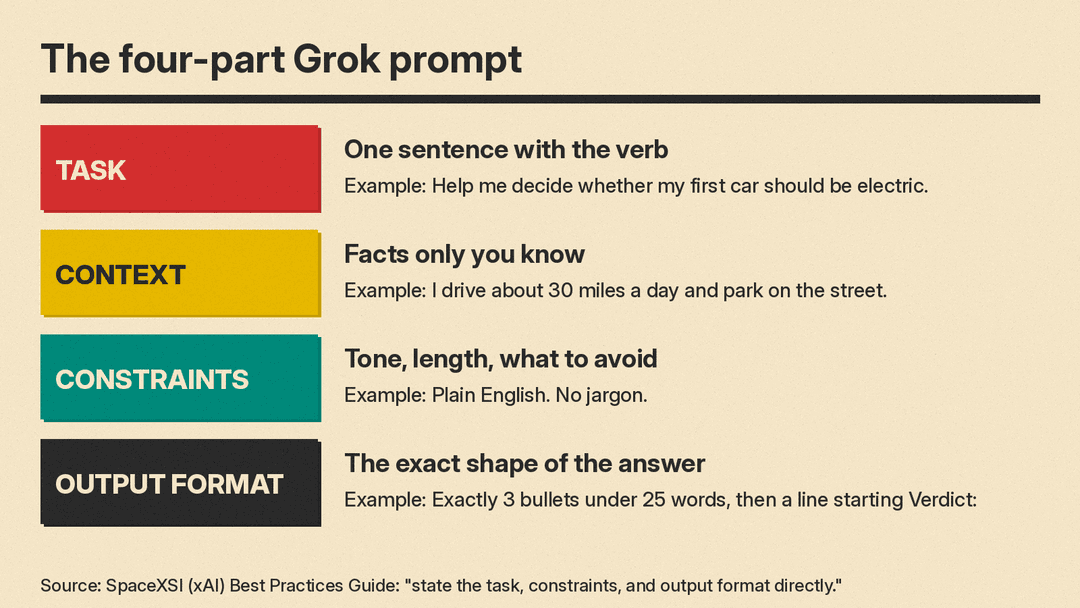
xAI's line about stating the task, constraints and format sits in the evaluation section of its guide, where it explains that "Grok reasoning models reason before they answer." The same idea works in chat. A reasoning model spends its effort on what you ask for. If you leave the format open, it picks one for you, often a long one.
Use four labeled parts:
- Task: one sentence with the verb you want (decide, rewrite, summarize, compare, fix).
- Context: the facts only you know, such as your audience, budget, deadline or situation.
- Constraints: what to avoid, the tone, the length and the sources to use.
- Output format: the exact shape of the answer, such as "3 bullets, then one line that starts with Verdict:".
Here is the base template:
Task: [one sentence: what you want done]
Context: [who it is for, your situation, the facts Grok cannot know]
Constraints: [tone, length, what to avoid, which sources to use]
Output format: [exact shape, for example "3 bullets under 25 words, then a line starting with Verdict:"]
xAI adds a second point that matters if you switch between assistants: "If you tuned a prompt for another model, spend comparable effort tuning it for Grok." A prompt that works well in ChatGPT or Claude is a starting point, not a finished Grok prompt. Our GPT-6 prompting guide covers what OpenAI recommends for its own models, and our beginner's guide to better AI prompts covers the basics that apply to every chatbot.
What we tested
We ran the four-part template on Gemma 3 1B, a small open model, on our own machine (llama.cpp, temperature 0). This shows whether the structure is easy to follow. It does not show how Grok answers.
The prompt asked whether a first car should be electric, for a driver who covers about 30 miles a day and parks on the street with no home charger. The format line asked for exactly 3 bullets under 25 words each, then a line starting with "Verdict:". The model returned 3 bullets (the longest was 9 words) and this final line:
Verdict: Electric is a good choice for your daily commute and street parking.The format held. The judgment did not: the model said street parking was fine and never dealt with the missing charger. A format line gets you the shape you asked for. It does not check the reasoning, so read the answer before you act on it.
The second test was the meeting-notes template (number 7 below). The notes named three owners and three due dates, plus one line about pizza at lunch. The model returned exactly this:
Priya | Send press kit to agency | Friday
Marco | Fix checkout bug | Monday
Dana | Finish FAQ page | Thursday
All three items came back in the requested form, and the pizza line was left out, as the "Use only facts in the notes" rule asked.
25 Grok prompt templates
Replace the text in brackets. Most templates use the four labeled parts, so you can add or remove a line without losing the structure.
Everyday writing
- Rewrite a message
Task: Rewrite the message below so it is clear and polite.
Context: It goes to [person and relationship].
Constraints: Keep every date, name and number. Under [80] words. No exclamation points.
Output format: The rewritten message only.
Message: [paste]- Explain a topic to a beginner
Task: Explain [topic] to someone who has never studied it.
Constraints: Plain words. One everyday comparison. No formulas.
Output format: 3 short paragraphs, then 3 questions I can ask to learn more.- Make a decision
Task: Help me choose between [option A] and [option B].
Context: [budget, timeline, what matters most to me]
Output format: A short list of pros and cons for each, then one line starting with "Pick:" and a one-sentence reason.- Plan a week
Task: Turn my to-do list into a plan for the week.
Context: I have [hours] free on weekdays and [hours] on the weekend.
Constraints: Put the hardest tasks in the mornings. Leave one evening free.
Output format: One line per day: day, tasks, total hours.
To-do list: [paste]- Give feedback on my writing
Task: Review the draft below.
Constraints: Do not rewrite it. Point out the 3 biggest problems only.
Output format: For each problem: the sentence, what is wrong, one suggested fix.
Draft: [paste]
Work, email and calendar
The Grok connectors page says connectors are "available to all Grok users," with built-in ones for Gmail and Google Calendar, Google Drive, OneDrive, Outlook, Microsoft Teams, SharePoint and Salesforce. Once a connector is linked at grok.com/connectors, Grok "can use the connector's tools automatically" when your question is about that service. Templates 6, 8 and 10 assume you have linked one.
- Triage the inbox
Task: Look at my unread email from the last [2] days.
Constraints: Skip newsletters and receipts.
Output format: A list of emails that need a reply from me, each with sender, subject, and one line on what they want.- Meeting notes to action items
Turn these meeting notes into action items.
Rules: one line per action item, in the form Owner | Task | Due. Use only facts in the notes. If a due date is missing, write "not set". Do not add anything else.
Notes:
[paste]- Prep for a meeting
Task: Prepare me for my next meeting with [name or company].
Context: Use my recent email threads and calendar invite about it.
Output format: 5 bullets: purpose, open questions, last thing we agreed, risks, my goal for the call.- Write a status update
Task: Write a weekly status update for [team or manager].
Context: Done: [list]. In progress: [list]. Blocked: [list].
Constraints: Under [120] words. Facts only, no filler.
Output format: Three labeled sections: Done, Next, Blocked.- Find a free slot
Task: Find three 30-minute slots next week when I am free.
Constraints: Between [9 am] and [5 pm] [time zone]. Not on [day].
Output format: A list of day, date and time for each slot.
Files and documents
The Grok FAQ says you can attach PDFs, images, spreadsheets, code, audio and more with the + button, and up to about 100 files at once on the web (20 on Android).
- Summarize a PDF
Task: Summarize the attached document for [audience].
Constraints: Use only what the document says. Quote page numbers where you can.
Output format: A 5-bullet summary, then a list of anything the document leaves unclear.- Pull data from a spreadsheet
Task: Using the attached spreadsheet, find [the top 5 products by revenue].
Constraints: Show the column names you used. Do not estimate missing values.
Output format: A short list, then one sentence on any data problems you saw.- Compare two contracts or offers
Task: Compare the two attached documents.
Context: I need to choose one by [date].
Output format: A list of every difference in price, term, cancellation and obligations, with the section where each appears.- Turn a screenshot into text
Task: Read the attached screenshot and type out all of its text.
Constraints: Keep the original order. Mark anything you cannot read as [unclear].
Output format: Plain text only.- Make a study sheet
Task: Make a study sheet from the attached notes.
Output format: 10 key terms with one-line definitions, then 5 practice questions with answers at the end.
Research and current events
Grok 4.7's knowledge cutoff is May 2026. For anything newer, the answer depends on search. On the API, web search and X search are tools you turn on; check that search is available in the Grok product you use before you trust a "latest" answer.
- Research with sources
Task: Find out [question].
Constraints: Use sources from the last [30] days. Prefer official pages and original reporting.
Output format: 5 bullets, each with the source link. Then one line on what is still unconfirmed.- What people are saying on X
Task: Summarize how people on X are reacting to [topic or launch].
Constraints: Quote posts word for word and include the handle and link for each.
Output format: 3 groups (positive, negative, questions), 2 posts each.- Check a claim
Task: Check this claim: "[claim]".
Constraints: Find the original source, not a repost.
Output format: True, false or unclear, then the source link and the exact sentence that supports your answer.- Explain the news
Task: Explain [news story] to someone who has not followed it.
Output format: What happened, why it matters, what happens next. One short paragraph each, with links.- Compare products
Task: Compare [product A], [product B] and [product C] for [use].
Constraints: Use each company's own pricing page. Give prices "as of" today's date.
Output format: A list per product: price, best for, main limit.
Coding with Grok Build or the API
- Find and fix a bug
xAI's own Grok 4.7 example uses this kind of prompt: "Find and fix the bug, then explain it."
Task: Find and fix the bug in the code below, then explain it.
Constraints: Change as little as possible.
Output format: The fixed code, then 2 sentences on the cause.
Code: [paste]- Write a function with tests
Task: Write a [language] function that [does X].
Constraints: No new dependencies. Handle empty input.
Output format: The function, then 3 unit tests.- Explain a codebase file
Task: Explain what [file] does.
Context: I am new to this project.
Output format: One paragraph, then a list of the 3 functions I should read first and why.- Plan a change before coding
Task: Plan how to add [feature]. Do not write code yet.
Output format: A numbered list of files to change and what changes in each, then the risks.- Return structured data
Task: Extract every [name, date and amount] from the text below.
Constraints: Use only values that appear in the text.
Output format: JSON array of objects with keys "name", "date", "amount". No other text.
Text: [paste]
For template 25 on the API, Grok 4.7 also supports structured outputs, which enforce a schema instead of only asking for one.
API settings xAI recommends
If you call Grok 4.7 from code, the Best Practices Guide gives a short list of settings. They affect quality as much as the prompt does:
- Use the Responses API. xAI says Chat Completions "is deprecated" and has no field for the model's encrypted reasoning, so multi-turn and tool-calling chats sent through it lose the model's earlier thinking.
- Send the reasoning back. Grok 4.7 returns an encrypted reasoning item on every Responses API response. Pass it back unchanged in the next request, or chain requests with
previous_response_id. - Set reasoning effort on every request. Grok 4.7 defaults to high. The reasoning page suggests low for "latency-sensitive agentic use and simple tool calling," medium for "complex data analysis and long-context reasoning," and xhigh for "the hardest problems."
- Keep the sampling settings xAI gives. xAI says to set temperature to 0.7 and top_p to 0.95 because "Grok models don't respond well to other sampling settings."
- Give it time. Prefer streaming and allow at least 900 seconds per request.
- Do not cap output too tightly.
max_output_tokenscovers only the visible answer and defaults to 128,000 tokens. A tight cap cuts the answer off.
The caching mistake: the time at the top
xAI caches the start of each prompt. When a request begins with exactly the same content as an earlier one, that part is read from the cache, which xAI's prompt caching example says costs "a quarter of the price." For this to work, the start of the prompt must stay identical from turn to turn.
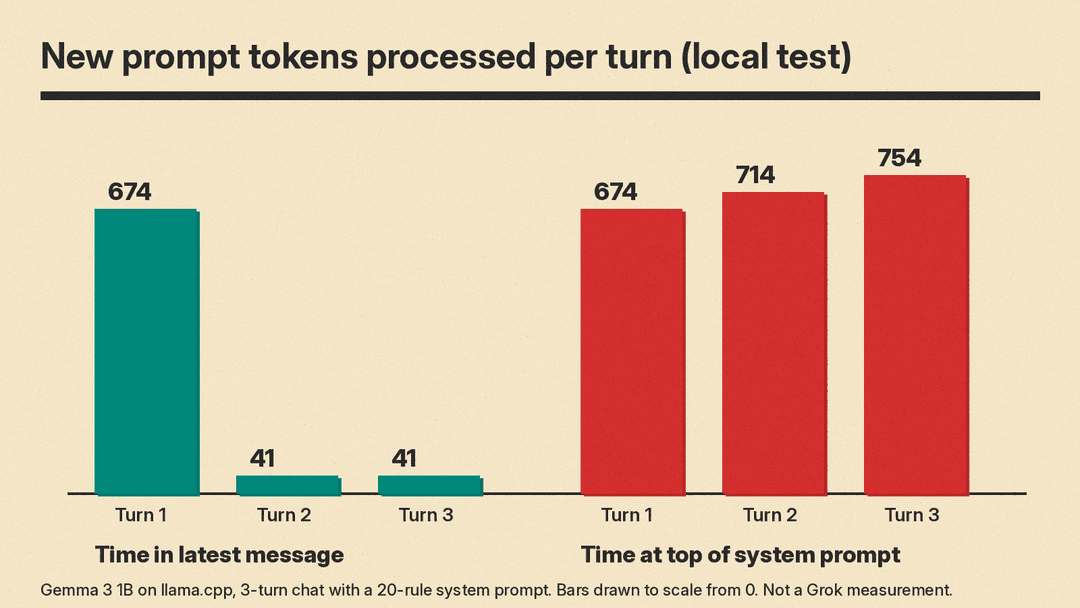
Many apps put the current time at the top of the system prompt. The time changes every turn, so nothing after it matches the cache. In xAI's example, the same 30-message chat cost 2.2 to 2.9 times as much across its runs with the time at the top of the system prompt, compared with the time at the top of the latest message. In one of those runs, the chat with the time on top read 3% of its input from the cache. The chat with the time in the message read 87%.
We saw the same effect locally. We sent a three-turn chat with a 20-rule shop handbook as the system prompt to Gemma 3 1B through llama.cpp, which also reuses a matching prompt start. With the time at the top of the latest message, turns 2 and 3 each processed 41 new tokens and reused the rest (702 and 760 tokens). With the time at the top of the system prompt, every turn processed the whole prompt again: 674, 714 and 754 tokens, with 1 token reused.
The fix is simple:
- Put the system prompt, examples and reference documents first, and keep them unchanged.
- Put anything that changes, like the time or the user's name for this session, in the newest message.
- Only add to the conversation. xAI says editing, removing or reordering earlier items breaks the match.
- Use one
prompt_cache_keyper conversation. xAI says it routes every turn to the same server, where the cache lives.
Mistakes to avoid
- No format line. Without one, a reasoning model picks the length and shape for you.
- Trusting the format as proof. Our test got a perfect format and a weak verdict. Check the content.
- Asking for news without search. The knowledge cutoff is May 2026. Ask for links so you can see where an answer came from.
- Copying a prompt from another chatbot unchanged. xAI says to tune prompts for Grok as you did for the other model.
- Changing temperature to "fix" answers. xAI says quality usually drops when you move far from 0.7 and 0.95.
For more on what Grok can do beyond chat, see our post on Grok Bot's always-on AI teammates.
