
An AI summarizer takes a long document, web article, research paper or video and returns the key points in a shorter form. Most tools work in one of two ways. You either paste text into a box, or you upload a file and ask questions about it. Video tools work from a transcript instead. Because the inputs differ, the useful tools differ too, so this list is grouped by what you want to summarize. The descriptions below reflect what the vendors themselves published as of November 2026.
Two notes before the list. If your actual goal is a record of a conversation rather than a shorter version of a document, the tools in our guide to AI note-taking apps for meeting summaries are a better starting point. And every summary, from any tool, can leave out or misstate details. Check anything important against the original.
Best general AI summarizer for text and files
ChatGPT is OpenAI's assistant. Its help center explains how to upload files and audio so you can ask questions about them, which covers the most common summarizing request: attach a document and ask for the key points. You can also paste text directly into the conversation. OpenAI says document uploads work on Free and paid plans, while audio uploads need a paid plan. Since it is a general assistant rather than a dedicated summarizer, you describe the output you want in plain language. Good fit if you already use a chat assistant and want summaries alongside other questions about the same file.
Claude is Anthropic's assistant. Its help center explains how to upload documents and images, and it lists the supported file types and size limits. Chat uploads can be up to 500MB per file and 20 files per chat, and PDFs are limited to 1,000 pages. Good fit if you want to know the accepted formats and size limits before you upload.
Gemini is Google's assistant. Google says you can upload documents, spreadsheets, photos, videos and more to Gemini Apps to get answers, summaries and insights about your content. Google says a Google AI plan raises the upload limits. Good fit if your source material mixes formats, such as a spreadsheet alongside a PDF.
Best AI summarizer for PDFs and long documents
For prompts and a walkthrough of the process, see our step-by-step guide to summarizing a PDF with AI.
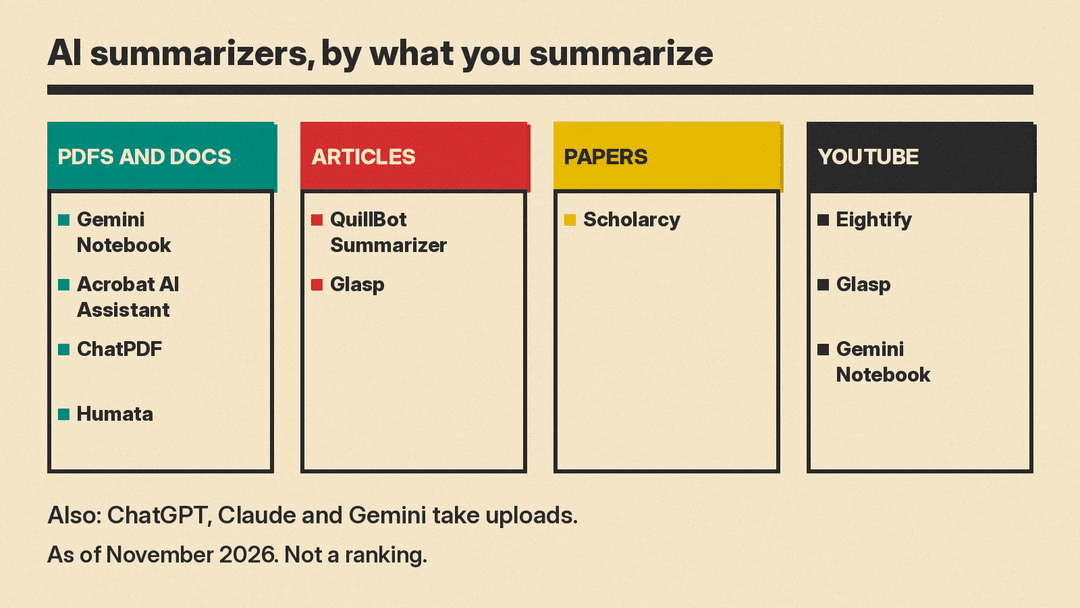
Gemini Notebook, formerly NotebookLM is Google's AI research notebook. You add sources such as PDFs, Word files, Google Docs and Slides, web URLs, audio files and public YouTube URLs, and each source gets an auto-generated summary in the Source Guide while chat handles questions about specific topics. Each source can hold up to 500,000 words or 200MB, and Free users can add up to 50 sources. Google's business page says answers come with citations for verification. Its Studio panel can create Audio Overviews, which are AI-hosted discussions of your sources, in formats including Deep Dive and Brief, and Google's help pages list reports, mind maps and flashcards among the other Studio outputs. Good fit if you are working with a set of related sources and want summaries, audio and study materials from the same collection. Our Gemini Notebook explainer covers the rename and the main features.
Adobe Acrobat AI Assistant works inside Acrobat. On Adobe's plan table, AI summaries are listed for Acrobat Express and Acrobat Studio, not Acrobat Pro. Adobe says it summarizes your files with citations that link to the source in your documents, so you can open the passage behind each point. It can also make podcast-style audio overviews of multiple documents and turn documents into visual reports and presentations. Adobe says content you use with AI Assistant is never used to train Adobe's AI models. Good fit if your files already live in Acrobat and you want summaries that link back to the exact page.
ChatPDF takes an uploaded PDF and answers questions about it. It also accepts Word, PowerPoint, Markdown and text files. Answers include citations that scroll to the source in the PDF, shown side by side with the chat. You can put files in a folder and chat with several at once. ChatPDF says no account is needed to try it, but multi-document chats need a free account, and the free plan covers 2 documents a day. Good fit if you want a quick summary of one file with the source visible next to the answer.
Humata is document AI for teams. Humata says you can ask it to summarize findings, compare documents and search for answers across your files, with answers that cite the source files. You can also ask it to rewrite a summary shorter. Humata's free plan covers up to 60 pages and 10 answers. Good fit if you need summaries across a shared library rather than a single document at a time.
Best AI summarizer for articles and pasted text
QuillBot Summarizer accepts pasted text or an uploaded document. You choose bullet point or paragraph style and adjust the length with a slider, and the Premium plan adds a Custom mode for your own instructions. The free version takes up to 600 words at a time, and Premium handles longer texts. It offers a side-by-side view with the original text. Good fit if you want control over the format and length of the output without writing a prompt.
Glasp describes itself as a free browser extension for Chrome, Safari, Edge and Firefox. It summarizes YouTube videos, web articles and PDFs using ChatGPT, Claude, Gemini or Mistral, and it includes a chat tab for questions about the page you are on. Glasp says Chat needs a free account, and the Free plan includes 20 Chat credits a month. Mobile apps are also available. Good fit if you read in a browser and want a summary without copying text anywhere else.
Best AI summarizer for research papers
If you are surveying a field rather than reading one paper, our list of AI research assistants for literature reviews covers tools built for searching and tracking studies.
Scholarcy is built for academic papers. It turns papers, articles and textbooks into summary flashcards that highlight key information. You can change the summary depth from a single sentence to a researcher-level overview, and the Spotlight feature jumps to key findings. It imports from Zotero and exports flashcards to citation managers and other formats. Good fit if you read many papers and want structured notes you can move into a reference library.
Best AI summarizer for YouTube videos
Eightify is a browser extension and an iOS and Android app that summarizes YouTube videos. It gives timestamped summaries so you can jump to a topic, along with transcripts and an overview of top comments. Summaries are available in more than 40 languages. Good fit if you watch long videos and want to skip to the sections you need.
Two tools from earlier in this list also handle video. Glasp, covered in the articles section, summarizes YouTube videos in the browser alongside articles and PDFs. Gemini Notebook, covered in the PDF section, accepts public YouTube URLs as sources, so a video can sit in the same notebook as your documents.
How to choose an AI summarizer
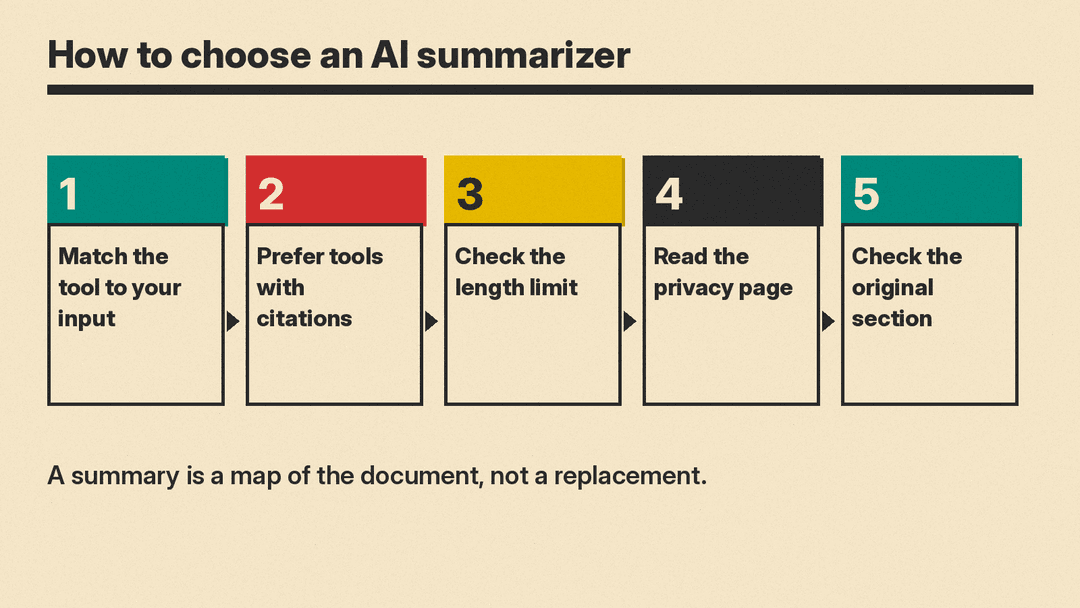
- Match the tool to your input. A PDF, a web page, a research paper and a video are different jobs, and most tools are built around one of them.
- Prefer tools that cite or link back to the source passage so you can check the claim yourself. Gemini Notebook, Acrobat AI Assistant, ChatPDF and Humata all attach citations to their answers.
- Check how long a document the tool accepts before you start. Claude and Gemini Notebook both publish their limits in their help pages, and a file over the limit has to be split.
- Read the vendor's own privacy page before you upload work or school files. Adobe states that content used with AI Assistant is never used to train Adobe's AI models, and other vendors publish their own policies.
- For anything important, read the original section the summary points to. Treat a summary as a map of the document, not a replacement for it.
FAQ
Can ChatGPT summarize a PDF?
Yes. You can upload files to ChatGPT, Claude and Gemini and ask for a summary, and the vendor help pages linked above describe the supported file types. For prompt wording and a full walkthrough, see our step-by-step guide to summarizing a PDF with AI.
Can AI summarize a YouTube video?
Yes. Gemini Notebook accepts public YouTube URLs as sources. Eightify and Glasp are browser extensions that summarize YouTube videos, and Eightify also has mobile apps.
Are AI summaries accurate?
They can leave out or misstate details, so they are not a substitute for reading the source. Tools that include citations, like Acrobat AI Assistant, ChatPDF and Humata, make it easier to check each point against the original passage.
Sources
- ChatGPT help: uploading files and audio
- Claude help: upload files to Claude
- Gemini Apps help: upload content
- Gemini Notebook product page
- Gemini Notebook help: sources
- Gemini Notebook help: Studio and Audio Overviews
- Adobe Acrobat AI Assistant
- ChatPDF
- Humata
- QuillBot Summarizer
- Glasp YouTube Summary
- Scholarcy
- Eightify
- Gemini Notebook help: create a notebook and Studio outputs
