
A literature review has four jobs: find the papers, see how they connect, check whether the findings hold up, and read the ones that matter. AI research assistants can help with each job. This guide groups eight real tools by the job they do, so you can build a small stack instead of trusting one chatbot. Features below are as described on each vendor's own pages as of October 2026. Check each vendor's pricing page for current plans.
If you are a student, our best AI tools for students guide covers note-taking and study tools. This page is only about finding and checking research.
For general web questions that need a cited answer, see our guide to the best AI search engines.
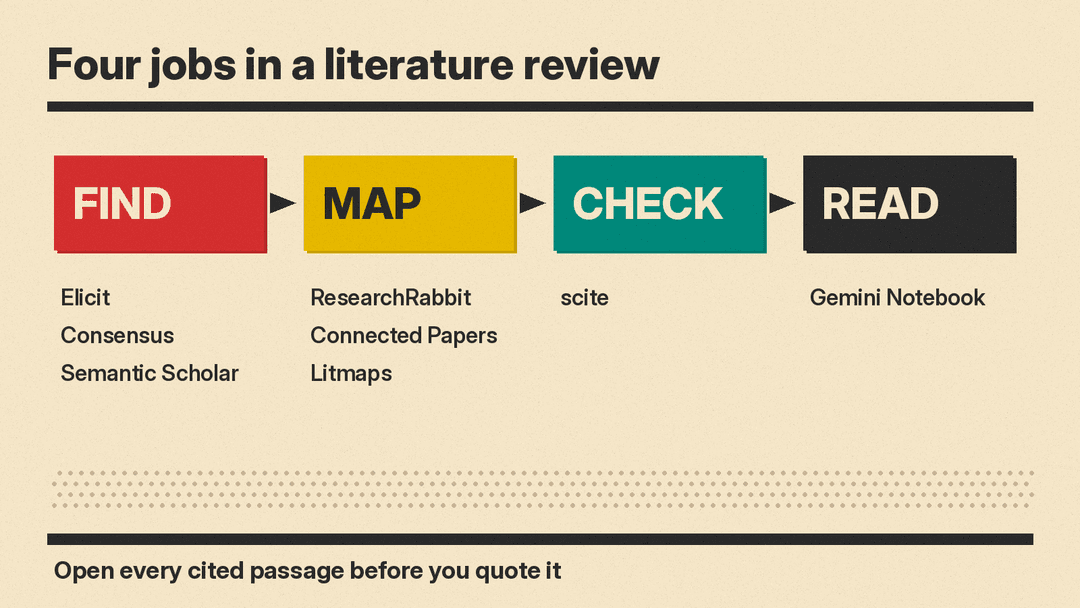
Find: tools that answer a research question
These tools start from a question in plain English and return papers plus a written answer with citations.
Elicit
Elicit searches academic papers and writes research reports. Its home page says the reports follow "a process inspired by systematic reviews" and that you can change which papers and what information the report covers. Elicit says it "supports all AI-generated claims with sentence-level citations from the underlying sources."
For formal reviews, Elicit says it "can automate screening and data extraction of systematic reviews, while partially supporting search and report generation." Note the word "partially": you still own the search strategy. Elicit also has a Library to store sources and Routines, which it says "find new evidence, update your work, and report back for your review."
Good for: structured reviews where you need a table of data pulled from many papers.
Consensus
Consensus describes itself as "an AI academic search engine for peer-reviewed literature." Its listed features include Pro Search and Deep Search modes with synthesized answers, Ask Paper to chat with a paper, a Consensus Meter that shows "scientific agreement on yes/no questions," Study Snapshots with key findings and methodology, a Citation Graph, and citation export in RIS, BibTeX and CSV.
The Consensus blog also describes Skills, "ready-to-run workflows for common research tasks: reviewing a field, tracing citations, finding evidence for a claim, and checking a draft's sources," and says Consensus "runs inside ChatGPT, Claude, and now, Microsoft 365 Copilot."
Good for: quick yes/no questions ("does X affect Y?") where you want to see how the evidence splits.
Semantic Scholar
Semantic Scholar is a scholarly search engine with AI features built in. Its TLDRs are "super-short summaries of the main objective and results of a paper," available for papers in computer science, biology and medicine. Highly Influential Citations flag citing papers on which the cited work had "a significant impact," as judged by a machine-learning model.
Ask This Paper answers your questions about a paper "along with supporting statements from the paper." The product page says it "has been tested only on English-language papers and is available on limited papers." Research Feeds recommend new papers based on the folders in your library, and you can set alerts for new citations of a paper or new work by an author.
Good for: a broad starting search and staying current through feeds and alerts.
Map: tools that start from one good paper
When you already have one paper that fits, these tools show you its neighbors.
ResearchRabbit
ResearchRabbit "analyzes papers you love and finds the research you've been missing." You use a paper as a seed "to see how papers connect," and the site says its recommendations improve as you add related work, authors and topics. It also connects to your reference library.
Good for: building out a reading list from a handful of papers you trust.
Connected Papers
Connected Papers builds a graph around one origin paper. Its about page says it analyzes "an order of ~50,000 papers" and selects "the few dozen with the strongest connections." The similarity measure uses co-citation and bibliographic coupling, so "papers that do not directly cite each other can be strongly connected." The site says plainly that "Connected Papers is not a citation tree." The about page says its database is connected to the Semantic Scholar paper corpus.
Good for: seeing the clusters in a field and spotting a related paper your keyword search missed.
Litmaps
Litmaps finds relevant articles "based on connection, using citations and references," then lets you visualize and annotate them as a map. You can share maps with colleagues or advisors, and Litmaps can send "automatic emails when new articles on your topic come out." The features page lists Zotero sync as part of Litmaps Pro.
Good for: keeping one living map per project and getting alerts when it grows.
Check: a tool that tests whether findings hold up
scite
scite adds Smart Citations, which it says show "whether a finding has been supported or contradicted by later research." Its AI assistant uses the same evidence signals to answer questions, and scite says every claim its AI makes "links back to the specific sentence in the specific paper it came from." The site also says scite runs inside Claude, ChatGPT and "any MCP-compatible assistant," plugs into Zotero, and has an API.
Good for: checking a key paper before you build an argument on it.
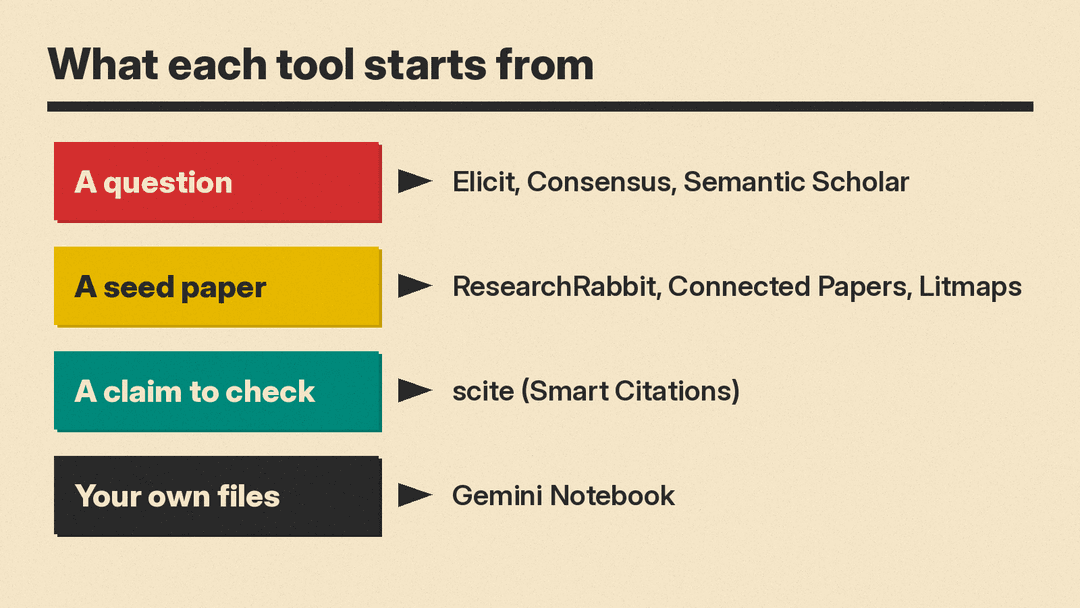
Read: a tool that answers from your own sources
Gemini Notebook
Google's research notebook, formerly at notebooklm.google, now redirects to notebook.google. Google's help page calls Gemini Notebook "an AI-powered research assistant." You upload PDFs, websites, YouTube videos, audio files, Google Docs or Slides, then chat with the notebook "to get grounded information based on your sources with clear in-line citations." It can turn sources into study guides, briefings, audio overviews and mind maps.
The difference from the search tools above: Gemini Notebook "is designed to answer questions based on the information provided in your uploaded sources." That makes it mainly a reading tool. Our Gemini Notebook explainer covers how to start a notebook and what it can make from your sources. The help page also mentions an option to "discover new sources" for a notebook, but answers come from the sources you add. On data, the same help page says "your data is protected, and is not used to train Gemini Notebook unless you provide feedback." For Workspace and Workspace for Education users, it says uploads, queries and responses "will not be reviewed by human reviewers, and will not be used to train AI models."
Good for: reading the final set of papers closely and asking questions across all of them.
A simple stack for one literature review
- Start with a question in Elicit, Consensus or Semantic Scholar. Save 3 to 5 papers that clearly fit.
- Put those papers into ResearchRabbit, Connected Papers or Litmaps as seeds. Add what the map surfaces that the search missed.
- Run the papers your argument depends on through scite to see later support or contradiction.
- Upload the final set to Gemini Notebook and ask questions across them. Open each cited passage before you quote it.
- Export citations to your reference manager. Consensus lists RIS, BibTeX and CSV export, and scite and Litmaps Pro list Zotero links.
Limits to keep in mind
- AI summaries are a filter, not a substitute for reading. Google's own help page says Gemini Notebook "can make mistakes," and the same caution applies to every tool here.
- Check every citation. Open the paper and confirm the sentence says what the summary says. Our 5-minute routine for fact-checking AI answers works for research tools too.
- Coverage differs. The vendors list different catalog sizes: Elicit says over 138 million papers, Semantic Scholar over 214 million, Litmaps 270+ million, ResearchRabbit over 320 million and Consensus 400M+. Connected Papers says its database is connected to the Semantic Scholar corpus. A paper missing from one tool may appear in another.
- For a formal systematic review, plan to own the search step. Elicit itself says it only partially supports search.
